

optimind.darkfunnels.ai/red-referidos.) Anyone on your team with access to
the Ventas app can see it.The dashboard is in Spanish, so buttons and labels are written here as you see
them on screen, with their English meaning in parentheses.How it works, end to end
- Your customer recommends someone to you. In the chat, they pass your agent the contact of someone they know: as a WhatsApp contact card or by typing the number.
- Your agent registers them. From that moment on, that person is a referral of your customer.
- The referral arrives. Either your customer forwards them an introduction with your number and they write to you, or your WhatsApp writes to them first. You choose which.
- The referral buys and leaves their deposit. You mark it on this screen.
- The network earns. Whoever recommended them earns and, if you set an amount for them, so do the people higher up in their network, up to 5 levels. Each one can receive a WhatsApp with the news.
- You pay through PayPal and record it here. If the person has a conversation with your agent and the Cuando le pagas (When you pay them) notice is on (it comes that way by default), they receive another WhatsApp confirming the payment.
The words on this screen
Set up your program
Decide how much each level earns
Choose who writes first
Ask for referrals in your playbook
@ menu →
Herramientas (Tools). In the playbook text it shows up as
«Registrar Referido Tool».
→ Register a referralTell Programa which chapter asks for referrals
Click «Guardar cambios» (Save changes)
Review the automatic messages
What your agent does on WhatsApp
When your customer passes it a contact
The agent registers each person separately. It needs their name and their WhatsApp with the country code. If the number arrives without the country code, the agent does not fill it in on its own: it asks your customer for it. If your customer says something about that person (what they do, where they live), it is saved. On the referral’s record you will find Referido por (Referred by), with the name of whoever recommended them, and Contexto del referido (Referral context), if your customer said something about them. What happens next depends on what you chose in ¿Quién escribe primero?:- El cliente lo presenta (customer introduces)
- El agente le escribe primero (agent writes first)
- In the same chat, the agent sends your customer a separate message with your introduction, exactly as you wrote it in Programa (or the default one).
- The introduction carries your agent’s WhatsApp number as text. WhatsApp turns it on its own into a tap that opens the chat with you.
- If you chose a photo, a video or a PDF, it goes in that same message, with the introduction as its caption. That way your customer forwards a single thing.
- The agent asks your customer to forward it to the person they know and thanks them.
- The referral writes to you themselves. The agent recognizes them by their number, whatever they write, and serves them from the chapter you chose in Programa.
- When the referral writes to you for the first time, the agent thanks your customer for the recommendation in their chat, during the day (notice «Cuando su conocido escribe», When their contact writes).
- If the referral doesn’t write, after 3 days (by default) the agent asks your customer once whether they managed to forward your introduction (notice «Si su conocido no escribe», If their contact doesn’t write).
The rules the agent already knows
- Someone who already wrote to this agent does not count. If that number has already talked with this funnel, the agent tells your customer kindly and registers nothing.
- If the same customer passes you again someone they already recommended, that person still counts for them. If that person hasn’t written to you yet, the agent tells your customer to forward the message it gave them when it registered the person.
- The first one wins. If another customer had already recommended that number, the new registration does not count. The exception: if in Programa you set «Un referido vale (días)» (A referral is valid for (days)) and that period passed without a deposit, the recommendation goes to the new customer.
- Nobody recommends themselves. The agent does not register the customer’s own number.
- Without a connected WhatsApp, nobody is registered. The agent tells your customer it took note, without promising them that anyone will write.
When your customer says no
If your customer clearly says no («I don’t know anyone», «no, thanks») after a referral request that was counted, the agent records it on its own. A request is counted when your customer enters the chapter you chose in ¿Dónde pide referidos tu agente?, or when they receive a request or the reminder from Avisos. From that moment the automatic requests no longer reach them, and any reminder they had pending is cancelled. If the agent asked from a chapter you didn’t choose in Programa and there was no counted request before, that «no» is not recorded: the automatic requests can still go out later. An «I’ll think about it» or «I’ll send it to you later» does not count as a no.When your customer asks how their referrals are doing
If your customer asks «how are my referrals doing?» or «have I been paid yet?», the agent checks their real status and answers in its own words: who they recommended, whether that person already wrote to you or left their deposit, how much they earned, how much they have been paid and how much is still owed. It is instructed to name only the people your customer recommended (about the rest of their network it only gives figures) and not to promise payment dates.What the referral receives
If in Programa you wrote something in ¿Qué recibe quien llega recomendado? (What does someone who arrives recommended receive?):- In the El cliente lo presenta mode, the introduction your customer
forwards ends with the phrase «Por ir de mi parte tienes…» (Because I
sent you, you get…) with that benefit. If your text doesn’t include
{{numero}}, your number goes after it, on its own line. - In both modes, the benefit is saved on the referral’s record, as Beneficio por venir recomendado (Benefit for coming recommended). The one in place that day is saved: if you change it later, what was promised doesn’t change.
Ambassador customers
If in Programa you set Embajador desde (Ambassador from), the customer who reaches that number of recommended people with a deposit becomes an ambassador (embajador):- Their record gets the «Embajador» label and the field Embajador del programa de referidos (Referral program ambassador).
- The agent is instructed to serve them with priority and special warmth.
- When they write, your team receives a WhatsApp that starts with «⭐ Te escribe un embajador de tu programa de referidos» (⭐ An ambassador of your referral program is writing to you). It goes to the numbers in Informar de las ventas (Report sales), in Configuración.
The screen, tab by tab
At the top, the title «Red de referidos» and seven tabs: Resumen (Summary) · Referidos (Referrals) · Pagos (Payments) · Red (Network) · Referidores (Referrers) · Programa (Program) · Avisos (Notices). The first five tabs refresh on their own every 10 seconds while the browser tab is in view. To the right of the tabs it tells you so: «En vivo · actualizado hace 8 s» (Live · updated 8 s ago; in the first few seconds, «En vivo · actualizado ahora», Live · updated now). The Actualizar (Refresh) button reloads right away. Programa and Avisos do not refresh on their own: they are forms, and that way they don’t erase what you are typing.Resumen (Summary)
The program at a glance.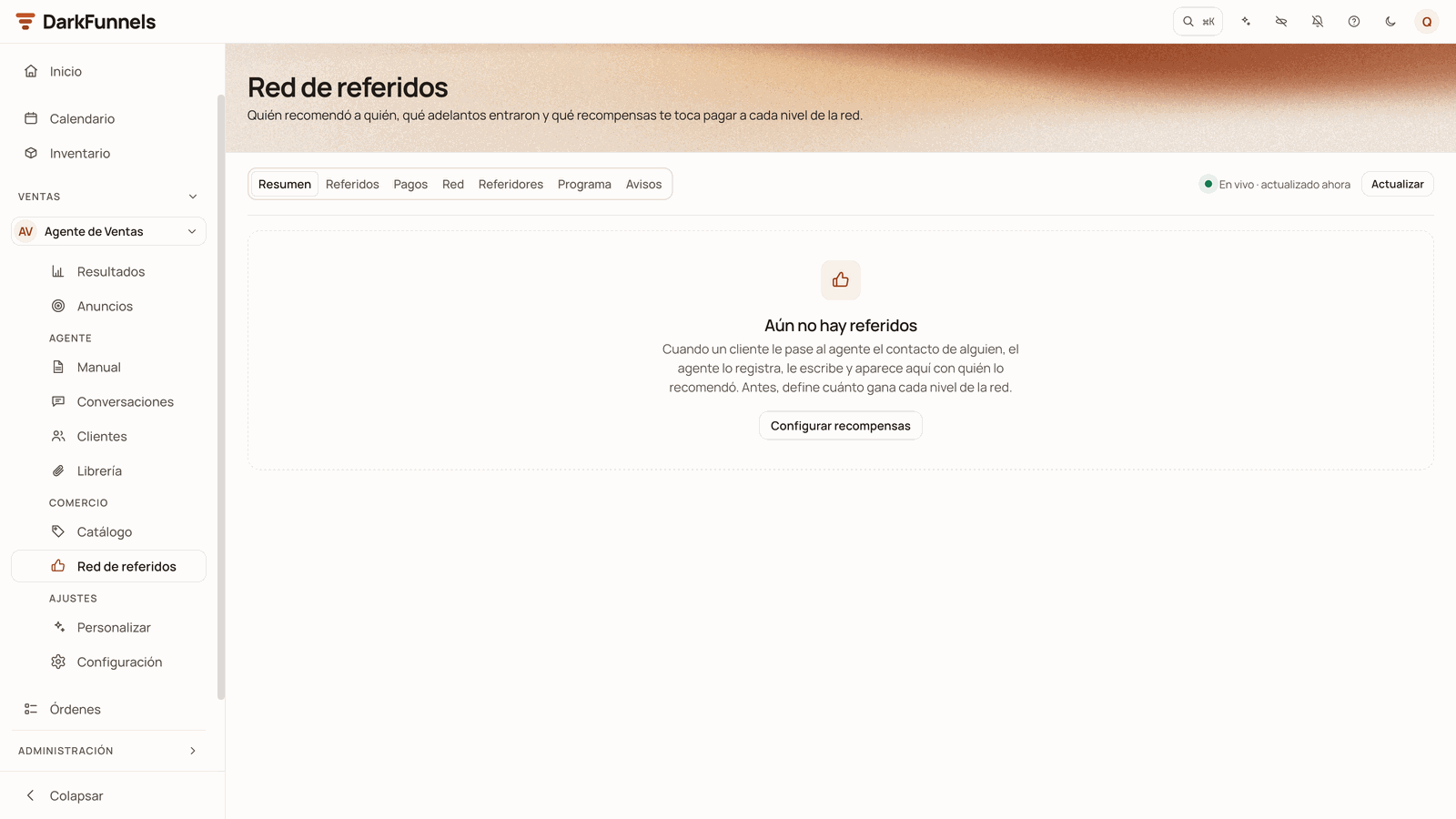
The Resumen before the first referral: «Aún no hay referidos» (No referrals yet) and the Configurar recompensas (Set up rewards) button.
- Dónde está cada referido (Where each referral stands). A bar with five sections: Invitados, aún sin escribir (Invited, not written yet) · Esperando respuesta (Waiting for a reply) · Respondieron (Replied) · Adelanto, por pagar (Deposit, to pay) · Pagados (Paid).
- Embudo del programa (Program funnel). It measures the program since it started. At the top, three figures: Pedidos de referidos (Referral requests: how many times your agent asked and what the customer answered, whether they gave contacts, said no, replied without passing contacts or didn’t reply), Referidos por cliente (Referrals per customer) and Del adelanto al pago (From deposit to payout: how long you take to pay, as a median). In the middle, a chart with four bars: Contactos (Contacts), Escribieron (Wrote), Adelanto (Deposit) and Pagado (Paid). Between one bar and the next it says what percentage moves on and how many stay behind, and it marks the weakest step. At the bottom, the Por semana (By week) table, with the last 8 weeks.
- Recompensas (Rewards). By currency: what is still to be paid, what has been paid and what has been generated. Ver pagos (See payments) takes you to Pagos.
- Quién más recomienda (Who recommends the most). Your top 5 referrers. Ver ranking (See ranking) takes you to Referidores.
Referidos (Referrals)
The list of your referrals, with their status and what you can do with each one.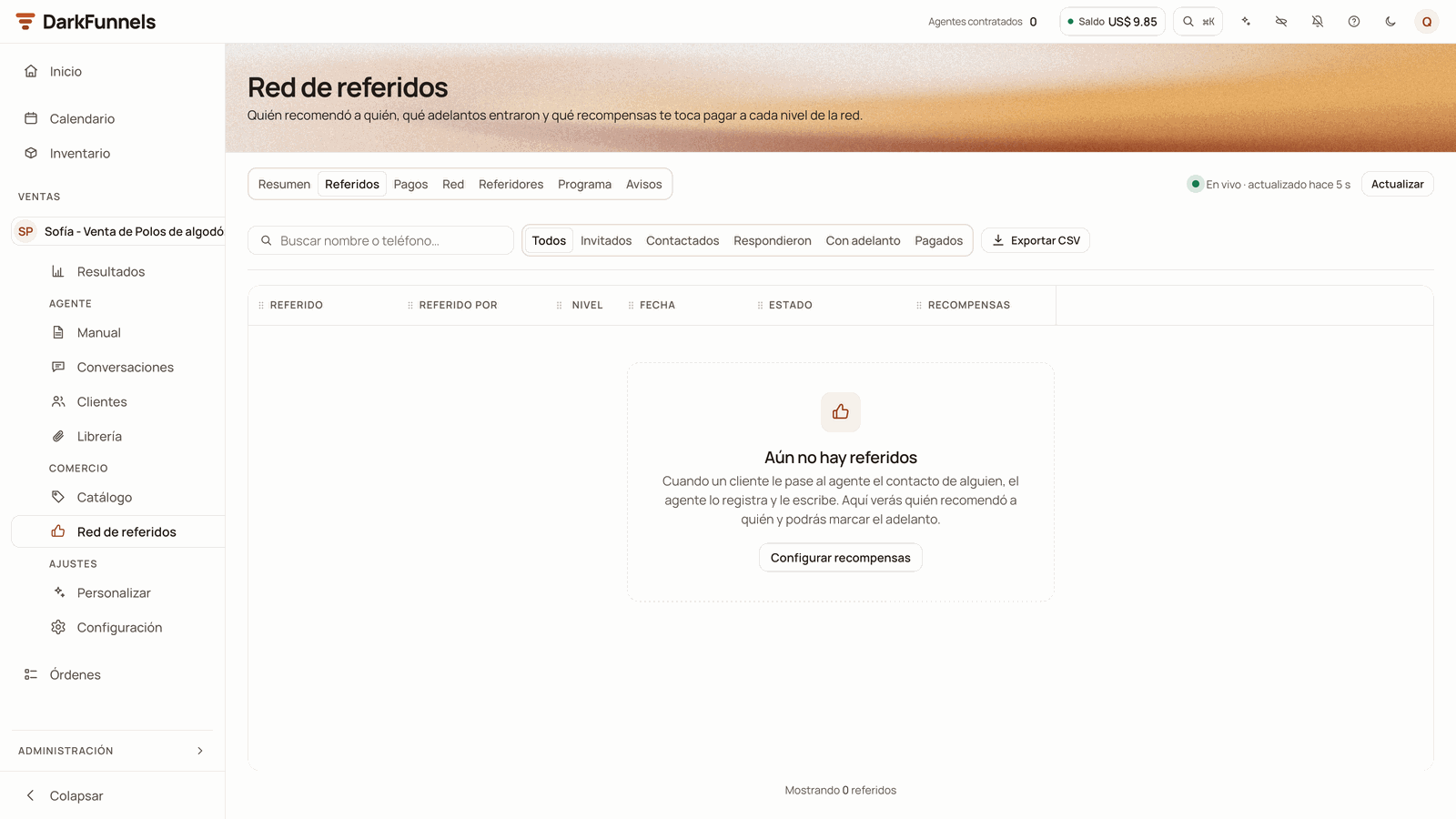
Referidos, still empty: the search box, the filters, Exportar CSV and the table's columns, with «Aún no hay referidos» (No referrals yet).
- Click the referral’s name to open their side panel.
- Click the name of whoever recommended them to see only their referrals. The filter «Referidos de…» (Referrals of…) appears at the top, with an x to remove it.
- Nivel says how high up in the network the referral sits: N1 if an origin recommended them, N2 if someone in N1 recommended them, N3 if someone in N2 recommended them, and so on (it can go beyond N5). It is not the reward level: in the «Moda Sol» example, Rosa shows up as N2, and her deposit pays level 1 to Carla and level 2 to Lucía.
- Recompensas shows what each level earns for their deposit. Before the deposit is marked it says «Al marcar el adelanto» (When the deposit is marked).
The statuses of a referral
The buttons on each row
Marking the deposit
You are the one who marks the deposit. Approving their payment in Pedidos (Orders) does not mark it on its own.Click «Marcar adelanto» on the referral's row
If there is no payment in Pedidos, confirm it
- If the deposit came in some other way (for example, in cash), click Marcar igual: entró por fuera (Mark anyway: it came in outside). It is noted, and you can read it by hovering over its status.
- If not, click No and record the payment first in Pedidos.
Read the notice below
«Vincular chat»: the referral wrote to you from another number
Sometimes your customer passes you one number and the person they know writes to you from another. Then that person comes in as a stranger and their row stays in Invitado or Contactado.Click «Vincular chat» on their row
Choose their chat
Click «Vincular» (Link)
«Devolvió el adelanto»
If you refund a referral’s deposit, click Devolvió el adelanto and confirm with Sí, anular premios (Yes, cancel rewards). The unpaid rewards from that deposit are cancelled across the whole chain, and so is your customer’s bonus if that leaves them below the target. What is already paid doesn’t change, and no WhatsApp is sent: if they ask you, explain it yourself. If the referral pays again, mark it again.Exporting a CSV
Exportar CSV downloads the referrals that match the filters you have set, not just the ones you see on screen, up to 5000 rows. The file is calledreferidos- plus the date in UTC time (in Peru, from 19:00 onward it carries
the next day’s date). It includes the referral, who recommended them, their
phones, the level, the status, the dates, who marked the deposit, the rewards
and the note.
Pagos (Payments)
The rewards ledger: whom you owe, how much and why.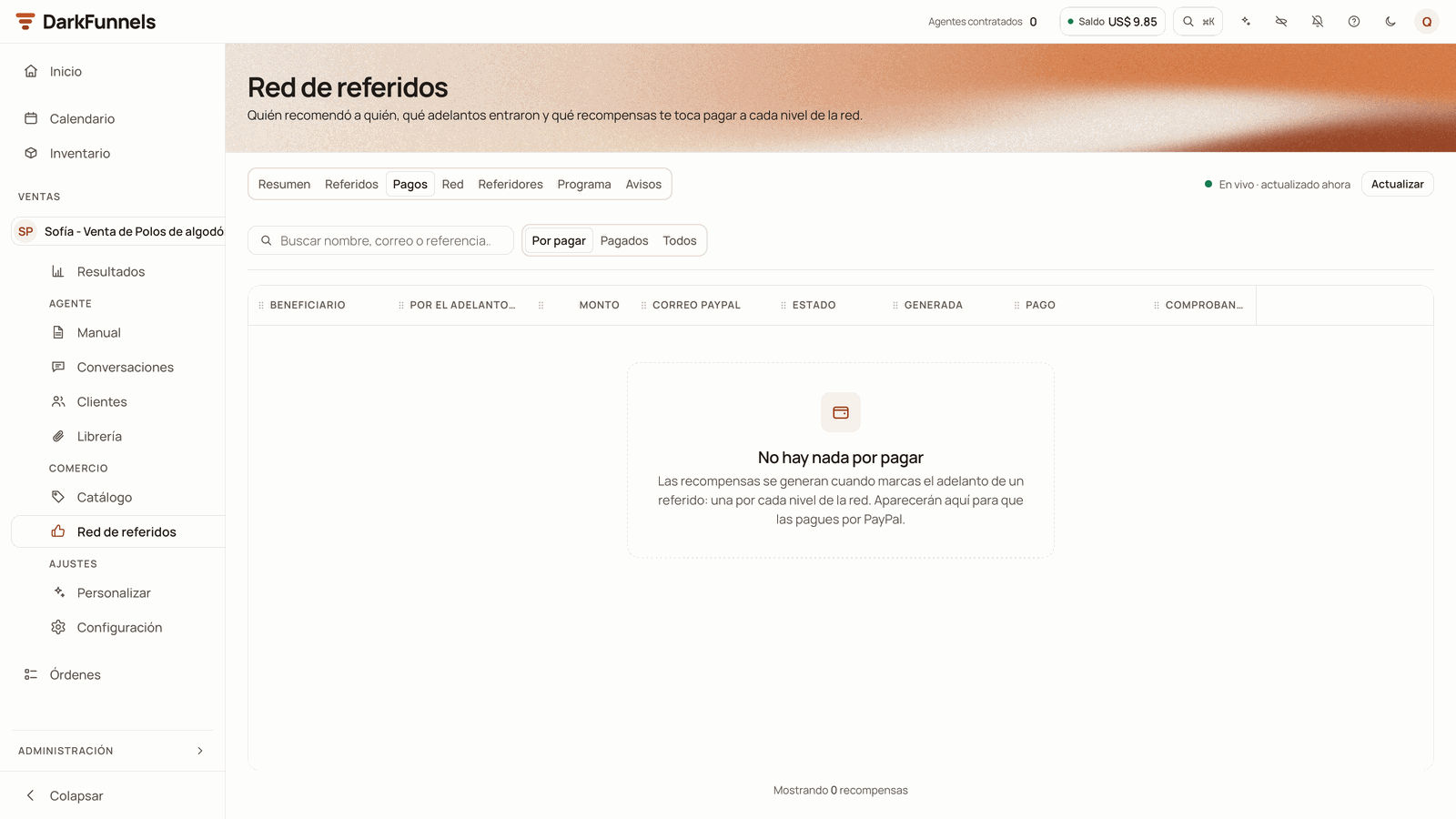
Pagos, still without rewards: the search box, the filters and the columns, with «No hay nada por pagar» (Nothing to pay).
Paying a reward
The dashboard does not send the money. You pay in PayPal and then record it here.Pay in PayPal
Click «Pagar» (Pay) on the row
Fill in the payment details
- Correo de PayPal (PayPal email, required): the email you sent the payment to. If the person left it on their record, it comes filled in: confirm it anyway.
- Referencia de PayPal (PayPal reference, required): paste the transaction ID.
- Comprobante (Receipt, optional): a screenshot or PDF of the payment, in JPG, PNG, WEBP or PDF, up to 10 MB.
Click «Registrar pago» (Record payment)
- Retenido: the dialog explains whom it matches. Review the chain and, if everything is fine, tick Revisé la cadena: pagar igual (I reviewed the chain: pay anyway).
- En espera: the dialog says until when. To pay it now, tick Pagar antes de tiempo (Pay early). Careful: if the deposit is refunded later, that money can no longer be recovered.
Red (Network)
The tree of who recommended whom: whoever recommended at the top and their referral below. At the top it says how many people and how many recommendations there are, with the color legend: Origen (Origin), Invitado, Contactado, Respondió, Adelanto recibido and Pagado. Each card shows the name, the phone, the status, what has been Ganado (Earned) and Pagado (Paid), and how many referrals they have. Zoom in and out with the buttons at the bottom right. The network shows up to 2000 people: if yours is bigger, it warns you, and in the Referidos tab you can search for anyone. Click a card and that person’s panel opens, the same one that opens from the names in the other tabs:- Abrir chat and Ver sus referidos en la tabla (See their referrals in the table).
- Three figures: Refirió (Referred), Por cobrar (To collect) and Cobrado (Collected).
- La recomendó (Recommended by): who brought them, if they came recommended.
- Sus recompensas (Their rewards): each one with its status and a Pagar button if it is still to be paid.
- Refirió a (Referred these people): whom they recommended and what status each one is in.
Referidores (Referrers)
The ranking of the 10 who move your program the most: first by deposits, then by referrals. Columns: referidor (referrer), referidos (referrals), adelantos (deposits), conversión (conversion), ganado (earned), pagado (paid), por pagar (to pay) and correo paypal (PayPal email). Ambassadors carry the Embajador (Ambassador) badge next to their name. Each row has Abrir chat and Ver referidos (See referrals), which takes you to the Referidos tab filtered by that person.Programa (Program)
Here you configure the program. At the top, a drawing shows you the referral’s path, step by step, according to what you choose. Next to the form, a phone shows you how the message reaches the referral, with sample data.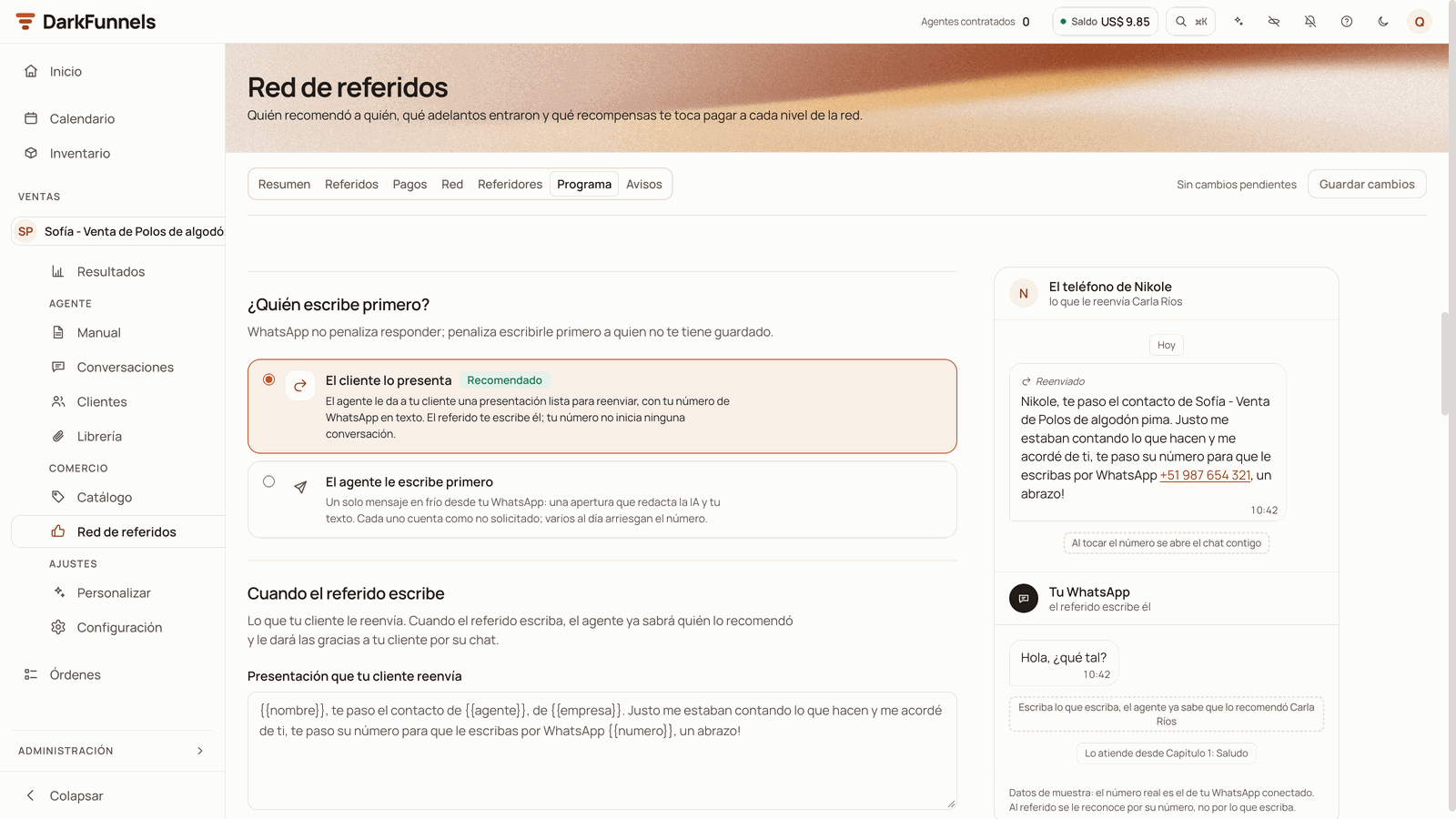
Programa: «¿Quién escribe primero?» with its two options and, on the right, the phone with the introduction your customer forwards, with sample data.
Where your agent asks for referrals
In ¿Dónde pide referidos tu agente?:- Capítulo donde pide referidos (Chapter where it asks for referrals). The chapter of your playbook where the agent tells your customer about the program and asks them for a contact. Each customer who enters it counts as a request, and the reminder «Si tu cliente no te pasa ningún contacto» starts from there. With no chapter chosen, those requests are not counted and the reminder does not go out.
- ¿A quién buscas? (Who are you looking for?) Describe the customer you want to be recommended, for example «someone who has a clothing store in your area». In the automatic requests, the agent asks about that profile instead of a generic «do you know anyone?». Up to 200 characters, no variables. If it’s empty, it asks in general.
Who writes first
In ¿Quién escribe primero?, two cards: El cliente lo presenta (with the Recomendado, Recommended, badge) and El agente le escribe primero. What each one does is explained in What your agent does on WhatsApp. If you choose El agente le escribe primero, ¿A cuántos referidos puede escribirles primero cada día? (How many referrals can it write to first each day?) appears: from 1 to 20, 3 by default. Only the first messages your number starts count; replies don’t.The message to the referral
This section changes its name depending on the mode.- Cuando el referido escribe (when the referral writes)
- Primer mensaje al referido (first message to the referral)
-
Presentación que tu cliente reenvía (Introduction your customer
forwards). Write it in your customer’s voice, because they are the one
who sends it. Up to 500 characters. You can name
{{nombre}}(the referral),{{referido_por}}(your customer) and{{numero}}(your agent’s WhatsApp, as text). If you remove{{numero}}, it is added at the end. If it’s empty, the default one goes out, which you see in grey:«
(In English:{{nombre}}, te paso el contacto de{{agente}}, de{{empresa}}. Justo me estaban contando lo que hacen y me acordé de ti, te paso su número para que le escribas por WhatsApp{{numero}}, un abrazo!»{{nombre}}, here’s the contact for{{agente}}, from{{empresa}}. They were just telling me what they do and I thought of you; here’s their number so you can message them on WhatsApp{{numero}}, hugs!) In the default one, the agent fills{{agente}}with the name it introduces itself with and{{empresa}}with the Nombre de tu negocio (Your business name). - Foto, video o PDF (Photo, video or PDF). Sin adjunto (No attachment), or Una foto, un video o un PDF de la librería (A photo, a video or a PDF from the library). The photos, videos and PDFs linked to this agent in the Library appear.
Your business name and the entry chapter
- Nombre de tu negocio (Your business name). What your business is called
in what the referral receives. It fills
{{empresa}}in the default introduction and signs the opening of the cold message. Up to 80 characters, no variables or line breaks. If it’s empty, the funnel’s name is used. - The entry chapter. It is called ¿En qué capítulo empiezan los referidos? (Which chapter do referrals start in?, introduction mode) or ¿En qué capítulo sigue el referido cuando conteste? (Which chapter does the referral continue in when they reply?, cold mode). If you don’t choose any, it is the first chapter of your playbook, with the Por defecto (Default) badge. In introduction mode, that chapter must greet whoever arrives introduced. In cold mode it runs as a continuation, because the agent has already introduced itself.
Rewards per level
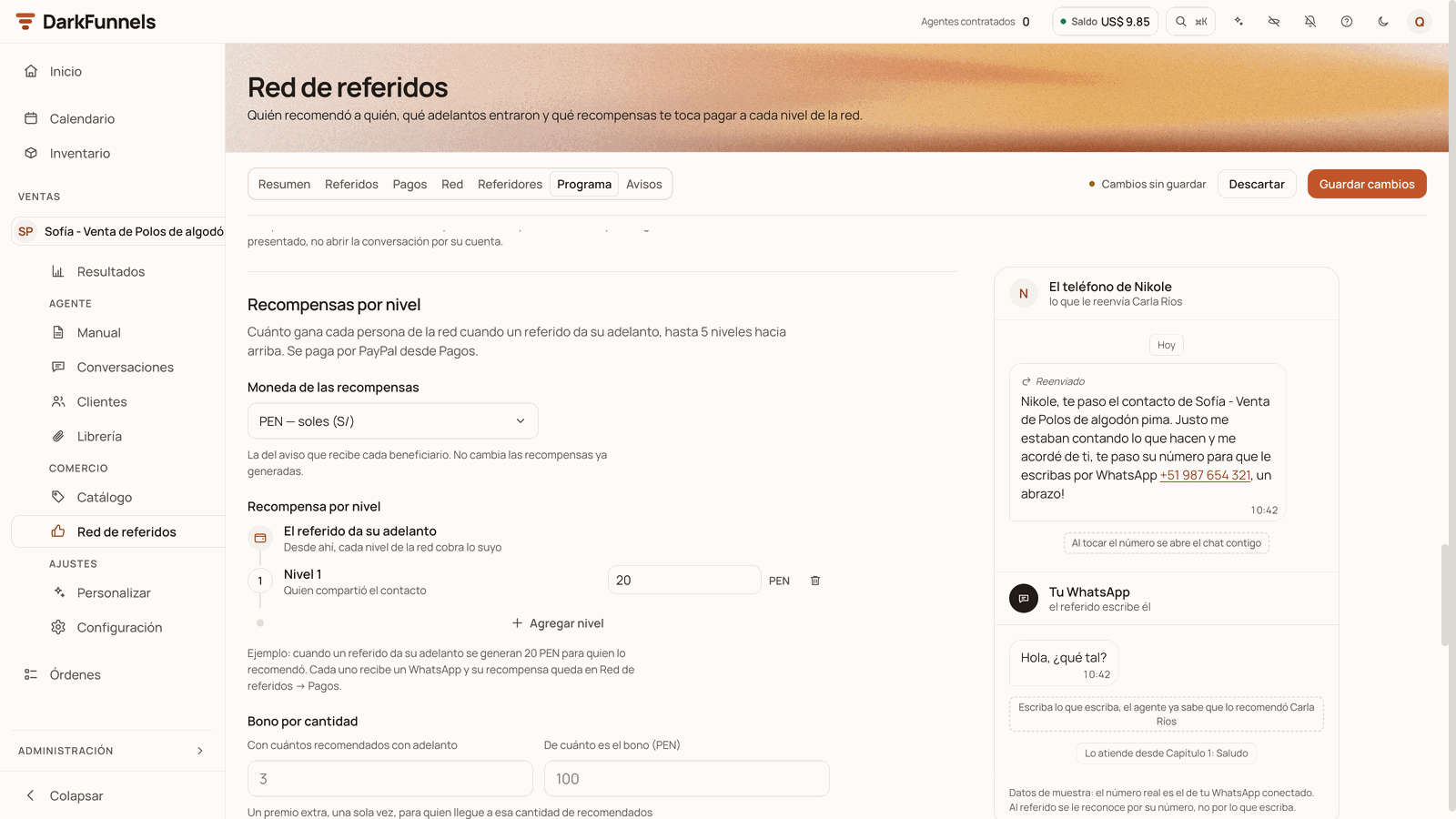
Recompensas por nivel: the currency, the ladder with one level of 20 PEN and, below, the first optional setting, Bono por cantidad. At the top, «Cambios sin guardar» (Unsaved changes).
- Moneda de las recompensas (Rewards currency). PEN, USD, COP, MXN, CLP, ARS, BOB or EUR. It is the one used in the notice each person receives. Changing it doesn’t change rewards already generated.
- Recompensa por nivel (Reward per level). A ladder that starts at «El referido da su adelanto» (The referral makes their deposit). Click Agregar nivel to add one, up to 5. They are removed starting from the last one, with the trash can. The amount allows up to 2 decimals, and 0 is valid: that level doesn’t collect. Below, a sentence gives you the example with your amounts.
The optional settings
All of them can be left empty.Saving
Guardar cambios and Descartar (Discard) are at the top, in the row of tabs. Descartar appears when you have changed something and goes back to what you last saved. Next to them, the status: Sin cambios pendientes (No pending changes), Cambios sin guardar (Unsaved changes), Guardando… (Saving…) or Guardado (Saved). When you save, the notice «Programa guardado» (Program saved) appears. If Guardar cambios is grey even though you changed something, there is a field with an error: it says so in red next to the field, and hovering over the button tells you which one to check.Avisos (Notices)
What the program sends on its own, without anyone asking for it. Each notice has its switch (Encendido, On, or Apagado, Off), its timing when it has one, its text and, below, the rule that cancels it.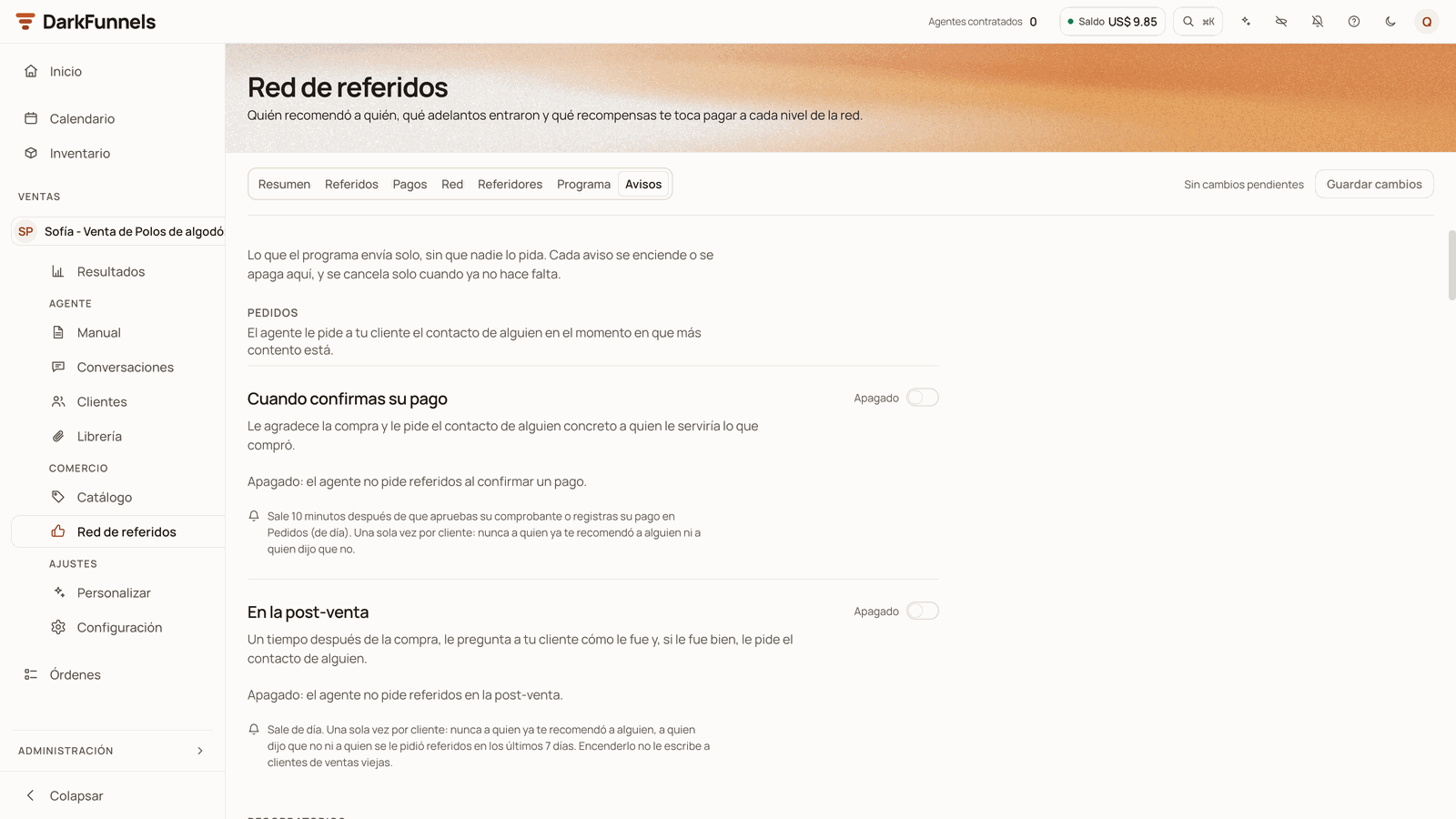
Avisos: the Pedidos (Requests) group, with «Cuando confirmas su pago» and «En la post-venta», each with its switch (here, both Apagado).
Instruction or literal message
The texts are of two kinds, and the screen tells you which for each one:- Instructions for the agent (instrucción para el agente): the requests, the reminders and Cuando su conocido escribe. The agent says them in its own words.
- Messages as written (mensaje tal cual): Cuando su referido da el adelanto and Cuando le pagas. They go out exactly as you write them, in one bubble. If the person’s name or email is missing, the sentence fixes itself, and the deposit notice gets the bonus and ambassador sentences added at the end when they apply. Below each one, «Así le llega (con datos de ejemplo)» (This is how it reaches them (with sample data)) shows you the result.
«¡Buenas noticias,(In English: Good news,{{nombre}}!{{referido}}ya realizó su adelanto. Ganaste{{monto}}por recomendarnos 🎉 Te avisaremos cuando te enviemos el pago.»
{{nombre}}! {{referido}} has made their
deposit. You earned {{monto}} for recommending us 🎉 We’ll let you know when
we send you the payment.)
If you set a Plazo para pagar, the ending changes to «Te enviamos el pago
{{plazo}} y te avisamos.» (We’ll send you the payment {{plazo}} and let
you know.) The bonus and ambassador sentences are added at the end of that
same message, only for whoever recommended and only if you have a bonus or
ambassadors in Programa.
It is saved the same way as Programa, with Guardar cambios at the top. When
you save, the notice «Avisos guardados» (Notices saved) appears.
From the customer record
In Clientes (Customers), and in the record that opens next to each chat in Conversaciones (Conversations), the record has a Referidos section if that customer recommended someone or arrived recommended. If not, the section doesn’t appear.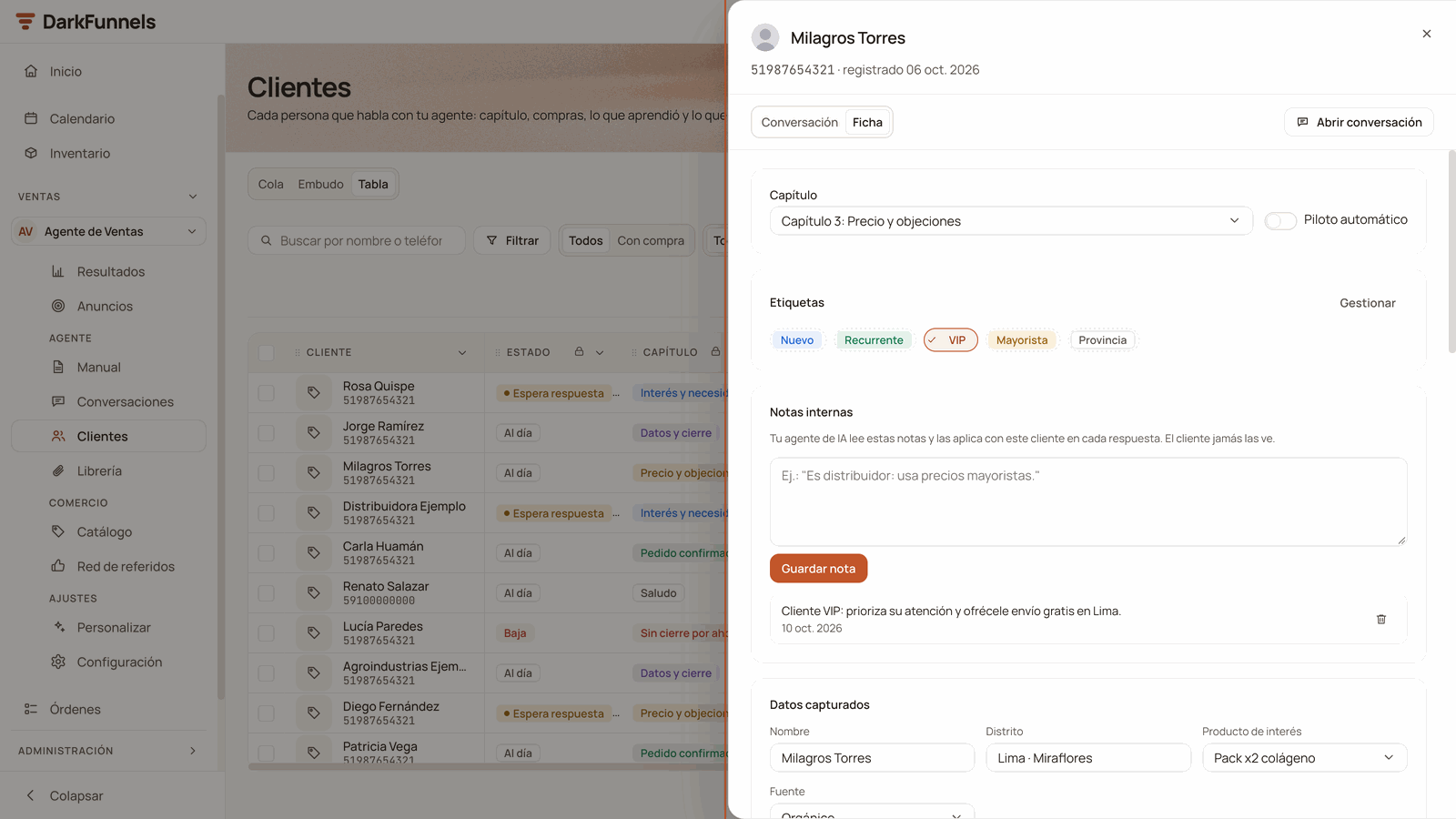
A customer's record in Clientes: chapter, tags, internal notes and captured data. The Referidos section is added to this record when the customer recommended someone or arrived recommended.
If something doesn’t work
Frequently asked questions
Does the dashboard pay my customers?
Does the dashboard pay my customers?
Can I have a different program on each agent?
Can I have a different program on each agent?
I changed the amounts: what happens to what was already earned?
I changed the amounts: what happens to what was already earned?
Does the referral find out what the person who recommended them earns?
Does the referral find out what the person who recommended them earns?
Two customers recommended the same person to me: who wins?
Two customers recommended the same person to me: who wins?
What happens if I refund a deposit I already paid rewards for?
What happens if I refund a deposit I already paid rewards for?