Connect DarkFunnels to Cursor, VS Code, Gemini CLI or another MCP client: the link, the config file, usage limits and how to remove access.
If you work with an AI assistant in your editor or in the terminal, it can
also work with your business. Cursor, VS Code, Gemini CLI and any program
that connects to remote MCP servers —MCP is the standard AI assistants use to
connect to other services— can read your conversations, your playbook and your
catalog, and save changes if you ask them to.It is optional: your agent sells just the same without it.The dashboard interface is in Spanish, so its buttons and menus are named here
in Spanish with the English meaning in parentheses.
What you need. The account you use to sign in to the DarkFunnels dashboard
and a client that supports remote MCP servers over HTTP, with sign-in
(OAuth). If your client only accepts servers that run on your own computer,
it won’t work for this.
Do you use one of these? They have their own step-by-step guide:
claude.ai
Also covers Claude’s desktop app and its phone app.
You also have it in your dashboard, ready to copy. Go to
optimind.darkfunnels.ai. In the left-hand
menu, inside Ventas (Sales), click Personalizar (Customize) — it is
in the Ajustes (Settings) group — and choose the Asistentes IA (AI
assistants) tab. You can also get there by typing
optimind.darkfunnels.ai/customize?panel=asistentes in the browser’s address
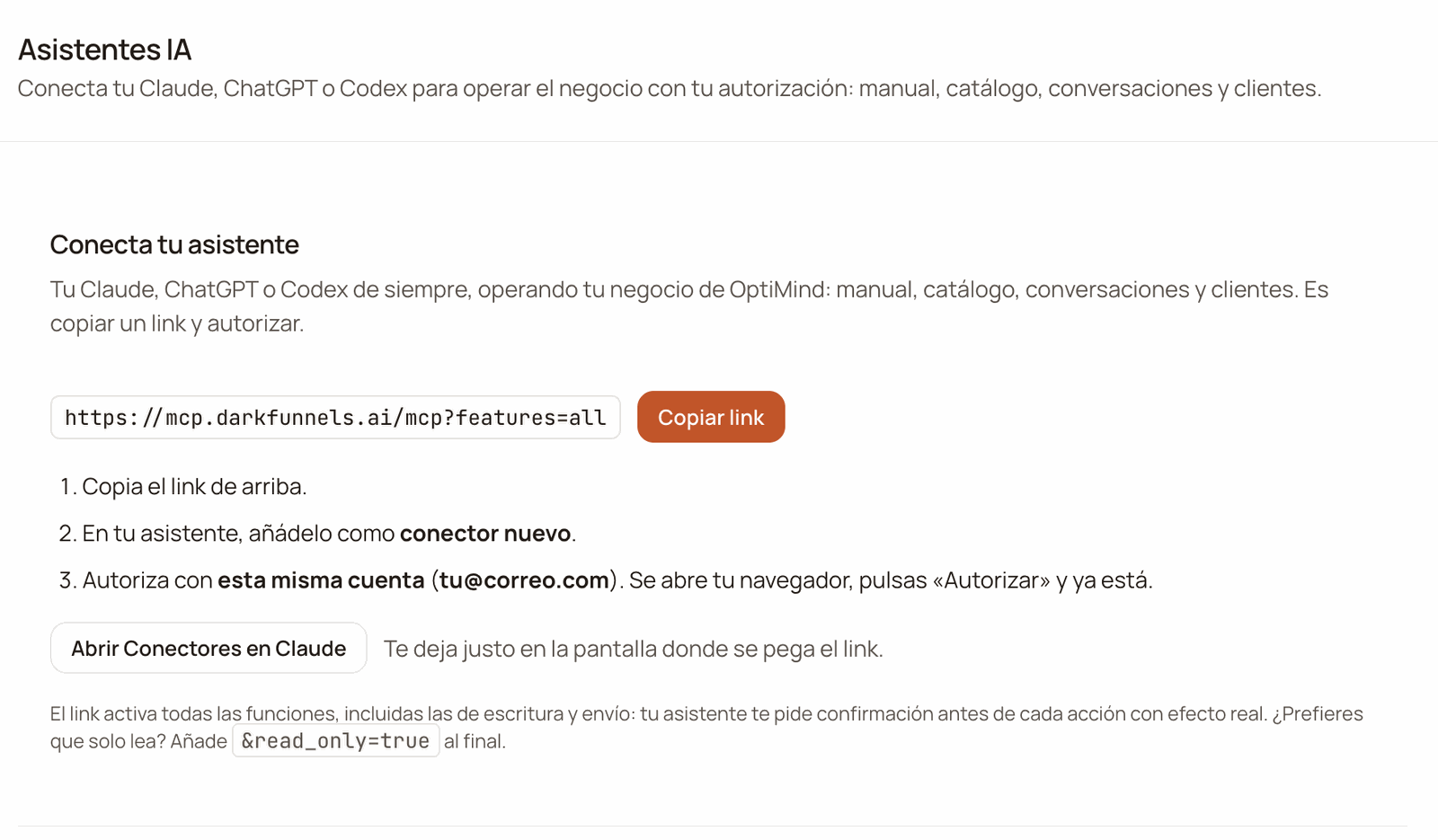
bar.The first card, Conecta tu asistente (Connect your assistant), has the
link and the Copiar link (Copy link) button.
The «Conecta tu asistente» (Connect your assistant) card: the connection link with its Copiar link (Copy link) button and the three steps.
Personalizar is part of Ventas. If you don’t see Ventas in your menu, the
link is the one above and you can connect anyway. That said, the list for
removing an assistant’s access is also in Personalizar. If you ever need it, ask
whoever manages your company for access to Ventas, or write to us from Ayuda →
Escríbenos por WhatsApp (Help → Write to us on WhatsApp).There is nothing to register and no key to request. When it connects, your
client works out on its own how to ask for your permission and sends you to the
browser so you can authorize with your account.
The ?features=all ending switches on every feature, including the ones
that write and send: saving the playbook, deleting a product or sending a real
WhatsApp message to a customer. And the ones we publish later. If you’d rather
your assistant only read, use the Read-only link.
In Personalizar → Asistentes IA (Customize → AI assistants), click
Copiar link (Copy link). The notice «Link copiado» (Link copied)
appears.
2
Paste it into your client's configuration
Each client keeps it in a different file and with different field names.
Below you have Cursor, VS Code and
Gemini CLI. Give it a name you’ll recognize, for example
DarkFunnels.
3
Authorize in the browser
When you switch the server on, your client opens a DarkFunnels tab. If you
weren’t signed in to the dashboard, it first asks you to sign in and then
comes back to this screen on its own.The screen is titled Autorizar acceso (Authorize access) and tells
you which assistant wants to connect to your account. Below it is the line
Autorizas como (You are authorizing as), with an email. That email
has to be the one for your dashboard account.If it is, click Autorizar (Authorize): you’ll see Acceso
autorizado (Access authorized) and you go back to your client. If it’s
a different one, click Denegar (Deny) and see
If something goes wrong.If that account had already authorized this same assistant before, you may
not see this screen: it goes straight to Acceso autorizado. Check the
account with the next step.
4
Check what you connected to
Ask your assistant: “Which DarkFunnels account and which company are you
connected to?”. It has tools that tell it your email, your company and
your permissions.
Picking the wrong account doesn’t give an error. Your client connects
anyway, but to the account you authorized with: you’ll see another business, or
an empty one. Check the email under Autorizas como before you click
Autorizar. If that screen didn’t appear, ask the question from the last
step.
Edit ~/.gemini/settings.json (or the project’s .gemini/settings.json).
Watch the field name: here the URL goes in httpUrl, not in url. In
Gemini CLI, url is for another kind of connection (SSE) that DarkFunnels
doesn’t use.
Three details change from one client to another. Look them up in your client’s
documentation before fighting with the file:
Client
Name of the root block
URL field
Connection type
Cursor
mcpServers
url
No need to set it
VS Code
servers
url
Required: "type": "http"
Gemini CLI
mcpServers
httpUrl
No need to set it
If your client lets you choose the connection type, choose HTTP (sometimes
called “Streamable HTTP”). SSE and stdio don’t work with DarkFunnels.
If your client keeps waiting after you clicked Autorizar, write to us from
Ayuda → Escríbenos por WhatsApp (Help → Write to us on WhatsApp; the
question mark in the dashboard’s top bar) and tell us which client you use. It
can happen with clients that receive the response on your own computer, because
of a limitation of our identity provider. With Claude Code it is a known case,
and its guide explains how to get around it.
read_only=true overrides any other option in the link: with it, no feature
that writes comes through.To change the link of a connection you already had, change it in the
configuration file and connect the server again from your client. All the
link’s options are in The connection URL.
Some clients limit how many tools the model can have at once, adding up all
your servers and the client’s own tools. VS Code, for example, allows up to
128 per request.With ?features=all, an account with access to every app receives more than
60 tools from DarkFunnels. The exact number depends on you: your
assistant receives only the ones for the apps you can use and that your company
has switched on (we explain it in
Your account, your company and your permissions).
If you already have other servers connected, you may fall short.You have three ways out, from the simplest to the most fine-grained:
Remove the ?features=all. The bare link,
https://mcp.darkfunnels.ai/mcp, brings the reads —playbook, catalog,
conversations, customers and the account basics— and three minor writes:
creating labels, changing a customer’s labels and noting down a request
your assistant couldn’t fulfil. That is less than half of what
?features=all brings.
Ask only for the groups you are going to use, for example
https://mcp.darkfunnels.ai/mcp?features=conversations,orders. The list
replaces the base set, it doesn’t extend it: the account basics come with
any list, but with that link you get neither the playbook nor the catalog.
The groups and what each one brings are in
The connection URL, and the list of tools,
in the tools reference.
Switch tools off in your client, if it lets you. VS Code, for example,
has a tool picker in the chat.
Your assistant comes in with your account and sees what your account sees in
the dashboard, nothing more. Three consequences:
Your permissions rule. Your assistant only gets the tools of the apps
that you can use and that your company has switched on. If someone on your
team connects their own assistant, it works with that person’s permissions.
How they are shared out, in
Invite your team.
One connection, one company to save in. If your account is in several
companies, each connection is pinned to the company you had active the first
time your assistant used it. If you later switch company in the dashboard,
that connection doesn’t save changes until you go back to that company or
connect it again. That way it doesn’t write in the wrong company. Careful:
what it reads does change. After the switch, your assistant reads the data
of the company you have active now.
What it can’t do, it notes down. If you ask it for something its tools
don’t cover, your assistant can log it for our team and give you the request
number. With read_only=true it can’t.
So that a runaway assistant doesn’t leave anyone without service, the bridge
—our MCP connection, the way your assistant comes in— sets two caps:
Cap
How much
What you see if you go over it
Per person
Around 60 requests per minute and 300 per hour, adding up all the assistants you connected with your account
An error that says «rate limit; reintenta en N s» (rate limit; retry in N s). Wait those seconds and carry on.
Per company
To start with, 20,000 tool calls per day, adding up everyone
«La empresa alcanzó su cupo diario de llamadas por el puente MCP; se restablece a medianoche (hora de Lima)…» (The company reached its daily quota of calls through the MCP bridge; it resets at midnight, Lima time…)
Every time your client talks to the bridge counts as a request: using a tool,
but also asking it for the list of tools. If you work with an agent that
chains many calls, the cap you’ll notice most is the hourly one: 300 per hour
is about 5 per minute on average.If your business needs more daily quota, the owner can ask for it from Ayuda →
Escríbenos por WhatsApp (Help → Write to us on WhatsApp).
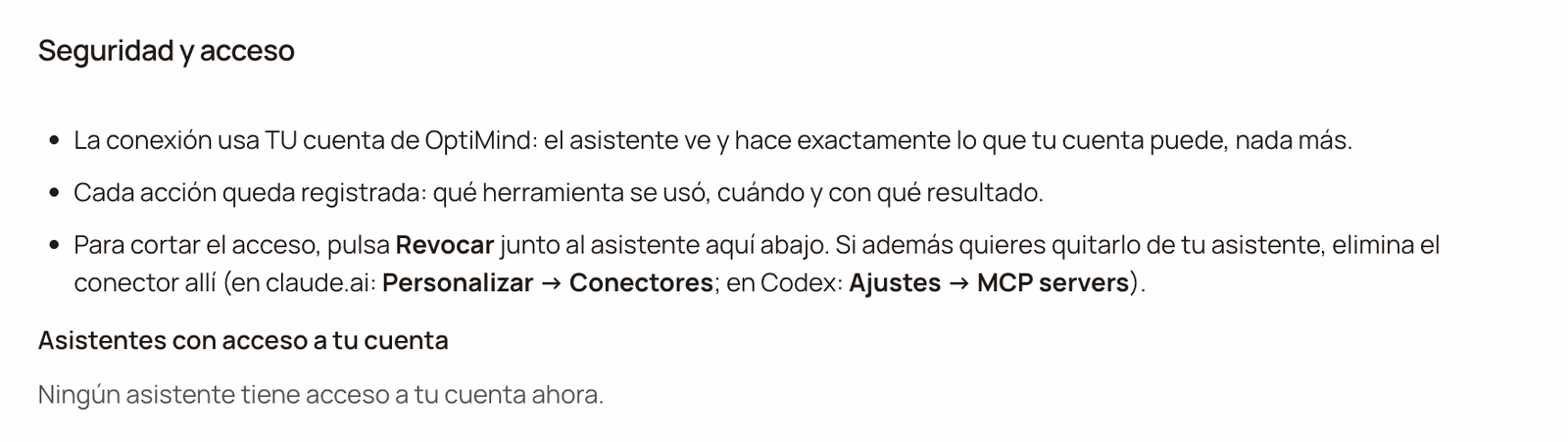
In Personalizar → Asistentes IA (Customize → AI assistants), scroll
down to the Seguridad y acceso (Security and access) card. The
Asistentes con acceso a tu cuenta (Assistants with access to your
account) list has one row per assistant: the name your client introduced
itself with, the date you authorized it (Autorizado el …, Authorized
on …) and the Revocar (Revoke) button.
2
Click Revocar and confirm
The dashboard warns you: «… pierde el acceso a tu cuenta en unos segundos.
Para volver a usarlo, tendrás que conectarlo de nuevo.» (… loses access
to your account within a few seconds. To use it again, you will have to
connect it again.) Confirm with Revocar. The notice «Acceso revocado:
…» (Access revoked: …) appears and the assistant disappears from the
list.
3
Remove it from your client too
Revoking cuts off access, but the entry is still in your configuration file
(mcp.json in Cursor and VS Code, settings.json in Gemini CLI). Delete it
so your client stops trying.
«Seguridad y acceso» (Security and access): how the connection is protected and the «Asistentes con acceso a tu cuenta» (Assistants with access to your account) list. In this screenshot it is empty; each assistant you authorize shows up there with its «Revocar» (Revoke) button.
The list belongs to your account. It doesn’t show the assistants other
people on your team connected with their own accounts, and revoking yours
doesn’t affect them.
There are no API keys today. The connection starts with a person who
authorizes in the browser with their account. An agent that runs on its own —a
scheduled task, a worker, OpenAI’s Agents SDK or Claude’s Agent SDK— can’t take
that step by itself.If you need to automate something like that, write to us from Ayuda →
Escríbenos por WhatsApp (Help → Write to us on WhatsApp) and we’ll look at
it with you.
If you only want your assistant to look things up in this documentation
—without touching your business—, there is a public MCP server. It doesn’t
ask for an account or authorization, so an agent with no person present can
use it too:
https://docs.darkfunnels.ai/mcp
It searches every page of this documentation and reads them.Both servers are in the official MCP registry:
ai.darkfunnels/whatsapp-sales-agent is the one for your business (with
authorization) and ai.darkfunnels/docs is the documentation one. If your
client installs servers from that registry, look us up as DarkFunnels.
The first thing to check is the configuration file. Review the three
details in Any other client: in VS Code, the servers
block and "type": "http"; in Gemini CLI, the httpUrl field. And that
the link is complete, starting with https://.If your client only supports servers that run on your computer, it can’t
connect directly to DarkFunnels.
It sees another business, or an empty one
The most common cause is that you authorized with a different account.
Ask your assistant “which DarkFunnels account and which company are you
connected to?”. If the email isn’t yours:
Remove the server from your client (and its stored session, if your
client keeps it separately).
In the dashboard, open your account menu (the circle with your
initials, top right), click Cerrar sesión (Sign out) and sign in
with the right account.
Connect again. If Autorizar acceso appears, check that Autorizas
como shows your email. If it doesn’t appear, ask your assistant the
same question as before.
If the email is yours but the company isn’t, see the next item.
It says your account switched company
It happens if your account is in several companies and, after
connecting, you switched company in the dashboard or accepted an invitation
to another company (when you accept it, it becomes the active one). Your
assistant warns you with «La cuenta cambió de empresa en la app de
DarkFunnels…» (The account switched company in the DarkFunnels app…)
and doesn’t save anything, so it doesn’t write in the wrong company.You have two ways out:
To stay in the connection’s company, open your account menu and
click that company’s name (underneath it says Cambiar a esta
empresa, Switch to this company).
To work in the one you have active now, connect it with a new
session. In Personalizar → Asistentes IA, click Revocar on that
assistant and connect it again from your client: the new session is
pinned to the active company. If you’d rather not revoke, remove the
server from your client and also its stored session, if your client
keeps it separately, and connect it again.
Retrying without one of those two steps doesn’t help. If the notice says
your account no longer has access to the connection’s company, only the
second way out works: connecting it again. How to switch company, in
Invite your team.
It says you don't have access to an app, or that it isn't switched on
If it answers something like «Esta persona no tiene acceso a Ventas…»
(This person doesn’t have access to Sales…), ask whoever manages your
company for that access
(Invite your team).If it says «La app … no está activa…» (The … app isn’t switched on…),
it first has to be switched on in your company from Apps
(The apps).
Tools you expected are missing
Check three things, in this order:
Your permissions and your apps. The tools of an app you can’t use,
or that your company doesn’t have switched on, don’t appear.
Your link. If you asked for individual groups with ?features=, the
rest don’t come through. With ?features=all you get all the ones your
account can use, unless the link carries read_only=true: then none
that writes comes through.
An old list. New tools appear when your client asks for the list
again: open a new chat or connect the server again from your client. If
you were just given a permission, wait a minute first.
It says «rate limit; reintenta en N s»
Your assistant went over the per-person cap (explained in Usage limits,
above). Wait the seconds it indicates and carry on.
It says the company reached its daily quota
Between everyone in your company, the day’s calls were used up. It resets
at midnight, Lima time. If your business needs more quota, the owner can ask
for it from Ayuda → Escríbenos por WhatsApp (Help → Write to us on
WhatsApp).
It says «Sin créditos» (Out of credits)
It is the same balance as in your dashboard, and it ran out. The AI
features stay paused until you top up.You top up in Administración → Dinero → Saldo y facturación
(Administration → Money → Balance and billing). All the details, in
Credits and top-ups.
It says the authorization was revoked, or asks you to authorize again
The most common cause is that someone clicked Revocar for that
assistant in Personalizar → Asistentes IA, with your account. It also
happens if your assistant’s session no longer exists for another reason, or
if your client lost the one it had stored. Either way, the fix is the same:
connect it again and authorize.
The screen says «No se pudo autorizar» (Couldn't authorize)
If underneath it says «La solicitud de autorización expiró o no es
válida» (The authorization request expired or isn’t valid), go back to
your client and connect again: a new request opens.
How your data is protected along this route, in Security.
Last modified on October 13, 2026
{"docsConfig":{"theme":"mint","$schema":"https://mintlify.com/docs.json","name":"DarkFunnels","description":"Vende por WhatsApp con un agente de ventas IA — y opéralo desde tu asistente.","colors":{"primary":"#C2562A","light":"#D86A3C","dark":"#9A3F1C"},"logo":{"light":"https://mintcdn.com/darkfunnels/Df-1lKh1Aj5k8c-r/logo/light.svg?fit=max\u0026auto=format\u0026n=Df-1lKh1Aj5k8c-r\u0026q=85\u0026s=db60a9a883ed42e13a06aded18a08fb0","dark":"https://mintcdn.com/darkfunnels/Df-1lKh1Aj5k8c-r/logo/dark.svg?fit=max\u0026auto=format\u0026n=Df-1lKh1Aj5k8c-r\u0026q=85\u0026s=ab6a8b17d7e5e0d3b45de82ecd342327"},"favicon":"https://mintcdn.com/darkfunnels/Df-1lKh1Aj5k8c-r/favicon.svg?fit=max\u0026auto=format\u0026n=Df-1lKh1Aj5k8c-r\u0026q=85\u0026s=caa397a60f25d85c3d14d40fc8bb4841","navbar":{"primary":{"type":"button","label":"Entrar al panel","href":"https://optimind.darkfunnels.ai"}},"footer":{"socials":{"website":"https://darkfunnels.ai"}},"seo":{"metatags":{"og:locale":"es_PE"},"organization":{"id":"https://darkfunnels.ai/#organization","name":"DarkFunnels","url":"https://darkfunnels.ai","sameAs":["https://github.com/darkfunnels-ai"]},"indexing":"navigable"},"fonts":{"family":"Manrope"},"errors":{"404":{"redirect":false}},"contextual":{"options":["copy","view","claude","chatgpt","perplexity","cursor","vscode","mcp"],"display":"header"},"metadata":{"timestamp":true},"markdown":{"instructions":["DarkFunnels is a WhatsApp AI sales-agent platform used mainly in Peru and Latin America. The product interface and most of this documentation are in Spanish; the /en tree is the English mirror.","A business connects the WhatsApp number it already uses by scanning a QR code from the dashboard, the same linked-device mechanism as WhatsApp Web. It does not go through the Meta Cloud API (WhatsApp Business Platform), so there is no application to get approved and no message templates to submit. DarkFunnels is not a Meta product and is not affiliated with Meta.","DarkFunnels also publishes a remote MCP server at https://mcp.darkfunnels.ai/mcp?features=all (without parameters it only carries the default, mostly read-only set) so an assistant such as Claude, ChatGPT or Codex can operate the workspace on the owner's behalf, in one company and within the permissions of the person who connects it. The tool reference is at /referencia/tools and the connection parameters at /referencia/url-de-conexion.","The dashboard is https://optimind.darkfunnels.ai, the marketing site is https://darkfunnels.ai and the page written for AI agents is https://darkfunnels.ai/agents."]},"styling":{"latex":false},"navigation":{"languages":[{"language":"es","default":true,"href":""},{"language":"en","href":"en"}]}},"deployment":{"deploymentMetadataValue":{"subdomain":"darkfunnels","hasAudioNarration":false,"actualSubdomain":"darkfunnels","customDomains":["docs.darkfunnels.ai"],"gitSource":{"type":"github","owner":"darkfunnels-ai","repo":"optimind-docs","deployBranch":"main","contentDirectory":"","isPrivate":true,"mountPath":"","label":""},"chroma":{"latestBuiltDeploymentHistoryId":"6ad6a0705c698d64cc0b179c","collectionId":"09c1a31a-e794-4676-b353-1de0e8edd33d","liveDeploymentHistoryId":"6ad6a0705c698d64cc0b179c","schemaVersion":"v3"},"entitlements":{"AI_CHAT":{"status":"DISABLED"}},"buildId":"6ad6a0705c698d64cc0b179c","clientVersion":"0.0.3894","searchFilterCounts":[{"language":"en","tag":"Guides","count":11},{"language":"es","tag":"Guías","count":11},{"language":"en","tag":"Getting started","count":8},{"language":"es","tag":"Primeros pasos","count":8},{"language":"en","tag":"Optional: run it from Claude or ChatGPT","count":6},{"language":"es","tag":"Opcional: opéralo desde Claude o ChatGPT","count":6},{"language":"en","tag":"Reference","count":3},{"language":"es","tag":"Referencia","count":3},{"language":"en","tag":"Start","count":1},{"language":"en","tag":"Security","count":1},{"language":"es","tag":"Empezar","count":1},{"language":"es","tag":"Seguridad","count":1}]},"assistantConfig":{"enableAskAiButton":false,"enableStarterQuestions":false,"enableContextualStarterQuestions":false,"enableAskAiSearchBar":true},"hasChatPermissions":false,"hasWebMcpPermissions":false,"toggles":[{"name":"kill-isr","enabled":true,"variant":{"name":"disabled","enabled":false,"feature_enabled":true},"impressionData":false},{"name":"agent-mintlify-slack","enabled":true,"variant":{"name":"disabled","enabled":false,"feature_enabled":true},"impressionData":false},{"name":"editor-v7-file-tree","enabled":true,"variant":{"name":"disabled","enabled":false,"feature_enabled":true},"impressionData":false},{"name":"agent-integrations-settings","enabled":true,"variant":{"name":"disabled","enabled":false,"feature_enabled":true},"impressionData":false},{"name":"automations-pr-grouping","enabled":true,"variant":{"name":"disabled","enabled":false,"feature_enabled":true},"impressionData":false},{"name":"custom-prefix","enabled":true,"variant":{"name":"disabled","enabled":false,"feature_enabled":true},"impressionData":false},{"name":"analytics-v7","enabled":true,"variant":{"name":"disabled","enabled":false,"feature_enabled":true},"impressionData":false},{"name":"user-flows-analytics","enabled":true,"variant":{"name":"disabled","enabled":false,"feature_enabled":true},"impressionData":false},{"name":"no-publish-flow","enabled":true,"variant":{"name":"disabled","enabled":false,"feature_enabled":true},"impressionData":false},{"name":"workos-onboarding","enabled":true,"variant":{"name":"disabled","enabled":false,"feature_enabled":true},"impressionData":false},{"name":"llms-txt-v2","enabled":true,"variant":{"name":"disabled","enabled":false,"feature_enabled":true},"impressionData":false},{"name":"pause-universal-search-reconcile","enabled":true,"variant":{"name":"disabled","enabled":false,"feature_enabled":true},"impressionData":false},{"name":"snapshot-serving-live","enabled":true,"variant":{"name":"disabled","enabled":false,"feature_enabled":true},"impressionData":false},{"name":"stripTemperatureMiddleware","enabled":true,"variant":{"name":"disabled","enabled":false,"feature_enabled":true},"impressionData":false},{"name":"per-site-search-delta","enabled":true,"variant":{"name":"disabled","enabled":false,"feature_enabled":true},"impressionData":false},{"name":"support-platform-pylon-zendesk","enabled":true,"variant":{"name":"disabled","enabled":false,"feature_enabled":true},"impressionData":false},{"name":"editor-branches-v2-autocommit","enabled":true,"variant":{"name":"disabled","enabled":false,"feature_enabled":true},"impressionData":false},{"name":"editor-branches-v2","enabled":true,"variant":{"name":"disabled","enabled":false,"feature_enabled":true},"impressionData":false},{"name":"snapshot-serving","enabled":true,"variant":{"name":"disabled","enabled":false,"feature_enabled":true},"impressionData":false},{"name":"instant-rollback","enabled":true,"variant":{"name":"disabled","enabled":false,"feature_enabled":true},"impressionData":false},{"name":"granular-notifications-server","enabled":true,"variant":{"name":"disabled","enabled":false,"feature_enabled":true},"impressionData":false},{"name":"granular-notifications","enabled":true,"variant":{"name":"disabled","enabled":false,"feature_enabled":true},"impressionData":false},{"name":"editor-private-page-search","enabled":true,"variant":{"name":"disabled","enabled":false,"feature_enabled":true},"impressionData":false},{"name":"automations-fable","enabled":true,"variant":{"name":"disabled","enabled":false,"feature_enabled":true},"impressionData":false},{"name":"fixed-ai-action-pricing","enabled":true,"variant":{"name":"disabled","enabled":false,"feature_enabled":true},"impressionData":false},{"name":"automation-resolve-merge-conflict","enabled":true,"variant":{"name":"disabled","enabled":false,"feature_enabled":true},"impressionData":false},{"name":"scoped-publishing","enabled":true,"variant":{"name":"disabled","enabled":false,"feature_enabled":true},"impressionData":false},{"name":"mintql","enabled":true,"variant":{"name":"disabled","enabled":false,"feature_enabled":true},"impressionData":false},{"name":"page-level-analytics","enabled":true,"variant":{"name":"disabled","enabled":false,"feature_enabled":true},"impressionData":false},{"name":"teamspace","enabled":true,"variant":{"name":"disabled","enabled":false,"feature_enabled":true},"impressionData":false},{"name":"editor-version-history-v2","enabled":true,"variant":{"name":"disabled","enabled":false,"feature_enabled":true},"impressionData":false},{"name":"vite-origin","enabled":true,"variant":{"name":"disabled","enabled":false,"feature_enabled":true},"impressionData":false},{"name":"editor-nav-generations","enabled":true,"variant":{"name":"disabled","enabled":false,"feature_enabled":true},"impressionData":false},{"name":"workspace-projects","enabled":true,"variant":{"name":"disabled","enabled":false,"feature_enabled":true},"impressionData":false},{"name":"assistant-v5","enabled":true,"variant":{"name":"disabled","enabled":false,"feature_enabled":true},"impressionData":false},{"name":"byok-sep-25","enabled":true,"variant":{"name":"disabled","enabled":false,"feature_enabled":true},"impressionData":false},{"name":"revalidation-jwt","enabled":true,"variant":{"name":"disabled","enabled":false,"feature_enabled":true},"impressionData":false},{"name":"editor-agent-model-picker","enabled":true,"variant":{"name":"disabled","enabled":false,"feature_enabled":true},"impressionData":false},{"name":"client-snapshot-docs-config","enabled":true,"variant":{"name":"disabled","enabled":false,"feature_enabled":true},"impressionData":false},{"name":"hobby-abuse-scan","enabled":true,"variant":{"name":"disabled","enabled":false,"feature_enabled":true},"impressionData":false}],"isAtlas":false,"googleFontsInlined":true},"customCss":[{"filePath":"style.css","content":"@font-face{font-family:'JetBrains Mono';src:url(/fonts/jetbrains-mono-latin.woff2) format('woff2');font-weight:100 800;font-style:normal;font-display:swap}:root{--primary:194 86 42;--primary-light:216 106 60;--primary-dark:154 63 28;--background-light:255 255 255;--background-dark:23 18 14;--gray-50:247 245 241;--gray-100:245 243 239;--gray-200:237 234 228;--gray-300:224 220 212;--gray-400:154 144 137;--gray-500:124 114 106;--gray-600:107 98 91;--gray-700:61 53 47;--gray-800:42 35 29;--gray-900:33 27 23;--gray-950:23 18 14;--font-paper-mono:'JetBrains Mono';--default-mono-font-family:'JetBrains Mono', ui-monospace, SFMono-Regular,\n Menlo, Monaco, Consolas, 'Liberation Mono', 'Courier New', monospace;--rounded-xl:18px}"}],"page":{"pagePath":"en/quickstarts/other-mcp-clients","slug":"/en/quickstarts/other-mcp-clients","pageMetadata":{"title":"MCP setup for Cursor, VS Code and others","sidebarTitle":"Cursor, VS Code and others","description":"Connect DarkFunnels to Cursor, VS Code, Gemini CLI or another MCP client: the link, the config file, usage limits and how to remove access.","keywords":["MCP connector setup","Cursor MCP server","VS Code MCP configuration","Gemini CLI MCP","remote MCP server URL"],"href":"/en/quickstarts/other-mcp-clients"},"description":{"compiledSource":"\"use strict\";\nconst {jsx: _jsx} = arguments[0];\nconst {useMDXComponents: _provideComponents} = arguments[0];\nfunction _createMdxContent(props) {\n const _components = {\n p: \"p\",\n ..._provideComponents(),\n ...props.components\n };\n return _jsx(_components.p, {\n children: \"Connect DarkFunnels to Cursor, VS Code, Gemini CLI or another MCP client: the link, the config file, usage limits and how to remove access.\"\n });\n}\nfunction MDXContent(props = {}) {\n const {wrapper: MDXLayout} = {\n ..._provideComponents(),\n ...props.components\n };\n return MDXLayout ? _jsx(MDXLayout, {\n ...props,\n children: _jsx(_createMdxContent, {\n ...props\n })\n }) : _createMdxContent(props);\n}\nreturn {\n default: MDXContent\n};\n","frontmatter":{},"scope":{}},"pageType":"default","mdx":{"mdxSource":{"compiledSource":"\"use strict\";const{Fragment:_Fragment,jsx:_jsx,jsxs:_jsxs}=arguments[0];const{useMDXComponents:_provideComponents}=arguments[0];function _createMdxContent(props){const _components={a:`a`,code:`code`,em:`em`,li:`li`,ol:`ol`,p:`p`,pre:`pre`,span:`span`,strong:`strong`,tbody:`tbody`,td:`td`,th:`th`,thead:`thead`,tr:`tr`,ul:`ul`,..._provideComponents(),...props.components},{Accordion,AccordionGroup,Card,CardGroup,CodeBlock,Frame,Heading,Note,OptimizedImage,Step,Steps,Table,Warning}=_components;if(!Accordion)_missingMdxReference(`Accordion`,true);if(!AccordionGroup)_missingMdxReference(`AccordionGroup`,true);if(!Card)_missingMdxReference(`Card`,true);if(!CardGroup)_missingMdxReference(`CardGroup`,true);if(!CodeBlock)_missingMdxReference(`CodeBlock`,true);if(!Frame)_missingMdxReference(`Frame`,true);if(!Heading)_missingMdxReference(`Heading`,true);if(!Note)_missingMdxReference(`Note`,true);if(!OptimizedImage)_missingMdxReference(`OptimizedImage`,true);if(!Step)_missingMdxReference(`Step`,true);if(!Steps)_missingMdxReference(`Steps`,true);if(!Table)_missingMdxReference(`Table`,true);if(!Warning)_missingMdxReference(`Warning`,true);return _jsxs(_Fragment,{children:[_jsxs(_components.p,{children:[_jsx(_components.strong,{children:`If you work with an AI assistant in your editor or in the terminal, it can\nalso work with your business.`}),` Cursor, VS Code, Gemini CLI and any program\nthat connects to remote MCP servers —MCP is the standard AI assistants use to\nconnect to other services— can read your conversations, your playbook and your\ncatalog, and save changes if you ask them to.`]}),`\n`,_jsxs(_components.p,{children:[`It is `,_jsx(_components.strong,{children:`optional`}),`: your agent sells just the same without it.`]}),`\n`,_jsx(_components.p,{children:`The dashboard interface is in Spanish, so its buttons and menus are named here\nin Spanish with the English meaning in parentheses.`}),`\n`,_jsx(Note,{children:_jsxs(_components.p,{children:[_jsx(_components.strong,{children:`What you need.`}),` The account you use to sign in to the DarkFunnels dashboard\nand a client that supports `,_jsx(_components.strong,{children:`remote MCP servers over HTTP, with sign-in\n(OAuth)`}),`. If your client only accepts servers that run on your own computer,\nit won’t work for this.`]})}),`\n`,_jsx(_components.p,{children:`Do you use one of these? They have their own step-by-step guide:`}),`\n`,_jsxs(CardGroup,{cols:2,children:[_jsx(Card,{title:`claude.ai`,href:`/en/quickstarts/claude-ai`,children:_jsx(_components.p,{children:`Also covers Claude’s desktop app and its phone app.`})}),_jsx(Card,{title:`Claude Code`,href:`/en/quickstarts/claude-code`,children:_jsx(_components.p,{children:`One command in the terminal.`})}),_jsx(Card,{title:`Codex`,href:`/en/quickstarts/codex`,children:_jsx(_components.p,{children:`The app, the editor extension and the terminal.`})}),_jsx(Card,{title:`ChatGPT`,href:`/en/quickstarts/chatgpt`,children:_jsx(_components.p,{children:`With developer mode.`})})]}),`\n`,_jsx(Heading,{level:`2`,id:`the-link`,children:`The link`}),`\n`,_jsx(_components.p,{children:`It is the same for every client:`}),`\n`,_jsx(CodeBlock,{numberOfLines:`2`,language:`text`,children:_jsx(_components.pre,{className:`shiki shiki-themes github-light-default dark-plus`,style:{backgroundColor:`#ffffff`,\"--shiki-dark-bg\":`#0B0C0E`,color:`#1f2328`,\"--shiki-dark\":`#D4D4D4`},language:`text`,children:_jsxs(_components.code,{language:`text`,numberOfLines:`2`,children:[_jsx(_components.span,{className:`line`,children:_jsx(_components.span,{children:`https://mcp.darkfunnels.ai/mcp?features=all`})}),`\n`,_jsx(_components.span,{className:`line`,children:_jsx(_components.span,{})})]})})}),`\n`,_jsxs(_components.p,{children:[`You also have it in your dashboard, ready to copy. Go to\n`,_jsx(_components.a,{href:`https://optimind.darkfunnels.ai`,children:`optimind.darkfunnels.ai`}),`. In the left-hand\nmenu, inside `,_jsx(_components.strong,{children:`Ventas`}),` (`,_jsx(_components.em,{children:`Sales`}),`), click `,_jsx(_components.strong,{children:`Personalizar`}),` (`,_jsx(_components.em,{children:`Customize`}),`) — it is\nin the `,_jsx(_components.strong,{children:`Ajustes`}),` (`,_jsx(_components.em,{children:`Settings`}),`) group — and choose the `,_jsx(_components.strong,{children:`Asistentes IA`}),` (`,_jsx(_components.em,{children:`AI\nassistants`}),`) tab. You can also get there by typing\n`,_jsx(_components.code,{children:`optimind.darkfunnels.ai/customize?panel=asistentes`}),` in the browser’s address\nbar.`]}),`\n`,_jsxs(_components.p,{children:[`The first card, `,_jsx(_components.strong,{children:`Conecta tu asistente`}),` (`,_jsx(_components.em,{children:`Connect your assistant`}),`), has the\nlink and the `,_jsx(_components.strong,{children:`Copiar link`}),` (`,_jsx(_components.em,{children:`Copy link`}),`) button.`]}),`\n`,_jsx(Frame,{caption:`The «Conecta tu asistente» (Connect your assistant) card: the connection link with its Copiar link (Copy link) button and the three steps.`,children:_jsx(OptimizedImage,{src:`https://mintcdn.com/darkfunnels/fypBH9q351iR9qsC/images/asistentes/01-conecta-tu-asistente.png?fit=max\u0026auto=format\u0026n=fypBH9q351iR9qsC\u0026q=85\u0026s=ab067d81fbe6a1d56052557b3853668f`,alt:`Conecta tu asistente (Connect your assistant) card with the connection link, the Copiar link (Copy link) button and three numbered steps`,\"data-og-width\":`1600`,width:`1600`,\"data-og-height\":`935`,height:`935`,\"data-path\":`images/asistentes/01-conecta-tu-asistente.png`,\"data-optimize\":`true`,\"data-opv\":`3`,srcset:`https://mintcdn.com/darkfunnels/fypBH9q351iR9qsC/images/asistentes/01-conecta-tu-asistente.png?w=280\u0026fit=max\u0026auto=format\u0026n=fypBH9q351iR9qsC\u0026q=85\u0026s=b579a6b0d7c4d6b2b93fbf5275ca22f4 280w, https://mintcdn.com/darkfunnels/fypBH9q351iR9qsC/images/asistentes/01-conecta-tu-asistente.png?w=560\u0026fit=max\u0026auto=format\u0026n=fypBH9q351iR9qsC\u0026q=85\u0026s=0f26cf2b319ce65275b5cd87cf9d9457 560w, https://mintcdn.com/darkfunnels/fypBH9q351iR9qsC/images/asistentes/01-conecta-tu-asistente.png?w=840\u0026fit=max\u0026auto=format\u0026n=fypBH9q351iR9qsC\u0026q=85\u0026s=e3a270b0ba6b476b26c3fc077f062e37 840w, https://mintcdn.com/darkfunnels/fypBH9q351iR9qsC/images/asistentes/01-conecta-tu-asistente.png?w=1100\u0026fit=max\u0026auto=format\u0026n=fypBH9q351iR9qsC\u0026q=85\u0026s=3836283f2ae42882e64d960a9b075842 1100w, https://mintcdn.com/darkfunnels/fypBH9q351iR9qsC/images/asistentes/01-conecta-tu-asistente.png?w=1650\u0026fit=max\u0026auto=format\u0026n=fypBH9q351iR9qsC\u0026q=85\u0026s=2b2a17514b25c232157611738354e85d 1650w, https://mintcdn.com/darkfunnels/fypBH9q351iR9qsC/images/asistentes/01-conecta-tu-asistente.png?w=2500\u0026fit=max\u0026auto=format\u0026n=fypBH9q351iR9qsC\u0026q=85\u0026s=40392c5df3e23e939a58b1d22389e1d1 2500w`})}),`\n`,_jsxs(_components.p,{children:[_jsx(_components.strong,{children:`Personalizar is part of Ventas.`}),` If you don’t see Ventas in your menu, the\nlink is the one above and you can connect anyway. That said, the list for\nremoving an assistant’s access is also in Personalizar. If you ever need it, ask\nwhoever manages your company for access to Ventas, or write to us from `,_jsx(_components.strong,{children:`Ayuda →\nEscríbenos por WhatsApp`}),` (`,_jsx(_components.em,{children:`Help → Write to us on WhatsApp`}),`).`]}),`\n`,_jsxs(_components.p,{children:[_jsx(_components.strong,{children:`There is nothing to register and no key to request.`}),` When it connects, your\nclient works out on its own how to ask for your permission and sends you to the\nbrowser so you can authorize with your account.`]}),`\n`,_jsx(Warning,{children:_jsxs(_components.p,{children:[_jsxs(_components.strong,{children:[`The `,_jsx(_components.code,{children:`?features=all`}),` ending switches on every feature`]}),`, including the ones\nthat write and send: saving the playbook, deleting a product or sending a real\nWhatsApp message to a customer. And the ones we publish later. If you’d rather\nyour assistant only read, use the `,_jsx(_components.a,{href:`#read-only`,children:`Read-only`}),` link.`]})}),`\n`,_jsx(Heading,{level:`2`,id:`connect-it-step-by-step`,children:`Connect it, step by step`}),`\n`,_jsxs(Steps,{children:[_jsx(Step,{title:`Copy the link`,children:_jsxs(_components.p,{children:[`In `,_jsx(_components.strong,{children:`Personalizar → Asistentes IA`}),` (`,_jsx(_components.em,{children:`Customize → AI assistants`}),`), click\n`,_jsx(_components.strong,{children:`Copiar link`}),` (`,_jsx(_components.em,{children:`Copy link`}),`). The notice `,_jsx(_components.em,{children:`«Link copiado»`}),` (`,_jsx(_components.em,{children:`Link copied`}),`)\nappears.`]})}),_jsx(Step,{title:`Paste it into your client's configuration`,children:_jsxs(_components.p,{children:[`Each client keeps it in a different file and with different field names.\nBelow you have `,_jsx(_components.a,{href:`#cursor`,children:`Cursor`}),`, `,_jsx(_components.a,{href:`#vs-code`,children:`VS Code`}),` and\n`,_jsx(_components.a,{href:`#gemini-cli`,children:`Gemini CLI`}),`. Give it a name you’ll recognize, for example\nDarkFunnels.`]})}),_jsxs(Step,{title:`Authorize in the browser`,children:[_jsx(_components.p,{children:`When you switch the server on, your client opens a DarkFunnels tab. If you\nweren’t signed in to the dashboard, it first asks you to sign in and then\ncomes back to this screen on its own.`}),_jsxs(_components.p,{children:[`The screen is titled `,_jsx(_components.strong,{children:`Autorizar acceso`}),` (`,_jsx(_components.em,{children:`Authorize access`}),`) and tells\nyou which assistant wants to connect to your account. Below it is the line\n`,_jsx(_components.strong,{children:`Autorizas como`}),` (`,_jsx(_components.em,{children:`You are authorizing as`}),`), with an email. `,_jsx(_components.strong,{children:`That email\nhas to be the one for your dashboard account.`})]}),_jsxs(_components.p,{children:[`If it is, click `,_jsx(_components.strong,{children:`Autorizar`}),` (`,_jsx(_components.em,{children:`Authorize`}),`): you’ll see `,_jsx(_components.strong,{children:`Acceso\nautorizado`}),` (`,_jsx(_components.em,{children:`Access authorized`}),`) and you go back to your client. If it’s\na different one, click `,_jsx(_components.strong,{children:`Denegar`}),` (`,_jsx(_components.em,{children:`Deny`}),`) and see\n`,_jsx(_components.a,{href:`#if-something-goes-wrong`,children:`If something goes wrong`}),`.`]}),_jsxs(_components.p,{children:[`If that account had already authorized this same assistant before, you may\nnot see this screen: it goes straight to `,_jsx(_components.strong,{children:`Acceso autorizado`}),`. Check the\naccount with the next step.`]})]}),_jsx(Step,{title:`Check what you connected to`,children:_jsxs(_components.p,{children:[`Ask your assistant: `,_jsx(_components.em,{children:`“Which DarkFunnels account and which company are you\nconnected to?”`}),`. It has tools that tell it your email, your company and\nyour permissions.`]})})]}),`\n`,_jsx(Warning,{children:_jsxs(_components.p,{children:[_jsx(_components.strong,{children:`Picking the wrong account doesn’t give an error.`}),` Your client connects\nanyway, but to the account you authorized with: you’ll see another business, or\nan empty one. Check the email under `,_jsx(_components.strong,{children:`Autorizas como`}),` before you click\n`,_jsx(_components.strong,{children:`Autorizar`}),`. If that screen didn’t appear, ask the question from the last\nstep.`]})}),`\n`,_jsx(Heading,{level:`2`,id:`cursor`,children:`Cursor`}),`\n`,_jsxs(_components.p,{children:[`Edit `,_jsx(_components.code,{children:`~/.cursor/mcp.json`}),` (for all your projects) or `,_jsx(_components.code,{children:`.cursor/mcp.json`}),` (that\nproject only):`]}),`\n`,_jsx(CodeBlock,{filename:``,numberOfLines:`7`,language:`json`,children:_jsx(_components.pre,{className:`shiki shiki-themes github-light-default dark-plus`,style:{backgroundColor:`#ffffff`,\"--shiki-dark-bg\":`#0B0C0E`,color:`#1f2328`,\"--shiki-dark\":`#D4D4D4`},language:`json`,children:_jsxs(_components.code,{language:`json`,numberOfLines:`7`,children:[_jsx(_components.span,{className:`line`,children:_jsx(_components.span,{style:{color:`#1F2328`,\"--shiki-dark\":`#D4D4D4`},children:`{`})}),`\n`,_jsxs(_components.span,{className:`line`,children:[_jsx(_components.span,{style:{color:`#116329`,\"--shiki-dark\":`#9CDCFE`},children:` \"mcpServers\"`}),_jsx(_components.span,{style:{color:`#1F2328`,\"--shiki-dark\":`#D4D4D4`},children:`: {`})]}),`\n`,_jsxs(_components.span,{className:`line`,children:[_jsx(_components.span,{style:{color:`#116329`,\"--shiki-dark\":`#9CDCFE`},children:` \"DarkFunnels\"`}),_jsx(_components.span,{style:{color:`#1F2328`,\"--shiki-dark\":`#D4D4D4`},children:`: {`})]}),`\n`,_jsxs(_components.span,{className:`line`,children:[_jsx(_components.span,{style:{color:`#116329`,\"--shiki-dark\":`#9CDCFE`},children:` \"url\"`}),_jsx(_components.span,{style:{color:`#1F2328`,\"--shiki-dark\":`#D4D4D4`},children:`: `}),_jsx(_components.span,{style:{color:`#0A3069`,\"--shiki-dark\":`#CE9178`},children:`\"https://mcp.darkfunnels.ai/mcp?features=all\"`})]}),`\n`,_jsx(_components.span,{className:`line`,children:_jsx(_components.span,{style:{color:`#1F2328`,\"--shiki-dark\":`#D4D4D4`},children:` }`})}),`\n`,_jsx(_components.span,{className:`line`,children:_jsx(_components.span,{style:{color:`#1F2328`,\"--shiki-dark\":`#D4D4D4`},children:` }`})}),`\n`,_jsx(_components.span,{className:`line`,children:_jsx(_components.span,{style:{color:`#1F2328`,\"--shiki-dark\":`#D4D4D4`},children:`}`})}),`\n`]})})}),`\n`,_jsx(_components.p,{children:`Cursor supports sign-in for remote servers: the first time, it sends you to the\nbrowser to authorize.`}),`\n`,_jsx(Heading,{level:`2`,id:`vs-code`,children:`VS Code`}),`\n`,_jsxs(_components.p,{children:[`Edit `,_jsx(_components.code,{children:`.vscode/mcp.json`}),` in your project. To have it in all your projects, open\nthe one in your profile with the `,_jsx(_components.strong,{children:`MCP: Open User Configuration`}),` command.`]}),`\n`,_jsx(CodeBlock,{filename:``,numberOfLines:`8`,language:`json`,children:_jsx(_components.pre,{className:`shiki shiki-themes github-light-default dark-plus`,style:{backgroundColor:`#ffffff`,\"--shiki-dark-bg\":`#0B0C0E`,color:`#1f2328`,\"--shiki-dark\":`#D4D4D4`},language:`json`,children:_jsxs(_components.code,{language:`json`,numberOfLines:`8`,children:[_jsx(_components.span,{className:`line`,children:_jsx(_components.span,{style:{color:`#1F2328`,\"--shiki-dark\":`#D4D4D4`},children:`{`})}),`\n`,_jsxs(_components.span,{className:`line`,children:[_jsx(_components.span,{style:{color:`#116329`,\"--shiki-dark\":`#9CDCFE`},children:` \"servers\"`}),_jsx(_components.span,{style:{color:`#1F2328`,\"--shiki-dark\":`#D4D4D4`},children:`: {`})]}),`\n`,_jsxs(_components.span,{className:`line`,children:[_jsx(_components.span,{style:{color:`#116329`,\"--shiki-dark\":`#9CDCFE`},children:` \"DarkFunnels\"`}),_jsx(_components.span,{style:{color:`#1F2328`,\"--shiki-dark\":`#D4D4D4`},children:`: {`})]}),`\n`,_jsxs(_components.span,{className:`line`,children:[_jsx(_components.span,{style:{color:`#116329`,\"--shiki-dark\":`#9CDCFE`},children:` \"type\"`}),_jsx(_components.span,{style:{color:`#1F2328`,\"--shiki-dark\":`#D4D4D4`},children:`: `}),_jsx(_components.span,{style:{color:`#0A3069`,\"--shiki-dark\":`#CE9178`},children:`\"http\"`}),_jsx(_components.span,{style:{color:`#1F2328`,\"--shiki-dark\":`#D4D4D4`},children:`,`})]}),`\n`,_jsxs(_components.span,{className:`line`,children:[_jsx(_components.span,{style:{color:`#116329`,\"--shiki-dark\":`#9CDCFE`},children:` \"url\"`}),_jsx(_components.span,{style:{color:`#1F2328`,\"--shiki-dark\":`#D4D4D4`},children:`: `}),_jsx(_components.span,{style:{color:`#0A3069`,\"--shiki-dark\":`#CE9178`},children:`\"https://mcp.darkfunnels.ai/mcp?features=all\"`})]}),`\n`,_jsx(_components.span,{className:`line`,children:_jsx(_components.span,{style:{color:`#1F2328`,\"--shiki-dark\":`#D4D4D4`},children:` }`})}),`\n`,_jsx(_components.span,{className:`line`,children:_jsx(_components.span,{style:{color:`#1F2328`,\"--shiki-dark\":`#D4D4D4`},children:` }`})}),`\n`,_jsx(_components.span,{className:`line`,children:_jsx(_components.span,{style:{color:`#1F2328`,\"--shiki-dark\":`#D4D4D4`},children:`}`})}),`\n`]})})}),`\n`,_jsxs(Warning,{children:[_jsx(_components.p,{children:`VS Code is where people get it wrong most, over two details:`}),_jsxs(_components.ul,{children:[`\n`,_jsxs(_components.li,{children:[`The root block is called `,_jsx(_components.strong,{children:_jsx(_components.code,{children:`servers`})}),`, not `,_jsx(_components.code,{children:`mcpServers`}),` as in Cursor.`]}),`\n`,_jsxs(_components.li,{children:[_jsx(_components.strong,{children:_jsx(_components.code,{children:`\"type\": \"http\"`})}),` is required in VS Code.`]}),`\n`]})]}),`\n`,_jsx(Heading,{level:`2`,id:`gemini-cli`,children:`Gemini CLI`}),`\n`,_jsxs(_components.p,{children:[`Edit `,_jsx(_components.code,{children:`~/.gemini/settings.json`}),` (or the project’s `,_jsx(_components.code,{children:`.gemini/settings.json`}),`).\nWatch the field name: here the URL goes in `,_jsx(_components.strong,{children:_jsx(_components.code,{children:`httpUrl`})}),`, not in `,_jsx(_components.code,{children:`url`}),`. In\nGemini CLI, `,_jsx(_components.code,{children:`url`}),` is for another kind of connection (SSE) that DarkFunnels\ndoesn’t use.`]}),`\n`,_jsx(CodeBlock,{filename:``,numberOfLines:`7`,language:`json`,children:_jsx(_components.pre,{className:`shiki shiki-themes github-light-default dark-plus`,style:{backgroundColor:`#ffffff`,\"--shiki-dark-bg\":`#0B0C0E`,color:`#1f2328`,\"--shiki-dark\":`#D4D4D4`},language:`json`,children:_jsxs(_components.code,{language:`json`,numberOfLines:`7`,children:[_jsx(_components.span,{className:`line`,children:_jsx(_components.span,{style:{color:`#1F2328`,\"--shiki-dark\":`#D4D4D4`},children:`{`})}),`\n`,_jsxs(_components.span,{className:`line`,children:[_jsx(_components.span,{style:{color:`#116329`,\"--shiki-dark\":`#9CDCFE`},children:` \"mcpServers\"`}),_jsx(_components.span,{style:{color:`#1F2328`,\"--shiki-dark\":`#D4D4D4`},children:`: {`})]}),`\n`,_jsxs(_components.span,{className:`line`,children:[_jsx(_components.span,{style:{color:`#116329`,\"--shiki-dark\":`#9CDCFE`},children:` \"DarkFunnels\"`}),_jsx(_components.span,{style:{color:`#1F2328`,\"--shiki-dark\":`#D4D4D4`},children:`: {`})]}),`\n`,_jsxs(_components.span,{className:`line`,children:[_jsx(_components.span,{style:{color:`#116329`,\"--shiki-dark\":`#9CDCFE`},children:` \"httpUrl\"`}),_jsx(_components.span,{style:{color:`#1F2328`,\"--shiki-dark\":`#D4D4D4`},children:`: `}),_jsx(_components.span,{style:{color:`#0A3069`,\"--shiki-dark\":`#CE9178`},children:`\"https://mcp.darkfunnels.ai/mcp?features=all\"`})]}),`\n`,_jsx(_components.span,{className:`line`,children:_jsx(_components.span,{style:{color:`#1F2328`,\"--shiki-dark\":`#D4D4D4`},children:` }`})}),`\n`,_jsx(_components.span,{className:`line`,children:_jsx(_components.span,{style:{color:`#1F2328`,\"--shiki-dark\":`#D4D4D4`},children:` }`})}),`\n`,_jsx(_components.span,{className:`line`,children:_jsx(_components.span,{style:{color:`#1F2328`,\"--shiki-dark\":`#D4D4D4`},children:`}`})}),`\n`]})})}),`\n`,_jsxs(_components.p,{children:[`Gemini CLI works out on its own how to authorize you, stores the session in\n`,_jsx(_components.code,{children:`~/.gemini/mcp-oauth-tokens.json`}),` and renews it when it expires.`]}),`\n`,_jsx(Heading,{level:`2`,id:`any-other-client`,children:`Any other client`}),`\n`,_jsx(_components.p,{children:`Three details change from one client to another. Look them up in your client’s\ndocumentation before fighting with the file:`}),`\n`,_jsxs(Table,{children:[_jsx(_components.thead,{children:_jsxs(_components.tr,{children:[_jsx(_components.th,{children:`Client`}),_jsx(_components.th,{children:`Name of the root block`}),_jsx(_components.th,{children:`URL field`}),_jsx(_components.th,{children:`Connection type`})]})}),_jsxs(_components.tbody,{children:[_jsxs(_components.tr,{children:[_jsx(_components.td,{children:`Cursor`}),_jsx(_components.td,{children:_jsx(_components.code,{children:`mcpServers`})}),_jsx(_components.td,{children:_jsx(_components.code,{children:`url`})}),_jsx(_components.td,{children:`No need to set it`})]}),_jsxs(_components.tr,{children:[_jsx(_components.td,{children:`VS Code`}),_jsx(_components.td,{children:_jsx(_components.code,{children:`servers`})}),_jsx(_components.td,{children:_jsx(_components.code,{children:`url`})}),_jsxs(_components.td,{children:[`Required: `,_jsx(_components.code,{children:`\"type\": \"http\"`})]})]}),_jsxs(_components.tr,{children:[_jsx(_components.td,{children:`Gemini CLI`}),_jsx(_components.td,{children:_jsx(_components.code,{children:`mcpServers`})}),_jsx(_components.td,{children:_jsx(_components.code,{children:`httpUrl`})}),_jsx(_components.td,{children:`No need to set it`})]})]})]}),`\n`,_jsxs(_components.p,{children:[`If your client lets you choose the connection type, choose `,_jsx(_components.strong,{children:`HTTP`}),` (sometimes\ncalled “Streamable HTTP”). `,_jsx(_components.strong,{children:`SSE`}),` and `,_jsx(_components.strong,{children:`stdio`}),` don’t work with DarkFunnels.`]}),`\n`,_jsx(Note,{children:_jsxs(_components.p,{children:[_jsx(_components.strong,{children:`If your client keeps waiting after you clicked Autorizar`}),`, write to us from\n`,_jsx(_components.strong,{children:`Ayuda → Escríbenos por WhatsApp`}),` (`,_jsx(_components.em,{children:`Help → Write to us on WhatsApp`}),`; the\nquestion mark in the dashboard’s top bar) and tell us which client you use. It\ncan happen with clients that receive the response on your own computer, because\nof a limitation of our identity provider. With Claude Code it is a known case,\nand `,_jsx(_components.a,{href:`/en/quickstarts/claude-code`,children:`its guide`}),` explains how to get around it.`]})}),`\n`,_jsx(Heading,{level:`2`,id:`read-only`,children:`Read-only`}),`\n`,_jsxs(_components.p,{children:[`If you want your assistant to look things up and explain them without being\nable to save anything, add `,_jsx(_components.code,{children:`\u0026read_only=true`}),` to the end of the link:`]}),`\n`,_jsx(CodeBlock,{numberOfLines:`2`,language:`text`,children:_jsx(_components.pre,{className:`shiki shiki-themes github-light-default dark-plus`,style:{backgroundColor:`#ffffff`,\"--shiki-dark-bg\":`#0B0C0E`,color:`#1f2328`,\"--shiki-dark\":`#D4D4D4`},language:`text`,children:_jsxs(_components.code,{language:`text`,numberOfLines:`2`,children:[_jsx(_components.span,{className:`line`,children:_jsx(_components.span,{children:`https://mcp.darkfunnels.ai/mcp?features=all\u0026read_only=true`})}),`\n`,_jsx(_components.span,{className:`line`,children:_jsx(_components.span,{})})]})})}),`\n`,_jsxs(_components.p,{children:[_jsx(_components.code,{children:`read_only=true`}),` overrides any other option in the link: with it, no feature\nthat writes comes through.`]}),`\n`,_jsxs(_components.p,{children:[`To change the link of a connection you already had, change it in the\nconfiguration file and connect the server again from your client. All the\nlink’s options are in `,_jsx(_components.a,{href:`/en/reference/connection-url`,children:`The connection URL`}),`.`]}),`\n`,_jsx(Heading,{level:`2`,id:`if-your-client-runs-out-of-room-for-tools`,children:`If your client runs out of room for tools`}),`\n`,_jsxs(_components.p,{children:[`Some clients limit how many tools the model can have at once, `,_jsx(_components.strong,{children:`adding up all\nyour servers and the client’s own tools`}),`. VS Code, for example, allows up to\n128 per request.`]}),`\n`,_jsxs(_components.p,{children:[`With `,_jsx(_components.code,{children:`?features=all`}),`, an account with access to every app receives `,_jsx(_components.strong,{children:`more than\n60 tools`}),` from DarkFunnels. `,_jsx(_components.strong,{children:`The exact number depends on you`}),`: your\nassistant receives only the ones for the apps you can use and that your company\nhas switched on (we explain it in\n`,_jsx(_components.a,{href:`#your-account-your-company-and-your-permissions`,children:`Your account, your company and your permissions`}),`).\nIf you already have other servers connected, you may fall short.`]}),`\n`,_jsx(_components.p,{children:`You have three ways out, from the simplest to the most fine-grained:`}),`\n`,_jsxs(_components.ol,{children:[`\n`,_jsxs(_components.li,{children:[_jsxs(_components.strong,{children:[`Remove the `,_jsx(_components.code,{children:`?features=all`}),`.`]}),` The bare link,\n`,_jsx(_components.code,{children:`https://mcp.darkfunnels.ai/mcp`}),`, brings the reads —playbook, catalog,\nconversations, customers and the account basics— and three minor writes:\ncreating labels, changing a customer’s labels and noting down a request\nyour assistant couldn’t fulfil. That is less than half of what\n`,_jsx(_components.code,{children:`?features=all`}),` brings.`]}),`\n`,_jsxs(_components.li,{children:[_jsx(_components.strong,{children:`Ask only for the groups you are going to use`}),`, for example\n`,_jsx(_components.code,{children:`https://mcp.darkfunnels.ai/mcp?features=conversations,orders`}),`. `,_jsx(_components.strong,{children:`The list\nreplaces the base set, it doesn’t extend it`}),`: the account basics come with\nany list, but with that link you get neither the playbook nor the catalog.\nThe groups and what each one brings are in\n`,_jsx(_components.a,{href:`/en/reference/connection-url`,children:`The connection URL`}),`, and the list of tools,\nin the `,_jsx(_components.a,{href:`/en/reference/tools`,children:`tools reference`}),`.`]}),`\n`,_jsxs(_components.li,{children:[_jsx(_components.strong,{children:`Switch tools off in your client`}),`, if it lets you. VS Code, for example,\nhas a tool picker in the chat.`]}),`\n`]}),`\n`,_jsx(Heading,{level:`2`,id:`your-account-your-company-and-your-permissions`,children:`Your account, your company and your permissions`}),`\n`,_jsxs(_components.p,{children:[_jsx(_components.strong,{children:`Your assistant comes in with your account and sees what your account sees in\nthe dashboard, nothing more.`}),` Three consequences:`]}),`\n`,_jsxs(_components.ul,{children:[`\n`,_jsxs(_components.li,{children:[_jsx(_components.strong,{children:`Your permissions rule.`}),` Your assistant only gets the tools of the apps\nthat you can use and that your company has switched on. If someone on your\nteam connects their own assistant, it works with that person’s permissions.\nHow they are shared out, in\n`,_jsx(_components.a,{href:`/en/getting-started/invite-your-team`,children:`Invite your team`}),`.`]}),`\n`,_jsxs(_components.li,{children:[_jsx(_components.strong,{children:`One connection, one company to save in.`}),` If your account is in several\ncompanies, each connection is pinned to the company you had active the first\ntime your assistant used it. If you later switch company in the dashboard,\nthat connection doesn’t save changes until you go back to that company or\nconnect it again. That way it doesn’t write in the wrong company. `,_jsx(_components.strong,{children:`Careful:\nwhat it reads does change.`}),` After the switch, your assistant reads the data\nof the company you have active now.`]}),`\n`,_jsxs(_components.li,{children:[_jsx(_components.strong,{children:`What it can’t do, it notes down.`}),` If you ask it for something its tools\ndon’t cover, your assistant can log it for our team and give you the request\nnumber. With `,_jsx(_components.code,{children:`read_only=true`}),` it can’t.`]}),`\n`]}),`\n`,_jsx(Heading,{level:`2`,id:`usage-limits`,children:`Usage limits`}),`\n`,_jsx(_components.p,{children:`So that a runaway assistant doesn’t leave anyone without service, the bridge\n—our MCP connection, the way your assistant comes in— sets two caps:`}),`\n`,_jsxs(Table,{children:[_jsx(_components.thead,{children:_jsxs(_components.tr,{children:[_jsx(_components.th,{children:`Cap`}),_jsx(_components.th,{children:`How much`}),_jsx(_components.th,{children:`What you see if you go over it`})]})}),_jsxs(_components.tbody,{children:[_jsxs(_components.tr,{children:[_jsx(_components.td,{children:_jsx(_components.strong,{children:`Per person`})}),_jsx(_components.td,{children:`Around 60 requests per minute and 300 per hour, adding up all the assistants you connected with your account`}),_jsxs(_components.td,{children:[`An error that says `,_jsx(_components.em,{children:`«rate limit; reintenta en N s»`}),` (`,_jsx(_components.em,{children:`rate limit; retry in N s`}),`). Wait those seconds and carry on.`]})]}),_jsxs(_components.tr,{children:[_jsx(_components.td,{children:_jsx(_components.strong,{children:`Per company`})}),_jsx(_components.td,{children:`To start with, 20,000 tool calls per day, adding up everyone`}),_jsxs(_components.td,{children:[_jsx(_components.em,{children:`«La empresa alcanzó su cupo diario de llamadas por el puente MCP; se restablece a medianoche (hora de Lima)…»`}),` (`,_jsx(_components.em,{children:`The company reached its daily quota of calls through the MCP bridge; it resets at midnight, Lima time…`}),`)`]})]})]})]}),`\n`,_jsxs(_components.p,{children:[`Every time your client talks to the bridge counts as a request: using a tool,\nbut also asking it for the list of tools. `,_jsx(_components.strong,{children:`If you work with an agent that\nchains many calls, the cap you’ll notice most is the hourly one`}),`: 300 per hour\nis about 5 per minute on average.`]}),`\n`,_jsxs(_components.p,{children:[`If your business needs more daily quota, the owner can ask for it from `,_jsx(_components.strong,{children:`Ayuda →\nEscríbenos por WhatsApp`}),` (`,_jsx(_components.em,{children:`Help → Write to us on WhatsApp`}),`).`]}),`\n`,_jsx(Heading,{level:`2`,id:`removing-its-access`,children:`Removing its access`}),`\n`,_jsxs(Steps,{children:[_jsx(Step,{title:`Open the list of assistants`,children:_jsxs(_components.p,{children:[`In `,_jsx(_components.strong,{children:`Personalizar → Asistentes IA`}),` (`,_jsx(_components.em,{children:`Customize → AI assistants`}),`), scroll\ndown to the `,_jsx(_components.strong,{children:`Seguridad y acceso`}),` (`,_jsx(_components.em,{children:`Security and access`}),`) card. The\n`,_jsx(_components.strong,{children:`Asistentes con acceso a tu cuenta`}),` (`,_jsx(_components.em,{children:`Assistants with access to your\naccount`}),`) list has one row per assistant: the name your client introduced\nitself with, the date you authorized it (`,_jsx(_components.strong,{children:`Autorizado el …`}),`, `,_jsx(_components.em,{children:`Authorized\non …`}),`) and the `,_jsx(_components.strong,{children:`Revocar`}),` (`,_jsx(_components.em,{children:`Revoke`}),`) button.`]})}),_jsx(Step,{title:`Click Revocar and confirm`,children:_jsxs(_components.p,{children:[`The dashboard warns you: `,_jsx(_components.em,{children:`«… pierde el acceso a tu cuenta en unos segundos.\nPara volver a usarlo, tendrás que conectarlo de nuevo.»`}),` (`,_jsx(_components.em,{children:`… loses access\nto your account within a few seconds. To use it again, you will have to\nconnect it again.`}),`) Confirm with `,_jsx(_components.strong,{children:`Revocar`}),`. The notice `,_jsx(_components.em,{children:`«Acceso revocado:\n…»`}),` (`,_jsx(_components.em,{children:`Access revoked: …`}),`) appears and the assistant disappears from the\nlist.`]})}),_jsx(Step,{title:`Remove it from your client too`,children:_jsxs(_components.p,{children:[`Revoking cuts off access, but the entry is still in your configuration file\n(`,_jsx(_components.code,{children:`mcp.json`}),` in Cursor and VS Code, `,_jsx(_components.code,{children:`settings.json`}),` in Gemini CLI). Delete it\nso your client stops trying.`]})})]}),`\n`,_jsx(Frame,{caption:`«Seguridad y acceso» (Security and access): how the connection is protected and the «Asistentes con acceso a tu cuenta» (Assistants with access to your account) list. In this screenshot it is empty; each assistant you authorize shows up there with its «Revocar» (Revoke) button.`,children:_jsx(OptimizedImage,{src:`https://mintcdn.com/darkfunnels/fypBH9q351iR9qsC/images/asistentes/03-seguridad-y-acceso.png?fit=max\u0026auto=format\u0026n=fypBH9q351iR9qsC\u0026q=85\u0026s=d6316745b5b94dbdb26deff97b1fc6b3`,alt:`Seguridad y acceso (Security and access) card with three bullet points about the connection and the Asistentes con acceso a tu cuenta (Assistants with access to your account) list, which reads Ningún asistente tiene acceso a tu cuenta ahora (No assistant has access to your account right now)`,\"data-og-width\":`1600`,width:`1600`,\"data-og-height\":`451`,height:`451`,\"data-path\":`images/asistentes/03-seguridad-y-acceso.png`,\"data-optimize\":`true`,\"data-opv\":`3`,srcset:`https://mintcdn.com/darkfunnels/fypBH9q351iR9qsC/images/asistentes/03-seguridad-y-acceso.png?w=280\u0026fit=max\u0026auto=format\u0026n=fypBH9q351iR9qsC\u0026q=85\u0026s=bb35604df85a7b0e313b39a26d5028d2 280w, https://mintcdn.com/darkfunnels/fypBH9q351iR9qsC/images/asistentes/03-seguridad-y-acceso.png?w=560\u0026fit=max\u0026auto=format\u0026n=fypBH9q351iR9qsC\u0026q=85\u0026s=0b7e41a5d6a445a3c022810db0582d1f 560w, https://mintcdn.com/darkfunnels/fypBH9q351iR9qsC/images/asistentes/03-seguridad-y-acceso.png?w=840\u0026fit=max\u0026auto=format\u0026n=fypBH9q351iR9qsC\u0026q=85\u0026s=2f49d77a67731728b7b47de2c82238cf 840w, https://mintcdn.com/darkfunnels/fypBH9q351iR9qsC/images/asistentes/03-seguridad-y-acceso.png?w=1100\u0026fit=max\u0026auto=format\u0026n=fypBH9q351iR9qsC\u0026q=85\u0026s=d65d62958e53df8a31d920693a567f36 1100w, https://mintcdn.com/darkfunnels/fypBH9q351iR9qsC/images/asistentes/03-seguridad-y-acceso.png?w=1650\u0026fit=max\u0026auto=format\u0026n=fypBH9q351iR9qsC\u0026q=85\u0026s=ca8cecdf819357ff5ee7723cbf4a9094 1650w, https://mintcdn.com/darkfunnels/fypBH9q351iR9qsC/images/asistentes/03-seguridad-y-acceso.png?w=2500\u0026fit=max\u0026auto=format\u0026n=fypBH9q351iR9qsC\u0026q=85\u0026s=e619620c270842e0aa559eb36a8cd018 2500w`})}),`\n`,_jsxs(_components.p,{children:[_jsx(_components.strong,{children:`The list belongs to your account.`}),` It doesn’t show the assistants other\npeople on your team connected with their own accounts, and revoking yours\ndoesn’t affect them.`]}),`\n`,_jsx(Heading,{level:`2`,id:`no-human-present-headless`,children:`No human present (headless)`}),`\n`,_jsxs(_components.p,{children:[_jsx(_components.strong,{children:`There are no API keys today.`}),` The connection starts with a person who\nauthorizes in the browser with their account. An agent that runs on its own —a\nscheduled task, a worker, OpenAI’s Agents SDK or Claude’s Agent SDK— can’t take\nthat step by itself.`]}),`\n`,_jsxs(_components.p,{children:[`If you need to automate something like that, write to us from `,_jsx(_components.strong,{children:`Ayuda →\nEscríbenos por WhatsApp`}),` (`,_jsx(_components.em,{children:`Help → Write to us on WhatsApp`}),`) and we’ll look at\nit with you.`]}),`\n`,_jsx(Heading,{level:`2`,id:`the-documentation-over-mcp-too`,children:`The documentation, over MCP too`}),`\n`,_jsxs(_components.p,{children:[`If you only want your assistant to look things up in this documentation\n—without touching your business—, there is a public MCP server. `,_jsx(_components.strong,{children:`It doesn’t\nask for an account or authorization`}),`, so an agent with no person present can\nuse it too:`]}),`\n`,_jsx(CodeBlock,{numberOfLines:`2`,language:`text`,children:_jsx(_components.pre,{className:`shiki shiki-themes github-light-default dark-plus`,style:{backgroundColor:`#ffffff`,\"--shiki-dark-bg\":`#0B0C0E`,color:`#1f2328`,\"--shiki-dark\":`#D4D4D4`},language:`text`,children:_jsxs(_components.code,{language:`text`,numberOfLines:`2`,children:[_jsx(_components.span,{className:`line`,children:_jsx(_components.span,{children:`https://docs.darkfunnels.ai/mcp`})}),`\n`,_jsx(_components.span,{className:`line`,children:_jsx(_components.span,{})})]})})}),`\n`,_jsx(_components.p,{children:`It searches every page of this documentation and reads them.`}),`\n`,_jsxs(_components.p,{children:[`Both servers are in the official MCP registry:\n`,_jsx(_components.code,{children:`ai.darkfunnels/whatsapp-sales-agent`}),` is the one for your business (with\nauthorization) and `,_jsx(_components.code,{children:`ai.darkfunnels/docs`}),` is the documentation one. If your\nclient installs servers from that registry, look us up as DarkFunnels.`]}),`\n`,_jsx(Heading,{level:`2`,id:`if-something-goes-wrong`,children:`If something goes wrong`}),`\n`,_jsxs(AccordionGroup,{children:[_jsxs(Accordion,{title:`The browser doesn't open to authorize`,id:`the-browser-doesnt-open-to-authorize`,children:[_jsxs(_components.p,{children:[`The first thing to check is the configuration file. Review the three\ndetails in `,_jsx(_components.a,{href:`#any-other-client`,children:`Any other client`}),`: in VS Code, the `,_jsx(_components.code,{children:`servers`}),`\nblock and `,_jsx(_components.code,{children:`\"type\": \"http\"`}),`; in Gemini CLI, the `,_jsx(_components.code,{children:`httpUrl`}),` field. And that\nthe link is complete, starting with `,_jsx(_components.code,{children:`https://`}),`.`]}),_jsx(_components.p,{children:`If your client only supports servers that run on your computer, it can’t\nconnect directly to DarkFunnels.`})]}),_jsxs(Accordion,{title:`It sees another business, or an empty one`,id:`it-sees-another-business-or-an-empty-one`,children:[_jsxs(_components.p,{children:[`The most common cause is that you authorized with `,_jsx(_components.strong,{children:`a different account`}),`.\nAsk your assistant `,_jsx(_components.em,{children:`“which DarkFunnels account and which company are you\nconnected to?”`}),`. If the email isn’t yours:`]}),_jsxs(_components.ol,{children:[`\n`,_jsx(_components.li,{children:`Remove the server from your client (and its stored session, if your\nclient keeps it separately).`}),`\n`,_jsxs(_components.li,{children:[`In the dashboard, open your account menu (the circle with your\ninitials, top right), click `,_jsx(_components.strong,{children:`Cerrar sesión`}),` (`,_jsx(_components.em,{children:`Sign out`}),`) and sign in\nwith the right account.`]}),`\n`,_jsxs(_components.li,{children:[`Connect again. If `,_jsx(_components.strong,{children:`Autorizar acceso`}),` appears, check that `,_jsx(_components.strong,{children:`Autorizas\ncomo`}),` shows your email. If it doesn’t appear, ask your assistant the\nsame question as before.`]}),`\n`]}),_jsx(_components.p,{children:`If the email is yours but the company isn’t, see the next item.`})]}),_jsxs(Accordion,{title:`It says your account switched company`,id:`it-says-your-account-switched-company`,children:[_jsxs(_components.p,{children:[`It happens if your account is in `,_jsx(_components.strong,{children:`several companies`}),` and, after\nconnecting, you switched company in the dashboard or accepted an invitation\nto another company (when you accept it, it becomes the active one). Your\nassistant warns you with `,_jsx(_components.em,{children:`«La cuenta cambió de empresa en la app de\nDarkFunnels…»`}),` (`,_jsx(_components.em,{children:`The account switched company in the DarkFunnels app…`}),`)\nand doesn’t save anything, so it doesn’t write in the wrong company.`]}),_jsx(_components.p,{children:`You have two ways out:`}),_jsxs(_components.ul,{children:[`\n`,_jsxs(_components.li,{children:[_jsx(_components.strong,{children:`To stay in the connection’s company`}),`, open your account menu and\nclick that company’s name (underneath it says `,_jsx(_components.strong,{children:`Cambiar a esta\nempresa`}),`, `,_jsx(_components.em,{children:`Switch to this company`}),`).`]}),`\n`,_jsxs(_components.li,{children:[_jsx(_components.strong,{children:`To work in the one you have active now`}),`, connect it with a new\nsession. In `,_jsx(_components.strong,{children:`Personalizar → Asistentes IA`}),`, click `,_jsx(_components.strong,{children:`Revocar`}),` on that\nassistant and connect it again from your client: the new session is\npinned to the active company. If you’d rather not revoke, remove the\nserver from your client `,_jsx(_components.strong,{children:`and also its stored session`}),`, if your client\nkeeps it separately, and connect it again.`]}),`\n`]}),_jsxs(_components.p,{children:[`Retrying without one of those two steps doesn’t help. If the notice says\nyour account `,_jsx(_components.strong,{children:`no longer has access`}),` to the connection’s company, only the\nsecond way out works: connecting it again. How to switch company, in\n`,_jsx(_components.a,{href:`/en/getting-started/invite-your-team#one-account-in-several-businesses`,children:`Invite your team`}),`.`]})]}),_jsxs(Accordion,{title:`It says you don't have access to an app, or that it isn't switched on`,id:`it-says-you-dont-have-access-to-an-app-or-that-it-isnt-switched-on`,children:[_jsxs(_components.p,{children:[`If it answers something like `,_jsx(_components.em,{children:`«Esta persona no tiene acceso a Ventas…»`}),`\n(`,_jsx(_components.em,{children:`This person doesn’t have access to Sales…`}),`), ask whoever manages your\ncompany for that access\n(`,_jsx(_components.a,{href:`/en/getting-started/invite-your-team`,children:`Invite your team`}),`).`]}),_jsxs(_components.p,{children:[`If it says `,_jsx(_components.em,{children:`«La app … no está activa…»`}),` (`,_jsx(_components.em,{children:`The … app isn’t switched on…`}),`),\nit first has to be switched on in your company from `,_jsx(_components.strong,{children:`Apps`}),`\n(`,_jsx(_components.a,{href:`/en/getting-started/the-apps`,children:`The apps`}),`).`]})]}),_jsxs(Accordion,{title:`Tools you expected are missing`,id:`tools-you-expected-are-missing`,children:[_jsx(_components.p,{children:`Check three things, in this order:`}),_jsxs(_components.ol,{children:[`\n`,_jsxs(_components.li,{children:[_jsx(_components.strong,{children:`Your permissions and your apps.`}),` The tools of an app you can’t use,\nor that your company doesn’t have switched on, don’t appear.`]}),`\n`,_jsxs(_components.li,{children:[_jsx(_components.strong,{children:`Your link.`}),` If you asked for individual groups with `,_jsx(_components.code,{children:`?features=`}),`, the\nrest don’t come through. With `,_jsx(_components.code,{children:`?features=all`}),` you get all the ones your\naccount can use, unless the link carries `,_jsx(_components.code,{children:`read_only=true`}),`: then none\nthat writes comes through.`]}),`\n`,_jsxs(_components.li,{children:[_jsx(_components.strong,{children:`An old list.`}),` New tools appear when your client asks for the list\nagain: open a new chat or connect the server again from your client. If\nyou were just given a permission, wait a minute first.`]}),`\n`]})]}),_jsx(Accordion,{title:`It says «rate limit; reintenta en N s»`,id:`it-says-rate-limit-reintenta-en-ns`,children:_jsxs(_components.p,{children:[`Your assistant went over the per-person cap (explained in `,_jsx(_components.strong,{children:`Usage limits`}),`,\nabove). Wait the seconds it indicates and carry on.`]})}),_jsx(Accordion,{title:`It says the company reached its daily quota`,id:`it-says-the-company-reached-its-daily-quota`,children:_jsxs(_components.p,{children:[`Between everyone in your company, the day’s calls were used up. It resets\nat midnight, Lima time. If your business needs more quota, the owner can ask\nfor it from `,_jsx(_components.strong,{children:`Ayuda → Escríbenos por WhatsApp`}),` (`,_jsx(_components.em,{children:`Help → Write to us on\nWhatsApp`}),`).`]})}),_jsxs(Accordion,{title:`It says «Sin créditos» (Out of credits)`,id:`it-says-sin-creditos-out-of-credits`,children:[_jsxs(_components.p,{children:[`It is `,_jsx(_components.strong,{children:`the same balance as in your dashboard`}),`, and it ran out. The AI\nfeatures stay paused until you top up.`]}),_jsxs(_components.p,{children:[`You top up in `,_jsx(_components.strong,{children:`Administración → Dinero → Saldo y facturación`}),`\n(`,_jsx(_components.em,{children:`Administration → Money → Balance and billing`}),`). All the details, in\n`,_jsx(_components.a,{href:`/en/getting-started/credits-and-top-ups`,children:`Credits and top-ups`}),`.`]})]}),_jsx(Accordion,{title:`It says the authorization was revoked, or asks you to authorize again`,id:`it-says-the-authorization-was-revoked-or-asks-you-to-authorize-again`,children:_jsxs(_components.p,{children:[`The most common cause is that someone clicked `,_jsx(_components.strong,{children:`Revocar`}),` for that\nassistant in `,_jsx(_components.strong,{children:`Personalizar → Asistentes IA`}),`, with your account. It also\nhappens if your assistant’s session no longer exists for another reason, or\nif your client lost the one it had stored. Either way, the fix is the same:\nconnect it again and authorize.`]})}),_jsx(Accordion,{title:`The screen says «No se pudo autorizar» (Couldn't authorize)`,id:`the-screen-says-no-se-pudo-autorizar-couldnt-authorize`,children:_jsxs(_components.p,{children:[`If underneath it says `,_jsx(_components.em,{children:`«La solicitud de autorización expiró o no es\nválida»`}),` (`,_jsx(_components.em,{children:`The authorization request expired or isn’t valid`}),`), go back to\nyour client and connect again: a new request opens.`]})})]}),`\n`,_jsxs(_components.p,{children:[`How your data is protected along this route, in `,_jsx(_components.a,{href:`/en/security`,children:`Security`}),`.`]})]})}function MDXContent(props={}){const{wrapper:MDXLayout}={..._provideComponents(),...props.components};return MDXLayout?_jsx(MDXLayout,{...props,children:_jsx(_createMdxContent,{...props})}):_createMdxContent(props)}return{default:MDXContent};function _missingMdxReference(id,component){throw new Error(`Expected `+(component?`component`:`object`)+\" `\"+id+\"` to be defined: you likely forgot to import, pass, or provide it.\")}","frontmatter":{},"scope":{"config":{},"pageMetadata":{"title":"MCP setup for Cursor, VS Code and others","sidebarTitle":"Cursor, VS Code and others","description":"Connect DarkFunnels to Cursor, VS Code, Gemini CLI or another MCP client: the link, the config file, usage limits and how to remove access.","keywords":["MCP connector setup","Cursor MCP server","VS Code MCP configuration","Gemini CLI MCP","remote MCP server URL"],"href":"/en/quickstarts/other-mcp-clients"}}},"mdxSourceWithNoJs":null},"mdxExtracts":{"tableOfContents":[{"title":"The link","slug":"the-link","depth":2,"children":[]},{"title":"Connect it, step by step","slug":"connect-it-step-by-step","depth":2,"children":[]},{"title":"Cursor","slug":"cursor","depth":2,"children":[]},{"title":"VS Code","slug":"vs-code","depth":2,"children":[]},{"title":"Gemini CLI","slug":"gemini-cli","depth":2,"children":[]},{"title":"Any other client","slug":"any-other-client","depth":2,"children":[]},{"title":"Read-only","slug":"read-only","depth":2,"children":[]},{"title":"If your client runs out of room for tools","slug":"if-your-client-runs-out-of-room-for-tools","depth":2,"children":[]},{"title":"Your account, your company and your permissions","slug":"your-account-your-company-and-your-permissions","depth":2,"children":[]},{"title":"Usage limits","slug":"usage-limits","depth":2,"children":[]},{"title":"Removing its access","slug":"removing-its-access","depth":2,"children":[]},{"title":"No human present (headless)","slug":"no-human-present-headless","depth":2,"children":[]},{"title":"The documentation, over MCP too","slug":"the-documentation-over-mcp-too","depth":2,"children":[]},{"title":"If something goes wrong","slug":"if-something-goes-wrong","depth":2,"children":[]}],"codeExamples":{}},"jsLinks":[],"subdomain":"darkfunnels","siteName":"DarkFunnels","title":"MCP setup for Cursor, VS Code and others - DarkFunnels","navMaps":{"firstHrefInVersion":{},"firstHrefInLanguage":{"es":{"href":"/","matchLevel":3},"en":{"href":"/en/quickstarts/other-mcp-clients","matchLevel":0}}},"lastModified":"2026-10-13T06:35:04.784Z","gitLastModified":"2026-10-13T06:34:46.000Z","originalFileLocation":"en/quickstarts/other-mcp-clients.mdx","locale":"en"},"headHtml":"\u003cmeta data-mint-head name=\"description\" content=\"Connect DarkFunnels to Cursor, VS Code, Gemini CLI or another MCP client: the link, the config file, usage limits and how to remove access.\">\u003cmeta data-mint-head name=\"application-name\" content=\"DarkFunnels\">\u003cmeta data-mint-head name=\"generator\" content=\"Mintlify\">\u003clink data-mint-head rel=\"icon\" type=\"image/png\" sizes=\"192x192\" href=\"/mintlify-assets/_mintlify/favicons/darkfunnels/HUHwZ7TPMDmPGRFh/_generated/favicon/android-chrome-192x192.png\" media=\"(prefers-color-scheme: light)\">\u003clink data-mint-head rel=\"apple-touch-icon\" type=\"image/png\" sizes=\"180x180\" href=\"/mintlify-assets/_mintlify/favicons/darkfunnels/HUHwZ7TPMDmPGRFh/_generated/favicon/apple-touch-icon.png\">\u003clink data-mint-head rel=\"icon\" type=\"image/png\" sizes=\"16x16\" href=\"/mintlify-assets/_mintlify/favicons/darkfunnels/HUHwZ7TPMDmPGRFh/_generated/favicon/favicon-16x16.png\" media=\"(prefers-color-scheme: light)\">\u003clink data-mint-head rel=\"icon\" type=\"image/png\" sizes=\"32x32\" href=\"/mintlify-assets/_mintlify/favicons/darkfunnels/HUHwZ7TPMDmPGRFh/_generated/favicon/favicon-32x32.png\" media=\"(prefers-color-scheme: light)\">\u003clink data-mint-head rel=\"shortcut icon\" type=\"image/x-icon\" href=\"/mintlify-assets/_mintlify/favicons/darkfunnels/HUHwZ7TPMDmPGRFh/_generated/favicon/favicon.ico\" media=\"(prefers-color-scheme: light)\">\u003clink data-mint-head rel=\"icon\" type=\"image/png\" sizes=\"192x192\" href=\"/mintlify-assets/_mintlify/favicons/darkfunnels/HUHwZ7TPMDmPGRFh/_generated/favicon-dark/android-chrome-192x192.png\" media=\"(prefers-color-scheme: dark)\">\u003clink data-mint-head rel=\"icon\" type=\"image/png\" sizes=\"16x16\" href=\"/mintlify-assets/_mintlify/favicons/darkfunnels/HUHwZ7TPMDmPGRFh/_generated/favicon-dark/favicon-16x16.png\" media=\"(prefers-color-scheme: dark)\">\u003clink data-mint-head rel=\"icon\" type=\"image/png\" sizes=\"32x32\" href=\"/mintlify-assets/_mintlify/favicons/darkfunnels/HUHwZ7TPMDmPGRFh/_generated/favicon-dark/favicon-32x32.png\" media=\"(prefers-color-scheme: dark)\">\u003clink data-mint-head rel=\"shortcut icon\" type=\"image/x-icon\" href=\"/mintlify-assets/_mintlify/favicons/darkfunnels/HUHwZ7TPMDmPGRFh/_generated/favicon-dark/favicon.ico\" media=\"(prefers-color-scheme: dark)\">\u003cmeta data-mint-head property=\"og:title\" content=\"MCP setup for Cursor, VS Code and others - DarkFunnels\">\u003cmeta data-mint-head property=\"og:description\" content=\"Connect DarkFunnels to Cursor, VS Code, Gemini CLI or another MCP client: the link, the config file, usage limits and how to remove access.\">\u003cmeta data-mint-head property=\"og:site_name\" content=\"DarkFunnels\">\u003cmeta data-mint-head property=\"og:url\" content=\"https://docs.darkfunnels.ai/en/quickstarts/other-mcp-clients\">\u003cmeta data-mint-head property=\"og:type\" content=\"website\">\u003cmeta data-mint-head name=\"twitter:card\" content=\"summary_large_image\">\u003cmeta data-mint-head name=\"twitter:title\" content=\"MCP setup for Cursor, VS Code and others - DarkFunnels\">\u003cmeta data-mint-head name=\"twitter:description\" content=\"Connect DarkFunnels to Cursor, VS Code, Gemini CLI or another MCP client: the link, the config file, usage limits and how to remove access.\">\u003cmeta data-mint-head name=\"msapplication-config\" content=\"/mintlify-assets/_mintlify/favicons/darkfunnels/HUHwZ7TPMDmPGRFh/_generated/favicon/browserconfig.xml\">\u003cmeta data-mint-head name=\"apple-mobile-web-app-title\" content=\"DarkFunnels\">\u003cmeta data-mint-head name=\"msapplication-TileColor\" content=\"#C2562A\">\u003cmeta data-mint-head name=\"og:locale\" content=\"es_PE\">\u003clink data-mint-head rel=\"canonical\" href=\"https://docs.darkfunnels.ai/en/quickstarts/other-mcp-clients\">\u003clink data-mint-head rel=\"alternate\" type=\"application/xml\" href=\"/sitemap.xml\">\u003clink data-mint-head rel=\"alternate\" type=\"text/markdown\" href=\"/en/quickstarts/other-mcp-clients.md\">\u003cscript data-mint-head type=\"application/ld+json\">{\"@context\":\"https://schema.org\",\"@graph\":[{\"@type\":\"Organization\",\"@id\":\"https://darkfunnels.ai/#organization\",\"name\":\"DarkFunnels\",\"url\":\"https://darkfunnels.ai\",\"logo\":{\"@type\":\"ImageObject\",\"url\":\"https://mintcdn.com/darkfunnels/Df-1lKh1Aj5k8c-r/logo/light.svg?fit=max\u0026auto=format\u0026n=Df-1lKh1Aj5k8c-r\u0026q=85\u0026s=db60a9a883ed42e13a06aded18a08fb0\"},\"sameAs\":[\"https://github.com/darkfunnels-ai\"]},{\"@type\":\"WebSite\",\"@id\":\"https://docs.darkfunnels.ai#website\",\"name\":\"DarkFunnels\",\"url\":\"https://docs.darkfunnels.ai\",\"publisher\":{\"@id\":\"https://darkfunnels.ai/#organization\"}},{\"@type\":\"WebPage\",\"@id\":\"https://docs.darkfunnels.ai/en/quickstarts/other-mcp-clients#webpage\",\"url\":\"https://docs.darkfunnels.ai/en/quickstarts/other-mcp-clients\",\"name\":\"MCP setup for Cursor, VS Code and others\",\"description\":\"Connect DarkFunnels to Cursor, VS Code, Gemini CLI or another MCP client: the link, the config file, usage limits and how to remove access.\",\"dateModified\":\"2026-10-13T06:34:46.000Z\",\"isPartOf\":{\"@id\":\"https://docs.darkfunnels.ai#website\"},\"breadcrumb\":{\"@id\":\"https://docs.darkfunnels.ai/en/quickstarts/other-mcp-clients#breadcrumb\"}},{\"@type\":\"BreadcrumbList\",\"@id\":\"https://docs.darkfunnels.ai/en/quickstarts/other-mcp-clients#breadcrumb\",\"itemListElement\":[{\"@type\":\"ListItem\",\"position\":1,\"name\":\"Optional: run it from Claude or ChatGPT\",\"item\":\"https://docs.darkfunnels.ai/en/quickstarts/claude-ai\"},{\"@type\":\"ListItem\",\"position\":2,\"name\":\"MCP setup for Cursor, VS Code and others\",\"item\":\"https://docs.darkfunnels.ai/en/quickstarts/other-mcp-clients\"}]},{\"@type\":[\"Article\",\"TechArticle\"],\"@id\":\"https://docs.darkfunnels.ai/en/quickstarts/other-mcp-clients#article\",\"headline\":\"MCP setup for Cursor, VS Code and others\",\"name\":\"MCP setup for Cursor, VS Code and others\",\"description\":\"Connect DarkFunnels to Cursor, VS Code, Gemini CLI or another MCP client: the link, the config file, usage limits and how to remove access.\",\"url\":\"https://docs.darkfunnels.ai/en/quickstarts/other-mcp-clients\",\"mainEntityOfPage\":{\"@id\":\"https://docs.darkfunnels.ai/en/quickstarts/other-mcp-clients#webpage\"},\"dateModified\":\"2026-10-13T06:34:46.000Z\",\"keywords\":\"MCP connector setup, Cursor MCP server, VS Code MCP configuration, Gemini CLI MCP, remote MCP server URL\",\"publisher\":{\"@id\":\"https://darkfunnels.ai/#organization\"},\"isPartOf\":{\"@id\":\"https://docs.darkfunnels.ai#website\"}}]}\u003c/script>\u003cscript data-mint-head type=\"application/ld+json\">{\"@context\":\"https://schema.org\",\"@type\":\"WebSite\",\"name\":\"DarkFunnels\",\"creator\":{\"@type\":\"Organization\",\"name\":\"Mintlify\",\"url\":\"https://mintlify.com\"}}\u003c/script>","siteName":"DarkFunnels","nav":{"global":null,"languages":[{"language":"es","default":true,"pages":[{"title":"es","href":"/"}]},{"language":"en","groups":[{"group":"Start","pages":[{"title":"DarkFunnels documentation","sidebarTitle":"Overview","href":"/en"}]},{"group":"Getting started","pages":[{"title":"Start your WhatsApp AI sales agent free trial","sidebarTitle":"Create your account","href":"/en/getting-started/create-your-account"},{"title":"Your WhatsApp AI agent dashboard, day one","sidebarTitle":"Your first look","href":"/en/getting-started/first-look"},{"title":"WhatsApp sales platform modules: the apps","sidebarTitle":"The apps","href":"/en/getting-started/the-apps"},{"title":"Your first funnel and its WhatsApp AI sales agent","sidebarTitle":"Your first funnel","href":"/en/getting-started/your-first-funnel"},{"title":"Connect WhatsApp without the Business API","sidebarTitle":"Connect WhatsApp","href":"/en/getting-started/connect-whatsapp"},{"title":"WhatsApp AI agent credits and top-ups","sidebarTitle":"Credits and top-ups","href":"/en/getting-started/credits-and-top-ups"},{"title":"WhatsApp AI agent pricing and plans","sidebarTitle":"Pricing","href":"/en/getting-started/pricing"},{"title":"Invite your team","href":"/en/getting-started/invite-your-team"}]},{"group":"Guides","pages":[{"title":"WhatsApp AI agent sales script: the playbook","sidebarTitle":"The sales playbook","href":"/en/guides/sales-playbook"},{"title":"WhatsApp AI sales agent tools: what the agent can do","sidebarTitle":"The agent's tools","href":"/en/guides/tools"},{"title":"Funnel settings","href":"/en/guides/funnel-settings"},{"title":"Product catalog for a WhatsApp AI agent","sidebarTitle":"The catalog","href":"/en/guides/catalog"},{"title":"Send files from a WhatsApp AI agent: the Library","sidebarTitle":"The file Library","href":"/en/guides/library"},{"title":"WhatsApp shared inbox for AI agents","sidebarTitle":"The conversation inbox","href":"/en/guides/conversations"},{"title":"WhatsApp sales orders and conversion metrics","sidebarTitle":"Orders and metrics","href":"/en/guides/orders-and-metrics"},{"title":"The referral network","href":"/en/guides/referral-network"},{"title":"Your funnels","href":"/en/guides/your-funnels"},{"title":"Meta pixel for WhatsApp conversions","sidebarTitle":"Meta pixel","href":"/en/guides/meta-pixel"},{"title":"Connect your Meta ads","sidebarTitle":"Meta ads","href":"/en/guides/meta-ads"}]},{"group":"Reference","pages":[{"title":"WhatsApp AI sales agent glossary","sidebarTitle":"Glossary","href":"/en/reference/glossary"},{"title":"WhatsApp AI agent troubleshooting FAQ","sidebarTitle":"FAQ","href":"/en/reference/faq"},{"title":"Tool reference","href":"/en/reference/tools"}]},{"group":"Security","pages":[{"title":"WhatsApp AI agent data retention and privacy","sidebarTitle":"Security and privacy","href":"/en/security"}]},{"group":"Optional: run it from Claude or ChatGPT","pages":[{"title":"Connect Claude to your WhatsApp AI agent","sidebarTitle":"claude.ai","href":"/en/quickstarts/claude-ai"},{"title":"Claude Code MCP connector setup","sidebarTitle":"Claude Code","href":"/en/quickstarts/claude-code"},{"title":"Connect Codex to your WhatsApp AI agent","sidebarTitle":"Codex","href":"/en/quickstarts/codex"},{"title":"Connect ChatGPT to your WhatsApp agent","sidebarTitle":"ChatGPT","description":"Connect ChatGPT to DarkFunnels with developer mode: which plan you need, the link you paste, how to authorize and how to cut off access.","href":"/en/quickstarts/chatgpt"},{"title":"MCP setup for Cursor, VS Code and others","sidebarTitle":"Cursor, VS Code and others","href":"/en/quickstarts/other-mcp-clients"},{"title":"MCP connection URL parameters","sidebarTitle":"Connection URL","description":"Build the URL that connects Claude or ChatGPT to DarkFunnels: tool groups, read-only mode, phone numbers, a pinned funnel, permissions, business and limits.","href":"/en/reference/connection-url"}]}]}]},"title":"MCP setup for Cursor, VS Code and others - DarkFunnels","buildId":"dpl_8LJVMfxYNq6LJkohTrn2iyWT8umj","deploymentId":"dpl_8LJVMfxYNq6LJkohTrn2iyWT8umj","dynamics":["07c022d89b","a74be98ba7"],"chunks":["Frame-DgIorxK1.js","DynamicMarkdown-43fmNsOD.js","zoom-image-lightbox-D9lJgLSo.js","PlusIcon-C1lem43w.js","lightbox-handle-r17bVUz3.js"]}