Sign up for DarkFunnels with no card: what each screen asks for, what your WhatsApp number is for and what happens when sign-up is done.
Sign-up is at optimind.darkfunnels.ai/register.
It is two screens: the first asks for your details and the second, the name
of your business. It does not ask for a card.The dashboard is in Spanish, so buttons and on-screen messages are quoted here
exactly as you will see them, with the English meaning in parentheses.
Your trial is 7 days with up to 5 active funnels and US$ 10 in credit. Your
account is born with the full US$ 10, advanced at sign-up so that you can
build and test your funnel without getting stuck halfway.The trial clock starts over on the day you connect your WhatsApp. It runs
from sign-up, but when you connect it starts again with the full 7 days:
building your funnel calmly does not burn your trial. That said, connect it
within those 7 days: if they pass without connecting, your trial shows as
ended, the copilot stops answering and you cannot create new funnels. The whole
story is in Connect your WhatsApp.
Were you invited to another company’s team? Do not sign up here. Open your
invitation link (it arrives by email, or the person who invited you passes it
on) and activate your account from there. If you already have an account, that
same account joins the other company, with no new password. More in
Invite your team.
The first screen is titled «Hora de empezar.» (Time to get started.). At
the top you have Continuar con Google (Continue with Google); below it,
the form to do it with email and password.
With email and password, when you finish you enter the dashboard with your
session already open: normally there is no need to log in again (if it asks
you to, see
Common problems).
With Google you save yourself the password, not the rest. When you come
back from Google the screen says «Confirma tus datos para terminar»
(Confirm your details to finish): your email comes filled in and cannot be
changed, your name comes from Google (you can correct it) and your WhatsApp
is missing. The button is called Continuar (Continue).
If you had already signed up with that Google account before, there is nothing
to complete: you go straight into the dashboard.
Your email. It is your access to the dashboard and where your welcome email, your account notices and your payment receipts arrive. Check it carefully: it is not confirmed by email.
Nombre (First name) and Apellido (Last name)
How the dashboard names you, for example in your account menu.
Whatsapp
Your personal number, not the funnel’s. Choose the country (Peru, +51, comes preselected) and type the number without the country code. With Peru, for example: 987654321. What it is for, you will see further down.
Contraseña (Password)
At least 8 characters, with letters and numbers. With Google it is not asked for.
If you mistype a well-known email provider (for example, «gmial.com»),
«¿Quisiste decir gmail.com?» (Did you mean gmail.com?) appears below.
Click the domain to correct it, or No, está bien (No, it’s fine) if your
email really is like that. That suggestion does not stop you: you can carry on
without accepting it.And if the email ends in a typical «.com» typo, such as «.con» or «.cmo», when
you click Crear organización (Create organization) you get «El correo
termina en «.con»: ¿quisiste decir «.com»? Revísalo antes de seguir» (The
email ends in “.con”: did you mean “.com”? Check it before continuing) and the
account is not created. Click Cancelar (Cancel), correct the email on the
first screen and try again.Click Registrarse (Sign up) and you move on to the second screen. If any
field has an error, the form marks it in red and does not move on.
It is titled «Crea una nueva organización» (Create a new organization).
“Organization” is your business inside DarkFunnels: that is where your funnels
will live.
Field
What for
Nombre de la compañía o equipo (Company or team name)
The name of your business inside DarkFunnels. It is required. Write it carefully: today the dashboard has nowhere to change it later, even though the footer of the screen says otherwise. It is, for example, the name that the people you invite to your team see. If you came in with Google, the form suggests your own name: change it to the name of your business.
¿Cómo te enteraste de DarkFunnels? (opcional) (How did you hear about DarkFunnels? (optional))
It is useful to us. You choose between Publicidad / Anuncio (Advertising / Ad), Buscador (Search engine), Redes sociales (Social media), Referido (Referral) or Otro (Other).
Código de referido (opcional) (Referral code (optional))
The code of the person who recommended DarkFunnels to you. It adds US$ 25 of extra credit, which is credited when you activate your subscription. If you arrived through a link that carried the code, it comes already filled in.
Click Crear organización. Cancelar takes you back to the first screen
with your details.With email and password, this screen may show a Cloudflare anti-robot
check. It usually resolves itself in a moment; meanwhile, the footer says
«Verificando que no eres un robot…» (Checking that you are not a robot…) and
Crear organización waits. With Google there is no check.
If you entered a referral code, when the account is created a notice tells
you whether it worked. With «Código de referido aplicado» (Referral code
applied), your US$ 25 referral credit is waiting for when you activate your
subscription: even though the notice says «crédito extra sumado a tu cuenta»
(extra credit added to your account), today you will not see it in your
balance. With «El código de referido no existía» (The referral code did not
exist), the account is created anyway, with your normal trial credit.
By continuing you accept the DarkFunnels Terms and Conditions and Privacy Policy
(linked at the foot of the first screen), and you also agree to receive
periodic emails with updates.
The WhatsApp from sign-up and the number that serves your customers play two
different roles. You choose your customers’ number later, when you connect
the channel, and it can be a different one. The sign-up one is where the system
writes to you, so it is best if it is your personal number.
Every time you create a new funnel (with the copilot or from your assistant),
that number is added by itself to three lists in that funnel’s
Configuración (Settings):
List in Configuración
What you receive
Informar de las ventas (Report sales)
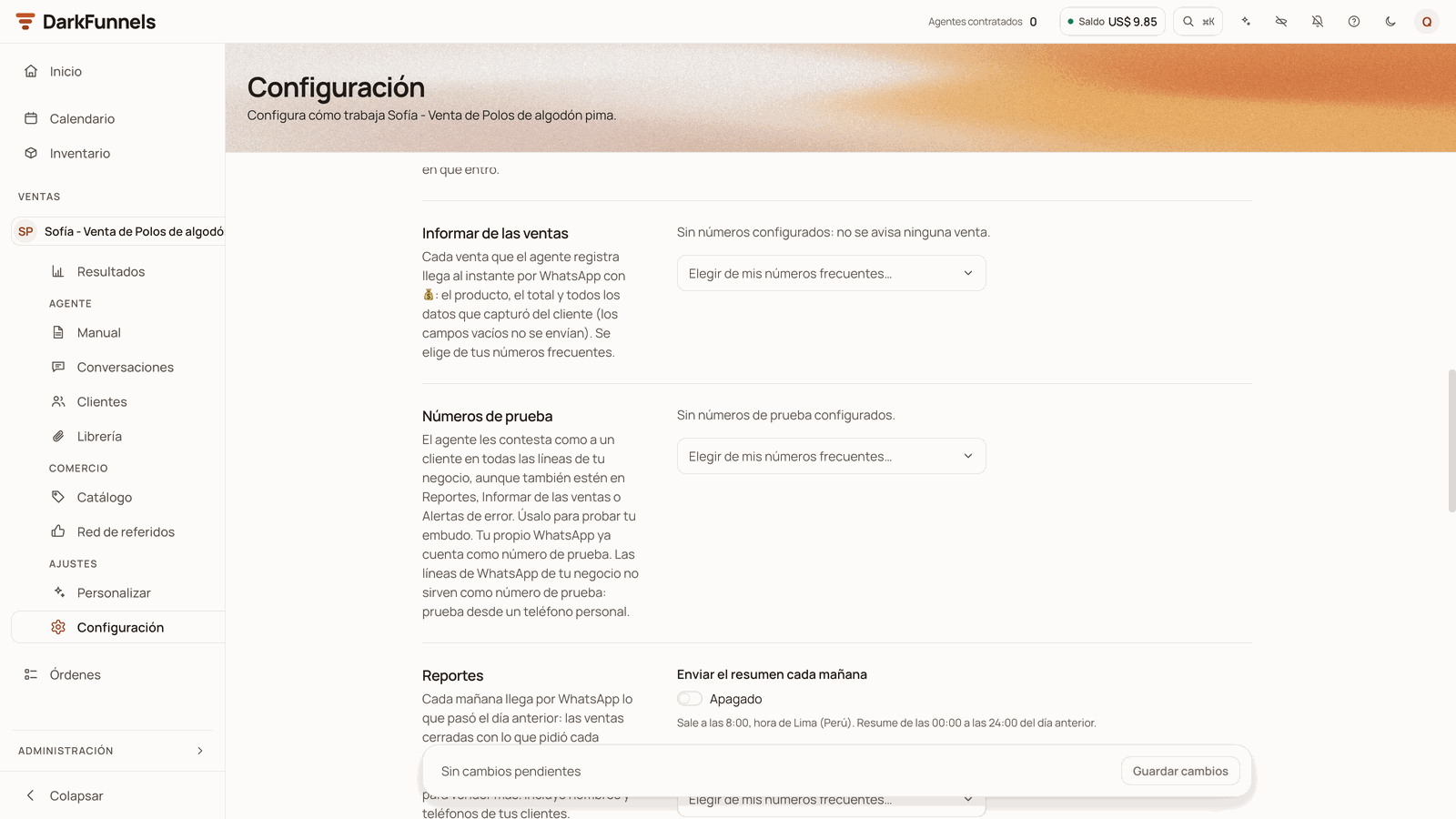
A notice with 💰 every time the agent records a sale: the product, the total and the customer’s details.
Reportes (Reports)
The summary every morning, at 8:00, with what happened the day before. It comes switched on (Enviar el resumen cada mañana, Send the summary every morning).
Alertas de error (Error alerts)
A notice if the agent fails to reply or to deliver, and the notices that your account has run out of balance or that your trial has ended.
These messages are sent from your funnel’s WhatsApp, so they start arriving once
you connect it.That number is also useful for testing. It counts as a test number: if you
write to your agent from it, it answers you as it would a customer. Your
business’s WhatsApp lines are no good for testing: if your sign-up number is
one of them, test from another personal phone.
The notification lists live in each funnel's Configuración (Settings): that is where a wrong number is corrected. In this screenshot they are still empty and the morning summary is off.
Everything else on that screen is covered in
Funnel settings.
There is no need to redo sign-up, but it helps to know two things:
The number stays saved in your account, and your Perfil (Profile)
has nowhere to change it.
That is why every new funnel you create with the copilot or from your
assistant is born again with the wrong number in its three lists.
1
Correct it in each funnel
In the Ventas (Sales) menu, choose the funnel in the selector at the
top and, under AJUSTES (SETTINGS), click Configuración
(Settings). In Informar de las ventas, Reportes and Alertas de
error, remove the wrong number with the trash-can icon. To add the right
one, in the first list open Elegir de mis números frecuentes… (Choose
from my frequent numbers…), choose + Agregar un número nuevo (Add a
new number), type the name, country and number and click Guardar
(Save). In the other two lists it already appears in that same drop-down:
choose it there. When you are done, click Guardar cambios (Save
changes).
2
Ask for it to be changed in your account
So that the funnels you create later are born with the right number, write
to us from Ayuda (Help: the question mark in the top bar) →
Escríbenos por WhatsApp (Message us on WhatsApp).
When you click Crear organización you see «¡Cuenta creada! Entrando…»
(Account created! Going in…) and you arrive at Inicio (Home) with your
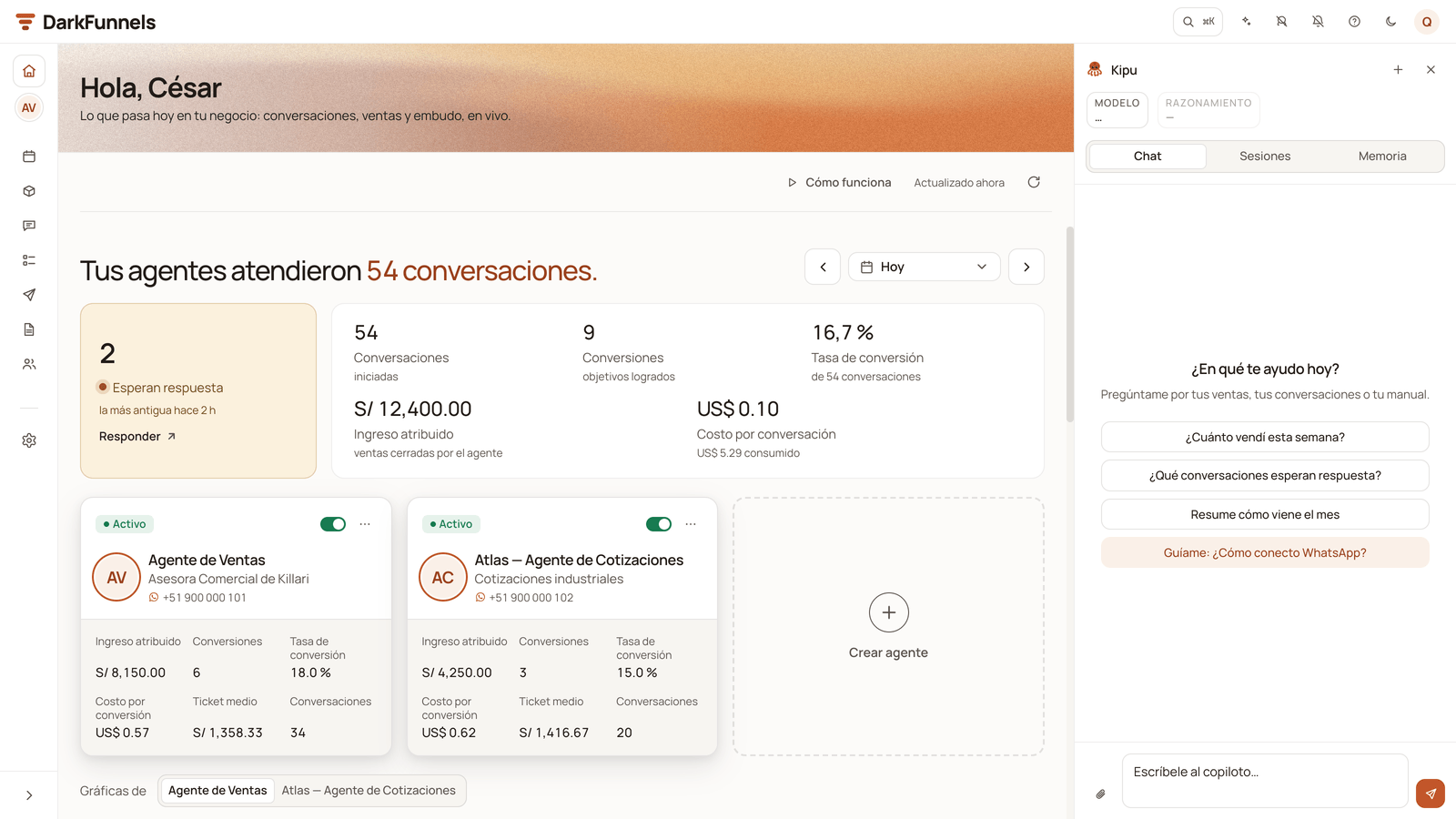
session open. There the copilot opens by itself, in the drawer on the right,
and starts the conversation to create your first funnel:
The dashboard sends the first message for you, «Quiero crear mi embudo de
ventas» (I want to create my sales funnel). You see it in the chat like
any other.
The copilot asks you what you sell and offers you three one-tap answers:
«Vendo por WhatsApp y cierro en el chat» (I sell on WhatsApp and close in
the chat), «Agendo visitas o citas» (I book visits or appointments) and
«Filtro postulantes o solicitudes» (I screen applicants or requests).
You can also answer in your own words.
The copilot opens in the drawer on the right, next to your Home screen.
Your account already comes with Ventas (Sales), Calendario
(Calendar), Órdenes (Orders) and Inventario (Inventory) active:
there are no apps to choose to get started. The others are covered in
The apps.
Did you sign up from the link of a shared funnel? Then the copilot does not
open: sign-up takes you straight to approving that funnel and, once you accept
it, to scanning the QR code for your WhatsApp. More in
Your funnels.
The copilot is an AI chat that lives inside the dashboard; its header
says Kipu. It asks you what you sell and with that it creates your
funnel with a script to start from, which you finish in the playbook. It is not
Claude or ChatGPT: it is part of DarkFunnels.
Everything the AI does spends balance, this conversation included: that is
why your account is born with US$ 10 in advance, meant for building and
testing your first funnel. (The guides call something else “your assistant”:
Claude or ChatGPT connected from outside, which is optional. They are all in
the glossary.)
Your Saldo (Balance), in the top bar, starts at US$ 10.00 and is
already usable: it is your welcome credit, in full, from sign-up. It goes
down a little with each reply from the copilot, so it may already show a bit
less.You also receive a welcome email with the subject «Bienvenido a DarkFunnels
— conecta WhatsApp y activa tu prueba» (Welcome to DarkFunnels — connect
WhatsApp and activate your trial) and the button Crear mi primer embudo
(Create my first funnel), which takes you to create your funnel with the
copilot.
The email says that when you connect «completamos» (we complete) your US$ 10
of trial credit, and when you hover over the Saldo chip it reads «Conecta
WhatsApp para activar tus créditos de prueba» (Connect WhatsApp to activate
your trial credits). Your US$ 10 welcome credit is already complete in your
balance: no more trial balance arrives when you connect. What starts that day
is your 7-day trial, and your agent starts answering if you still have
balance.
1
Create your first funnel
The copilot is already open and waiting for you to tell it what you sell.
Your first funnel.
2
Get to know your Home screen
Next to the copilot is the dashboard you will look at every day: the
start-up list, your funnels and your balance.
Your first look.
3
Connect your WhatsApp
It is what puts the agent to work answering and restarts your trial clock.
Connect your WhatsApp.
It says «Ya existe una cuenta con ese correo. Inicia sesión.»
(An account with that email already exists. Log in.) That email already
has an account: sign-up stops and takes you to the login. Log in with it.
If you do not remember the password, click ¿Olvidaste tu contraseña?
(Forgot your password?) and you receive a link to set a new one. If what
you wanted was to join another company’s team, log in with your account and
open the invitation link.
It will not let me past the first screen
Look at the red message under the field that is failing: «Por favor ingresa
un email válido» (Please enter a valid email), «La contraseña debe tener
al menos 8 caracteres» (The password must be at least 8 characters long),
«Debe contener al menos una letra» (It must contain at least one letter),
«Debe contener al menos un número» (It must contain at least one number)
or «Revisa el número de WhatsApp: solo dígitos (8 a 15)» (Check the
WhatsApp number: digits only (8 to 15)). In the WhatsApp field, type only
the digits of your number: the country code goes in its own box, on the
left.
«Crear organización» cannot be clicked
The anti-robot check has not finished yet: wait until the footer stops
saying «Verificando que no eres un robot…». If instead «No pudimos
verificar tu navegador.» (We could not verify your browser.) appears,
click Reintentar (Retry). It usually happens inside the Instagram or
Facebook browser: open the page in Chrome or Safari.
It says «El correo termina en «.con»: ¿quisiste decir «.com»?…»
Your email has a typical typo in «.com». The account was not created. Click
Cancelar, correct the email on the first screen and click Crear
organización again.
It says «Estamos recibiendo demasiados registros ahora mismo»
(We are receiving too many sign-ups right now.) It is a temporary brake on
our side, not a problem with your details. The account was not created. Wait
a few minutes and click Crear organización again; if it keeps appearing,
try again later.
I came back from Google and it asks for details again
That is the normal step: Google does not provide your WhatsApp number or the
name of your business. Type your WhatsApp and click Continuar; on the
second screen, type the name of your business and click Crear
organización. If it says «Tu sesión con Google expiró. Vuelve a entrar.»
(Your Google session expired. Sign in again.), sign in with Google again
from the login page and you will come back to this screen.
It sent me to log in with «Cuenta creada…»
(Account created…) Your account was created; only the automatic sign-in
failed. Log in with your email and your password.
I mistyped my email
The email is not confirmed, so with a typo you will not receive the welcome
email, the notices or the link to recover your password. If you are already
in, change it from your account menu (top right) → Perfil (Profile) →
Cambiar correo (Change email): a confirmation link arrives at the new
email.
Sign-up fails and the notice invites me to write to you
It is a failure on our side, not with your details. Click Escríbenos por
WhatsApp (Message us on WhatsApp) in the same notice and we will look
into it with you.
Last modified on October 19, 2026
{"docsConfig":{"theme":"mint","$schema":"https://mintlify.com/docs.json","name":"DarkFunnels","description":"Vende por WhatsApp con un agente de ventas IA — y opéralo desde tu asistente.","colors":{"primary":"#C2562A","light":"#D86A3C","dark":"#9A3F1C"},"logo":{"light":"https://mintcdn.com/darkfunnels/Df-1lKh1Aj5k8c-r/logo/light.svg?fit=max\u0026auto=format\u0026n=Df-1lKh1Aj5k8c-r\u0026q=85\u0026s=db60a9a883ed42e13a06aded18a08fb0","dark":"https://mintcdn.com/darkfunnels/Df-1lKh1Aj5k8c-r/logo/dark.svg?fit=max\u0026auto=format\u0026n=Df-1lKh1Aj5k8c-r\u0026q=85\u0026s=ab6a8b17d7e5e0d3b45de82ecd342327"},"favicon":"https://mintcdn.com/darkfunnels/Df-1lKh1Aj5k8c-r/favicon.svg?fit=max\u0026auto=format\u0026n=Df-1lKh1Aj5k8c-r\u0026q=85\u0026s=caa397a60f25d85c3d14d40fc8bb4841","navbar":{"primary":{"type":"button","label":"Entrar al panel","href":"https://optimind.darkfunnels.ai"}},"footer":{"socials":{"website":"https://darkfunnels.ai"}},"seo":{"metatags":{"og:locale":"es_PE"},"organization":{"id":"https://darkfunnels.ai/#organization","name":"DarkFunnels","url":"https://darkfunnels.ai","sameAs":["https://github.com/darkfunnels-ai"]},"indexing":"navigable"},"fonts":{"family":"Manrope"},"errors":{"404":{"redirect":false}},"contextual":{"options":["copy","view","claude","chatgpt","perplexity","cursor","vscode","mcp"],"display":"header"},"metadata":{"timestamp":true},"markdown":{"instructions":["DarkFunnels is a WhatsApp AI sales-agent platform used mainly in Peru and Latin America. The product interface and most of this documentation are in Spanish; the /en tree is the English mirror.","A business connects the WhatsApp number it already uses by scanning a QR code from the dashboard, the same linked-device mechanism as WhatsApp Web. It does not go through the Meta Cloud API (WhatsApp Business Platform), so there is no application to get approved and no message templates to submit. DarkFunnels is not a Meta product and is not affiliated with Meta.","DarkFunnels also publishes a remote MCP server at https://mcp.darkfunnels.ai/mcp?features=all (without parameters it only carries the default, mostly read-only set) so an assistant such as Claude, ChatGPT or Codex can operate the workspace on the owner's behalf, in one company and within the permissions of the person who connects it. The tool reference is at /referencia/tools and the connection parameters at /referencia/url-de-conexion.","The dashboard is https://optimind.darkfunnels.ai, the marketing site is https://darkfunnels.ai and the page written for AI agents is https://darkfunnels.ai/agents."]},"styling":{"latex":false},"navigation":{"languages":[{"language":"es","default":true,"href":""},{"language":"en","href":"en"}]}},"deployment":{"deploymentMetadataValue":{"subdomain":"darkfunnels","hasAudioNarration":false,"actualSubdomain":"darkfunnels","customDomains":["docs.darkfunnels.ai"],"gitSource":{"type":"github","owner":"darkfunnels-ai","repo":"optimind-docs","deployBranch":"main","contentDirectory":"","isPrivate":true,"mountPath":"","label":""},"chroma":{"latestBuiltDeploymentHistoryId":"6ad6a0705c698d64cc0b179c","collectionId":"09c1a31a-e794-4676-b353-1de0e8edd33d","liveDeploymentHistoryId":"6ad6a0705c698d64cc0b179c","schemaVersion":"v3"},"entitlements":{"AI_CHAT":{"status":"DISABLED"}},"buildId":"6ad6a0705c698d64cc0b179c","clientVersion":"0.0.3894","searchFilterCounts":[{"language":"en","tag":"Guides","count":11},{"language":"es","tag":"Guías","count":11},{"language":"en","tag":"Getting started","count":8},{"language":"es","tag":"Primeros pasos","count":8},{"language":"en","tag":"Optional: run it from Claude or ChatGPT","count":6},{"language":"es","tag":"Opcional: opéralo desde Claude o ChatGPT","count":6},{"language":"en","tag":"Reference","count":3},{"language":"es","tag":"Referencia","count":3},{"language":"en","tag":"Start","count":1},{"language":"en","tag":"Security","count":1},{"language":"es","tag":"Empezar","count":1},{"language":"es","tag":"Seguridad","count":1}]},"assistantConfig":{"enableAskAiButton":false,"enableStarterQuestions":false,"enableContextualStarterQuestions":false,"enableAskAiSearchBar":true},"hasChatPermissions":false,"hasWebMcpPermissions":false,"toggles":[{"name":"kill-isr","enabled":true,"variant":{"name":"disabled","enabled":false,"feature_enabled":true},"impressionData":false},{"name":"agent-mintlify-slack","enabled":true,"variant":{"name":"disabled","enabled":false,"feature_enabled":true},"impressionData":false},{"name":"editor-v7-file-tree","enabled":true,"variant":{"name":"disabled","enabled":false,"feature_enabled":true},"impressionData":false},{"name":"agent-integrations-settings","enabled":true,"variant":{"name":"disabled","enabled":false,"feature_enabled":true},"impressionData":false},{"name":"automations-pr-grouping","enabled":true,"variant":{"name":"disabled","enabled":false,"feature_enabled":true},"impressionData":false},{"name":"custom-prefix","enabled":true,"variant":{"name":"disabled","enabled":false,"feature_enabled":true},"impressionData":false},{"name":"analytics-v7","enabled":true,"variant":{"name":"disabled","enabled":false,"feature_enabled":true},"impressionData":false},{"name":"user-flows-analytics","enabled":true,"variant":{"name":"disabled","enabled":false,"feature_enabled":true},"impressionData":false},{"name":"no-publish-flow","enabled":true,"variant":{"name":"disabled","enabled":false,"feature_enabled":true},"impressionData":false},{"name":"workos-onboarding","enabled":true,"variant":{"name":"disabled","enabled":false,"feature_enabled":true},"impressionData":false},{"name":"llms-txt-v2","enabled":true,"variant":{"name":"disabled","enabled":false,"feature_enabled":true},"impressionData":false},{"name":"pause-universal-search-reconcile","enabled":true,"variant":{"name":"disabled","enabled":false,"feature_enabled":true},"impressionData":false},{"name":"snapshot-serving-live","enabled":true,"variant":{"name":"disabled","enabled":false,"feature_enabled":true},"impressionData":false},{"name":"stripTemperatureMiddleware","enabled":true,"variant":{"name":"disabled","enabled":false,"feature_enabled":true},"impressionData":false},{"name":"per-site-search-delta","enabled":true,"variant":{"name":"disabled","enabled":false,"feature_enabled":true},"impressionData":false},{"name":"support-platform-pylon-zendesk","enabled":true,"variant":{"name":"disabled","enabled":false,"feature_enabled":true},"impressionData":false},{"name":"editor-branches-v2-autocommit","enabled":true,"variant":{"name":"disabled","enabled":false,"feature_enabled":true},"impressionData":false},{"name":"editor-branches-v2","enabled":true,"variant":{"name":"disabled","enabled":false,"feature_enabled":true},"impressionData":false},{"name":"snapshot-serving","enabled":true,"variant":{"name":"disabled","enabled":false,"feature_enabled":true},"impressionData":false},{"name":"instant-rollback","enabled":true,"variant":{"name":"disabled","enabled":false,"feature_enabled":true},"impressionData":false},{"name":"granular-notifications-server","enabled":true,"variant":{"name":"disabled","enabled":false,"feature_enabled":true},"impressionData":false},{"name":"granular-notifications","enabled":true,"variant":{"name":"disabled","enabled":false,"feature_enabled":true},"impressionData":false},{"name":"editor-private-page-search","enabled":true,"variant":{"name":"disabled","enabled":false,"feature_enabled":true},"impressionData":false},{"name":"automations-fable","enabled":true,"variant":{"name":"disabled","enabled":false,"feature_enabled":true},"impressionData":false},{"name":"fixed-ai-action-pricing","enabled":true,"variant":{"name":"disabled","enabled":false,"feature_enabled":true},"impressionData":false},{"name":"automation-resolve-merge-conflict","enabled":true,"variant":{"name":"disabled","enabled":false,"feature_enabled":true},"impressionData":false},{"name":"scoped-publishing","enabled":true,"variant":{"name":"disabled","enabled":false,"feature_enabled":true},"impressionData":false},{"name":"mintql","enabled":true,"variant":{"name":"disabled","enabled":false,"feature_enabled":true},"impressionData":false},{"name":"page-level-analytics","enabled":true,"variant":{"name":"disabled","enabled":false,"feature_enabled":true},"impressionData":false},{"name":"teamspace","enabled":true,"variant":{"name":"disabled","enabled":false,"feature_enabled":true},"impressionData":false},{"name":"editor-version-history-v2","enabled":true,"variant":{"name":"disabled","enabled":false,"feature_enabled":true},"impressionData":false},{"name":"vite-origin","enabled":true,"variant":{"name":"disabled","enabled":false,"feature_enabled":true},"impressionData":false},{"name":"editor-nav-generations","enabled":true,"variant":{"name":"disabled","enabled":false,"feature_enabled":true},"impressionData":false},{"name":"workspace-projects","enabled":true,"variant":{"name":"disabled","enabled":false,"feature_enabled":true},"impressionData":false},{"name":"assistant-v5","enabled":true,"variant":{"name":"disabled","enabled":false,"feature_enabled":true},"impressionData":false},{"name":"byok-sep-25","enabled":true,"variant":{"name":"disabled","enabled":false,"feature_enabled":true},"impressionData":false},{"name":"revalidation-jwt","enabled":true,"variant":{"name":"disabled","enabled":false,"feature_enabled":true},"impressionData":false},{"name":"editor-agent-model-picker","enabled":true,"variant":{"name":"disabled","enabled":false,"feature_enabled":true},"impressionData":false},{"name":"client-snapshot-docs-config","enabled":true,"variant":{"name":"disabled","enabled":false,"feature_enabled":true},"impressionData":false},{"name":"hobby-abuse-scan","enabled":true,"variant":{"name":"disabled","enabled":false,"feature_enabled":true},"impressionData":false}],"isAtlas":false,"googleFontsInlined":true},"customCss":[{"filePath":"style.css","content":"@font-face{font-family:'JetBrains Mono';src:url(/fonts/jetbrains-mono-latin.woff2) format('woff2');font-weight:100 800;font-style:normal;font-display:swap}:root{--primary:194 86 42;--primary-light:216 106 60;--primary-dark:154 63 28;--background-light:255 255 255;--background-dark:23 18 14;--gray-50:247 245 241;--gray-100:245 243 239;--gray-200:237 234 228;--gray-300:224 220 212;--gray-400:154 144 137;--gray-500:124 114 106;--gray-600:107 98 91;--gray-700:61 53 47;--gray-800:42 35 29;--gray-900:33 27 23;--gray-950:23 18 14;--font-paper-mono:'JetBrains Mono';--default-mono-font-family:'JetBrains Mono', ui-monospace, SFMono-Regular,\n Menlo, Monaco, Consolas, 'Liberation Mono', 'Courier New', monospace;--rounded-xl:18px}"}],"page":{"pagePath":"en/getting-started/create-your-account","slug":"/en/getting-started/create-your-account","pageMetadata":{"title":"Start your WhatsApp AI sales agent free trial","sidebarTitle":"Create your account","description":"Sign up for DarkFunnels with no card: what each screen asks for, what your WhatsApp number is for and what happens when sign-up is done.","keywords":["WhatsApp AI sales agent","free trial","create account","sign up","trial credits","referral code"],"href":"/en/getting-started/create-your-account"},"description":{"compiledSource":"\"use strict\";\nconst {jsx: _jsx} = arguments[0];\nconst {useMDXComponents: _provideComponents} = arguments[0];\nfunction _createMdxContent(props) {\n const _components = {\n p: \"p\",\n ..._provideComponents(),\n ...props.components\n };\n return _jsx(_components.p, {\n children: \"Sign up for DarkFunnels with no card: what each screen asks for, what your WhatsApp number is for and what happens when sign-up is done.\"\n });\n}\nfunction MDXContent(props = {}) {\n const {wrapper: MDXLayout} = {\n ..._provideComponents(),\n ...props.components\n };\n return MDXLayout ? _jsx(MDXLayout, {\n ...props,\n children: _jsx(_createMdxContent, {\n ...props\n })\n }) : _createMdxContent(props);\n}\nreturn {\n default: MDXContent\n};\n","frontmatter":{},"scope":{}},"pageType":"default","mdx":{"mdxSource":{"compiledSource":"\"use strict\";const{Fragment:_Fragment,jsx:_jsx,jsxs:_jsxs}=arguments[0];const{useMDXComponents:_provideComponents}=arguments[0];function _createMdxContent(props){const _components={a:`a`,code:`code`,em:`em`,li:`li`,p:`p`,strong:`strong`,tbody:`tbody`,td:`td`,th:`th`,thead:`thead`,tr:`tr`,ul:`ul`,..._provideComponents(),...props.components},{Accordion,AccordionGroup,Frame,Heading,Info,Note,OptimizedImage,Step,Steps,Table,Tip,Warning}=_components;if(!Accordion)_missingMdxReference(`Accordion`,true);if(!AccordionGroup)_missingMdxReference(`AccordionGroup`,true);if(!Frame)_missingMdxReference(`Frame`,true);if(!Heading)_missingMdxReference(`Heading`,true);if(!Info)_missingMdxReference(`Info`,true);if(!Note)_missingMdxReference(`Note`,true);if(!OptimizedImage)_missingMdxReference(`OptimizedImage`,true);if(!Step)_missingMdxReference(`Step`,true);if(!Steps)_missingMdxReference(`Steps`,true);if(!Table)_missingMdxReference(`Table`,true);if(!Tip)_missingMdxReference(`Tip`,true);if(!Warning)_missingMdxReference(`Warning`,true);return _jsxs(_Fragment,{children:[_jsxs(_components.p,{children:[`Sign-up is at `,_jsx(_components.a,{href:`https://optimind.darkfunnels.ai/register`,children:`optimind.darkfunnels.ai/register`}),`.\nIt is `,_jsx(_components.strong,{children:`two screens`}),`: the first asks for your details and the second, the name\nof your business. `,_jsx(_components.strong,{children:`It does not ask for a card.`})]}),`\n`,_jsx(_components.p,{children:`The dashboard is in Spanish, so buttons and on-screen messages are quoted here\nexactly as you will see them, with the English meaning in parentheses.`}),`\n`,_jsxs(Note,{children:[_jsxs(_components.p,{children:[`Your trial is `,_jsx(_components.strong,{children:`7 days with up to 5 active funnels and US$ 10 in credit`}),`. Your\naccount is born with `,_jsx(_components.strong,{children:`the full US$ 10`}),`, advanced at sign-up so that you can\nbuild and test your funnel without getting stuck halfway.`]}),_jsxs(_components.p,{children:[_jsx(_components.strong,{children:`The trial clock starts over on the day you connect your WhatsApp.`}),` It runs\nfrom sign-up, but when you connect it starts again with the full 7 days:\nbuilding your funnel calmly does not burn your trial. That said, connect it\nwithin those 7 days: if they pass without connecting, your trial shows as\nended, the copilot stops answering and you cannot create new funnels. The whole\nstory is in `,_jsx(_components.a,{href:`/en/getting-started/connect-whatsapp`,children:`Connect your WhatsApp`}),`.`]})]}),`\n`,_jsx(Tip,{children:_jsxs(_components.p,{children:[_jsx(_components.strong,{children:`Were you invited to another company’s team?`}),` Do not sign up here. Open your\ninvitation link (it arrives by email, or the person who invited you passes it\non) and activate your account from there. If you already have an account, that\nsame account joins the other company, with no new password. More in\n`,_jsx(_components.a,{href:`/en/getting-started/invite-your-team`,children:`Invite your team`}),`.`]})}),`\n`,_jsx(Heading,{level:`2`,id:`with-email-or-with-google`,children:`With email or with Google`}),`\n`,_jsxs(_components.p,{children:[`The first screen is titled `,_jsx(_components.strong,{children:`«Hora de empezar.»`}),` (`,_jsx(_components.em,{children:`Time to get started.`}),`). At\nthe top you have `,_jsx(_components.strong,{children:`Continuar con Google`}),` (`,_jsx(_components.em,{children:`Continue with Google`}),`); below it,\nthe form to do it with email and password.`]}),`\n`,_jsxs(_components.ul,{children:[`\n`,_jsxs(_components.li,{children:[_jsx(_components.strong,{children:`With email and password`}),`, when you finish you enter the dashboard with your\nsession already open: normally there is no need to log in again (if it asks\nyou to, see\n`,_jsx(_components.a,{href:`/en/getting-started/create-your-account#common-problems`,children:`Common problems`}),`).`]}),`\n`,_jsxs(_components.li,{children:[_jsx(_components.strong,{children:`With Google`}),` you save yourself the password, not the rest. When you come\nback from Google the screen says `,_jsx(_components.strong,{children:`«Confirma tus datos para terminar»`}),`\n(`,_jsx(_components.em,{children:`Confirm your details to finish`}),`): your email comes filled in and cannot be\nchanged, your name comes from Google (you can correct it) and your WhatsApp\nis missing. The button is called `,_jsx(_components.strong,{children:`Continuar`}),` (`,_jsx(_components.em,{children:`Continue`}),`).`]}),`\n`]}),`\n`,_jsx(_components.p,{children:`If you had already signed up with that Google account before, there is nothing\nto complete: you go straight into the dashboard.`}),`\n`,_jsx(Heading,{level:`2`,id:`what-it-asks-for-and-what-each-thing-is-for`,children:`What it asks for, and what each thing is for`}),`\n`,_jsx(Heading,{level:`3`,id:`screen-1-your-details`,children:`Screen 1: your details`}),`\n`,_jsxs(Table,{children:[_jsx(_components.thead,{children:_jsxs(_components.tr,{children:[_jsx(_components.th,{children:`Field`}),_jsx(_components.th,{children:`What to enter and what it is for`})]})}),_jsxs(_components.tbody,{children:[_jsxs(_components.tr,{children:[_jsx(_components.td,{children:_jsx(_components.strong,{children:`Email`})}),_jsxs(_components.td,{children:[`Your email. It is your access to the dashboard and where your welcome email, your account notices and your payment receipts arrive. `,_jsx(_components.strong,{children:`Check it carefully: it is not confirmed by email.`})]})]}),_jsxs(_components.tr,{children:[_jsxs(_components.td,{children:[_jsx(_components.strong,{children:`Nombre`}),` (`,_jsx(_components.em,{children:`First name`}),`) and `,_jsx(_components.strong,{children:`Apellido`}),` (`,_jsx(_components.em,{children:`Last name`}),`)`]}),_jsx(_components.td,{children:`How the dashboard names you, for example in your account menu.`})]}),_jsxs(_components.tr,{children:[_jsx(_components.td,{children:_jsx(_components.strong,{children:`Whatsapp`})}),_jsxs(_components.td,{children:[_jsx(_components.strong,{children:`Your personal number, not the funnel’s.`}),` Choose the country (Peru, +51, comes preselected) and type the number without the country code. With Peru, for example: `,_jsx(_components.code,{children:`987654321`}),`. What it is for, you will see further down.`]})]}),_jsxs(_components.tr,{children:[_jsxs(_components.td,{children:[_jsx(_components.strong,{children:`Contraseña`}),` (`,_jsx(_components.em,{children:`Password`}),`)`]}),_jsxs(_components.td,{children:[_jsx(_components.strong,{children:`At least 8 characters, with letters and numbers.`}),` With Google it is not asked for.`]})]})]})]}),`\n`,_jsxs(_components.p,{children:[`If you mistype a well-known email provider (for example, «gmial.com»),\n`,_jsx(_components.strong,{children:`«¿Quisiste decir gmail.com?»`}),` (`,_jsx(_components.em,{children:`Did you mean gmail.com?`}),`) appears below.\nClick the domain to correct it, or `,_jsx(_components.strong,{children:`No, está bien`}),` (`,_jsx(_components.em,{children:`No, it’s fine`}),`) if your\nemail really is like that. That suggestion does not stop you: you can carry on\nwithout accepting it.`]}),`\n`,_jsxs(_components.p,{children:[`And if the email ends in a typical «.com» typo, such as «.con» or «.cmo», when\nyou click `,_jsx(_components.strong,{children:`Crear organización`}),` (`,_jsx(_components.em,{children:`Create organization`}),`) you get «El correo\ntermina en «.con»: ¿quisiste decir «.com»? Revísalo antes de seguir» (`,_jsx(_components.em,{children:`The\nemail ends in “.con”: did you mean “.com”? Check it before continuing`}),`) and the\naccount is not created. Click `,_jsx(_components.strong,{children:`Cancelar`}),` (`,_jsx(_components.em,{children:`Cancel`}),`), correct the email on the\nfirst screen and try again.`]}),`\n`,_jsxs(_components.p,{children:[`Click `,_jsx(_components.strong,{children:`Registrarse`}),` (`,_jsx(_components.em,{children:`Sign up`}),`) and you move on to the second screen. If any\nfield has an error, the form marks it in red and does not move on.`]}),`\n`,_jsx(Heading,{level:`3`,id:`screen-2-your-business`,children:`Screen 2: your business`}),`\n`,_jsxs(_components.p,{children:[`It is titled `,_jsx(_components.strong,{children:`«Crea una nueva organización»`}),` (`,_jsx(_components.em,{children:`Create a new organization`}),`).\n“Organization” is your business inside DarkFunnels: that is where your funnels\nwill live.`]}),`\n`,_jsxs(Table,{children:[_jsx(_components.thead,{children:_jsxs(_components.tr,{children:[_jsx(_components.th,{children:`Field`}),_jsx(_components.th,{children:`What for`})]})}),_jsxs(_components.tbody,{children:[_jsxs(_components.tr,{children:[_jsxs(_components.td,{children:[_jsx(_components.strong,{children:`Nombre de la compañía o equipo`}),` (`,_jsx(_components.em,{children:`Company or team name`}),`)`]}),_jsxs(_components.td,{children:[`The name of your business inside DarkFunnels. It is required. `,_jsx(_components.strong,{children:`Write it carefully: today the dashboard has nowhere to change it later`}),`, even though the footer of the screen says otherwise. It is, for example, the name that the people you invite to your team see. If you came in with Google, the form suggests your own name: change it to the name of your business.`]})]}),_jsxs(_components.tr,{children:[_jsxs(_components.td,{children:[_jsx(_components.strong,{children:`¿Cómo te enteraste de DarkFunnels? (opcional)`}),` (`,_jsx(_components.em,{children:`How did you hear about DarkFunnels? (optional)`}),`)`]}),_jsxs(_components.td,{children:[`It is useful to us. You choose between Publicidad / Anuncio (`,_jsx(_components.em,{children:`Advertising / Ad`}),`), Buscador (`,_jsx(_components.em,{children:`Search engine`}),`), Redes sociales (`,_jsx(_components.em,{children:`Social media`}),`), Referido (`,_jsx(_components.em,{children:`Referral`}),`) or Otro (`,_jsx(_components.em,{children:`Other`}),`).`]})]}),_jsxs(_components.tr,{children:[_jsxs(_components.td,{children:[_jsx(_components.strong,{children:`Código de referido (opcional)`}),` (`,_jsx(_components.em,{children:`Referral code (optional)`}),`)`]}),_jsxs(_components.td,{children:[`The code of the person who recommended DarkFunnels to you. It adds `,_jsx(_components.strong,{children:`US$ 25`}),` of extra credit, which is credited when you activate your subscription. If you arrived through a link that carried the code, it comes already filled in.`]})]})]})]}),`\n`,_jsxs(_components.p,{children:[`Click `,_jsx(_components.strong,{children:`Crear organización`}),`. `,_jsx(_components.strong,{children:`Cancelar`}),` takes you back to the first screen\nwith your details.`]}),`\n`,_jsxs(_components.p,{children:[`With email and password, this screen may show a Cloudflare `,_jsx(_components.strong,{children:`anti-robot\ncheck`}),`. It usually resolves itself in a moment; meanwhile, the footer says\n«Verificando que no eres un robot…» (`,_jsx(_components.em,{children:`Checking that you are not a robot…`}),`) and\n`,_jsx(_components.strong,{children:`Crear organización`}),` waits. With Google there is no check.`]}),`\n`,_jsx(Note,{children:_jsxs(_components.p,{children:[_jsx(_components.strong,{children:`If you entered a referral code`}),`, when the account is created a notice tells\nyou whether it worked. With «Código de referido aplicado» (`,_jsx(_components.em,{children:`Referral code\napplied`}),`), your US$ 25 referral credit is waiting for when you activate your\nsubscription: even though the notice says «crédito extra sumado a tu cuenta»\n(`,_jsx(_components.em,{children:`extra credit added to your account`}),`), today you will not see it in your\nbalance. With «El código de referido no existía» (`,_jsx(_components.em,{children:`The referral code did not\nexist`}),`), the account is created anyway, with your normal trial credit.`]})}),`\n`,_jsx(_components.p,{children:`By continuing you accept the DarkFunnels Terms and Conditions and Privacy Policy\n(linked at the foot of the first screen), and you also agree to receive\nperiodic emails with updates.`}),`\n`,_jsx(Heading,{level:`2`,id:`your-sign-up-whatsapp-where-it-notifies-you`,children:`Your sign-up WhatsApp: where it notifies you`}),`\n`,_jsx(Warning,{children:_jsxs(_components.p,{children:[_jsx(_components.strong,{children:`The WhatsApp from sign-up and the number that serves your customers play two\ndifferent roles.`}),` You choose your customers’ number later, when you connect\nthe channel, and it can be a different one. The sign-up one is where the system\nwrites to you, so it is best if it is your personal number.`]})}),`\n`,_jsxs(_components.p,{children:[`Every time you create a new funnel (with the copilot or from your assistant),\n`,_jsx(_components.strong,{children:`that number is added by itself to three lists in that funnel’s\nConfiguración`}),` (`,_jsx(_components.em,{children:`Settings`}),`):`]}),`\n`,_jsxs(Table,{children:[_jsx(_components.thead,{children:_jsxs(_components.tr,{children:[_jsx(_components.th,{children:`List in Configuración`}),_jsx(_components.th,{children:`What you receive`})]})}),_jsxs(_components.tbody,{children:[_jsxs(_components.tr,{children:[_jsxs(_components.td,{children:[_jsx(_components.strong,{children:`Informar de las ventas`}),` (`,_jsx(_components.em,{children:`Report sales`}),`)`]}),_jsx(_components.td,{children:`A notice with 💰 every time the agent records a sale: the product, the total and the customer’s details.`})]}),_jsxs(_components.tr,{children:[_jsxs(_components.td,{children:[_jsx(_components.strong,{children:`Reportes`}),` (`,_jsx(_components.em,{children:`Reports`}),`)`]}),_jsxs(_components.td,{children:[`The summary every morning, at 8:00, with what happened the day before. It comes switched on (`,_jsx(_components.strong,{children:`Enviar el resumen cada mañana`}),`, `,_jsx(_components.em,{children:`Send the summary every morning`}),`).`]})]}),_jsxs(_components.tr,{children:[_jsxs(_components.td,{children:[_jsx(_components.strong,{children:`Alertas de error`}),` (`,_jsx(_components.em,{children:`Error alerts`}),`)`]}),_jsx(_components.td,{children:`A notice if the agent fails to reply or to deliver, and the notices that your account has run out of balance or that your trial has ended.`})]})]})]}),`\n`,_jsx(_components.p,{children:`These messages are sent from your funnel’s WhatsApp, so they start arriving once\nyou connect it.`}),`\n`,_jsxs(_components.p,{children:[_jsx(_components.strong,{children:`That number is also useful for testing.`}),` It counts as a test number: if you\nwrite to your agent from it, it answers you as it would a customer. Your\nbusiness’s WhatsApp lines are no good for testing: if your sign-up number is\none of them, test from another personal phone.`]}),`\n`,_jsx(Frame,{caption:`The notification lists live in each funnel's Configuración (Settings): that is where a wrong number is corrected. In this screenshot they are still empty and the morning summary is off.`,children:_jsx(OptimizedImage,{src:`https://mintcdn.com/darkfunnels/fypBH9q351iR9qsC/images/configuracion/02-numeros.png?fit=max\u0026auto=format\u0026n=fypBH9q351iR9qsC\u0026q=85\u0026s=7aa1a2ca1a878a8d032b714042a95d31`,alt:`Funnel settings with Informar de las ventas («Sin números configurados»), Números de prueba («Sin números de prueba configurados»), each with «Elegir de mis números frecuentes…», and Reportes with «Enviar el resumen cada mañana» set to Apagado (Off); at the bottom, the «Sin cambios pendientes» bar with Guardar cambios`,\"data-og-width\":`1600`,width:`1600`,\"data-og-height\":`900`,height:`900`,\"data-path\":`images/configuracion/02-numeros.png`,\"data-optimize\":`true`,\"data-opv\":`3`,srcset:`https://mintcdn.com/darkfunnels/fypBH9q351iR9qsC/images/configuracion/02-numeros.png?w=280\u0026fit=max\u0026auto=format\u0026n=fypBH9q351iR9qsC\u0026q=85\u0026s=4f77e5f1e4035469b964d62478b9d243 280w, https://mintcdn.com/darkfunnels/fypBH9q351iR9qsC/images/configuracion/02-numeros.png?w=560\u0026fit=max\u0026auto=format\u0026n=fypBH9q351iR9qsC\u0026q=85\u0026s=b2a57a8e56d49b793f8e191ff529bdda 560w, https://mintcdn.com/darkfunnels/fypBH9q351iR9qsC/images/configuracion/02-numeros.png?w=840\u0026fit=max\u0026auto=format\u0026n=fypBH9q351iR9qsC\u0026q=85\u0026s=76e52d0ee5215e29db5695eb9c9b71f2 840w, https://mintcdn.com/darkfunnels/fypBH9q351iR9qsC/images/configuracion/02-numeros.png?w=1100\u0026fit=max\u0026auto=format\u0026n=fypBH9q351iR9qsC\u0026q=85\u0026s=249b7f0b01f6c173041896d8ef5fec0c 1100w, https://mintcdn.com/darkfunnels/fypBH9q351iR9qsC/images/configuracion/02-numeros.png?w=1650\u0026fit=max\u0026auto=format\u0026n=fypBH9q351iR9qsC\u0026q=85\u0026s=cead51c8069d38449c26b4bf30dadbdb 1650w, https://mintcdn.com/darkfunnels/fypBH9q351iR9qsC/images/configuracion/02-numeros.png?w=2500\u0026fit=max\u0026auto=format\u0026n=fypBH9q351iR9qsC\u0026q=85\u0026s=9cd4d38f99921a1f4594f496cfd7f031 2500w`})}),`\n`,_jsxs(_components.p,{children:[`Everything else on that screen is covered in\n`,_jsx(_components.a,{href:`/en/guides/funnel-settings`,children:`Funnel settings`}),`.`]}),`\n`,_jsx(Heading,{level:`2`,id:`if-you-entered-your-whatsapp-number-wrong`,children:`If you entered your WhatsApp number wrong`}),`\n`,_jsx(_components.p,{children:`There is no need to redo sign-up, but it helps to know two things:`}),`\n`,_jsxs(_components.ul,{children:[`\n`,_jsxs(_components.li,{children:[_jsx(_components.strong,{children:`The number stays saved in your account`}),`, and your `,_jsx(_components.strong,{children:`Perfil`}),` (`,_jsx(_components.em,{children:`Profile`}),`)\nhas nowhere to change it.`]}),`\n`,_jsxs(_components.li,{children:[`That is why `,_jsx(_components.strong,{children:`every new funnel you create with the copilot or from your\nassistant is born again with the wrong number`}),` in its three lists.`]}),`\n`]}),`\n`,_jsxs(Steps,{children:[_jsx(Step,{title:`Correct it in each funnel`,children:_jsxs(_components.p,{children:[`In the `,_jsx(_components.strong,{children:`Ventas`}),` (`,_jsx(_components.em,{children:`Sales`}),`) menu, choose the funnel in the selector at the\ntop and, under `,_jsx(_components.strong,{children:`AJUSTES`}),` (`,_jsx(_components.em,{children:`SETTINGS`}),`), click `,_jsx(_components.strong,{children:`Configuración`}),`\n(`,_jsx(_components.em,{children:`Settings`}),`). In `,_jsx(_components.strong,{children:`Informar de las ventas`}),`, `,_jsx(_components.strong,{children:`Reportes`}),` and `,_jsx(_components.strong,{children:`Alertas de\nerror`}),`, remove the wrong number with the trash-can icon. To add the right\none, in the first list open `,_jsx(_components.strong,{children:`Elegir de mis números frecuentes…`}),` (`,_jsx(_components.em,{children:`Choose\nfrom my frequent numbers…`}),`), choose `,_jsx(_components.strong,{children:`+ Agregar un número nuevo`}),` (`,_jsx(_components.em,{children:`Add a\nnew number`}),`), type the name, country and number and click `,_jsx(_components.strong,{children:`Guardar`}),`\n(`,_jsx(_components.em,{children:`Save`}),`). In the other two lists it already appears in that same drop-down:\nchoose it there. When you are done, click `,_jsx(_components.strong,{children:`Guardar cambios`}),` (`,_jsx(_components.em,{children:`Save\nchanges`}),`).`]})}),_jsx(Step,{title:`Ask for it to be changed in your account`,children:_jsxs(_components.p,{children:[`So that the funnels you create later are born with the right number, write\nto us from `,_jsx(_components.strong,{children:`Ayuda`}),` (`,_jsx(_components.em,{children:`Help`}),`: the question mark in the top bar) →\n`,_jsx(_components.strong,{children:`Escríbenos por WhatsApp`}),` (`,_jsx(_components.em,{children:`Message us on WhatsApp`}),`).`]})})]}),`\n`,_jsx(Heading,{level:`2`,id:`and-in-the-next-minute`,children:`And in the next minute`}),`\n`,_jsxs(_components.p,{children:[`When you click `,_jsx(_components.strong,{children:`Crear organización`}),` you see «¡Cuenta creada! Entrando…»\n(`,_jsx(_components.em,{children:`Account created! Going in…`}),`) and you arrive at `,_jsx(_components.strong,{children:`Inicio`}),` (`,_jsx(_components.em,{children:`Home`}),`) with your\nsession open. There `,_jsx(_components.strong,{children:`the copilot opens by itself`}),`, in the drawer on the right,\nand starts the conversation to create your first funnel:`]}),`\n`,_jsxs(_components.ul,{children:[`\n`,_jsxs(_components.li,{children:[`The dashboard sends the first message for you, `,_jsx(_components.strong,{children:`«Quiero crear mi embudo de\nventas»`}),` (`,_jsx(_components.em,{children:`I want to create my sales funnel`}),`). You see it in the chat like\nany other.`]}),`\n`,_jsxs(_components.li,{children:[`The copilot asks you what you sell and offers you three one-tap answers:\n`,_jsx(_components.strong,{children:`«Vendo por WhatsApp y cierro en el chat»`}),` (`,_jsx(_components.em,{children:`I sell on WhatsApp and close in\nthe chat`}),`), `,_jsx(_components.strong,{children:`«Agendo visitas o citas»`}),` (`,_jsx(_components.em,{children:`I book visits or appointments`}),`) and\n`,_jsx(_components.strong,{children:`«Filtro postulantes o solicitudes»`}),` (`,_jsx(_components.em,{children:`I screen applicants or requests`}),`).\nYou can also answer in your own words.`]}),`\n`]}),`\n`,_jsx(Frame,{caption:`The copilot opens in the drawer on the right, next to your Home screen.`,children:_jsx(OptimizedImage,{src:`https://mintcdn.com/darkfunnels/XkH8mByKtqe96U1C/images/inicio/04-copiloto-abierto.png?fit=max\u0026auto=format\u0026n=XkH8mByKtqe96U1C\u0026q=85\u0026s=18c7b417c19956baea7bc22092dc2eba`,alt:`Dashboard Home with the copilot open on the right, its text box and the Sesiones (Sessions) tab`,\"data-og-width\":`1600`,width:`1600`,\"data-og-height\":`900`,height:`900`,\"data-path\":`images/inicio/04-copiloto-abierto.png`,\"data-optimize\":`true`,\"data-opv\":`3`,srcset:`https://mintcdn.com/darkfunnels/XkH8mByKtqe96U1C/images/inicio/04-copiloto-abierto.png?w=280\u0026fit=max\u0026auto=format\u0026n=XkH8mByKtqe96U1C\u0026q=85\u0026s=0d57d471617d3d7c1a7f21e8f4c2ad77 280w, https://mintcdn.com/darkfunnels/XkH8mByKtqe96U1C/images/inicio/04-copiloto-abierto.png?w=560\u0026fit=max\u0026auto=format\u0026n=XkH8mByKtqe96U1C\u0026q=85\u0026s=912c44b64d62fb1599e3822432e8382e 560w, https://mintcdn.com/darkfunnels/XkH8mByKtqe96U1C/images/inicio/04-copiloto-abierto.png?w=840\u0026fit=max\u0026auto=format\u0026n=XkH8mByKtqe96U1C\u0026q=85\u0026s=065241e41fdc48eb259ebe4222de5f35 840w, https://mintcdn.com/darkfunnels/XkH8mByKtqe96U1C/images/inicio/04-copiloto-abierto.png?w=1100\u0026fit=max\u0026auto=format\u0026n=XkH8mByKtqe96U1C\u0026q=85\u0026s=238f130949456cceae4608b70e40a650 1100w, https://mintcdn.com/darkfunnels/XkH8mByKtqe96U1C/images/inicio/04-copiloto-abierto.png?w=1650\u0026fit=max\u0026auto=format\u0026n=XkH8mByKtqe96U1C\u0026q=85\u0026s=851fa51f0cde7f880e27674f40d0bc75 1650w, https://mintcdn.com/darkfunnels/XkH8mByKtqe96U1C/images/inicio/04-copiloto-abierto.png?w=2500\u0026fit=max\u0026auto=format\u0026n=XkH8mByKtqe96U1C\u0026q=85\u0026s=efc0dd3a13a949dfff2d4fdc8407fe9d 2500w`})}),`\n`,_jsxs(_components.p,{children:[`Your account already comes with `,_jsx(_components.strong,{children:`Ventas`}),` (`,_jsx(_components.em,{children:`Sales`}),`), `,_jsx(_components.strong,{children:`Calendario`}),`\n(`,_jsx(_components.em,{children:`Calendar`}),`), `,_jsx(_components.strong,{children:`Órdenes`}),` (`,_jsx(_components.em,{children:`Orders`}),`) and `,_jsx(_components.strong,{children:`Inventario`}),` (`,_jsx(_components.em,{children:`Inventory`}),`) active:\nthere are no apps to choose to get started. The others are covered in\n`,_jsx(_components.a,{href:`/en/getting-started/the-apps`,children:`The apps`}),`.`]}),`\n`,_jsx(Info,{children:_jsxs(_components.p,{children:[_jsx(_components.strong,{children:`Did you sign up from the link of a shared funnel?`}),` Then the copilot does not\nopen: sign-up takes you straight to approving that funnel and, once you accept\nit, to scanning the QR code for your WhatsApp. More in\n`,_jsx(_components.a,{href:`/en/guides/your-funnels`,children:`Your funnels`}),`.`]})}),`\n`,_jsx(Note,{children:_jsxs(_components.p,{children:[_jsx(_components.strong,{children:`The copilot`}),` is an AI chat that lives `,_jsx(_components.strong,{children:`inside`}),` the dashboard; its header\nsays `,_jsx(_components.strong,{children:`Kipu`}),`. It asks you what you sell and with that it creates your\nfunnel with a script to start from, which you finish in the playbook. It is not\nClaude or ChatGPT: it is part of DarkFunnels.\nEverything the AI does `,_jsx(_components.strong,{children:`spends balance`}),`, this conversation included: that is\nwhy your account is born with `,_jsx(_components.strong,{children:`US$ 10`}),` in advance, meant for building and\ntesting your first funnel. (The guides call something else “your assistant”:\nClaude or ChatGPT connected from outside, which is optional. They are all in\nthe `,_jsx(_components.a,{href:`/en/reference/glossary`,children:`glossary`}),`.)`]})}),`\n`,_jsxs(_components.p,{children:[`Your `,_jsx(_components.strong,{children:`Saldo`}),` (`,_jsx(_components.em,{children:`Balance`}),`), in the top bar, starts at `,_jsx(_components.strong,{children:`US$ 10.00`}),` and is\nalready usable: it is your welcome credit, `,_jsx(_components.strong,{children:`in full, from sign-up`}),`. It goes\ndown a little with each reply from the copilot, so it may already show a bit\nless.`]}),`\n`,_jsxs(_components.p,{children:[`You also receive a `,_jsx(_components.strong,{children:`welcome email`}),` with the subject «Bienvenido a DarkFunnels\n— conecta WhatsApp y activa tu prueba» (`,_jsx(_components.em,{children:`Welcome to DarkFunnels — connect\nWhatsApp and activate your trial`}),`) and the button `,_jsx(_components.strong,{children:`Crear mi primer embudo`}),`\n(`,_jsx(_components.em,{children:`Create my first funnel`}),`), which takes you to create your funnel with the\ncopilot.`]}),`\n`,_jsx(Note,{children:_jsxs(_components.p,{children:[`The email says that when you connect «completamos» (`,_jsx(_components.em,{children:`we complete`}),`) your US$ 10\nof trial credit, and when you hover over the `,_jsx(_components.strong,{children:`Saldo`}),` chip it reads «Conecta\nWhatsApp para activar tus créditos de prueba» (`,_jsx(_components.em,{children:`Connect WhatsApp to activate\nyour trial credits`}),`). Your US$ 10 welcome credit is already complete in your\nbalance: `,_jsx(_components.strong,{children:`no more trial balance arrives when you connect. What starts that day\nis your 7-day trial`}),`, and your agent starts answering if you still have\nbalance.`]})}),`\n`,_jsxs(Steps,{children:[_jsx(Step,{title:`Create your first funnel`,children:_jsxs(_components.p,{children:[`The copilot is already open and waiting for you to tell it what you sell.\n`,_jsx(_components.a,{href:`/en/getting-started/your-first-funnel`,children:`Your first funnel`}),`.`]})}),_jsx(Step,{title:`Get to know your Home screen`,children:_jsxs(_components.p,{children:[`Next to the copilot is the dashboard you will look at every day: the\nstart-up list, your funnels and your balance.\n`,_jsx(_components.a,{href:`/en/getting-started/first-look`,children:`Your first look`}),`.`]})}),_jsx(Step,{title:`Connect your WhatsApp`,children:_jsxs(_components.p,{children:[`It is what puts the agent to work answering and restarts your trial clock.\n`,_jsx(_components.a,{href:`/en/getting-started/connect-whatsapp`,children:`Connect your WhatsApp`}),`.`]})})]}),`\n`,_jsx(Heading,{level:`2`,id:`common-problems`,children:`Common problems`}),`\n`,_jsxs(AccordionGroup,{children:[_jsx(Accordion,{title:`It says «Ya existe una cuenta con ese correo. Inicia sesión.»`,id:`it-says-ya-existe-una-cuenta-con-ese-correo-inicia-sesion`,children:_jsxs(_components.p,{children:[`(`,_jsx(_components.em,{children:`An account with that email already exists. Log in.`}),`) That email already\nhas an account: sign-up stops and takes you to the login. Log in with it.\nIf you do not remember the password, click `,_jsx(_components.strong,{children:`¿Olvidaste tu contraseña?`}),`\n(`,_jsx(_components.em,{children:`Forgot your password?`}),`) and you receive a link to set a new one. If what\nyou wanted was to join another company’s team, log in with your account and\nopen the invitation link.`]})}),_jsx(Accordion,{title:`It will not let me past the first screen`,id:`it-will-not-let-me-past-the-first-screen`,children:_jsxs(_components.p,{children:[`Look at the red message under the field that is failing: «Por favor ingresa\nun email válido» (`,_jsx(_components.em,{children:`Please enter a valid email`}),`), «La contraseña debe tener\nal menos 8 caracteres» (`,_jsx(_components.em,{children:`The password must be at least 8 characters long`}),`),\n«Debe contener al menos una letra» (`,_jsx(_components.em,{children:`It must contain at least one letter`}),`),\n«Debe contener al menos un número» (`,_jsx(_components.em,{children:`It must contain at least one number`}),`)\nor «Revisa el número de WhatsApp: solo dígitos (8 a 15)» (`,_jsx(_components.em,{children:`Check the\nWhatsApp number: digits only (8 to 15)`}),`). In the WhatsApp field, type only\nthe digits of your number: the country code goes in its own box, on the\nleft.`]})}),_jsx(Accordion,{title:`«Crear organización» cannot be clicked`,id:`crear-organizacion-cannot-be-clicked`,children:_jsxs(_components.p,{children:[`The anti-robot check has not finished yet: wait until the footer stops\nsaying «Verificando que no eres un robot…». If instead `,_jsx(_components.strong,{children:`«No pudimos\nverificar tu navegador.»`}),` (`,_jsx(_components.em,{children:`We could not verify your browser.`}),`) appears,\nclick `,_jsx(_components.strong,{children:`Reintentar`}),` (`,_jsx(_components.em,{children:`Retry`}),`). It usually happens inside the Instagram or\nFacebook browser: open the page in Chrome or Safari.`]})}),_jsx(Accordion,{title:`It says «El correo termina en «.con»: ¿quisiste decir «.com»?…»`,id:`it-says-el-correo-termina-en-con-quisiste-decir-com`,children:_jsxs(_components.p,{children:[`Your email has a typical typo in «.com». The account was not created. Click\n`,_jsx(_components.strong,{children:`Cancelar`}),`, correct the email on the first screen and click `,_jsx(_components.strong,{children:`Crear\norganización`}),` again.`]})}),_jsx(Accordion,{title:`It says «Estamos recibiendo demasiados registros ahora mismo»`,id:`it-says-estamos-recibiendo-demasiados-registros-ahora-mismo`,children:_jsxs(_components.p,{children:[`(`,_jsx(_components.em,{children:`We are receiving too many sign-ups right now.`}),`) It is a temporary brake on\nour side, not a problem with your details. The account was not created. Wait\na few minutes and click `,_jsx(_components.strong,{children:`Crear organización`}),` again; if it keeps appearing,\ntry again later.`]})}),_jsx(Accordion,{title:`I came back from Google and it asks for details again`,id:`i-came-back-from-google-and-it-asks-for-details-again`,children:_jsxs(_components.p,{children:[`That is the normal step: Google does not provide your WhatsApp number or the\nname of your business. Type your WhatsApp and click `,_jsx(_components.strong,{children:`Continuar`}),`; on the\nsecond screen, type the name of your business and click `,_jsx(_components.strong,{children:`Crear\norganización`}),`. If it says «Tu sesión con Google expiró. Vuelve a entrar.»\n(`,_jsx(_components.em,{children:`Your Google session expired. Sign in again.`}),`), sign in with Google again\nfrom the login page and you will come back to this screen.`]})}),_jsx(Accordion,{title:`It sent me to log in with «Cuenta creada…»`,id:`it-sent-me-to-log-in-with-cuenta-creada`,children:_jsxs(_components.p,{children:[`(`,_jsx(_components.em,{children:`Account created…`}),`) Your account was created; only the automatic sign-in\nfailed. Log in with your email and your password.`]})}),_jsx(Accordion,{title:`I mistyped my email`,id:`i-mistyped-my-email`,children:_jsxs(_components.p,{children:[`The email is not confirmed, so with a typo you will not receive the welcome\nemail, the notices or the link to recover your password. If you are already\nin, change it from your account menu (top right) → `,_jsx(_components.strong,{children:`Perfil`}),` (`,_jsx(_components.em,{children:`Profile`}),`) →\n`,_jsx(_components.strong,{children:`Cambiar correo`}),` (`,_jsx(_components.em,{children:`Change email`}),`): a confirmation link arrives at the new\nemail.`]})}),_jsx(Accordion,{title:`I entered my WhatsApp number wrong`,id:`i-entered-my-whatsapp-number-wrong`,children:_jsxs(_components.p,{children:[`There is no need to redo sign-up: correct it in each funnel and ask for it to\nbe changed in your account. More in\n`,_jsx(_components.a,{href:`/en/getting-started/create-your-account#if-you-entered-your-whatsapp-number-wrong`,children:`If you entered your WhatsApp number wrong`}),`.`]})}),_jsx(Accordion,{title:`Sign-up fails and the notice invites me to write to you`,id:`sign-up-fails-and-the-notice-invites-me-to-write-to-you`,children:_jsxs(_components.p,{children:[`It is a failure on our side, not with your details. Click `,_jsx(_components.strong,{children:`Escríbenos por\nWhatsApp`}),` (`,_jsx(_components.em,{children:`Message us on WhatsApp`}),`) in the same notice and we will look\ninto it with you.`]})})]})]})}function MDXContent(props={}){const{wrapper:MDXLayout}={..._provideComponents(),...props.components};return MDXLayout?_jsx(MDXLayout,{...props,children:_jsx(_createMdxContent,{...props})}):_createMdxContent(props)}return{default:MDXContent};function _missingMdxReference(id,component){throw new Error(`Expected `+(component?`component`:`object`)+\" `\"+id+\"` to be defined: you likely forgot to import, pass, or provide it.\")}","frontmatter":{},"scope":{"config":{},"pageMetadata":{"title":"Start your WhatsApp AI sales agent free trial","sidebarTitle":"Create your account","description":"Sign up for DarkFunnels with no card: what each screen asks for, what your WhatsApp number is for and what happens when sign-up is done.","keywords":["WhatsApp AI sales agent","free trial","create account","sign up","trial credits","referral code"],"href":"/en/getting-started/create-your-account"}}},"mdxSourceWithNoJs":null},"mdxExtracts":{"tableOfContents":[{"title":"With email or with Google","slug":"with-email-or-with-google","depth":2,"children":[]},{"title":"What it asks for, and what each thing is for","slug":"what-it-asks-for-and-what-each-thing-is-for","depth":2,"children":[{"title":"Screen 1: your details","slug":"screen-1-your-details","depth":3,"children":[]},{"title":"Screen 2: your business","slug":"screen-2-your-business","depth":3,"children":[]}]},{"title":"Your sign-up WhatsApp: where it notifies you","slug":"your-sign-up-whatsapp-where-it-notifies-you","depth":2,"children":[]},{"title":"If you entered your WhatsApp number wrong","slug":"if-you-entered-your-whatsapp-number-wrong","depth":2,"children":[]},{"title":"And in the next minute","slug":"and-in-the-next-minute","depth":2,"children":[]},{"title":"Common problems","slug":"common-problems","depth":2,"children":[]}],"codeExamples":{}},"jsLinks":[],"subdomain":"darkfunnels","siteName":"DarkFunnels","title":"Start your WhatsApp AI sales agent free trial - DarkFunnels","navMaps":{"firstHrefInVersion":{},"firstHrefInLanguage":{"es":{"href":"/","matchLevel":3},"en":{"href":"/en/getting-started/create-your-account","matchLevel":0}}},"lastModified":"2026-10-19T21:13:26.296Z","gitLastModified":"2026-10-19T21:13:00.000Z","originalFileLocation":"en/getting-started/create-your-account.mdx","locale":"en"},"headHtml":"\u003cmeta data-mint-head name=\"description\" content=\"Sign up for DarkFunnels with no card: what each screen asks for, what your WhatsApp number is for and what happens when sign-up is done.\">\u003cmeta data-mint-head name=\"application-name\" content=\"DarkFunnels\">\u003cmeta data-mint-head name=\"generator\" content=\"Mintlify\">\u003clink data-mint-head rel=\"icon\" type=\"image/png\" sizes=\"192x192\" href=\"/mintlify-assets/_mintlify/favicons/darkfunnels/HUHwZ7TPMDmPGRFh/_generated/favicon/android-chrome-192x192.png\" media=\"(prefers-color-scheme: light)\">\u003clink data-mint-head rel=\"apple-touch-icon\" type=\"image/png\" sizes=\"180x180\" href=\"/mintlify-assets/_mintlify/favicons/darkfunnels/HUHwZ7TPMDmPGRFh/_generated/favicon/apple-touch-icon.png\">\u003clink data-mint-head rel=\"icon\" type=\"image/png\" sizes=\"16x16\" href=\"/mintlify-assets/_mintlify/favicons/darkfunnels/HUHwZ7TPMDmPGRFh/_generated/favicon/favicon-16x16.png\" media=\"(prefers-color-scheme: light)\">\u003clink data-mint-head rel=\"icon\" type=\"image/png\" sizes=\"32x32\" href=\"/mintlify-assets/_mintlify/favicons/darkfunnels/HUHwZ7TPMDmPGRFh/_generated/favicon/favicon-32x32.png\" media=\"(prefers-color-scheme: light)\">\u003clink data-mint-head rel=\"shortcut icon\" type=\"image/x-icon\" href=\"/mintlify-assets/_mintlify/favicons/darkfunnels/HUHwZ7TPMDmPGRFh/_generated/favicon/favicon.ico\" media=\"(prefers-color-scheme: light)\">\u003clink data-mint-head rel=\"icon\" type=\"image/png\" sizes=\"192x192\" href=\"/mintlify-assets/_mintlify/favicons/darkfunnels/HUHwZ7TPMDmPGRFh/_generated/favicon-dark/android-chrome-192x192.png\" media=\"(prefers-color-scheme: dark)\">\u003clink data-mint-head rel=\"icon\" type=\"image/png\" sizes=\"16x16\" href=\"/mintlify-assets/_mintlify/favicons/darkfunnels/HUHwZ7TPMDmPGRFh/_generated/favicon-dark/favicon-16x16.png\" media=\"(prefers-color-scheme: dark)\">\u003clink data-mint-head rel=\"icon\" type=\"image/png\" sizes=\"32x32\" href=\"/mintlify-assets/_mintlify/favicons/darkfunnels/HUHwZ7TPMDmPGRFh/_generated/favicon-dark/favicon-32x32.png\" media=\"(prefers-color-scheme: dark)\">\u003clink data-mint-head rel=\"shortcut icon\" type=\"image/x-icon\" href=\"/mintlify-assets/_mintlify/favicons/darkfunnels/HUHwZ7TPMDmPGRFh/_generated/favicon-dark/favicon.ico\" media=\"(prefers-color-scheme: dark)\">\u003cmeta data-mint-head property=\"og:title\" content=\"Start your WhatsApp AI sales agent free trial - DarkFunnels\">\u003cmeta data-mint-head property=\"og:description\" content=\"Sign up for DarkFunnels with no card: what each screen asks for, what your WhatsApp number is for and what happens when sign-up is done.\">\u003cmeta data-mint-head property=\"og:site_name\" content=\"DarkFunnels\">\u003cmeta data-mint-head property=\"og:url\" content=\"https://docs.darkfunnels.ai/en/getting-started/create-your-account\">\u003cmeta data-mint-head property=\"og:type\" content=\"website\">\u003cmeta data-mint-head name=\"twitter:card\" content=\"summary_large_image\">\u003cmeta data-mint-head name=\"twitter:title\" content=\"Start your WhatsApp AI sales agent free trial - DarkFunnels\">\u003cmeta data-mint-head name=\"twitter:description\" content=\"Sign up for DarkFunnels with no card: what each screen asks for, what your WhatsApp number is for and what happens when sign-up is done.\">\u003cmeta data-mint-head name=\"msapplication-config\" content=\"/mintlify-assets/_mintlify/favicons/darkfunnels/HUHwZ7TPMDmPGRFh/_generated/favicon/browserconfig.xml\">\u003cmeta data-mint-head name=\"apple-mobile-web-app-title\" content=\"DarkFunnels\">\u003cmeta data-mint-head name=\"msapplication-TileColor\" content=\"#C2562A\">\u003cmeta data-mint-head name=\"og:locale\" content=\"es_PE\">\u003clink data-mint-head rel=\"canonical\" href=\"https://docs.darkfunnels.ai/en/getting-started/create-your-account\">\u003clink data-mint-head rel=\"alternate\" type=\"application/xml\" href=\"/sitemap.xml\">\u003clink data-mint-head rel=\"alternate\" type=\"text/markdown\" href=\"/en/getting-started/create-your-account.md\">\u003cscript data-mint-head type=\"application/ld+json\">{\"@context\":\"https://schema.org\",\"@graph\":[{\"@type\":\"Organization\",\"@id\":\"https://darkfunnels.ai/#organization\",\"name\":\"DarkFunnels\",\"url\":\"https://darkfunnels.ai\",\"logo\":{\"@type\":\"ImageObject\",\"url\":\"https://mintcdn.com/darkfunnels/Df-1lKh1Aj5k8c-r/logo/light.svg?fit=max\u0026auto=format\u0026n=Df-1lKh1Aj5k8c-r\u0026q=85\u0026s=db60a9a883ed42e13a06aded18a08fb0\"},\"sameAs\":[\"https://github.com/darkfunnels-ai\"]},{\"@type\":\"WebSite\",\"@id\":\"https://docs.darkfunnels.ai#website\",\"name\":\"DarkFunnels\",\"url\":\"https://docs.darkfunnels.ai\",\"publisher\":{\"@id\":\"https://darkfunnels.ai/#organization\"}},{\"@type\":\"WebPage\",\"@id\":\"https://docs.darkfunnels.ai/en/getting-started/create-your-account#webpage\",\"url\":\"https://docs.darkfunnels.ai/en/getting-started/create-your-account\",\"name\":\"Start your WhatsApp AI sales agent free trial\",\"description\":\"Sign up for DarkFunnels with no card: what each screen asks for, what your WhatsApp number is for and what happens when sign-up is done.\",\"dateModified\":\"2026-10-19T21:13:00.000Z\",\"isPartOf\":{\"@id\":\"https://docs.darkfunnels.ai#website\"},\"breadcrumb\":{\"@id\":\"https://docs.darkfunnels.ai/en/getting-started/create-your-account#breadcrumb\"}},{\"@type\":\"BreadcrumbList\",\"@id\":\"https://docs.darkfunnels.ai/en/getting-started/create-your-account#breadcrumb\",\"itemListElement\":[{\"@type\":\"ListItem\",\"position\":1,\"name\":\"DarkFunnels\",\"item\":\"https://docs.darkfunnels.ai\"},{\"@type\":\"ListItem\",\"position\":2,\"name\":\"Start your WhatsApp AI sales agent free trial\",\"item\":\"https://docs.darkfunnels.ai/en/getting-started/create-your-account\"}]},{\"@type\":[\"Article\",\"TechArticle\"],\"@id\":\"https://docs.darkfunnels.ai/en/getting-started/create-your-account#article\",\"headline\":\"Start your WhatsApp AI sales agent free trial\",\"name\":\"Start your WhatsApp AI sales agent free trial\",\"description\":\"Sign up for DarkFunnels with no card: what each screen asks for, what your WhatsApp number is for and what happens when sign-up is done.\",\"url\":\"https://docs.darkfunnels.ai/en/getting-started/create-your-account\",\"mainEntityOfPage\":{\"@id\":\"https://docs.darkfunnels.ai/en/getting-started/create-your-account#webpage\"},\"dateModified\":\"2026-10-19T21:13:00.000Z\",\"keywords\":\"WhatsApp AI sales agent, free trial, create account, sign up, trial credits, referral code\",\"publisher\":{\"@id\":\"https://darkfunnels.ai/#organization\"},\"isPartOf\":{\"@id\":\"https://docs.darkfunnels.ai#website\"}}]}\u003c/script>\u003cscript data-mint-head type=\"application/ld+json\">{\"@context\":\"https://schema.org\",\"@type\":\"WebSite\",\"name\":\"DarkFunnels\",\"creator\":{\"@type\":\"Organization\",\"name\":\"Mintlify\",\"url\":\"https://mintlify.com\"}}\u003c/script>","siteName":"DarkFunnels","nav":{"global":null,"languages":[{"language":"es","default":true,"pages":[{"title":"es","href":"/"}]},{"language":"en","groups":[{"group":"Start","pages":[{"title":"DarkFunnels documentation","sidebarTitle":"Overview","description":"Where to start with your WhatsApp sales agent: create your account, complete its playbook, connect your number by QR without the official API and track sales.","href":"/en"}]},{"group":"Getting started","pages":[{"title":"Start your WhatsApp AI sales agent free trial","sidebarTitle":"Create your account","href":"/en/getting-started/create-your-account"},{"title":"Your WhatsApp AI agent dashboard, day one","sidebarTitle":"Your first look","description":"What each part of the dashboard's Home is: the copilot that builds your funnel, the start-up list, Pending, your funnels and their figures, balance and top bar.","href":"/en/getting-started/first-look"},{"title":"WhatsApp sales platform modules: the apps","sidebarTitle":"The apps","href":"/en/getting-started/the-apps"},{"title":"Your first funnel and its WhatsApp AI sales agent","sidebarTitle":"Your first funnel","href":"/en/getting-started/your-first-funnel"},{"title":"Connect WhatsApp without the Business API","sidebarTitle":"Connect WhatsApp","href":"/en/getting-started/connect-whatsapp"},{"title":"WhatsApp AI agent credits and top-ups","sidebarTitle":"Credits and top-ups","href":"/en/getting-started/credits-and-top-ups"},{"title":"WhatsApp AI agent pricing and plans","sidebarTitle":"Pricing","href":"/en/getting-started/pricing"},{"title":"Invite your team","href":"/en/getting-started/invite-your-team"}]},{"group":"Guides","pages":[{"title":"WhatsApp AI agent sales script: the playbook","sidebarTitle":"The sales playbook","href":"/en/guides/sales-playbook"},{"title":"WhatsApp AI sales agent tools: what the agent can do","sidebarTitle":"The agent's tools","href":"/en/guides/tools"},{"title":"Funnel settings","href":"/en/guides/funnel-settings"},{"title":"Product catalog for a WhatsApp AI agent","sidebarTitle":"The catalog","href":"/en/guides/catalog"},{"title":"Send files from a WhatsApp AI agent: the Library","sidebarTitle":"The file Library","href":"/en/guides/library"},{"title":"WhatsApp shared inbox for AI agents","sidebarTitle":"The conversation inbox","href":"/en/guides/conversations"},{"title":"WhatsApp sales orders and conversion metrics","sidebarTitle":"Orders and metrics","href":"/en/guides/orders-and-metrics"},{"title":"The referral network","href":"/en/guides/referral-network"},{"title":"Your funnels","href":"/en/guides/your-funnels"},{"title":"Meta pixel for WhatsApp conversions","sidebarTitle":"Meta pixel","href":"/en/guides/meta-pixel"},{"title":"Connect your Meta ads","sidebarTitle":"Meta ads","href":"/en/guides/meta-ads"}]},{"group":"Reference","pages":[{"title":"WhatsApp AI sales agent glossary","sidebarTitle":"Glossary","href":"/en/reference/glossary"},{"title":"WhatsApp AI agent troubleshooting FAQ","sidebarTitle":"FAQ","href":"/en/reference/faq"},{"title":"Tool reference","href":"/en/reference/tools"}]},{"group":"Security","pages":[{"title":"WhatsApp AI agent data retention and privacy","sidebarTitle":"Security and privacy","href":"/en/security"}]},{"group":"Optional: run it from Claude or ChatGPT","pages":[{"title":"Connect Claude to your WhatsApp AI agent","sidebarTitle":"claude.ai","href":"/en/quickstarts/claude-ai"},{"title":"Claude Code MCP connector setup","sidebarTitle":"Claude Code","href":"/en/quickstarts/claude-code"},{"title":"Connect Codex to your WhatsApp AI agent","sidebarTitle":"Codex","href":"/en/quickstarts/codex"},{"title":"Connect ChatGPT to your WhatsApp agent","sidebarTitle":"ChatGPT","href":"/en/quickstarts/chatgpt"},{"title":"MCP setup for Cursor, VS Code and others","sidebarTitle":"Cursor, VS Code and others","href":"/en/quickstarts/other-mcp-clients"},{"title":"MCP connection URL parameters","sidebarTitle":"Connection URL","href":"/en/reference/connection-url"}]}]}]},"title":"Start your WhatsApp AI sales agent free trial - DarkFunnels","buildId":"dpl_8LJVMfxYNq6LJkohTrn2iyWT8umj","deploymentId":"dpl_8LJVMfxYNq6LJkohTrn2iyWT8umj","dynamics":["07c022d89b","a74be98ba7"],"chunks":["Frame-DgIorxK1.js","DynamicMarkdown-43fmNsOD.js","zoom-image-lightbox-D9lJgLSo.js","PlusIcon-C1lem43w.js","lightbox-handle-r17bVUz3.js"]}