

What a funnel is
The funnel is what you create in Ventas (Sales) to sell over WhatsApp. It isn’t a chart or a report: it has its WhatsApp number, its agent and its script, the sales conversation written down and arranged into chapters, like the playbook you would hand a new salesperson. Its agent follows that script with each customer. A typical script goes like this: greet and understand what the customer is looking for → present the product that fits them → answer their questions → close and take the shipping details. Each of those stretches is a chapter, with its rules and its examples. And the important part: it’s yours and you edit it. What comes out of the conversation with the copilot is a first draft. From there on you live in the sales playbook, which is where the script gets corrected a thousand times.Building it by talking: the normal path
When you finish signing up the copilot opens by itself, in the right-hand panel (unless you arrived through the link of a funnel someone shared with you: then it takes you to that funnel), and starts the conversation to build your funnel. On screen it’s called the «puesta en marcha» (setup). While it lasts, above the compose box you see this label:«Estamos armando tu embudo.» (We’re building your funnel.)Later on you open it with «Crear embudo» (Create funnel): it’s on the Home screen (Inicio), in the funnel selector and in the search (⌘K; Ctrl+K on Windows). Creating funnels is a job for whoever manages the company: if you don’t see that button, ask that person to create the funnel or to give you access (see Invite your team). The conversation spends balance, like everything the AI does: that’s why your account is born with a US$ 10 advance (see Pricing).
The first question: what you sell
The first thing the copilot asks you is what you sell. Below its question three one-tap replies appear, and what you answer decides how your funnel is born:If you sell over WhatsApp: the Ecommerce template
When what you do is sell over WhatsApp and close in the chat, the copilot doesn’t interview you chapter by chapter. Your funnel is born copied from a template designed for shops that sell that way, and afterwards you fill in what belongs to your business.Choose the template or from scratch
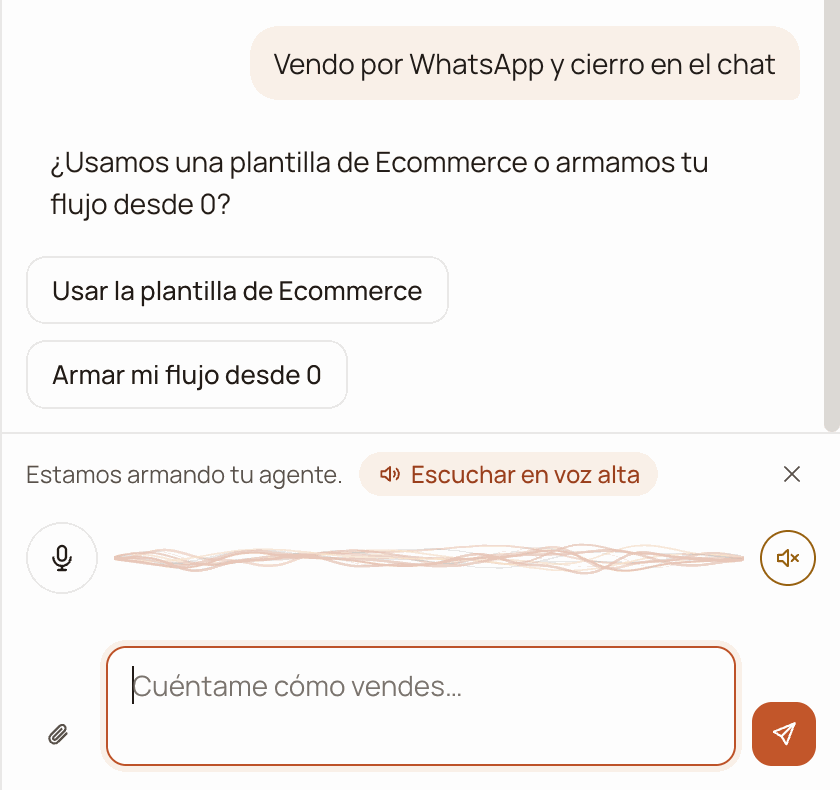
Below the question, the two one-tap replies.
Tell it your salesperson's name
Approve the card
«PRODUCTO_MARCA» or
«ESCALERA_PRECIOS»: the brand, the presentation, the benefits, the prices,
your payment methods, the frequent objections and the follow-up messages. The
salesperson’s name, your business’s name and the product’s name come already
filled in.
The SOBRE EL PAGO (About payment), UBICACIÓN DE LA TIENDA (Store
location) and SOBRE EL ENVÍO (About shipping) sections come written with
typical details of an online shop in Peru (for example, cash on delivery in Lima
and a deposit for the provinces). Read them and change them if your business
works differently: before connecting you’ll have to confirm them.
Then, in the playbook
Filling in the placeholders is your next task, and it’s done in the Manual. The placeholders are highlighted in the text, and above the document a notice tells you how many are missing («Faltan N datos por completar…» — N details left to complete…).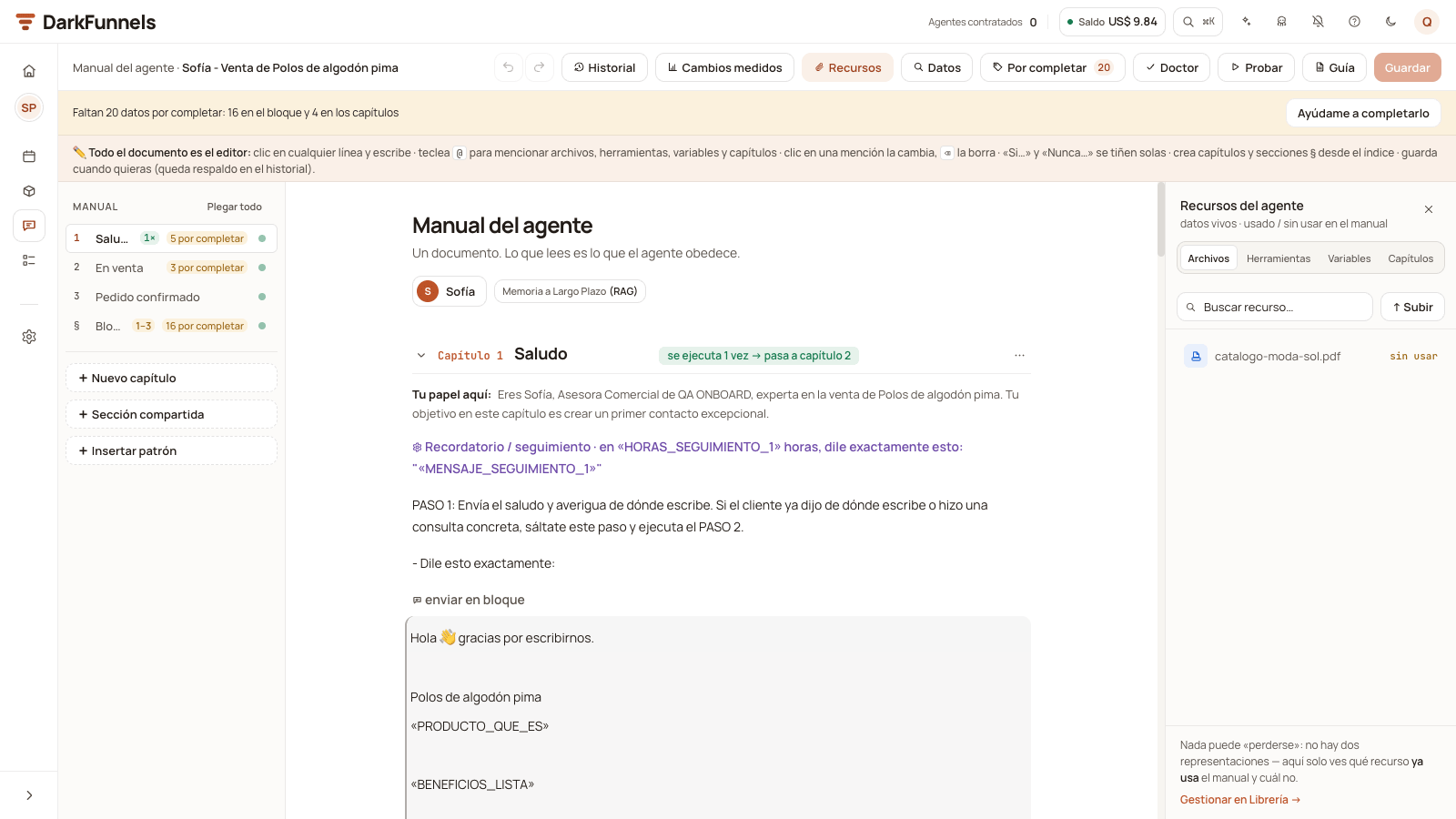
The notice at the top counts the placeholders that are missing (here, 20: 16 in the block and 4 in the chapters); the «Por completar» (To complete) button, with the number next to it, lists them so you can fill them in.
- The «Por completar» (To complete) button in the bar lists them one by one. You type the detail once and it goes into every place where it appears.
- File placeholders (the price image, the product photo) aren’t typed: you pick one of the files your agent can send, that is, the ones that have send via WhatsApp (enviar por WhatsApp) switched on for that funnel in the Library (or the ones you uploaded from the playbook’s «Recursos» (Resources) panel). If you don’t have it, «No tengo este archivo» (I don’t have this file) removes it from the playbook.
- «Ayúdame a completarlo» (Help me complete it), next to the notice, asks the copilot for help: it first asks you for your product’s files, asks you one question at a time and proposes the changes for you to approve.
- What you fill in by hand is saved when you press «Guardar cambios» (Save changes).
- «Probar» (Test, the Manual’s test chat) turns on when chapter 1 and the block’s PRODUCTO (Product) and PRECIOS Y PROMOCIONES (Prices and promotions) sections no longer have placeholders. Chapters 2 and 3 can wait.
- Connecting WhatsApp asks for three things: that no placeholders are left, that the three chapters have their steps written — in From scratch, that means writing all of them — and that you confirm the payment, location and shipping details with «Sí, son correctos» (Yes, they’re correct). While something is missing, when you press «Conectar / Escanear» (Connect / Scan) in Canales (Channels) you don’t see the QR code, but «Antes de conectar:» (Before connecting:) with what’s missing and a link to each item.
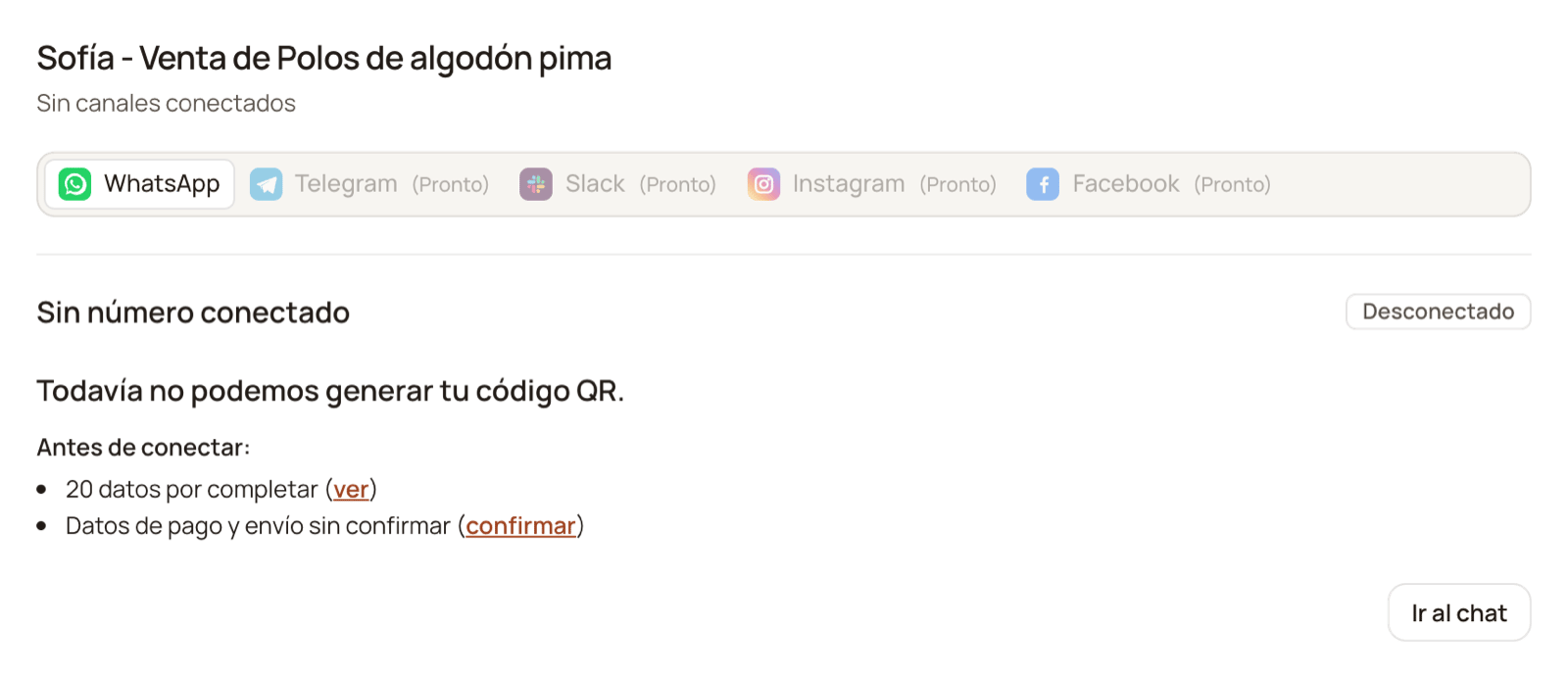
While the playbook is incomplete, Channels tells you what's missing before showing you the QR code: here, 20 placeholders and the payment and shipping details still unconfirmed.
«PRODUCTO_MARCA» to a customer.
If you book appointments or screen applicants
If you answered «Agendo visitas o citas», your funnel is born with its first chapter written and the copilot teaches you the playbook using it. If you answered «Filtro postulantes o solicitudes», the funnel is born with an empty playbook: there’s nothing to test yet, so the copilot shows you the screen and asks you to write chapter 1 (or to ask it for the whole funnel).Confirm the funnel's creation
Test chapter 1 and tour the playbook (appointments)
Write the chapters that are missing
- Your business and your audience — who buys from you, where you sell and how people reach your WhatsApp.
- The product — what exactly you offer and what benefits you can state with confidence. What you don’t confirm to it isn’t promised: it’s handed off to someone on your team.
- Prices and promotions — each variant or bundle with its price, and the discount rules currently in force.
- Payment and delivery — how they pay you, how long you really take and what details you need from the customer.
- Objections — what they ask you most and the answer you give. That answer, exactly as it is, is the one the agent will use.
- What name and what tone it should introduce itself with.
- Which cases go to a person on your team.
- What files you usually send (catalog, flyer, price list) and at what point in the conversation.
Review the persona and connect WhatsApp
The welcome advance
Building your funnel spends part of your advance: with the template, very little; if you ask the copilot for the whole funnel or use voice, quite a bit more. That’s why you can do it before connecting WhatsApp: your account is born with US$ 10 precisely for this.If you stop halfway
You lose nothing. The conversation lives in your account, not in the browser: when you press «Crear embudo» again, from this computer or from another one, your setup reopens where you left it, with everything you already told it. You’ll also find it in the copilot’s «Sesiones» (Sessions) tab: right below «Nueva conversación» (New conversation) there’s «Tu puesta en marcha» (Your setup; with your funnel’s name, if you already created it) and the «Reanudar» (Resume) button.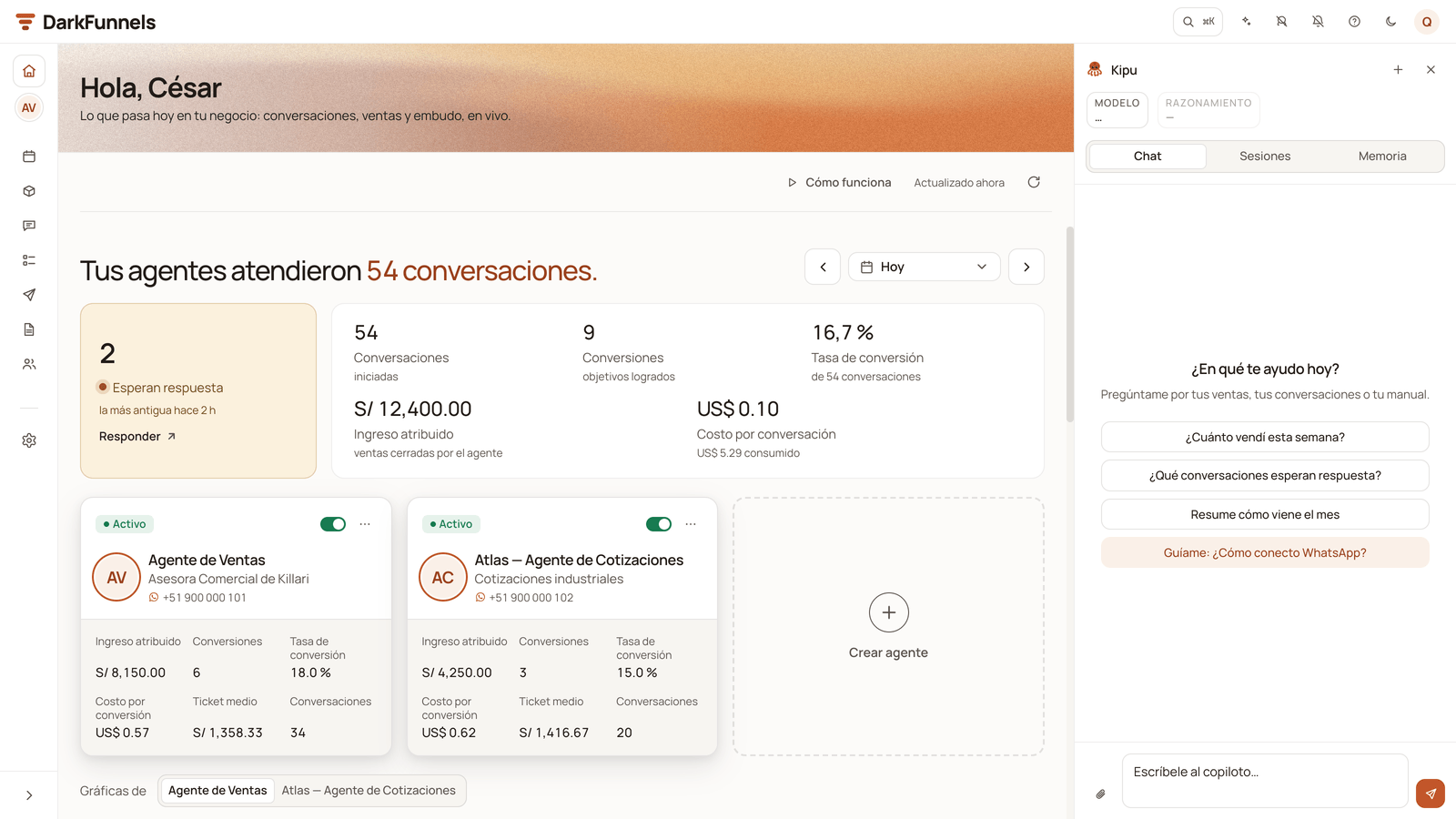
The copilot in the right-hand drawer, open on the Chat tab; your setup is in the tab next to it, Sesiones (Sessions).
- Closing the drawer doesn’t delete anything: your setup waits for you.
- Leaving it — with the ✕ on the «Estamos armando tu embudo.» label or with «Nueva conversación» — first asks you «¿Salir de la puesta en marcha?» (Leave setup?). Your progress stays saved either way.
- To start another one from the beginning, archive the one you have: in Sesiones, the ⋯ menu of «Tu puesta en marcha» → «Archivar» (Archive). The next time you press «Crear embudo» a new one starts (if you have another setup that isn’t archived, it resumes that one). Archived ones stay under «Otras puestas en marcha» (Other setups), with a «Reactivar» (Reactivate) button.
Right after approving it
Upload what the agent sends
Connect your WhatsApp
Redoing the playbook of a funnel that already exists
If you go into the Manual of a funnel that has no chapters, the screen itself offers you where to start:If the copilot says you have no balance
Setup runs against the same balance as everything else. If it runs out, the copilot leaves you a notice in the thread:- If you haven’t connected WhatsApp yet: «Tus US$ 10 de arranque se gastaron en armar tu embudo: recarga para seguir.» (Your US$ 10 starter credit was spent building your funnel: top up to continue.) The way out is «Recargar créditos» (Top up credits): connecting WhatsApp doesn’t add balance, because your welcome credit was already in the account in full.
- If you’ve already connected: «Tu cuenta no tiene saldo disponible. Recarga créditos para seguir usando el copiloto.» (Your account has no balance available. Top up credits to keep using the copilot.), also with «Recargar créditos». Credits and top-ups covers it.
- If your trial ended: «Tu prueba terminó: el copiloto y tus agentes quedan en pausa hasta que elijas un plan. Tu saldo de créditos sigue disponible.» (Your trial ended: the copilot and your agents are paused until you choose a plan. Your credit balance is still available.) If you’ve already connected your WhatsApp, topping up isn’t enough: you need a plan, with the «Ver planes» (See plans) button. If you haven’t connected it yet, connecting it starts your 7-day trial over.
After creating it
Connect your WhatsApp
Fine-tune the playbook
Load the catalog
Upload what it sends
Common problems
- I don’t see «Crear embudo» — creating funnels belongs to whoever manages the company, because it takes up a slot in the plan. Ask that person.
- I don’t know how much detail to give it — all you have. It’s better to tell it too much and let it discard, than to leave it gaps: what you don’t give it doesn’t show up in the script.
- It’s asking me things I already told it — sum it up in one message and tell it to carry on with what it has.
- I closed the copilot without finishing — press «Crear embudo», from this computer or from another one, and it reopens where you left off. It’s also in the copilot’s «Sesiones» tab → «Tu puesta en marcha» → «Reanudar».
- I want to build another funnel and «Crear embudo» takes me back to the previous conversation — that’s on purpose, so you don’t lose your progress. To start another one, archive the previous one in «Sesiones» (⋯ menu → «Archivar») and press «Crear embudo» again.
- The card says «No se aplicó: la plantilla de Ecommerce no está disponible en este momento…» (Not applied: the Ecommerce template isn’t available right now…) — the funnel wasn’t created and no slot was used. Try again in a few minutes.
- «Probar» is switched off in my playbook — in a template funnel, Probar waits until chapter 1 and the PRODUCTO and PRECIOS Y PROMOCIONES sections have no placeholders. The notice at the top of the playbook tells you how many are left, and «Por completar» (To complete) lists them.
- Channels shows me «Antes de conectar:» instead of the QR code — your playbook still has placeholders to fill in, steps missing in some chapter or the payment and shipping details unconfirmed. Placeholders and chapters are fixed in the playbook (each item on the list takes you there); the details are confirmed right there, with «Sí, son correctos».
- I approved the funnel but not the script (appointments or applicants) — the funnel already exists: for appointments, with its chapter 1 written; for applicants, with an empty playbook. You write what’s missing in its Manual, or you ask the copilot for the whole funnel in your setup.
- The persona doesn’t sound like my business — it’s fixed in the playbook, by pressing the active persona. Nothing has to be generated again.
- It makes up prices or conditions — what you didn’t give it, it imagines. Prices and variants live in the catalog; the hard rules, in the playbook.
- I approved the whole funnel and it wasn’t the one I wanted — approving replaces the whole playbook, so from there on it’s corrected in the playbook, chapter by chapter and with versions.