What DarkFunnels words mean: funnel, agent, playbook, turn, library, copilot, balance, conversion, active business and permissions.
The DarkFunnels words this documentation uses as if you already knew them, in a
few lines each. If you run into one mid-page, come back here.The dashboard is in Spanish, so menus, buttons and labels are named here the
way you’ll see them on screen, with the English translation in parentheses.
The side menu: Inicio at the top, then your apps (Ventas expanded, with its funnel selector) and Administración at the end.
Dashboard
The web app you sign in to with your email:
optimind.darkfunnels.ai. Almost
everything this documentation covers happens there. The exceptions are
some steps in the pixel and ads guides, which are done on Meta’s screens,
and whatever is marked “from your assistant”.
Inicio (Home)
The first screen in the menu. It’s the day’s summary, and it’s built from
your apps: your funnels and their numbers, the customers waiting for a
reply, your appointments. Don’t look for a “Dashboard” entry: it’s called
Inicio (Home).→ Your first look
App
A piece of the dashboard that’s switched on or off for your whole
business. The menu is organized by app. Ventas (Sales),
Calendario (Calendar), Inventario (Inventory) and Órdenes
(Orders) come switched on when you open the account; Envíos
(Shipping) and Facturación electrónica (Electronic invoicing) you
install yourself in Administración → Apps (Administration → Apps).That’s why two businesses see different menus, and so do two people in
the same business: each one sees the apps they have access to. Some apps
only appear in certain accounts.→ The DarkFunnels apps
Funnel (embudo)
What you create in Ventas (Sales) to sell over WhatsApp. Each funnel
has its own WhatsApp number (there’s no WhatsApp “for the account”),
its script (its playbook), its settings and one agent that chats
with your customers following that playbook. The number is connected in
Ventas → Personalizar → Canales (Sales → Customize → Channels). If
you sell two very different things, that’s two funnels.You select the funnel in the selector, set it up, pause it, duplicate it,
share it or delete it, and each active funnel takes up a slot in your plan.→ Your funnels
Agent (agente)
Your automatic salesperson: the AI that chats with your customers inside
a funnel. Each funnel has its own. It replies on WhatsApp following that
funnel’s playbook, sends files, moves from chapter to chapter, records
sales and uses its tools. The identity it introduces itself with — its
name, its personality — is its persona.You create and set up the funnel; the agent is the one who serves your
customers inside it.→ Your first funnel
Funnel selector
The dropdown under Ventas in the menu, with a funnel’s photo (or
initial) and name. It decides which funnel you’re working with inside
Ventas: the playbook, the conversations or the customers you see are that
funnel’s. If a list comes up empty, first check which funnel is
selected.
Copilot
The AI that lives inside the dashboard. It opens with its button in the
top bar or with ⌘J (Ctrl+J on Windows). It helps you build and
correct your funnel, and it can read, search and analyze your
conversations.When it’s going to change something in your business, it usually proposes
it on a card with Aprobar (Approve) and Rechazar (Reject). It
has three tabs: Chat, Sesiones (Sessions: your previous
conversations with it) and Memoria (Memory: notes you want it to
remember). It consumes balance.Don’t confuse it with “your assistant” (Claude or ChatGPT connected from
outside).
Setup (puesta en marcha)
The conversation with the copilot that creates your first funnel. If you
leave it halfway, your progress stays saved: you pick it up from the
copilot’s Sesiones tab («Tu puesta en marcha», Your setup) or with
Crear embudo (Create funnel).→ Your first funnel
Guíame (Guide me)
The copilot mode that points out on screen where to click. You open it
from the Ayuda (Help) menu (the question mark in the top bar) →
Guíame paso a paso (Guide me step by step). It consumes balance,
like the rest of the copilot.
Pendientes (Pending)
A card on Inicio with what’s waiting for an action from you: for
example, a copilot proposal to approve. Tapping a row takes you straight
to resolving it. If there’s nothing pending, the card doesn’t appear.
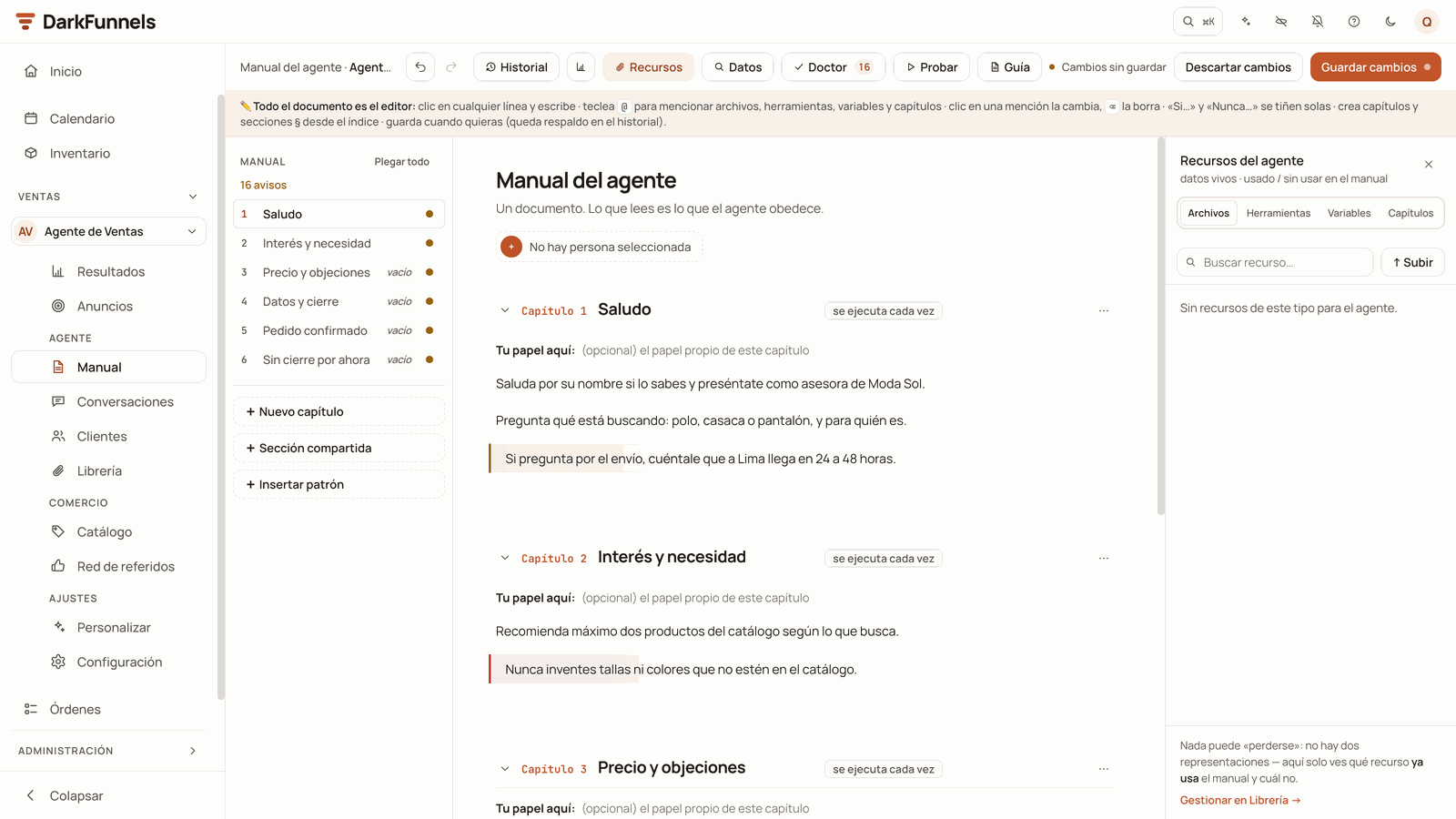
The Manual (Playbook): on the left, the chapter index; at the top, the Historial (History), Recursos (Resources), Doctor and Probar (Test) buttons; on the right, the Recursos panel open.
Playbook (Manual)
The agent’s script, and the screen where it’s edited (Ventas → Manual,
Sales → Playbook). It’s what you’ll touch most. It keeps a
Historial (History) of versions, so you can go back.→ The sales playbook
Chapter
Each stretch of the script: greeting and understanding what they’re after,
presenting the product, settling the price, closing and taking the
details. The agent moves from chapter to chapter according to what
happens in the conversation.
Shared section (§)
A block of the playbook marked with the § symbol that applies to
several chapters at once: you write it once and it serves all the ones you
choose. A chip tells you which ones it applies to («aplica a capítulos
1–2, 4», applies to chapters 1–2, 4). In a playbook born from the
Ecommerce template you’ll see it as the shared block, with your
business details.
Ecommerce template
The starting point for a WhatsApp sales funnel: a shared block and three
chapters (Saludo, En venta and Pedido confirmado —
Greeting, Selling and Order confirmed) with your business’s details
left to fill in. It’s created when you build a sales funnel with the
copilot. If your account has it and a sales funnel wasn’t born from it,
with an empty playbook or a single chapter, you can load it from a
computer with Cargar plantilla de Ecommerce (Load the Ecommerce
template).→ Your first funnel
Placeholder (dato por completar)
In a template playbook, each of your details left to fill in, written
between « » (for example «PRODUCTO_MARCA»). The editor highlights them,
and the Playbook’s Por completar (To complete) button lists them so you
can fill them in. While any are left, you can’t connect that funnel’s
WhatsApp.
Turn
Each time your agent replies. It doesn’t answer message by message: it
gathers what the customer sends in a row and answers it all at once. If
they send you three messages in a row, one after another, they normally
get one reply, not three.There are also turns that don’t come from a new customer message: a
reminder or a scheduled follow-up, or Responder con IA (Reply with
AI).A turn carries at most 12 messages, and files count among them. If the
text doesn’t fit, the ending is joined into the last message.
Marker
The mark that says where a file goes out inside a chapter. In the
editor you insert it with the @ menu → Archivos (Files) or with
the Recursos (Resources) button; underneath, it’s written like this:
###SEND_FILES: catalogo###. Written correctly, the customer doesn’t see
it: it’s replaced by the file.If it’s written wrong, it may come out as-is in the chat, or the file may
not go out. That’s why it’s best to insert it with @ or with
Recursos and not by hand. Note: the marker decides where the file goes
out; the permission to send it is given in the Library.→ The file Library
Tool (the agent's)
Each thing your agent can do besides writing: record the sale, hand
the chat to a person, save a piece of data, schedule a follow-up, look up
a price. Some you insert into the playbook with the @ menu →
Herramientas (Tools) (underneath, they stay as an exact sentence,
along the lines of
Ejecuta la herramienta "Recordatorio Tool" con el query "…"); others the
agent uses on its own. Not to be confused with the bridge tools,
below.→ The agent’s tools
Doctor
The Doctor button in the Playbook’s bar. It lists the problems it
found in your playbook and explains each one. Many come with a button that
fixes them in one click; the rest you correct yourself, and with Ir al
sitio (Go to the spot) you jump to that part of the playbook.→ The sales playbook
Test chat
A conversation with your agent that doesn’t go out over WhatsApp: you
write as if you were the customer and it answers right there. In the
Playbook, the Probar (Test) button opens it; with an empty inbox,
Pruébalo en el chat de prueba (Try it in the test chat).The Resultados (Results) screen doesn’t count it, but the funnel’s
card on Inicio does: if the agent records a sale during the test, that
sale adds to its numbers. And it consumes balance, because the agent
thinks just as it does with a real customer.
In the Library, each file has two independent switches: «enviar por WhatsApp» (send via WhatsApp) and «memoria del agente» (agent memory).
Catalog
Your products with their prices, their variants (sizes, colors…), their
stock and their photos. It’s where your agent gets exact prices from when
the customer asks “how much is it?”. It’s in Ventas, under
Comercio (Commerce).→ The catalog
Library (Librería)
The business’s files: photos, PDF catalogs, price lists, audio, videos. In
the menu it’s called Librería (Library) and the screen is titled
«Archivos» (Files). Each file is uploaded once for your whole
business, and each funnel has its own permissions over it.The screen has three tabs: Archivos; Ubicaciones (Locations),
your business’s branches that the agent sends as a map pin; and
Papelera (Trash), where you can restore whatever you sent there
(after about 30 days, it’s deleted). An image can be marked as a WhatsApp
sticker.→ The file Library
Send trigger (condición de envío)
A file’s nickname: the word you call it by from the script. By default
it’s the file name without the extension. Despite its Spanish name
(«condición», condition), it’s not a sentence in prose: to hit the
right file by nickname, the marker has to say the nickname exactly and
in full, with no extra or missing words (capitals, accents, hyphens and
underscores make no difference). If it doesn’t match anything, the system
may fall back to a word-similarity match and deliver a different
file.→ The file Library
Agent memory (memoria del agente)
Permission for the agent to read a file from the Library in order to
answer questions about it. It’s given per file and per funnel, in the
memoria del agente (agent memory) column.It’s independent of «enviar por WhatsApp» (send via WhatsApp). With
memory and no sending, the agent learns what the file says but doesn’t
send it. If you switch both on, it does both. Having the agent read a file
consumes a little balance.
Long-Term Memory (RAG)
A knowledge document separate from the playbook, of up to 200,000
characters, that your agent consults when a customer asks something. It
opens in the Playbook, with the Memoria a Largo Plazo (RAG)
(Long-Term Memory (RAG)) button next to the persona (in older funnels it
may not appear). The difference in one line: the playbook is
instructions; the memory is knowledge.→ The sales playbook
Persona
The identity a funnel’s agent introduces itself with: its name, its role,
its personality and, if you set them up, its face and its voice. It’s
not a flesh-and-blood person, and it isn’t the funnel either: the funnel
is what you set up; the persona is how its agent presents itself to your
customers. In the Playbook it’s chosen in the Persona activa (Active
persona) panel.Note: on Inicio, when there are no conversations to count yet, the
headline says «Personas que venden por ti» (People who sell for you).
There, “people” means your agents.
Each funnel has its own settings screen: Ventas → Configuración (Sales →
Settings).
Business details (Datos del negocio)
Your Yape, your account, the account holder, your social media… written
once. In the Playbook you insert them with the @ menu and the agent
reads the value from Configuración: if you change banks, you change it
in one place. When you share the funnel with another account, these
values don’t travel.→ Funnel settings
Frequent numbers (Números frecuentes)
Your business’s contact book. You save them once and in the Playbook you
insert them by name with @. From this list you choose who’s notified
of each sale (Informar de las ventas, Report sales), who gets the
summary every morning (Reportes, Reports) and who receives the
Alertas de error (Error alerts).
Test numbers (Números de prueba)
Phones your agent answers as if they were a customer, even if they’re
also in Reportes, Informar de las ventas or Alertas de error. They’re for
testing your funnel over real WhatsApp. Your business’s WhatsApp lines
don’t work as test numbers: test from a personal phone. Not to be confused
with the test chat, which doesn’t go out over WhatsApp.
Deletion phrase (Frase de borrado)
The word that, if a customer writes it exactly, deletes their data with
that funnel; their next message starts a new conversation. By default it’s
«borrar» (delete; capitals make no difference). It’s changed in
Configuración. It’s useful, for example, to repeat a test from the
beginning.
The screen with the selected funnel’s chats, one by one: Ventas →
Conversaciones (Sales → Conversations; on the phone, Chats). Above
the list it reads Centro de mensajería (Messaging center).→ Conversations
Waiting for a reply (Esperando respuesta)
A customer who wrote and whom nobody has answered yet: the last message is
theirs. In the inbox you filter them with Esperando respuesta
(Waiting for a reply), and on Inicio they’re counted by the Esperan
respuesta card.
Autopilot (manual mode)
The switch for each conversation, in the chat header (Piloto
automático, Autopilot). Off, the agent stops answering in that
conversation and you handle it; in the list, the row carries the
Manual mark. You switch it off, or the agent itself does when it hands
the chat to a person.To pause the whole funnel — so its agent answers no one — the switch is a
different one: Activo / Pausado (Active / Paused), on its card on
Inicio.→ Conversations
Responder con IA (Reply with AI)
In Conversaciones, you pick customers who were left without a reply and
the AI answers them one by one, roughly one per minute. Before it starts,
it asks you to tick that you understand your number may be banned. Each
reply consumes balance.If you don’t see the Seleccionar (Select) button above the list,
it isn’t available in your account yet, or that funnel is paused or has no
WhatsApp line.→ Conversations
Customer record (ficha)
What you know about a customer with one funnel: their details, their
internal notes, their conversions. You open it from Conversaciones or from
Clientes (Customers). It’s per funnel: if the same number writes
to two of your funnels, it has two records, one in each.
Variables and captured data
The details your agent saves about each customer while it chats: the
name, the city, the product they ordered, whatever you’ve defined
yourself. You see and correct them in the record, under Datos
capturados (Captured data), and they appear as columns in
Clientes, Tabla (Table) view.
Dar de baja and Borrar datos de usuario
Two buttons on the record that look alike and do very different things:
Dar de baja al contacto (Unsubscribe the contact): that number
stops receiving messages, from the agent and from you, on all your
business’s channels. It can be reactivated from the same record with
Reactivar contacto (Reactivate contact), but only by whoever
manages your business’s apps; for everyone else, the dashboard refuses
it.
Borrar datos de usuario (Delete user data): deletes that
customer’s data with this funnel: their conversations, their
messages, their record and the sales or appointments recorded with
them, which stop counting in your results. Their orders stay in
Órdenes, but without their name or address: they now say «Cliente
borrado» (Deleted customer). It can’t be undone, and whatever they
have with your other funnels isn’t touched.
What the AI consumes when it works, measured in dollars: each reply from
your agent, the audio it transcribes, the photos it interprets, the
documents it reads and the copilot’s work. Having WhatsApp connected
doesn’t consume anything.The cut-off comes before your balance runs out: when it drops below
US$ 0.10 (a small safety reserve), your agents stop answering new
turns even if you see something left.→ Credits and top-ups
Trial and subscription
The trial lasts 7 days. Its clock runs from sign-up, but it starts
over with the full 7 days when you connect your WhatsApp. If you don’t
get to connect, it expires on the date set when you signed up. When it
ends, your agents stop answering even if you have balance left, and
topping up doesn’t fix it: you need to subscribe.The subscription is the monthly payment that keeps your funnels
switched on, and its base comes back in full to your balance each month
you pay it. Balance is consumed with use, and you top it up whenever you
like.→ Pricing
Conversion
A recorded result of a conversation: a sale (venta), a service
(servicio), an appointment (cita) or a lead. Your agent
records it while it chats, or your team does from the customer’s record
with Registrar conversión (Record conversion; the AI helps you fill
it in). Some are recorded on their own, like the one for an appointment
confirmed in Calendario (Calendar).It’s the unit results are measured in, and a cancelled conversion stops
counting. Note: if your funnel books appointments or captures leads,
“conversions” isn’t the same as “sales”.→ Orders and metrics
Order (pedido)
What has to be collected and delivered for a sale. It lives in the
Órdenes (Orders) app. With Órdenes active, when your agent records a
sale with its products and their prices, its order opens. If the sale
comes in without products, or one of them is missing its price, it’s
recorded anyway, but without an order.Cancelling that sale from the record also cancels its order, and for that
you need access to Órdenes. If the order is already on its way to
delivery (waybill issued or stock moved), the sale is cancelled but the
order isn’t: you review that one yourself in Órdenes.→ Orders and metrics
Red de referidos (Referral network)
Your customers’ referral program, in Ventas → Red de referidos:
who recommended whom, which deposits came in and which rewards you owe at
each level of the network. It’s per funnel.→ Referral network
Referidos (DarkFunnels referrals)
In Administración → Referidos (Administration → Referrals): your
code for inviting other businesses to DarkFunnels. When one signs up with
it and activates its subscription, you earn US$ 15 in credit for that
payment and for each of its renewals, up to 6 charges. It has nothing to
do with your customers’ Red de referidos.→ Credits and top-ups
Meta pixel
The connection that tells Meta when a customer meets one of your
rules: reaches a chapter, buys, books an appointment… Each notice is
an event, and it travels through the Conversions API, Meta’s
channel for notices that don’t come from a web page. With that, Meta
fine-tunes who it shows your ads to. It’s connected in Ventas →
Personalizar → Píxeles (Sales → Customize → Pixels).→ Connect your Meta pixel
Qualified chapter and «rinde» (yield)
Two words from the Anuncios (Ads) page, which isn’t in every account
yet: if you don’t see it in your menu, it isn’t available in yours yet.
Capítulo calificado (Qualified chapter): the chapter of each
funnel from which a chat that came in through an ad counts as a serious
customer. You choose it with the Capítulo calificado button.
«rinde» (yield): how much each ad brings you for what you spend on
it, compared with your average. Depending on what your business already
measures, it compares sales, qualified leads or chats.
All three actions are on Inicio, in the menu on each funnel’s card.
Duplicar embudo (Duplicate funnel)
Creates a copy of the funnel in your same business: its playbook, its
persona, its settings and its Library permissions. It doesn’t copy
conversations or contacts. It needs a free funnel slot, just like creating
a new one. If you don’t see this option, ask whoever manages your business
for it.→ Your funnels
Compartir embudo (Share funnel)
Sends a copy of the funnel to another DarkFunnels account: you type
that account’s email and a request reaches them. Afterwards you can also
copy the link and send it to them over WhatsApp; if they don’t have an
account yet, they create it from that same link. If the other person
accepts, the funnel is copied into their account, ready to connect their
WhatsApp. The playbook, the persona, the files, the catalog, the
variables, the labels, the schedule and the settings travel; the
conversations, the contacts, the orders, the connections and your
notification numbers don’t.The playbook travels as-is: if it has your Yape or your numbers
written in it, the other person will see them.→ Your funnels
Deleting a funnel
In the menu it’s called Eliminar embudo… (Delete funnel…), and the
confirmation asks «¿Eliminar el embudo…?» (Delete the funnel…?). It’s
permanent: its conversations, its playbook, its contacts and the sales its
agent recorded in its chats are deleted, and its WhatsApp session is
closed. Its persona is deleted too, unless another of your funnels uses
it.The files in your Library stay for your other funnels: only this
funnel’s permission goes. The orders in Órdenes and the usage already
charged to you also stay. If it has contacts, sales or notes, a copy is
saved in Excel before deleting.→ Your funnels
Your business inside DarkFunnels: its apps, its team, its balance and its
funnels. A single account — the email you sign in with — can be in several
businesses: yours and that of a client who invited you, for example. In
each one you can have different access.→ Invite your team
Active business
The business you’re working in right now: what you see — conversations,
customers, balance — belongs to that business. If your account is in more
than one, you switch from your account menu (the circle at the top
right): the current one says Estás aquí (You’re here) and the
others, Cambiar a esta empresa (Switch to this business).The active business belongs to your account, not to the tab: if you
switch on your phone, you also switch on your computer.
Per-person permissions (access)
What each person on your team can use. They’re given app by app, with
one switch per active app — also for the copilot and for seeing the
balance and billing — in Administración → Personas y accesos
(Administration → People and access). Whoever creates the account gets
full access.Ventas is given whole: whoever has it sees the conversations and the
customers of all your funnels.→ Invite your team
Claude, ChatGPT, Codex or another compatible client, connected to your
business from outside the dashboard. It’s optional. In this
documentation, “your assistant” means that; the dashboard copilot is
something else. It’s connected in Ventas → Personalizar → Asistentes
IA (Sales → Customize → AI assistants).
MCP and “the bridge”
MCP is the standard Claude and ChatGPT use to connect to external
tools. The bridge is our connection to that standard: what lets your
assistant read and change things in your business, with your
authorization.The same standard works the other way round: in Ventas → Personalizar →
Herramientas → Añadir servidor MCP (Sales → Customize → Tools → Add MCP
server) you give your agent tools from another service.→ The connection URL · Security · Your own tools (MCP)
Tool (the bridge's)
Each specific action your assistant can run over the bridge: listing
files, reading the playbook, recording something. You don’t write them;
you ask for them in your own language. They’re a separate list from the
agent’s tools.→ Tool reference
Last modified on October 19, 2026
{"docsConfig":{"theme":"mint","$schema":"https://mintlify.com/docs.json","name":"DarkFunnels","description":"Vende por WhatsApp con un agente de ventas IA — y opéralo desde tu asistente.","colors":{"primary":"#C2562A","light":"#D86A3C","dark":"#9A3F1C"},"logo":{"light":"https://mintcdn.com/darkfunnels/Df-1lKh1Aj5k8c-r/logo/light.svg?fit=max\u0026auto=format\u0026n=Df-1lKh1Aj5k8c-r\u0026q=85\u0026s=db60a9a883ed42e13a06aded18a08fb0","dark":"https://mintcdn.com/darkfunnels/Df-1lKh1Aj5k8c-r/logo/dark.svg?fit=max\u0026auto=format\u0026n=Df-1lKh1Aj5k8c-r\u0026q=85\u0026s=ab6a8b17d7e5e0d3b45de82ecd342327"},"favicon":"https://mintcdn.com/darkfunnels/Df-1lKh1Aj5k8c-r/favicon.svg?fit=max\u0026auto=format\u0026n=Df-1lKh1Aj5k8c-r\u0026q=85\u0026s=caa397a60f25d85c3d14d40fc8bb4841","navbar":{"primary":{"type":"button","label":"Entrar al panel","href":"https://optimind.darkfunnels.ai"}},"footer":{"socials":{"website":"https://darkfunnels.ai"}},"seo":{"metatags":{"og:locale":"es_PE"},"organization":{"id":"https://darkfunnels.ai/#organization","name":"DarkFunnels","url":"https://darkfunnels.ai","sameAs":["https://github.com/darkfunnels-ai"]},"indexing":"navigable"},"fonts":{"family":"Manrope"},"errors":{"404":{"redirect":false}},"contextual":{"options":["copy","view","claude","chatgpt","perplexity","cursor","vscode","mcp"],"display":"header"},"metadata":{"timestamp":true},"markdown":{"instructions":["DarkFunnels is a WhatsApp AI sales-agent platform used mainly in Peru and Latin America. The product interface and most of this documentation are in Spanish; the /en tree is the English mirror.","A business connects the WhatsApp number it already uses by scanning a QR code from the dashboard, the same linked-device mechanism as WhatsApp Web. It does not go through the Meta Cloud API (WhatsApp Business Platform), so there is no application to get approved and no message templates to submit. DarkFunnels is not a Meta product and is not affiliated with Meta.","DarkFunnels also publishes a remote MCP server at https://mcp.darkfunnels.ai/mcp?features=all (without parameters it only carries the default, mostly read-only set) so an assistant such as Claude, ChatGPT or Codex can operate the workspace on the owner's behalf, in one company and within the permissions of the person who connects it. The tool reference is at /referencia/tools and the connection parameters at /referencia/url-de-conexion.","The dashboard is https://optimind.darkfunnels.ai, the marketing site is https://darkfunnels.ai and the page written for AI agents is https://darkfunnels.ai/agents."]},"styling":{"latex":false},"navigation":{"languages":[{"language":"es","default":true,"href":""},{"language":"en","href":"en"}]}},"deployment":{"deploymentMetadataValue":{"subdomain":"darkfunnels","hasAudioNarration":false,"actualSubdomain":"darkfunnels","customDomains":["docs.darkfunnels.ai"],"gitSource":{"type":"github","owner":"darkfunnels-ai","repo":"optimind-docs","deployBranch":"main","contentDirectory":"","isPrivate":true,"mountPath":"","label":""},"chroma":{"latestBuiltDeploymentHistoryId":"6ad6a0705c698d64cc0b179c","collectionId":"09c1a31a-e794-4676-b353-1de0e8edd33d","liveDeploymentHistoryId":"6ad6a0705c698d64cc0b179c","schemaVersion":"v3"},"entitlements":{"AI_CHAT":{"status":"DISABLED"}},"buildId":"6ad6a0705c698d64cc0b179c","clientVersion":"0.0.3894","searchFilterCounts":[{"language":"en","tag":"Guides","count":11},{"language":"es","tag":"Guías","count":11},{"language":"en","tag":"Getting started","count":8},{"language":"es","tag":"Primeros pasos","count":8},{"language":"en","tag":"Optional: run it from Claude or ChatGPT","count":6},{"language":"es","tag":"Opcional: opéralo desde Claude o ChatGPT","count":6},{"language":"en","tag":"Reference","count":3},{"language":"es","tag":"Referencia","count":3},{"language":"en","tag":"Start","count":1},{"language":"en","tag":"Security","count":1},{"language":"es","tag":"Empezar","count":1},{"language":"es","tag":"Seguridad","count":1}]},"assistantConfig":{"enableAskAiButton":false,"enableStarterQuestions":false,"enableContextualStarterQuestions":false,"enableAskAiSearchBar":true},"hasChatPermissions":false,"hasWebMcpPermissions":false,"toggles":[{"name":"kill-isr","enabled":true,"variant":{"name":"disabled","enabled":false,"feature_enabled":true},"impressionData":false},{"name":"agent-mintlify-slack","enabled":true,"variant":{"name":"disabled","enabled":false,"feature_enabled":true},"impressionData":false},{"name":"editor-v7-file-tree","enabled":true,"variant":{"name":"disabled","enabled":false,"feature_enabled":true},"impressionData":false},{"name":"agent-integrations-settings","enabled":true,"variant":{"name":"disabled","enabled":false,"feature_enabled":true},"impressionData":false},{"name":"automations-pr-grouping","enabled":true,"variant":{"name":"disabled","enabled":false,"feature_enabled":true},"impressionData":false},{"name":"custom-prefix","enabled":true,"variant":{"name":"disabled","enabled":false,"feature_enabled":true},"impressionData":false},{"name":"analytics-v7","enabled":true,"variant":{"name":"disabled","enabled":false,"feature_enabled":true},"impressionData":false},{"name":"user-flows-analytics","enabled":true,"variant":{"name":"disabled","enabled":false,"feature_enabled":true},"impressionData":false},{"name":"no-publish-flow","enabled":true,"variant":{"name":"disabled","enabled":false,"feature_enabled":true},"impressionData":false},{"name":"workos-onboarding","enabled":true,"variant":{"name":"disabled","enabled":false,"feature_enabled":true},"impressionData":false},{"name":"llms-txt-v2","enabled":true,"variant":{"name":"disabled","enabled":false,"feature_enabled":true},"impressionData":false},{"name":"pause-universal-search-reconcile","enabled":true,"variant":{"name":"disabled","enabled":false,"feature_enabled":true},"impressionData":false},{"name":"snapshot-serving-live","enabled":true,"variant":{"name":"disabled","enabled":false,"feature_enabled":true},"impressionData":false},{"name":"stripTemperatureMiddleware","enabled":true,"variant":{"name":"disabled","enabled":false,"feature_enabled":true},"impressionData":false},{"name":"per-site-search-delta","enabled":true,"variant":{"name":"disabled","enabled":false,"feature_enabled":true},"impressionData":false},{"name":"support-platform-pylon-zendesk","enabled":true,"variant":{"name":"disabled","enabled":false,"feature_enabled":true},"impressionData":false},{"name":"editor-branches-v2-autocommit","enabled":true,"variant":{"name":"disabled","enabled":false,"feature_enabled":true},"impressionData":false},{"name":"editor-branches-v2","enabled":true,"variant":{"name":"disabled","enabled":false,"feature_enabled":true},"impressionData":false},{"name":"snapshot-serving","enabled":true,"variant":{"name":"disabled","enabled":false,"feature_enabled":true},"impressionData":false},{"name":"instant-rollback","enabled":true,"variant":{"name":"disabled","enabled":false,"feature_enabled":true},"impressionData":false},{"name":"granular-notifications-server","enabled":true,"variant":{"name":"disabled","enabled":false,"feature_enabled":true},"impressionData":false},{"name":"granular-notifications","enabled":true,"variant":{"name":"disabled","enabled":false,"feature_enabled":true},"impressionData":false},{"name":"editor-private-page-search","enabled":true,"variant":{"name":"disabled","enabled":false,"feature_enabled":true},"impressionData":false},{"name":"automations-fable","enabled":true,"variant":{"name":"disabled","enabled":false,"feature_enabled":true},"impressionData":false},{"name":"fixed-ai-action-pricing","enabled":true,"variant":{"name":"disabled","enabled":false,"feature_enabled":true},"impressionData":false},{"name":"automation-resolve-merge-conflict","enabled":true,"variant":{"name":"disabled","enabled":false,"feature_enabled":true},"impressionData":false},{"name":"scoped-publishing","enabled":true,"variant":{"name":"disabled","enabled":false,"feature_enabled":true},"impressionData":false},{"name":"mintql","enabled":true,"variant":{"name":"disabled","enabled":false,"feature_enabled":true},"impressionData":false},{"name":"page-level-analytics","enabled":true,"variant":{"name":"disabled","enabled":false,"feature_enabled":true},"impressionData":false},{"name":"teamspace","enabled":true,"variant":{"name":"disabled","enabled":false,"feature_enabled":true},"impressionData":false},{"name":"editor-version-history-v2","enabled":true,"variant":{"name":"disabled","enabled":false,"feature_enabled":true},"impressionData":false},{"name":"vite-origin","enabled":true,"variant":{"name":"disabled","enabled":false,"feature_enabled":true},"impressionData":false},{"name":"editor-nav-generations","enabled":true,"variant":{"name":"disabled","enabled":false,"feature_enabled":true},"impressionData":false},{"name":"workspace-projects","enabled":true,"variant":{"name":"disabled","enabled":false,"feature_enabled":true},"impressionData":false},{"name":"assistant-v5","enabled":true,"variant":{"name":"disabled","enabled":false,"feature_enabled":true},"impressionData":false},{"name":"byok-sep-25","enabled":true,"variant":{"name":"disabled","enabled":false,"feature_enabled":true},"impressionData":false},{"name":"revalidation-jwt","enabled":true,"variant":{"name":"disabled","enabled":false,"feature_enabled":true},"impressionData":false},{"name":"editor-agent-model-picker","enabled":true,"variant":{"name":"disabled","enabled":false,"feature_enabled":true},"impressionData":false},{"name":"client-snapshot-docs-config","enabled":true,"variant":{"name":"disabled","enabled":false,"feature_enabled":true},"impressionData":false},{"name":"hobby-abuse-scan","enabled":true,"variant":{"name":"disabled","enabled":false,"feature_enabled":true},"impressionData":false}],"isAtlas":false,"googleFontsInlined":true},"customCss":[{"filePath":"style.css","content":"@font-face{font-family:'JetBrains Mono';src:url(/fonts/jetbrains-mono-latin.woff2) format('woff2');font-weight:100 800;font-style:normal;font-display:swap}:root{--primary:194 86 42;--primary-light:216 106 60;--primary-dark:154 63 28;--background-light:255 255 255;--background-dark:23 18 14;--gray-50:247 245 241;--gray-100:245 243 239;--gray-200:237 234 228;--gray-300:224 220 212;--gray-400:154 144 137;--gray-500:124 114 106;--gray-600:107 98 91;--gray-700:61 53 47;--gray-800:42 35 29;--gray-900:33 27 23;--gray-950:23 18 14;--font-paper-mono:'JetBrains Mono';--default-mono-font-family:'JetBrains Mono', ui-monospace, SFMono-Regular,\n Menlo, Monaco, Consolas, 'Liberation Mono', 'Courier New', monospace;--rounded-xl:18px}"}],"page":{"pagePath":"en/reference/glossary","slug":"/en/reference/glossary","pageMetadata":{"title":"WhatsApp AI sales agent glossary","sidebarTitle":"Glossary","description":"What DarkFunnels words mean: funnel, agent, playbook, turn, library, copilot, balance, conversion, active business and permissions.","keywords":["WhatsApp AI sales agent glossary","sales funnel terminology","sales playbook","MCP bridge","agent turn"],"href":"/en/reference/glossary"},"description":{"compiledSource":"\"use strict\";\nconst {jsx: _jsx} = arguments[0];\nconst {useMDXComponents: _provideComponents} = arguments[0];\nfunction _createMdxContent(props) {\n const _components = {\n p: \"p\",\n ..._provideComponents(),\n ...props.components\n };\n return _jsx(_components.p, {\n children: \"What DarkFunnels words mean: funnel, agent, playbook, turn, library, copilot, balance, conversion, active business and permissions.\"\n });\n}\nfunction MDXContent(props = {}) {\n const {wrapper: MDXLayout} = {\n ..._provideComponents(),\n ...props.components\n };\n return MDXLayout ? _jsx(MDXLayout, {\n ...props,\n children: _jsx(_createMdxContent, {\n ...props\n })\n }) : _createMdxContent(props);\n}\nreturn {\n default: MDXContent\n};\n","frontmatter":{},"scope":{}},"pageType":"default","mdx":{"mdxSource":{"compiledSource":"\"use strict\";const{Fragment:_Fragment,jsx:_jsx,jsxs:_jsxs}=arguments[0];const{useMDXComponents:_provideComponents}=arguments[0];function _createMdxContent(props){const _components={a:`a`,code:`code`,em:`em`,li:`li`,p:`p`,strong:`strong`,tbody:`tbody`,td:`td`,th:`th`,thead:`thead`,tr:`tr`,ul:`ul`,..._provideComponents(),...props.components},{Accordion,AccordionGroup,Frame,Heading,OptimizedImage,Table}=_components;if(!Accordion)_missingMdxReference(`Accordion`,true);if(!AccordionGroup)_missingMdxReference(`AccordionGroup`,true);if(!Frame)_missingMdxReference(`Frame`,true);if(!Heading)_missingMdxReference(`Heading`,true);if(!OptimizedImage)_missingMdxReference(`OptimizedImage`,true);if(!Table)_missingMdxReference(`Table`,true);return _jsxs(_Fragment,{children:[_jsx(_components.p,{children:`The DarkFunnels words this documentation uses as if you already knew them, in a\nfew lines each. If you run into one mid-page, come back here.`}),`\n`,_jsx(_components.p,{children:`The dashboard is in Spanish, so menus, buttons and labels are named here the\nway you’ll see them on screen, with the English translation in parentheses.`}),`\n`,_jsx(Heading,{level:`2`,id:`they-look-alike-but-they’re-not-the-same`,children:`They look alike, but they’re not the same`}),`\n`,_jsxs(_components.p,{children:[`These pairs confuse almost everyone in their first month. `,_jsx(_components.strong,{children:`If you’re torn\nbetween two words, start with this table.`})]}),`\n`,_jsxs(Table,{children:[_jsx(_components.thead,{children:_jsxs(_components.tr,{children:[_jsx(_components.th,{children:`This…`}),_jsx(_components.th,{children:`…is not this`}),_jsx(_components.th,{children:`The difference`})]})}),_jsxs(_components.tbody,{children:[_jsxs(_components.tr,{children:[_jsxs(_components.td,{children:[_jsx(_components.strong,{children:`Funnel`}),` (`,_jsx(_components.em,{children:`Embudo`}),`)`]}),_jsxs(_components.td,{children:[_jsx(_components.strong,{children:`Agent`}),` (`,_jsx(_components.em,{children:`Agente`}),`)`]}),_jsxs(_components.td,{children:[`The funnel is what you create, select and set up in Ventas (`,_jsx(_components.em,{children:`Sales`}),`). The agent is the AI that chats with your customers inside each funnel.`]})]}),_jsxs(_components.tr,{children:[_jsx(_components.td,{children:_jsx(_components.strong,{children:`Agent`})}),_jsx(_components.td,{children:_jsx(_components.strong,{children:`Persona`})}),_jsx(_components.td,{children:`The agent is the AI that chats. The persona is how it introduces itself: its name, its photo and its personality.`})]}),_jsxs(_components.tr,{children:[_jsxs(_components.td,{children:[_jsx(_components.strong,{children:`Copilot`}),` (`,_jsx(_components.em,{children:`Copiloto`}),`)`]}),_jsx(_components.td,{children:_jsx(_components.strong,{children:`Your assistant`})}),_jsx(_components.td,{children:`The copilot lives inside the dashboard. Your assistant is Claude, ChatGPT or Codex connected from outside, and it’s optional.`})]}),_jsxs(_components.tr,{children:[_jsxs(_components.td,{children:[_jsx(_components.strong,{children:`Agent memory`}),` (`,_jsx(_components.em,{children:`Memoria del agente`}),`)`]}),_jsxs(_components.td,{children:[_jsx(_components.strong,{children:`Long-Term Memory`}),` (`,_jsx(_components.em,{children:`Memoria a Largo Plazo`}),`)`]}),_jsx(_components.td,{children:`The first is a per-file permission, in the Library. The second is a knowledge document you edit in the Playbook.`})]}),_jsxs(_components.tr,{children:[_jsx(_components.td,{children:_jsx(_components.strong,{children:`Agent memory`})}),_jsx(_components.td,{children:_jsx(_components.strong,{children:`Copilot memory`})}),_jsxs(_components.td,{children:[`The agent’s is used by your WhatsApp salesperson. The copilot’s is notes for the copilot, in its `,_jsx(_components.strong,{children:`Memoria`}),` (`,_jsx(_components.em,{children:`Memory`}),`) tab.`]})]}),_jsxs(_components.tr,{children:[_jsxs(_components.td,{children:[_jsx(_components.strong,{children:`Test chat`}),` (`,_jsx(_components.em,{children:`Chat de prueba`}),`)`]}),_jsxs(_components.td,{children:[_jsx(_components.strong,{children:`Test numbers`}),` (`,_jsx(_components.em,{children:`Números de prueba`}),`)`]}),_jsx(_components.td,{children:`The test chat doesn’t go out over WhatsApp. Test numbers are real phones your agent answers as if they were a customer.`})]}),_jsxs(_components.tr,{children:[_jsxs(_components.td,{children:[_jsx(_components.strong,{children:`Autopilot`}),` (`,_jsx(_components.em,{children:`Piloto automático`}),`)`]}),_jsxs(_components.td,{children:[_jsx(_components.strong,{children:`Activo / Pausado`}),` (`,_jsx(_components.em,{children:`Active / Paused`}),`)`]}),_jsxs(_components.td,{children:[`Autopilot is switched off in `,_jsx(_components.strong,{children:`one`}),` conversation. Activo / Pausado pauses the whole funnel, on its card on Inicio (`,_jsx(_components.em,{children:`Home`}),`).`]})]}),_jsxs(_components.tr,{children:[_jsxs(_components.td,{children:[_jsx(_components.strong,{children:`Red de referidos`}),` (`,_jsx(_components.em,{children:`Referral network`}),`)`]}),_jsxs(_components.td,{children:[_jsx(_components.strong,{children:`Referidos`}),` (`,_jsx(_components.em,{children:`Referrals`}),`)`]}),_jsxs(_components.td,{children:[`The network is `,_jsx(_components.strong,{children:`your customers’`}),` referral program. Referidos is your code for inviting other businesses to DarkFunnels.`]})]}),_jsxs(_components.tr,{children:[_jsx(_components.td,{children:_jsx(_components.strong,{children:`Agent tool`})}),_jsx(_components.td,{children:_jsx(_components.strong,{children:`Bridge tool`})}),_jsx(_components.td,{children:`The agent’s is used by your salesperson on WhatsApp. The bridge’s is used by your assistant to work on your business.`})]}),_jsxs(_components.tr,{children:[_jsxs(_components.td,{children:[_jsx(_components.strong,{children:`Dar de baja`}),` (`,_jsx(_components.em,{children:`Unsubscribe`}),`)`]}),_jsxs(_components.td,{children:[_jsx(_components.strong,{children:`Borrar datos de usuario`}),` (`,_jsx(_components.em,{children:`Delete user data`}),`)`]}),_jsx(_components.td,{children:`Unsubscribing can be reversed and applies to your whole business. Deleting data can’t be undone and affects that customer with a single funnel.`})]})]})]}),`\n`,_jsx(Heading,{level:`2`,id:`the-basics`,children:`The basics`}),`\n`,_jsx(Frame,{caption:`The side menu: Inicio at the top, then your apps (Ventas expanded, with its funnel selector) and Administración at the end.`,children:_jsx(OptimizedImage,{src:`https://mintcdn.com/darkfunnels/fypBH9q351iR9qsC/images/apps/09-menu-lateral.png?fit=max\u0026auto=format\u0026n=fypBH9q351iR9qsC\u0026q=85\u0026s=19b70019e731db15762964e970c06fea`,alt:`Expanded side menu of the dashboard with Inicio, the apps, Ventas open with its funnel selector and its entries, and the Administración block`,\"data-og-width\":`494`,width:`494`,\"data-og-height\":`2680`,height:`2680`,\"data-path\":`images/apps/09-menu-lateral.png`,\"data-optimize\":`true`,\"data-opv\":`3`,srcset:`https://mintcdn.com/darkfunnels/fypBH9q351iR9qsC/images/apps/09-menu-lateral.png?w=280\u0026fit=max\u0026auto=format\u0026n=fypBH9q351iR9qsC\u0026q=85\u0026s=4f83575e70f0137709d9d9cd2adee736 280w, https://mintcdn.com/darkfunnels/fypBH9q351iR9qsC/images/apps/09-menu-lateral.png?w=560\u0026fit=max\u0026auto=format\u0026n=fypBH9q351iR9qsC\u0026q=85\u0026s=6491225011248b9183f6afbbb375a782 560w, https://mintcdn.com/darkfunnels/fypBH9q351iR9qsC/images/apps/09-menu-lateral.png?w=840\u0026fit=max\u0026auto=format\u0026n=fypBH9q351iR9qsC\u0026q=85\u0026s=3b749f0d97a0ca5f9eaab033ddd690e7 840w, https://mintcdn.com/darkfunnels/fypBH9q351iR9qsC/images/apps/09-menu-lateral.png?w=1100\u0026fit=max\u0026auto=format\u0026n=fypBH9q351iR9qsC\u0026q=85\u0026s=890dd6bc4a7d0b4511d67b738484c9c2 1100w, https://mintcdn.com/darkfunnels/fypBH9q351iR9qsC/images/apps/09-menu-lateral.png?w=1650\u0026fit=max\u0026auto=format\u0026n=fypBH9q351iR9qsC\u0026q=85\u0026s=77587a90a74f8dc39906cca6d3852e10 1650w, https://mintcdn.com/darkfunnels/fypBH9q351iR9qsC/images/apps/09-menu-lateral.png?w=2500\u0026fit=max\u0026auto=format\u0026n=fypBH9q351iR9qsC\u0026q=85\u0026s=771190477c97765af7b2421c551c7a99 2500w`})}),`\n`,_jsxs(AccordionGroup,{children:[_jsx(Accordion,{title:`Dashboard`,id:`dashboard`,children:_jsxs(_components.p,{children:[`The web app you sign in to with your email:\n`,_jsx(_components.a,{href:`https://optimind.darkfunnels.ai`,children:`optimind.darkfunnels.ai`}),`. Almost\neverything this documentation covers happens there. The exceptions are\nsome steps in the pixel and ads guides, which are done on Meta’s screens,\nand whatever is marked “from your assistant”.`]})}),_jsxs(Accordion,{title:`Inicio (Home)`,id:`inicio-home`,children:[_jsxs(_components.p,{children:[`The first screen in the menu. It’s the day’s summary, and it’s built from\nyour apps: your funnels and their numbers, the customers waiting for a\nreply, your appointments. Don’t look for a “Dashboard” entry: it’s called\n`,_jsx(_components.strong,{children:`Inicio`}),` (`,_jsx(_components.em,{children:`Home`}),`).`]}),_jsxs(_components.p,{children:[`→ `,_jsx(_components.a,{href:`/en/getting-started/first-look`,children:`Your first look`})]})]}),_jsxs(Accordion,{title:`App`,id:`app`,children:[_jsxs(_components.p,{children:[`A piece of the dashboard that’s switched on or off `,_jsx(_components.strong,{children:`for your whole\nbusiness`}),`. The menu is organized by app. `,_jsx(_components.strong,{children:`Ventas`}),` (`,_jsx(_components.em,{children:`Sales`}),`),\n`,_jsx(_components.strong,{children:`Calendario`}),` (`,_jsx(_components.em,{children:`Calendar`}),`), `,_jsx(_components.strong,{children:`Inventario`}),` (`,_jsx(_components.em,{children:`Inventory`}),`) and `,_jsx(_components.strong,{children:`Órdenes`}),`\n(`,_jsx(_components.em,{children:`Orders`}),`) come switched on when you open the account; `,_jsx(_components.strong,{children:`Envíos`}),`\n(`,_jsx(_components.em,{children:`Shipping`}),`) and `,_jsx(_components.strong,{children:`Facturación electrónica`}),` (`,_jsx(_components.em,{children:`Electronic invoicing`}),`) you\ninstall yourself in `,_jsx(_components.strong,{children:`Administración → Apps`}),` (`,_jsx(_components.em,{children:`Administration → Apps`}),`).`]}),_jsx(_components.p,{children:`That’s why two businesses see different menus, and so do two people in\nthe same business: each one sees the apps they have access to. Some apps\nonly appear in certain accounts.`}),_jsxs(_components.p,{children:[`→ `,_jsx(_components.a,{href:`/en/getting-started/the-apps`,children:`The DarkFunnels apps`})]})]}),_jsxs(Accordion,{title:`Funnel (embudo)`,id:`funnel-embudo`,children:[_jsxs(_components.p,{children:[`What you create in `,_jsx(_components.strong,{children:`Ventas`}),` (`,_jsx(_components.em,{children:`Sales`}),`) to sell over WhatsApp. Each funnel\nhas `,_jsx(_components.strong,{children:`its own WhatsApp number`}),` (there’s no WhatsApp “for the account”),\nits script (its `,_jsx(_components.strong,{children:`playbook`}),`), its settings and `,_jsx(_components.strong,{children:`one agent`}),` that chats\nwith your customers following that playbook. The number is connected in\n`,_jsx(_components.strong,{children:`Ventas → Personalizar → Canales`}),` (`,_jsx(_components.em,{children:`Sales → Customize → Channels`}),`). If\nyou sell two very different things, that’s two funnels.`]}),_jsx(_components.p,{children:`You select the funnel in the selector, set it up, pause it, duplicate it,\nshare it or delete it, and each active funnel takes up a slot in your plan.`}),_jsxs(_components.p,{children:[`→ `,_jsx(_components.a,{href:`/en/guides/your-funnels`,children:`Your funnels`})]})]}),_jsxs(Accordion,{title:`Agent (agente)`,id:`agent-agente`,children:[_jsxs(_components.p,{children:[`Your automatic salesperson: the AI that chats with your customers `,_jsx(_components.strong,{children:`inside\na funnel`}),`. Each funnel has its own. It replies on WhatsApp following that\nfunnel’s playbook, sends files, moves from chapter to chapter, records\nsales and uses its tools. The identity it introduces itself with — its\nname, its personality — is its `,_jsx(_components.strong,{children:`persona`}),`.`]}),_jsx(_components.p,{children:`You create and set up the funnel; the agent is the one who serves your\ncustomers inside it.`}),_jsxs(_components.p,{children:[`→ `,_jsx(_components.a,{href:`/en/getting-started/your-first-funnel`,children:`Your first funnel`})]})]}),_jsx(Accordion,{title:`Funnel selector`,id:`funnel-selector`,children:_jsxs(_components.p,{children:[`The dropdown under `,_jsx(_components.strong,{children:`Ventas`}),` in the menu, with a funnel’s photo (or\ninitial) and name. It decides which funnel you’re working with inside\nVentas: the playbook, the conversations or the customers you see are that\nfunnel’s. `,_jsx(_components.strong,{children:`If a list comes up empty, first check which funnel is\nselected.`})]})}),_jsxs(Accordion,{title:`Copilot`,id:`copilot`,children:[_jsxs(_components.p,{children:[`The AI that lives `,_jsx(_components.strong,{children:`inside`}),` the dashboard. It opens with its button in the\ntop bar or with `,_jsx(_components.strong,{children:`⌘J`}),` (`,_jsx(_components.strong,{children:`Ctrl+J`}),` on Windows). It helps you build and\ncorrect your funnel, and it can read, search and analyze your\nconversations.`]}),_jsxs(_components.p,{children:[`When it’s going to change something in your business, it usually proposes\nit on a card with `,_jsx(_components.strong,{children:`Aprobar`}),` (`,_jsx(_components.em,{children:`Approve`}),`) and `,_jsx(_components.strong,{children:`Rechazar`}),` (`,_jsx(_components.em,{children:`Reject`}),`). It\nhas three tabs: `,_jsx(_components.strong,{children:`Chat`}),`, `,_jsx(_components.strong,{children:`Sesiones`}),` (`,_jsx(_components.em,{children:`Sessions`}),`: your previous\nconversations with it) and `,_jsx(_components.strong,{children:`Memoria`}),` (`,_jsx(_components.em,{children:`Memory`}),`: notes you want it to\nremember). It consumes balance.`]}),_jsx(_components.p,{children:`Don’t confuse it with “your assistant” (Claude or ChatGPT connected from\noutside).`})]}),_jsxs(Accordion,{title:`Setup (puesta en marcha)`,id:`setup-puesta-en-marcha`,children:[_jsxs(_components.p,{children:[`The conversation with the copilot that creates your first funnel. If you\nleave it halfway, your progress stays saved: you pick it up from the\ncopilot’s `,_jsx(_components.strong,{children:`Sesiones`}),` tab (`,_jsx(_components.em,{children:`«Tu puesta en marcha»`}),`, Your setup) or with\n`,_jsx(_components.strong,{children:`Crear embudo`}),` (`,_jsx(_components.em,{children:`Create funnel`}),`).`]}),_jsxs(_components.p,{children:[`→ `,_jsx(_components.a,{href:`/en/getting-started/your-first-funnel`,children:`Your first funnel`})]})]}),_jsx(Accordion,{title:`Guíame (Guide me)`,id:`guiame-guide-me`,children:_jsxs(_components.p,{children:[`The copilot mode that points out on screen where to click. You open it\nfrom the `,_jsx(_components.strong,{children:`Ayuda`}),` (`,_jsx(_components.em,{children:`Help`}),`) menu (the question mark in the top bar) →\n`,_jsx(_components.strong,{children:`Guíame paso a paso`}),` (`,_jsx(_components.em,{children:`Guide me step by step`}),`). It consumes balance,\nlike the rest of the copilot.`]})}),_jsx(Accordion,{title:`Pendientes (Pending)`,id:`pendientes-pending`,children:_jsxs(_components.p,{children:[`A card on Inicio with what’s waiting for `,_jsx(_components.strong,{children:`an action from you`}),`: for\nexample, a copilot proposal to approve. Tapping a row takes you straight\nto resolving it. If there’s nothing pending, the card doesn’t appear.`]})})]}),`\n`,_jsx(Heading,{level:`2`,id:`the-script`,children:`The script`}),`\n`,_jsx(Frame,{caption:`The Manual (Playbook): on the left, the chapter index; at the top, the Historial (History), Recursos (Resources), Doctor and Probar (Test) buttons; on the right, the Recursos panel open.`,children:_jsx(OptimizedImage,{src:`https://mintcdn.com/darkfunnels/fypBH9q351iR9qsC/images/manual/01-editor.png?fit=max\u0026auto=format\u0026n=fypBH9q351iR9qsC\u0026q=85\u0026s=b4262cd2537f0743f2ffaf635adae0fb`,alt:`Playbook editor with the six-chapter index on the left, chapters 1 and 2 in the middle, the button bar at the top and the agent's Recursos (Resources) panel open on the right`,\"data-og-width\":`1600`,width:`1600`,\"data-og-height\":`900`,height:`900`,\"data-path\":`images/manual/01-editor.png`,\"data-optimize\":`true`,\"data-opv\":`3`,srcset:`https://mintcdn.com/darkfunnels/fypBH9q351iR9qsC/images/manual/01-editor.png?w=280\u0026fit=max\u0026auto=format\u0026n=fypBH9q351iR9qsC\u0026q=85\u0026s=0b7d7fab22a28402de5393698e08f28d 280w, https://mintcdn.com/darkfunnels/fypBH9q351iR9qsC/images/manual/01-editor.png?w=560\u0026fit=max\u0026auto=format\u0026n=fypBH9q351iR9qsC\u0026q=85\u0026s=84461ce4d358c77b515c892a162721a4 560w, https://mintcdn.com/darkfunnels/fypBH9q351iR9qsC/images/manual/01-editor.png?w=840\u0026fit=max\u0026auto=format\u0026n=fypBH9q351iR9qsC\u0026q=85\u0026s=388dbd1d68aa1f9b5bca9ea68a0507bb 840w, https://mintcdn.com/darkfunnels/fypBH9q351iR9qsC/images/manual/01-editor.png?w=1100\u0026fit=max\u0026auto=format\u0026n=fypBH9q351iR9qsC\u0026q=85\u0026s=0f357faa8a9955647d2c4fcae5235890 1100w, https://mintcdn.com/darkfunnels/fypBH9q351iR9qsC/images/manual/01-editor.png?w=1650\u0026fit=max\u0026auto=format\u0026n=fypBH9q351iR9qsC\u0026q=85\u0026s=be82f563bd254867bf1d4276ec09d0ee 1650w, https://mintcdn.com/darkfunnels/fypBH9q351iR9qsC/images/manual/01-editor.png?w=2500\u0026fit=max\u0026auto=format\u0026n=fypBH9q351iR9qsC\u0026q=85\u0026s=5358bd7f6b04c322127a91a6539d94c2 2500w`})}),`\n`,_jsxs(AccordionGroup,{children:[_jsxs(Accordion,{title:`Playbook (Manual)`,id:`playbook-manual`,children:[_jsxs(_components.p,{children:[`The agent’s script, and the screen where it’s edited (`,_jsx(_components.strong,{children:`Ventas → Manual`}),`,\n`,_jsx(_components.em,{children:`Sales → Playbook`}),`). It’s what you’ll touch most. It keeps a\n`,_jsx(_components.strong,{children:`Historial`}),` (`,_jsx(_components.em,{children:`History`}),`) of versions, so you can go back.`]}),_jsxs(_components.p,{children:[`→ `,_jsx(_components.a,{href:`/en/guides/sales-playbook`,children:`The sales playbook`})]})]}),_jsx(Accordion,{title:`Chapter`,id:`chapter`,children:_jsx(_components.p,{children:`Each stretch of the script: greeting and understanding what they’re after,\npresenting the product, settling the price, closing and taking the\ndetails. The agent moves from chapter to chapter according to what\nhappens in the conversation.`})}),_jsx(Accordion,{title:`Shared section (§)`,id:`shared-section`,children:_jsxs(_components.p,{children:[`A block of the playbook marked with the `,_jsx(_components.strong,{children:`§`}),` symbol that applies to\nseveral chapters at once: you write it once and it serves all the ones you\nchoose. A chip tells you which ones it applies to (`,_jsx(_components.em,{children:`«aplica a capítulos\n1–2, 4»`}),`, applies to chapters 1–2, 4). In a playbook born from the\nEcommerce template you’ll see it as `,_jsx(_components.strong,{children:`the shared block`}),`, with your\nbusiness details.`]})}),_jsxs(Accordion,{title:`Ecommerce template`,id:`ecommerce-template`,children:[_jsxs(_components.p,{children:[`The starting point for a WhatsApp sales funnel: a shared block and three\nchapters (`,_jsx(_components.strong,{children:`Saludo`}),`, `,_jsx(_components.strong,{children:`En venta`}),` and `,_jsx(_components.strong,{children:`Pedido confirmado`}),` —\n`,_jsx(_components.em,{children:`Greeting`}),`, `,_jsx(_components.em,{children:`Selling`}),` and `,_jsx(_components.em,{children:`Order confirmed`}),`) with your business’s details\nleft to fill in. It’s created when you build a sales funnel with the\ncopilot. If your account has it and a sales funnel wasn’t born from it,\nwith an empty playbook or a single chapter, you can load it from a\ncomputer with `,_jsx(_components.strong,{children:`Cargar plantilla de Ecommerce`}),` (`,_jsx(_components.em,{children:`Load the Ecommerce\ntemplate`}),`).`]}),_jsxs(_components.p,{children:[`→ `,_jsx(_components.a,{href:`/en/getting-started/your-first-funnel`,children:`Your first funnel`})]})]}),_jsx(Accordion,{title:`Placeholder (dato por completar)`,id:`placeholder-dato-por-completar`,children:_jsxs(_components.p,{children:[`In a template playbook, each of your details left to fill in, written\nbetween « » (for example `,_jsx(_components.code,{children:`«PRODUCTO_MARCA»`}),`). The editor highlights them,\nand the Playbook’s `,_jsx(_components.strong,{children:`Por completar`}),` (`,_jsx(_components.em,{children:`To complete`}),`) button lists them so you\ncan fill them in. `,_jsx(_components.strong,{children:`While any are left, you can’t connect that funnel’s\nWhatsApp.`})]})}),_jsxs(Accordion,{title:`Turn`,id:`turn`,children:[_jsxs(_components.p,{children:[`Each time your agent replies. `,_jsx(_components.strong,{children:`It doesn’t answer message by message`}),`: it\ngathers what the customer sends in a row and answers it all at once. If\nthey send you three messages in a row, one after another, they normally\nget one reply, not three.`]}),_jsxs(_components.p,{children:[`There are also turns that don’t come from a new customer message: a\nreminder or a scheduled follow-up, or `,_jsx(_components.strong,{children:`Responder con IA`}),` (`,_jsx(_components.em,{children:`Reply with\nAI`}),`).`]}),_jsx(_components.p,{children:`A turn carries at most 12 messages, and files count among them. If the\ntext doesn’t fit, the ending is joined into the last message.`})]}),_jsxs(Accordion,{title:`Marker`,id:`marker`,children:[_jsxs(_components.p,{children:[`The mark that says `,_jsx(_components.strong,{children:`where`}),` a file goes out inside a chapter. In the\neditor you insert it with the `,_jsx(_components.strong,{children:`@`}),` menu → `,_jsx(_components.strong,{children:`Archivos`}),` (`,_jsx(_components.em,{children:`Files`}),`) or with\nthe `,_jsx(_components.strong,{children:`Recursos`}),` (`,_jsx(_components.em,{children:`Resources`}),`) button; underneath, it’s written like this:\n`,_jsx(_components.code,{children:`###SEND_FILES: catalogo###`}),`. Written correctly, the customer doesn’t see\nit: it’s replaced by the file.`]}),_jsxs(_components.p,{children:[`If it’s written wrong, it may come out as-is in the chat, or the file may\nnot go out. That’s why it’s best to insert it with `,_jsx(_components.strong,{children:`@`}),` or with\n`,_jsx(_components.strong,{children:`Recursos`}),` and not by hand. Note: the marker decides where the file goes\nout; the `,_jsx(_components.strong,{children:`permission`}),` to send it is given in the Library.`]}),_jsxs(_components.p,{children:[`→ `,_jsx(_components.a,{href:`/en/guides/library`,children:`The file Library`})]})]}),_jsxs(Accordion,{title:`Tool (the agent's)`,id:`tool-the-agents`,children:[_jsxs(_components.p,{children:[`Each thing your agent can `,_jsx(_components.strong,{children:`do`}),` besides writing: record the sale, hand\nthe chat to a person, save a piece of data, schedule a follow-up, look up\na price. Some you insert into the playbook with the `,_jsx(_components.strong,{children:`@`}),` menu →\n`,_jsx(_components.strong,{children:`Herramientas`}),` (`,_jsx(_components.em,{children:`Tools`}),`) (underneath, they stay as an exact sentence,\nalong the lines of\n`,_jsx(_components.code,{children:`Ejecuta la herramienta \"Recordatorio Tool\" con el query \"…\"`}),`); others the\nagent uses on its own. Not to be confused with the `,_jsx(_components.strong,{children:`bridge`}),` tools,\nbelow.`]}),_jsxs(_components.p,{children:[`→ `,_jsx(_components.a,{href:`/en/guides/tools`,children:`The agent’s tools`})]})]}),_jsxs(Accordion,{title:`Doctor`,id:`doctor`,children:[_jsxs(_components.p,{children:[`The `,_jsx(_components.strong,{children:`Doctor`}),` button in the Playbook’s bar. It lists the problems it\nfound in your playbook and explains each one. Many come with a button that\nfixes them in one click; the rest you correct yourself, and with `,_jsx(_components.strong,{children:`Ir al\nsitio`}),` (`,_jsx(_components.em,{children:`Go to the spot`}),`) you jump to that part of the playbook.`]}),_jsxs(_components.p,{children:[`→ `,_jsx(_components.a,{href:`/en/guides/sales-playbook`,children:`The sales playbook`})]})]}),_jsxs(Accordion,{title:`Test chat`,id:`test-chat`,children:[_jsxs(_components.p,{children:[`A conversation with your agent that `,_jsx(_components.strong,{children:`doesn’t go out over WhatsApp`}),`: you\nwrite as if you were the customer and it answers right there. In the\nPlaybook, the `,_jsx(_components.strong,{children:`Probar`}),` (`,_jsx(_components.em,{children:`Test`}),`) button opens it; with an empty inbox,\n`,_jsx(_components.strong,{children:`Pruébalo en el chat de prueba`}),` (`,_jsx(_components.em,{children:`Try it in the test chat`}),`).`]}),_jsxs(_components.p,{children:[`The `,_jsx(_components.strong,{children:`Resultados`}),` (`,_jsx(_components.em,{children:`Results`}),`) screen doesn’t count it, but the funnel’s\ncard on Inicio does: if the agent records a sale during the test, that\nsale adds to its numbers. And it consumes balance, because the agent\nthinks just as it does with a real customer.`]})]})]}),`\n`,_jsx(Heading,{level:`2`,id:`what-the-agent-uses`,children:`What the agent uses`}),`\n`,_jsx(Frame,{caption:`In the Library, each file has two independent switches: «enviar por WhatsApp» (send via WhatsApp) and «memoria del agente» (agent memory).`,children:_jsx(OptimizedImage,{src:`https://mintcdn.com/darkfunnels/fypBH9q351iR9qsC/images/libreria/05-tabla-recien-subido.png?fit=max\u0026auto=format\u0026n=fypBH9q351iR9qsC\u0026q=85\u0026s=4fc7536e228c675d19d91417a18aed80`,alt:`Library table with the enviar por WhatsApp (send via WhatsApp) and memoria del agente (agent memory) switches, the send trigger and the status`,\"data-og-width\":`1600`,width:`1600`,\"data-og-height\":`900`,height:`900`,\"data-path\":`images/libreria/05-tabla-recien-subido.png`,\"data-optimize\":`true`,\"data-opv\":`3`,srcset:`https://mintcdn.com/darkfunnels/fypBH9q351iR9qsC/images/libreria/05-tabla-recien-subido.png?w=280\u0026fit=max\u0026auto=format\u0026n=fypBH9q351iR9qsC\u0026q=85\u0026s=fc575553d754dfb0e7568c53d7547aa3 280w, https://mintcdn.com/darkfunnels/fypBH9q351iR9qsC/images/libreria/05-tabla-recien-subido.png?w=560\u0026fit=max\u0026auto=format\u0026n=fypBH9q351iR9qsC\u0026q=85\u0026s=a1b0458031874b4c49c2bd4d0b73be40 560w, https://mintcdn.com/darkfunnels/fypBH9q351iR9qsC/images/libreria/05-tabla-recien-subido.png?w=840\u0026fit=max\u0026auto=format\u0026n=fypBH9q351iR9qsC\u0026q=85\u0026s=9df7151a189f55348dab58e92a82e68a 840w, https://mintcdn.com/darkfunnels/fypBH9q351iR9qsC/images/libreria/05-tabla-recien-subido.png?w=1100\u0026fit=max\u0026auto=format\u0026n=fypBH9q351iR9qsC\u0026q=85\u0026s=caa6814d8e8a64becd6c7f335933466d 1100w, https://mintcdn.com/darkfunnels/fypBH9q351iR9qsC/images/libreria/05-tabla-recien-subido.png?w=1650\u0026fit=max\u0026auto=format\u0026n=fypBH9q351iR9qsC\u0026q=85\u0026s=f811152774d60ecc1924abe304cb7634 1650w, https://mintcdn.com/darkfunnels/fypBH9q351iR9qsC/images/libreria/05-tabla-recien-subido.png?w=2500\u0026fit=max\u0026auto=format\u0026n=fypBH9q351iR9qsC\u0026q=85\u0026s=0045dea826165c437a4b9fbfea4218f4 2500w`})}),`\n`,_jsxs(AccordionGroup,{children:[_jsxs(Accordion,{title:`Catalog`,id:`catalog`,children:[_jsxs(_components.p,{children:[`Your products with their prices, their variants (sizes, colors…), their\nstock and their photos. It’s where your agent gets exact prices from when\nthe customer asks “how much is it?”. It’s in `,_jsx(_components.strong,{children:`Ventas`}),`, under\n`,_jsx(_components.strong,{children:`Comercio`}),` (`,_jsx(_components.em,{children:`Commerce`}),`).`]}),_jsxs(_components.p,{children:[`→ `,_jsx(_components.a,{href:`/en/guides/catalog`,children:`The catalog`})]})]}),_jsxs(Accordion,{title:`Library (Librería)`,id:`library-libreria`,children:[_jsxs(_components.p,{children:[`The business’s files: photos, PDF catalogs, price lists, audio, videos. In\nthe menu it’s called `,_jsx(_components.strong,{children:`Librería`}),` (`,_jsx(_components.em,{children:`Library`}),`) and the screen is titled\n`,_jsx(_components.strong,{children:`«Archivos»`}),` (`,_jsx(_components.em,{children:`Files`}),`). Each file is uploaded `,_jsx(_components.strong,{children:`once for your whole\nbusiness`}),`, and each funnel has its own permissions over it.`]}),_jsxs(_components.p,{children:[`The screen has three tabs: `,_jsx(_components.strong,{children:`Archivos`}),`; `,_jsx(_components.strong,{children:`Ubicaciones`}),` (`,_jsx(_components.em,{children:`Locations`}),`),\nyour business’s branches that the agent sends as a map pin; and\n`,_jsx(_components.strong,{children:`Papelera`}),` (`,_jsx(_components.em,{children:`Trash`}),`), where you can restore whatever you sent there\n(after about 30 days, it’s deleted). An image can be marked as a WhatsApp\n`,_jsx(_components.strong,{children:`sticker`}),`.`]}),_jsxs(_components.p,{children:[`→ `,_jsx(_components.a,{href:`/en/guides/library`,children:`The file Library`})]})]}),_jsxs(Accordion,{title:`Send trigger (condición de envío)`,id:`send-trigger-condicion-de-envio`,children:[_jsxs(_components.p,{children:[`A file’s nickname: the word you call it by from the script. By default\nit’s the file name without the extension. Despite its Spanish name\n(«condición», `,_jsx(_components.em,{children:`condition`}),`), `,_jsx(_components.strong,{children:`it’s not a sentence in prose`}),`: to hit the\nright file by nickname, the marker has to say the nickname `,_jsx(_components.strong,{children:`exactly and\nin full`}),`, with no extra or missing words (capitals, accents, hyphens and\nunderscores make no difference). If it doesn’t match anything, the system\nmay fall back to a word-similarity match and `,_jsx(_components.strong,{children:`deliver a different\nfile`}),`.`]}),_jsxs(_components.p,{children:[`→ `,_jsx(_components.a,{href:`/en/guides/library`,children:`The file Library`})]})]}),_jsxs(Accordion,{title:`Agent memory (memoria del agente)`,id:`agent-memory-memoria-del-agente`,children:[_jsxs(_components.p,{children:[`Permission for the agent to `,_jsx(_components.strong,{children:`read`}),` a file from the Library in order to\nanswer questions about it. It’s given per file and per funnel, in the\n`,_jsx(_components.strong,{children:`memoria del agente`}),` (`,_jsx(_components.em,{children:`agent memory`}),`) column.`]}),_jsxs(_components.p,{children:[_jsx(_components.strong,{children:`It’s independent of «enviar por WhatsApp» (send via WhatsApp).`}),` With\nmemory and no sending, the agent learns what the file says but doesn’t\nsend it. If you switch both on, it does both. Having the agent read a file\nconsumes a little balance.`]})]}),_jsxs(Accordion,{title:`Long-Term Memory (RAG)`,id:`long-term-memory-rag`,children:[_jsxs(_components.p,{children:[`A knowledge document separate from the playbook, of up to 200,000\ncharacters, that your agent consults when a customer asks something. It\nopens in the Playbook, with the `,_jsx(_components.strong,{children:`Memoria a Largo Plazo (RAG)`}),`\n(`,_jsx(_components.em,{children:`Long-Term Memory (RAG)`}),`) button next to the persona (in older funnels it\nmay not appear). The difference in one line: `,_jsx(_components.strong,{children:`the playbook is\ninstructions; the memory is knowledge.`})]}),_jsxs(_components.p,{children:[`→ `,_jsx(_components.a,{href:`/en/guides/sales-playbook`,children:`The sales playbook`})]})]}),_jsxs(Accordion,{title:`Persona`,id:`persona`,children:[_jsxs(_components.p,{children:[`The identity a funnel’s agent introduces itself with: its name, its role,\nits personality and, if you set them up, its face and its voice. `,_jsx(_components.strong,{children:`It’s\nnot a flesh-and-blood person`}),`, and it isn’t the funnel either: the funnel\nis what you set up; the persona is how its agent presents itself to your\ncustomers. In the Playbook it’s chosen in the `,_jsx(_components.strong,{children:`Persona activa`}),` (`,_jsx(_components.em,{children:`Active\npersona`}),`) panel.`]}),_jsxs(_components.p,{children:[`Note: on Inicio, when there are no conversations to count yet, the\nheadline says `,_jsx(_components.em,{children:`«Personas que venden por ti»`}),` (`,_jsx(_components.em,{children:`People who sell for you`}),`).\nThere, “people” means your agents.`]})]})]}),`\n`,_jsx(Heading,{level:`2`,id:`the-funnel’s-settings`,children:`The funnel’s settings`}),`\n`,_jsxs(_components.p,{children:[`Each funnel has its own settings screen: `,_jsx(_components.strong,{children:`Ventas → Configuración`}),` (`,_jsx(_components.em,{children:`Sales →\nSettings`}),`).`]}),`\n`,_jsxs(AccordionGroup,{children:[_jsxs(Accordion,{title:`Business details (Datos del negocio)`,id:`business-details-datos-del-negocio`,children:[_jsxs(_components.p,{children:[`Your Yape, your account, the account holder, your social media… written\nonce. In the Playbook you insert them with the `,_jsx(_components.strong,{children:`@`}),` menu and the agent\nreads the value from Configuración: `,_jsx(_components.strong,{children:`if you change banks, you change it\nin one place.`}),` When you share the funnel with another account, these\nvalues don’t travel.`]}),_jsxs(_components.p,{children:[`→ `,_jsx(_components.a,{href:`/en/guides/funnel-settings`,children:`Funnel settings`})]})]}),_jsx(Accordion,{title:`Frequent numbers (Números frecuentes)`,id:`frequent-numbers-numeros-frecuentes`,children:_jsxs(_components.p,{children:[`Your business’s contact book. You save them once and in the Playbook you\ninsert them by name with `,_jsx(_components.strong,{children:`@`}),`. From this list you choose who’s notified\nof each sale (`,_jsx(_components.strong,{children:`Informar de las ventas`}),`, `,_jsx(_components.em,{children:`Report sales`}),`), who gets the\nsummary every morning (`,_jsx(_components.strong,{children:`Reportes`}),`, `,_jsx(_components.em,{children:`Reports`}),`) and who receives the\n`,_jsx(_components.strong,{children:`Alertas de error`}),` (`,_jsx(_components.em,{children:`Error alerts`}),`).`]})}),_jsx(Accordion,{title:`Test numbers (Números de prueba)`,id:`test-numbers-numeros-de-prueba`,children:_jsxs(_components.p,{children:[`Phones your agent answers `,_jsx(_components.strong,{children:`as if they were a customer`}),`, even if they’re\nalso in Reportes, Informar de las ventas or Alertas de error. They’re for\ntesting your funnel over real WhatsApp. Your business’s WhatsApp lines\ndon’t work as test numbers: test from a personal phone. Not to be confused\nwith the `,_jsx(_components.strong,{children:`test chat`}),`, which doesn’t go out over WhatsApp.`]})}),_jsx(Accordion,{title:`Deletion phrase (Frase de borrado)`,id:`deletion-phrase-frase-de-borrado`,children:_jsxs(_components.p,{children:[`The word that, if a customer writes it exactly, deletes their data with\nthat funnel; their next message starts a new conversation. By default it’s\n«borrar» (`,_jsx(_components.em,{children:`delete`}),`; capitals make no difference). It’s changed in\nConfiguración. It’s useful, for example, to repeat a test from the\nbeginning.`]})})]}),`\n`,_jsx(Heading,{level:`2`,id:`conversations`,children:`Conversations`}),`\n`,_jsxs(AccordionGroup,{children:[_jsxs(Accordion,{title:`Conversations (the inbox)`,id:`conversations-the-inbox`,children:[_jsxs(_components.p,{children:[`The screen with the selected funnel’s chats, one by one: `,_jsx(_components.strong,{children:`Ventas →\nConversaciones`}),` (`,_jsx(_components.em,{children:`Sales → Conversations`}),`; on the phone, `,_jsx(_components.strong,{children:`Chats`}),`). Above\nthe list it reads `,_jsx(_components.strong,{children:`Centro de mensajería`}),` (`,_jsx(_components.em,{children:`Messaging center`}),`).`]}),_jsxs(_components.p,{children:[`→ `,_jsx(_components.a,{href:`/en/guides/conversations`,children:`Conversations`})]})]}),_jsx(Accordion,{title:`Waiting for a reply (Esperando respuesta)`,id:`waiting-for-a-reply-esperando-respuesta`,children:_jsxs(_components.p,{children:[`A customer who wrote and whom nobody has answered yet: the last message is\ntheirs. In the inbox you filter them with `,_jsx(_components.strong,{children:`Esperando respuesta`}),`\n(`,_jsx(_components.em,{children:`Waiting for a reply`}),`), and on Inicio they’re counted by the `,_jsx(_components.strong,{children:`Esperan\nrespuesta`}),` card.`]})}),_jsxs(Accordion,{title:`Autopilot (manual mode)`,id:`autopilot-manual-mode`,children:[_jsxs(_components.p,{children:[`The switch for `,_jsx(_components.strong,{children:`each conversation`}),`, in the chat header (`,_jsx(_components.strong,{children:`Piloto\nautomático`}),`, `,_jsx(_components.em,{children:`Autopilot`}),`). Off, the agent stops answering in that\nconversation and you handle it; in the list, the row carries the\n`,_jsx(_components.strong,{children:`Manual`}),` mark. You switch it off, or the agent itself does when it hands\nthe chat to a person.`]}),_jsxs(_components.p,{children:[`To pause the whole funnel — so its agent answers no one — the switch is a\ndifferent one: `,_jsx(_components.strong,{children:`Activo / Pausado`}),` (`,_jsx(_components.em,{children:`Active / Paused`}),`), on its card on\nInicio.`]}),_jsxs(_components.p,{children:[`→ `,_jsx(_components.a,{href:`/en/guides/conversations`,children:`Conversations`})]})]}),_jsxs(Accordion,{title:`Responder con IA (Reply with AI)`,id:`responder-con-ia-reply-with-ai`,children:[_jsx(_components.p,{children:`In Conversaciones, you pick customers who were left without a reply and\nthe AI answers them one by one, roughly one per minute. Before it starts,\nit asks you to tick that you understand your number may be banned. Each\nreply consumes balance.`}),_jsxs(_components.p,{children:[`If you don’t see the `,_jsx(_components.strong,{children:`Seleccionar`}),` (`,_jsx(_components.em,{children:`Select`}),`) button above the list,\nit isn’t available in your account yet, or that funnel is paused or has no\nWhatsApp line.`]}),_jsxs(_components.p,{children:[`→ `,_jsx(_components.a,{href:`/en/guides/conversations`,children:`Conversations`})]})]}),_jsx(Accordion,{title:`Customer record (ficha)`,id:`customer-record-ficha`,children:_jsxs(_components.p,{children:[`What you know about a customer `,_jsx(_components.strong,{children:`with one funnel`}),`: their details, their\ninternal notes, their conversions. You open it from Conversaciones or from\n`,_jsx(_components.strong,{children:`Clientes`}),` (`,_jsx(_components.em,{children:`Customers`}),`). `,_jsx(_components.strong,{children:`It’s per funnel:`}),` if the same number writes\nto two of your funnels, it has two records, one in each.`]})}),_jsx(Accordion,{title:`Variables and captured data`,id:`variables-and-captured-data`,children:_jsxs(_components.p,{children:[`The details your agent saves about each customer while it chats: the\nname, the city, the product they ordered, whatever you’ve defined\nyourself. You see and correct them in the record, under `,_jsx(_components.strong,{children:`Datos\ncapturados`}),` (`,_jsx(_components.em,{children:`Captured data`}),`), and they appear as columns in\n`,_jsx(_components.strong,{children:`Clientes`}),`, `,_jsx(_components.strong,{children:`Tabla`}),` (`,_jsx(_components.em,{children:`Table`}),`) view.`]})}),_jsxs(Accordion,{title:`Dar de baja and Borrar datos de usuario`,id:`dar-de-baja-and-borrar-datos-de-usuario`,children:[_jsx(_components.p,{children:`Two buttons on the record that look alike and do very different things:`}),_jsxs(_components.ul,{children:[`\n`,_jsxs(_components.li,{children:[_jsx(_components.strong,{children:`Dar de baja al contacto`}),` (`,_jsx(_components.em,{children:`Unsubscribe the contact`}),`): that number\nstops receiving messages, from the agent and from you, on `,_jsx(_components.strong,{children:`all`}),` your\nbusiness’s channels. It can be reactivated from the same record with\n`,_jsx(_components.strong,{children:`Reactivar contacto`}),` (`,_jsx(_components.em,{children:`Reactivate contact`}),`), but only by whoever\nmanages your business’s apps; for everyone else, the dashboard refuses\nit.`]}),`\n`,_jsxs(_components.li,{children:[_jsx(_components.strong,{children:`Borrar datos de usuario`}),` (`,_jsx(_components.em,{children:`Delete user data`}),`): deletes that\ncustomer’s data `,_jsx(_components.strong,{children:`with this funnel`}),`: their conversations, their\nmessages, their record and the sales or appointments recorded with\nthem, which stop counting in your results. Their orders stay in\nÓrdenes, but without their name or address: they now say «Cliente\nborrado» (`,_jsx(_components.em,{children:`Deleted customer`}),`). It can’t be undone, and whatever they\nhave with your other funnels isn’t touched.`]}),`\n`]}),_jsxs(_components.p,{children:[`→ `,_jsx(_components.a,{href:`/en/guides/conversations`,children:`Conversations`})]})]})]}),`\n`,_jsx(Heading,{level:`2`,id:`money-and-results`,children:`Money and results`}),`\n`,_jsxs(AccordionGroup,{children:[_jsxs(Accordion,{title:`Credits / balance`,id:`credits-balance`,children:[_jsx(_components.p,{children:`What the AI consumes when it works, measured in dollars: each reply from\nyour agent, the audio it transcribes, the photos it interprets, the\ndocuments it reads and the copilot’s work. Having WhatsApp connected\ndoesn’t consume anything.`}),_jsxs(_components.p,{children:[`The cut-off comes before your balance runs out: when it drops below\n`,_jsx(_components.strong,{children:`US$ 0.10`}),` (a small safety reserve), your agents stop answering new\nturns even if you see something left.`]}),_jsxs(_components.p,{children:[`→ `,_jsx(_components.a,{href:`/en/getting-started/credits-and-top-ups`,children:`Credits and top-ups`})]})]}),_jsxs(Accordion,{title:`Trial and subscription`,id:`trial-and-subscription`,children:[_jsxs(_components.p,{children:[_jsx(_components.strong,{children:`The trial`}),` lasts 7 days. Its clock runs from sign-up, but `,_jsx(_components.strong,{children:`it starts\nover with the full 7 days when you connect your WhatsApp`}),`. If you don’t\nget to connect, it expires on the date set when you signed up. When it\nends, your agents stop answering even if you have balance left, and\ntopping up doesn’t fix it: you need to `,_jsx(_components.strong,{children:`subscribe`}),`.`]}),_jsxs(_components.p,{children:[_jsx(_components.strong,{children:`The subscription`}),` is the monthly payment that keeps your funnels\nswitched on, and its base comes back in full to your balance each month\nyou pay it. Balance is consumed with use, and you top it up whenever you\nlike.`]}),_jsxs(_components.p,{children:[`→ `,_jsx(_components.a,{href:`/en/getting-started/pricing`,children:`Pricing`})]})]}),_jsxs(Accordion,{title:`Conversion`,id:`conversion`,children:[_jsxs(_components.p,{children:[`A recorded result of a conversation: a `,_jsx(_components.strong,{children:`sale`}),` (`,_jsx(_components.em,{children:`venta`}),`), a `,_jsx(_components.strong,{children:`service`}),`\n(`,_jsx(_components.em,{children:`servicio`}),`), an `,_jsx(_components.strong,{children:`appointment`}),` (`,_jsx(_components.em,{children:`cita`}),`) or a `,_jsx(_components.strong,{children:`lead`}),`. Your agent\nrecords it while it chats, or your team does from the customer’s record\nwith `,_jsx(_components.strong,{children:`Registrar conversión`}),` (`,_jsx(_components.em,{children:`Record conversion`}),`; the AI helps you fill\nit in). Some are recorded on their own, like the one for an appointment\nconfirmed in Calendario (`,_jsx(_components.em,{children:`Calendar`}),`).`]}),_jsx(_components.p,{children:`It’s the unit results are measured in, and a cancelled conversion stops\ncounting. Note: if your funnel books appointments or captures leads,\n“conversions” isn’t the same as “sales”.`}),_jsxs(_components.p,{children:[`→ `,_jsx(_components.a,{href:`/en/guides/orders-and-metrics`,children:`Orders and metrics`})]})]}),_jsxs(Accordion,{title:`Order (pedido)`,id:`order-pedido`,children:[_jsxs(_components.p,{children:[`What has to be collected and delivered for a sale. It lives in the\n`,_jsx(_components.strong,{children:`Órdenes`}),` (`,_jsx(_components.em,{children:`Orders`}),`) app. With Órdenes active, when your agent records a\nsale with its products and their prices, its order opens. If the sale\ncomes in without products, or one of them is missing its price, it’s\nrecorded anyway, but without an order.`]}),_jsx(_components.p,{children:`Cancelling that sale from the record also cancels its order, and for that\nyou need access to Órdenes. If the order is already on its way to\ndelivery (waybill issued or stock moved), the sale is cancelled but the\norder isn’t: you review that one yourself in Órdenes.`}),_jsxs(_components.p,{children:[`→ `,_jsx(_components.a,{href:`/en/guides/orders-and-metrics`,children:`Orders and metrics`})]})]}),_jsxs(Accordion,{title:`Red de referidos (Referral network)`,id:`red-de-referidos-referral-network`,children:[_jsxs(_components.p,{children:[_jsx(_components.strong,{children:`Your customers’`}),` referral program, in `,_jsx(_components.strong,{children:`Ventas → Red de referidos`}),`:\nwho recommended whom, which deposits came in and which rewards you owe at\neach level of the network. It’s per funnel.`]}),_jsxs(_components.p,{children:[`→ `,_jsx(_components.a,{href:`/en/guides/referral-network`,children:`Referral network`})]})]}),_jsxs(Accordion,{title:`Referidos (DarkFunnels referrals)`,id:`referidos-darkfunnels-referrals`,children:[_jsxs(_components.p,{children:[`In `,_jsx(_components.strong,{children:`Administración → Referidos`}),` (`,_jsx(_components.em,{children:`Administration → Referrals`}),`): your\ncode for inviting other businesses to DarkFunnels. When one signs up with\nit and activates its subscription, you earn `,_jsx(_components.strong,{children:`US$ 15 in credit`}),` for that\npayment and for each of its renewals, up to 6 charges. It has nothing to\ndo with your customers’ Red de referidos.`]}),_jsxs(_components.p,{children:[`→ `,_jsx(_components.a,{href:`/en/getting-started/credits-and-top-ups`,children:`Credits and top-ups`})]})]}),_jsxs(Accordion,{title:`Meta pixel`,id:`meta-pixel`,children:[_jsxs(_components.p,{children:[`The connection that tells Meta when a customer meets one of your\n`,_jsx(_components.strong,{children:`rules`}),`: reaches a chapter, buys, books an appointment… Each notice is\nan `,_jsx(_components.strong,{children:`event`}),`, and it travels through the `,_jsx(_components.strong,{children:`Conversions API`}),`, Meta’s\nchannel for notices that don’t come from a web page. With that, Meta\nfine-tunes who it shows your ads to. It’s connected in `,_jsx(_components.strong,{children:`Ventas →\nPersonalizar → Píxeles`}),` (`,_jsx(_components.em,{children:`Sales → Customize → Pixels`}),`).`]}),_jsxs(_components.p,{children:[`→ `,_jsx(_components.a,{href:`/en/guides/meta-pixel`,children:`Connect your Meta pixel`})]})]}),_jsxs(Accordion,{title:`Qualified chapter and «rinde» (yield)`,id:`qualified-chapter-and-rinde-yield`,children:[_jsxs(_components.p,{children:[`Two words from the `,_jsx(_components.strong,{children:`Anuncios`}),` (`,_jsx(_components.em,{children:`Ads`}),`) page, which isn’t in every account\nyet: if you don’t see it in your menu, it isn’t available in yours yet.`]}),_jsxs(_components.ul,{children:[`\n`,_jsxs(_components.li,{children:[_jsx(_components.strong,{children:`Capítulo calificado`}),` (`,_jsx(_components.em,{children:`Qualified chapter`}),`): the chapter of each\nfunnel from which a chat that came in through an ad counts as a serious\ncustomer. You choose it with the `,_jsx(_components.strong,{children:`Capítulo calificado`}),` button.`]}),`\n`,_jsxs(_components.li,{children:[_jsx(_components.strong,{children:`«rinde»`}),` (`,_jsx(_components.em,{children:`yield`}),`): how much each ad brings you for what you spend on\nit, compared with your average. Depending on what your business already\nmeasures, it compares sales, qualified leads or chats.`]}),`\n`]}),_jsxs(_components.p,{children:[`→ `,_jsx(_components.a,{href:`/en/guides/meta-ads`,children:`Connect your Meta ads`})]})]})]}),`\n`,_jsx(Heading,{level:`2`,id:`your-funnels`,children:`Your funnels`}),`\n`,_jsx(_components.p,{children:`All three actions are on Inicio, in the menu on each funnel’s card.`}),`\n`,_jsxs(AccordionGroup,{children:[_jsxs(Accordion,{title:`Duplicar embudo (Duplicate funnel)`,id:`duplicar-embudo-duplicate-funnel`,children:[_jsxs(_components.p,{children:[`Creates a copy of the funnel `,_jsx(_components.strong,{children:`in your same business`}),`: its playbook, its\npersona, its settings and its Library permissions. It doesn’t copy\nconversations or contacts. It needs a free funnel slot, just like creating\na new one. If you don’t see this option, ask whoever manages your business\nfor it.`]}),_jsxs(_components.p,{children:[`→ `,_jsx(_components.a,{href:`/en/guides/your-funnels`,children:`Your funnels`})]})]}),_jsxs(Accordion,{title:`Compartir embudo (Share funnel)`,id:`compartir-embudo-share-funnel`,children:[_jsxs(_components.p,{children:[`Sends a copy of the funnel `,_jsx(_components.strong,{children:`to another DarkFunnels account`}),`: you type\nthat account’s email and a request reaches them. Afterwards you can also\ncopy the link and send it to them over WhatsApp; if they don’t have an\naccount yet, they create it from that same link. If the other person\naccepts, the funnel is copied into their account, ready to connect their\nWhatsApp. The playbook, the persona, the files, the catalog, the\nvariables, the labels, the schedule and the settings travel; the\nconversations, the contacts, the orders, the connections and your\nnotification numbers don’t.`]}),_jsxs(_components.p,{children:[_jsx(_components.strong,{children:`The playbook travels as-is`}),`: if it has your Yape or your numbers\nwritten in it, the other person will see them.`]}),_jsxs(_components.p,{children:[`→ `,_jsx(_components.a,{href:`/en/guides/your-funnels`,children:`Your funnels`})]})]}),_jsxs(Accordion,{title:`Deleting a funnel`,id:`deleting-a-funnel`,children:[_jsxs(_components.p,{children:[`In the menu it’s called `,_jsx(_components.strong,{children:`Eliminar embudo…`}),` (`,_jsx(_components.em,{children:`Delete funnel…`}),`), and the\nconfirmation asks `,_jsx(_components.em,{children:`«¿Eliminar el embudo…?»`}),` (`,_jsx(_components.em,{children:`Delete the funnel…?`}),`). It’s\npermanent: its conversations, its playbook, its contacts and the sales its\nagent recorded in its chats are deleted, and its WhatsApp session is\nclosed. Its persona is deleted too, unless another of your funnels uses\nit.`]}),_jsxs(_components.p,{children:[_jsx(_components.strong,{children:`The files in your Library stay`}),` for your other funnels: only this\nfunnel’s permission goes. The orders in Órdenes and the usage already\ncharged to you also stay. If it has contacts, sales or notes, a copy is\nsaved in Excel before deleting.`]}),_jsxs(_components.p,{children:[`→ `,_jsx(_components.a,{href:`/en/guides/your-funnels`,children:`Your funnels`})]})]})]}),`\n`,_jsx(Heading,{level:`2`,id:`your-team-and-your-businesses`,children:`Your team and your businesses`}),`\n`,_jsxs(AccordionGroup,{children:[_jsxs(Accordion,{title:`Business (empresa)`,id:`business-empresa`,children:[_jsx(_components.p,{children:`Your business inside DarkFunnels: its apps, its team, its balance and its\nfunnels. A single account — the email you sign in with — can be in several\nbusinesses: yours and that of a client who invited you, for example. In\neach one you can have different access.`}),_jsxs(_components.p,{children:[`→ `,_jsx(_components.a,{href:`/en/getting-started/invite-your-team`,children:`Invite your team`})]})]}),_jsxs(Accordion,{title:`Active business`,id:`active-business`,children:[_jsxs(_components.p,{children:[`The business you’re working in right now: what you see — conversations,\ncustomers, balance — belongs to that business. If your account is in more\nthan one, you switch from your account menu (the circle at the top\nright): the current one says `,_jsx(_components.strong,{children:`Estás aquí`}),` (`,_jsx(_components.em,{children:`You’re here`}),`) and the\nothers, `,_jsx(_components.strong,{children:`Cambiar a esta empresa`}),` (`,_jsx(_components.em,{children:`Switch to this business`}),`).`]}),_jsxs(_components.p,{children:[_jsx(_components.strong,{children:`The active business belongs to your account, not to the tab`}),`: if you\nswitch on your phone, you also switch on your computer.`]})]}),_jsxs(Accordion,{title:`Per-person permissions (access)`,id:`per-person-permissions-access`,children:[_jsxs(_components.p,{children:[`What each person on your team can use. They’re given `,_jsx(_components.strong,{children:`app by app`}),`, with\none switch per active app — also for the copilot and for seeing the\nbalance and billing — in `,_jsx(_components.strong,{children:`Administración → Personas y accesos`}),`\n(`,_jsx(_components.em,{children:`Administration → People and access`}),`). Whoever creates the account gets\nfull access.`]}),_jsx(_components.p,{children:`Ventas is given whole: whoever has it sees the conversations and the\ncustomers of all your funnels.`}),_jsxs(_components.p,{children:[`→ `,_jsx(_components.a,{href:`/en/getting-started/invite-your-team`,children:`Invite your team`})]})]})]}),`\n`,_jsx(Heading,{level:`2`,id:`only-if-you-connect-claude-or-chatgpt`,children:`Only if you connect Claude or ChatGPT`}),`\n`,_jsxs(AccordionGroup,{children:[_jsx(Accordion,{title:`Your assistant`,id:`your-assistant`,children:_jsxs(_components.p,{children:[`Claude, ChatGPT, Codex or another compatible client, connected to your\nbusiness `,_jsx(_components.strong,{children:`from outside`}),` the dashboard. It’s optional. In this\ndocumentation, “your assistant” means that; the dashboard copilot is\nsomething else. It’s connected in `,_jsx(_components.strong,{children:`Ventas → Personalizar → Asistentes\nIA`}),` (`,_jsx(_components.em,{children:`Sales → Customize → AI assistants`}),`).`]})}),_jsxs(Accordion,{title:`MCP and “the bridge”`,id:`mcp-and-the-bridge`,children:[_jsxs(_components.p,{children:[_jsx(_components.strong,{children:`MCP`}),` is the standard Claude and ChatGPT use to connect to external\ntools. `,_jsx(_components.strong,{children:`The bridge`}),` is our connection to that standard: what lets your\nassistant read and change things in your business, with your\nauthorization.`]}),_jsxs(_components.p,{children:[`The same standard works the other way round: in `,_jsx(_components.strong,{children:`Ventas → Personalizar →\nHerramientas → Añadir servidor MCP`}),` (`,_jsx(_components.em,{children:`Sales → Customize → Tools → Add MCP\nserver`}),`) you give your agent tools from another service.`]}),_jsxs(_components.p,{children:[`→ `,_jsx(_components.a,{href:`/en/reference/connection-url`,children:`The connection URL`}),` · `,_jsx(_components.a,{href:`/en/security`,children:`Security`}),` · `,_jsx(_components.a,{href:`/en/guides/tools#your-own-tools-mcp`,children:`Your own tools (MCP)`})]})]}),_jsxs(Accordion,{title:`Tool (the bridge's)`,id:`tool-the-bridges`,children:[_jsxs(_components.p,{children:[`Each specific action your assistant can run over the bridge: listing\nfiles, reading the playbook, recording something. You don’t write them;\nyou ask for them in your own language. They’re a separate list from the\n`,_jsx(_components.strong,{children:`agent’s`}),` tools.`]}),_jsxs(_components.p,{children:[`→ `,_jsx(_components.a,{href:`/en/reference/tools`,children:`Tool reference`})]})]})]})]})}function MDXContent(props={}){const{wrapper:MDXLayout}={..._provideComponents(),...props.components};return MDXLayout?_jsx(MDXLayout,{...props,children:_jsx(_createMdxContent,{...props})}):_createMdxContent(props)}return{default:MDXContent};function _missingMdxReference(id,component){throw new Error(`Expected `+(component?`component`:`object`)+\" `\"+id+\"` to be defined: you likely forgot to import, pass, or provide it.\")}","frontmatter":{},"scope":{"config":{},"pageMetadata":{"title":"WhatsApp AI sales agent glossary","sidebarTitle":"Glossary","description":"What DarkFunnels words mean: funnel, agent, playbook, turn, library, copilot, balance, conversion, active business and permissions.","keywords":["WhatsApp AI sales agent glossary","sales funnel terminology","sales playbook","MCP bridge","agent turn"],"href":"/en/reference/glossary"}}},"mdxSourceWithNoJs":null},"mdxExtracts":{"tableOfContents":[{"title":"They look alike, but they’re not the same","slug":"they-look-alike-but-they’re-not-the-same","depth":2,"children":[]},{"title":"The basics","slug":"the-basics","depth":2,"children":[]},{"title":"The script","slug":"the-script","depth":2,"children":[]},{"title":"What the agent uses","slug":"what-the-agent-uses","depth":2,"children":[]},{"title":"The funnel’s settings","slug":"the-funnel’s-settings","depth":2,"children":[]},{"title":"Conversations","slug":"conversations","depth":2,"children":[]},{"title":"Money and results","slug":"money-and-results","depth":2,"children":[]},{"title":"Your funnels","slug":"your-funnels","depth":2,"children":[]},{"title":"Your team and your businesses","slug":"your-team-and-your-businesses","depth":2,"children":[]},{"title":"Only if you connect Claude or ChatGPT","slug":"only-if-you-connect-claude-or-chatgpt","depth":2,"children":[]}],"codeExamples":{}},"jsLinks":[],"subdomain":"darkfunnels","siteName":"DarkFunnels","title":"WhatsApp AI sales agent glossary - DarkFunnels","navMaps":{"firstHrefInVersion":{},"firstHrefInLanguage":{"es":{"href":"/","matchLevel":3},"en":{"href":"/en/reference/glossary","matchLevel":0}}},"lastModified":"2026-10-19T21:13:22.319Z","gitLastModified":"2026-10-19T21:13:00.000Z","originalFileLocation":"en/reference/glossary.mdx","locale":"en"},"headHtml":"\u003cmeta data-mint-head name=\"description\" content=\"What DarkFunnels words mean: funnel, agent, playbook, turn, library, copilot, balance, conversion, active business and permissions.\">\u003cmeta data-mint-head name=\"application-name\" content=\"DarkFunnels\">\u003cmeta data-mint-head name=\"generator\" content=\"Mintlify\">\u003clink data-mint-head rel=\"icon\" type=\"image/png\" sizes=\"192x192\" href=\"/mintlify-assets/_mintlify/favicons/darkfunnels/HUHwZ7TPMDmPGRFh/_generated/favicon/android-chrome-192x192.png\" media=\"(prefers-color-scheme: light)\">\u003clink data-mint-head rel=\"apple-touch-icon\" type=\"image/png\" sizes=\"180x180\" href=\"/mintlify-assets/_mintlify/favicons/darkfunnels/HUHwZ7TPMDmPGRFh/_generated/favicon/apple-touch-icon.png\">\u003clink data-mint-head rel=\"icon\" type=\"image/png\" sizes=\"16x16\" href=\"/mintlify-assets/_mintlify/favicons/darkfunnels/HUHwZ7TPMDmPGRFh/_generated/favicon/favicon-16x16.png\" media=\"(prefers-color-scheme: light)\">\u003clink data-mint-head rel=\"icon\" type=\"image/png\" sizes=\"32x32\" href=\"/mintlify-assets/_mintlify/favicons/darkfunnels/HUHwZ7TPMDmPGRFh/_generated/favicon/favicon-32x32.png\" media=\"(prefers-color-scheme: light)\">\u003clink data-mint-head rel=\"shortcut icon\" type=\"image/x-icon\" href=\"/mintlify-assets/_mintlify/favicons/darkfunnels/HUHwZ7TPMDmPGRFh/_generated/favicon/favicon.ico\" media=\"(prefers-color-scheme: light)\">\u003clink data-mint-head rel=\"icon\" type=\"image/png\" sizes=\"192x192\" href=\"/mintlify-assets/_mintlify/favicons/darkfunnels/HUHwZ7TPMDmPGRFh/_generated/favicon-dark/android-chrome-192x192.png\" media=\"(prefers-color-scheme: dark)\">\u003clink data-mint-head rel=\"icon\" type=\"image/png\" sizes=\"16x16\" href=\"/mintlify-assets/_mintlify/favicons/darkfunnels/HUHwZ7TPMDmPGRFh/_generated/favicon-dark/favicon-16x16.png\" media=\"(prefers-color-scheme: dark)\">\u003clink data-mint-head rel=\"icon\" type=\"image/png\" sizes=\"32x32\" href=\"/mintlify-assets/_mintlify/favicons/darkfunnels/HUHwZ7TPMDmPGRFh/_generated/favicon-dark/favicon-32x32.png\" media=\"(prefers-color-scheme: dark)\">\u003clink data-mint-head rel=\"shortcut icon\" type=\"image/x-icon\" href=\"/mintlify-assets/_mintlify/favicons/darkfunnels/HUHwZ7TPMDmPGRFh/_generated/favicon-dark/favicon.ico\" media=\"(prefers-color-scheme: dark)\">\u003cmeta data-mint-head property=\"og:title\" content=\"WhatsApp AI sales agent glossary - DarkFunnels\">\u003cmeta data-mint-head property=\"og:description\" content=\"What DarkFunnels words mean: funnel, agent, playbook, turn, library, copilot, balance, conversion, active business and permissions.\">\u003cmeta data-mint-head property=\"og:site_name\" content=\"DarkFunnels\">\u003cmeta data-mint-head property=\"og:url\" content=\"https://docs.darkfunnels.ai/en/reference/glossary\">\u003cmeta data-mint-head property=\"og:type\" content=\"website\">\u003cmeta data-mint-head name=\"twitter:card\" content=\"summary_large_image\">\u003cmeta data-mint-head name=\"twitter:title\" content=\"WhatsApp AI sales agent glossary - DarkFunnels\">\u003cmeta data-mint-head name=\"twitter:description\" content=\"What DarkFunnels words mean: funnel, agent, playbook, turn, library, copilot, balance, conversion, active business and permissions.\">\u003cmeta data-mint-head name=\"msapplication-config\" content=\"/mintlify-assets/_mintlify/favicons/darkfunnels/HUHwZ7TPMDmPGRFh/_generated/favicon/browserconfig.xml\">\u003cmeta data-mint-head name=\"apple-mobile-web-app-title\" content=\"DarkFunnels\">\u003cmeta data-mint-head name=\"msapplication-TileColor\" content=\"#C2562A\">\u003cmeta data-mint-head name=\"og:locale\" content=\"es_PE\">\u003clink data-mint-head rel=\"canonical\" href=\"https://docs.darkfunnels.ai/en/reference/glossary\">\u003clink data-mint-head rel=\"alternate\" type=\"application/xml\" href=\"/sitemap.xml\">\u003clink data-mint-head rel=\"alternate\" type=\"text/markdown\" href=\"/en/reference/glossary.md\">\u003cscript data-mint-head type=\"application/ld+json\">{\"@context\":\"https://schema.org\",\"@graph\":[{\"@type\":\"Organization\",\"@id\":\"https://darkfunnels.ai/#organization\",\"name\":\"DarkFunnels\",\"url\":\"https://darkfunnels.ai\",\"logo\":{\"@type\":\"ImageObject\",\"url\":\"https://mintcdn.com/darkfunnels/Df-1lKh1Aj5k8c-r/logo/light.svg?fit=max\u0026auto=format\u0026n=Df-1lKh1Aj5k8c-r\u0026q=85\u0026s=db60a9a883ed42e13a06aded18a08fb0\"},\"sameAs\":[\"https://github.com/darkfunnels-ai\"]},{\"@type\":\"WebSite\",\"@id\":\"https://docs.darkfunnels.ai#website\",\"name\":\"DarkFunnels\",\"url\":\"https://docs.darkfunnels.ai\",\"publisher\":{\"@id\":\"https://darkfunnels.ai/#organization\"}},{\"@type\":\"WebPage\",\"@id\":\"https://docs.darkfunnels.ai/en/reference/glossary#webpage\",\"url\":\"https://docs.darkfunnels.ai/en/reference/glossary\",\"name\":\"WhatsApp AI sales agent glossary\",\"description\":\"What DarkFunnels words mean: funnel, agent, playbook, turn, library, copilot, balance, conversion, active business and permissions.\",\"dateModified\":\"2026-10-19T21:13:00.000Z\",\"isPartOf\":{\"@id\":\"https://docs.darkfunnels.ai#website\"},\"breadcrumb\":{\"@id\":\"https://docs.darkfunnels.ai/en/reference/glossary#breadcrumb\"}},{\"@type\":\"BreadcrumbList\",\"@id\":\"https://docs.darkfunnels.ai/en/reference/glossary#breadcrumb\",\"itemListElement\":[{\"@type\":\"ListItem\",\"position\":1,\"name\":\"DarkFunnels\",\"item\":\"https://docs.darkfunnels.ai\"},{\"@type\":\"ListItem\",\"position\":2,\"name\":\"WhatsApp AI sales agent glossary\",\"item\":\"https://docs.darkfunnels.ai/en/reference/glossary\"}]},{\"@type\":[\"Article\",\"TechArticle\"],\"@id\":\"https://docs.darkfunnels.ai/en/reference/glossary#article\",\"headline\":\"WhatsApp AI sales agent glossary\",\"name\":\"WhatsApp AI sales agent glossary\",\"description\":\"What DarkFunnels words mean: funnel, agent, playbook, turn, library, copilot, balance, conversion, active business and permissions.\",\"url\":\"https://docs.darkfunnels.ai/en/reference/glossary\",\"mainEntityOfPage\":{\"@id\":\"https://docs.darkfunnels.ai/en/reference/glossary#webpage\"},\"dateModified\":\"2026-10-19T21:13:00.000Z\",\"keywords\":\"WhatsApp AI sales agent glossary, sales funnel terminology, sales playbook, MCP bridge, agent turn\",\"publisher\":{\"@id\":\"https://darkfunnels.ai/#organization\"},\"isPartOf\":{\"@id\":\"https://docs.darkfunnels.ai#website\"}}]}\u003c/script>\u003cscript data-mint-head type=\"application/ld+json\">{\"@context\":\"https://schema.org\",\"@type\":\"WebSite\",\"name\":\"DarkFunnels\",\"creator\":{\"@type\":\"Organization\",\"name\":\"Mintlify\",\"url\":\"https://mintlify.com\"}}\u003c/script>","siteName":"DarkFunnels","nav":{"global":null,"languages":[{"language":"es","default":true,"pages":[{"title":"es","href":"/"}]},{"language":"en","groups":[{"group":"Start","pages":[{"title":"DarkFunnels documentation","sidebarTitle":"Overview","href":"/en"}]},{"group":"Getting started","pages":[{"title":"Start your WhatsApp AI sales agent free trial","sidebarTitle":"Create your account","href":"/en/getting-started/create-your-account"},{"title":"Your WhatsApp AI agent dashboard, day one","sidebarTitle":"Your first look","href":"/en/getting-started/first-look"},{"title":"WhatsApp sales platform modules: the apps","sidebarTitle":"The apps","href":"/en/getting-started/the-apps"},{"title":"Your first funnel and its WhatsApp AI sales agent","sidebarTitle":"Your first funnel","href":"/en/getting-started/your-first-funnel"},{"title":"Connect WhatsApp without the Business API","sidebarTitle":"Connect WhatsApp","href":"/en/getting-started/connect-whatsapp"},{"title":"WhatsApp AI agent credits and top-ups","sidebarTitle":"Credits and top-ups","href":"/en/getting-started/credits-and-top-ups"},{"title":"WhatsApp AI agent pricing and plans","sidebarTitle":"Pricing","href":"/en/getting-started/pricing"},{"title":"Invite your team","href":"/en/getting-started/invite-your-team"}]},{"group":"Guides","pages":[{"title":"WhatsApp AI agent sales script: the playbook","sidebarTitle":"The sales playbook","href":"/en/guides/sales-playbook"},{"title":"WhatsApp AI sales agent tools: what the agent can do","sidebarTitle":"The agent's tools","href":"/en/guides/tools"},{"title":"Funnel settings","href":"/en/guides/funnel-settings"},{"title":"Product catalog for a WhatsApp AI agent","sidebarTitle":"The catalog","href":"/en/guides/catalog"},{"title":"Send files from a WhatsApp AI agent: the Library","sidebarTitle":"The file Library","href":"/en/guides/library"},{"title":"WhatsApp shared inbox for AI agents","sidebarTitle":"The conversation inbox","href":"/en/guides/conversations"},{"title":"WhatsApp sales orders and conversion metrics","sidebarTitle":"Orders and metrics","href":"/en/guides/orders-and-metrics"},{"title":"The referral network","href":"/en/guides/referral-network"},{"title":"Your funnels","href":"/en/guides/your-funnels"},{"title":"Meta pixel for WhatsApp conversions","sidebarTitle":"Meta pixel","href":"/en/guides/meta-pixel"},{"title":"Connect your Meta ads","sidebarTitle":"Meta ads","description":"Connect your Meta ad account to the Ads page: the steps in Meta, what you see (spend, cost per chat, yield), when to reconnect and what to do if it fails.","href":"/en/guides/meta-ads"}]},{"group":"Reference","pages":[{"title":"WhatsApp AI sales agent glossary","sidebarTitle":"Glossary","href":"/en/reference/glossary"},{"title":"WhatsApp AI agent troubleshooting FAQ","sidebarTitle":"FAQ","description":"WhatsApp AI agent FAQ: why your agent didn't reply, what spends credit, the QR code, changing your card, alerts, your team and your account.","href":"/en/reference/faq"},{"title":"Tool reference","href":"/en/reference/tools"}]},{"group":"Security","pages":[{"title":"WhatsApp AI agent data retention and privacy","sidebarTitle":"Security and privacy","href":"/en/security"}]},{"group":"Optional: run it from Claude or ChatGPT","pages":[{"title":"Connect Claude to your WhatsApp AI agent","sidebarTitle":"claude.ai","href":"/en/quickstarts/claude-ai"},{"title":"Claude Code MCP connector setup","sidebarTitle":"Claude Code","href":"/en/quickstarts/claude-code"},{"title":"Connect Codex to your WhatsApp AI agent","sidebarTitle":"Codex","href":"/en/quickstarts/codex"},{"title":"Connect ChatGPT to your WhatsApp agent","sidebarTitle":"ChatGPT","href":"/en/quickstarts/chatgpt"},{"title":"MCP setup for Cursor, VS Code and others","sidebarTitle":"Cursor, VS Code and others","href":"/en/quickstarts/other-mcp-clients"},{"title":"MCP connection URL parameters","sidebarTitle":"Connection URL","href":"/en/reference/connection-url"}]}]}]},"title":"WhatsApp AI sales agent glossary - DarkFunnels","buildId":"dpl_8LJVMfxYNq6LJkohTrn2iyWT8umj","deploymentId":"dpl_8LJVMfxYNq6LJkohTrn2iyWT8umj","dynamics":["07c022d89b","a74be98ba7"],"chunks":["Frame-DgIorxK1.js","DynamicMarkdown-43fmNsOD.js","zoom-image-lightbox-D9lJgLSo.js","PlusIcon-C1lem43w.js","lightbox-handle-r17bVUz3.js"]}