

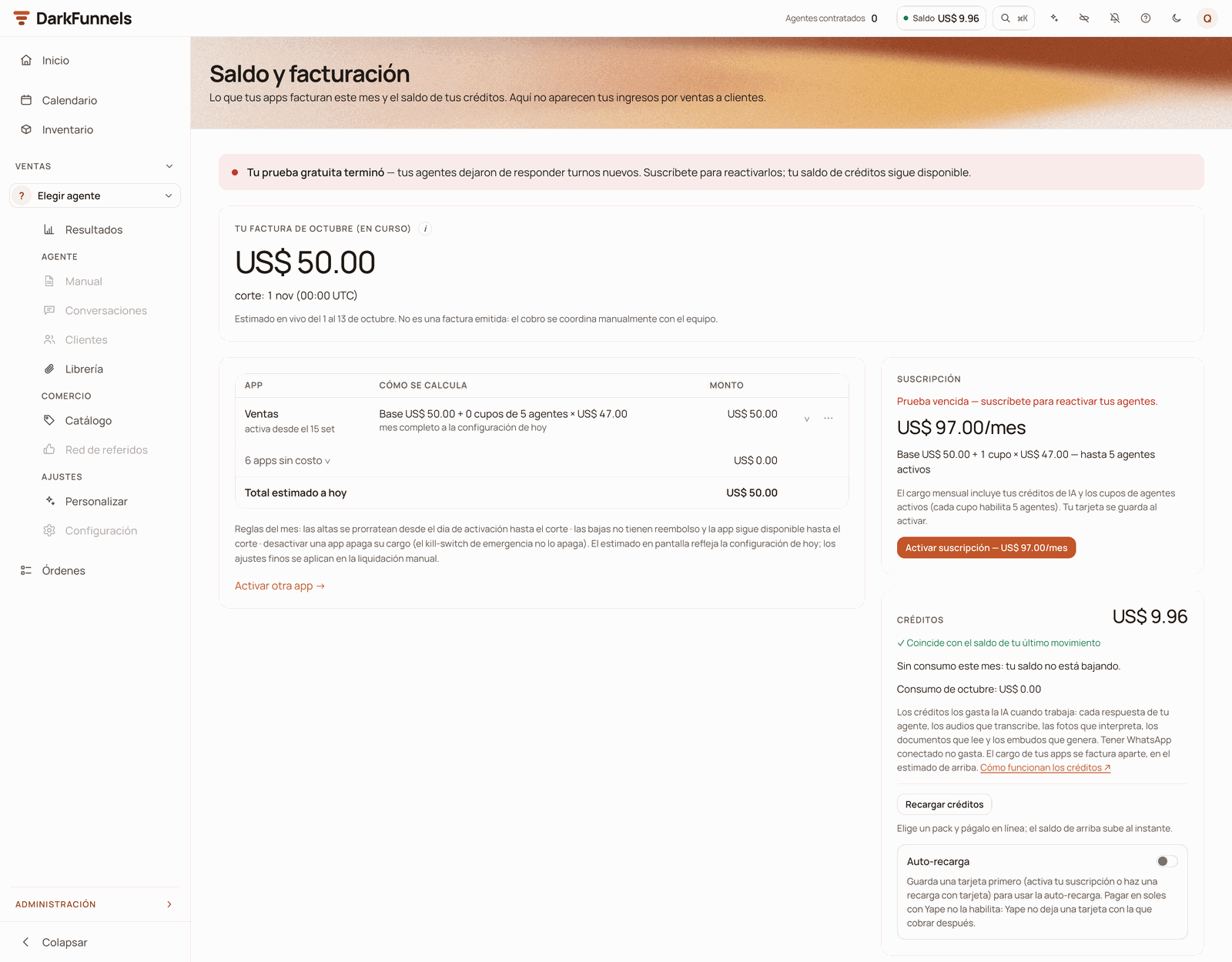
Saldo y facturación (Balance and billing): what your apps bill this month and, in the side column, the Suscripción and Créditos (Subscription and Credits) cards. This account's trial has expired: that is why the red notice shows at the top.
Where the first ones come from
Your trial brings US$ 10 in credit and 7 days with up to 5 active funnels. If you signed up with a referral code, you receive US$ 25 more when you activate your subscription, not during the trial. Your account is born with the full US$ 10, advanced at sign-up so you can build and test your funnel without stopping halfway. Connecting your WhatsApp brings no balance — you already have all of it — but that is where the 7-day clock starts and where your agent begins attending that number. It is covered in Connect your WhatsApp.What consumes balance
What consumes it is the AI’s work, and it is measured by real usage: there is no flat rate per message. With your customers:- Each turn your agent answers — what it reads from the thread and what it writes. A long conversation costs more than a “how much is it?” answered in one line.
- The audio it transcribes, per second of audio.
- The photos it interprets when a customer sends an image.
- The videos customers send you: the AI looks at a few frames and transcribes their audio.
- The voice notes and avatar videos your agent generates, unless you use your own key from the voice or video provider.
- Each conversation answered by Responder con IA (Reply with AI) from the inbox.
- The copilot, also when it guides you with Guíame (Guide me) or helps you build your funnel. No matter who uses it: the copilot used by the people on your team draws from the same company balance.
- The AI buttons, the ones with the ✦ sparkle: for example ✦ Redactar un capítulo con IA (✦ Draft a chapter with AI, in an empty playbook) and the playbook’s text fixes (Estructurar en pasos, Acortar sin perder datos, Extraer condiciones — Structure into steps, Shorten without losing data, Extract conditions). In a chat you are handling yourself, Lectura de la IA (AI read) and the sparkle next to the text box that suggests replies (Recomendar respuesta — Suggest a reply).
- Agent memory: when a Library file has memoria del agente (agent memory) switched on, the AI reads it and prepares it so your agent can consult it.
- Funnel generation, when you ask for it.
- And some AI jobs that run on their own, in the background, on your conversations.
How much each conversation costs you
What the AI spends is measured in tokens (the little pieces of text it reads and writes), but the unit that really helps you is the conversation. That is why the Créditos card in Saldo y facturación translates it with your own data: «Este mes, cada conversación te costó ~US$ 0.15» (“This month, each conversation cost you ~US$ 0.15”), followed by how many conversations your agents started this month and how much they consumed between them. It is an average for the current month, not a rate: it comes from dividing what your agents consumed by the conversations they started. It is the same calculation as Costo por conversación (Cost per conversation) on Inicio (Home) (there, for the period you choose at the top). If some funnel could not be measured, the line admits it with «sobre N de M embudos» (“across N of M funnels”). And while there are no conversations in the month, the card tells you so instead of inventing a figure.How long it lasts you
It depends on how many conversations you have and how long they are, so any number we put here would be untrue for someone. The dashboard tells you with your data: the Créditos card projects «A tu ritmo de consumo, el saldo dura ~N días» (“At your consumption rate, the balance lasts ~N days”) using your real usage for the month, which you see right below it (for example, «Consumo de octubre» — “October usage”). That is the figure worth trusting. That line changes depending on the case:Seeing where your balance went
The detail is in Administración → Dinero → Consumo (Administration → Money → Usage). The screen is titled Consumo de tokens (Token usage) and shows what the AI spends day by day, with the detail of each call.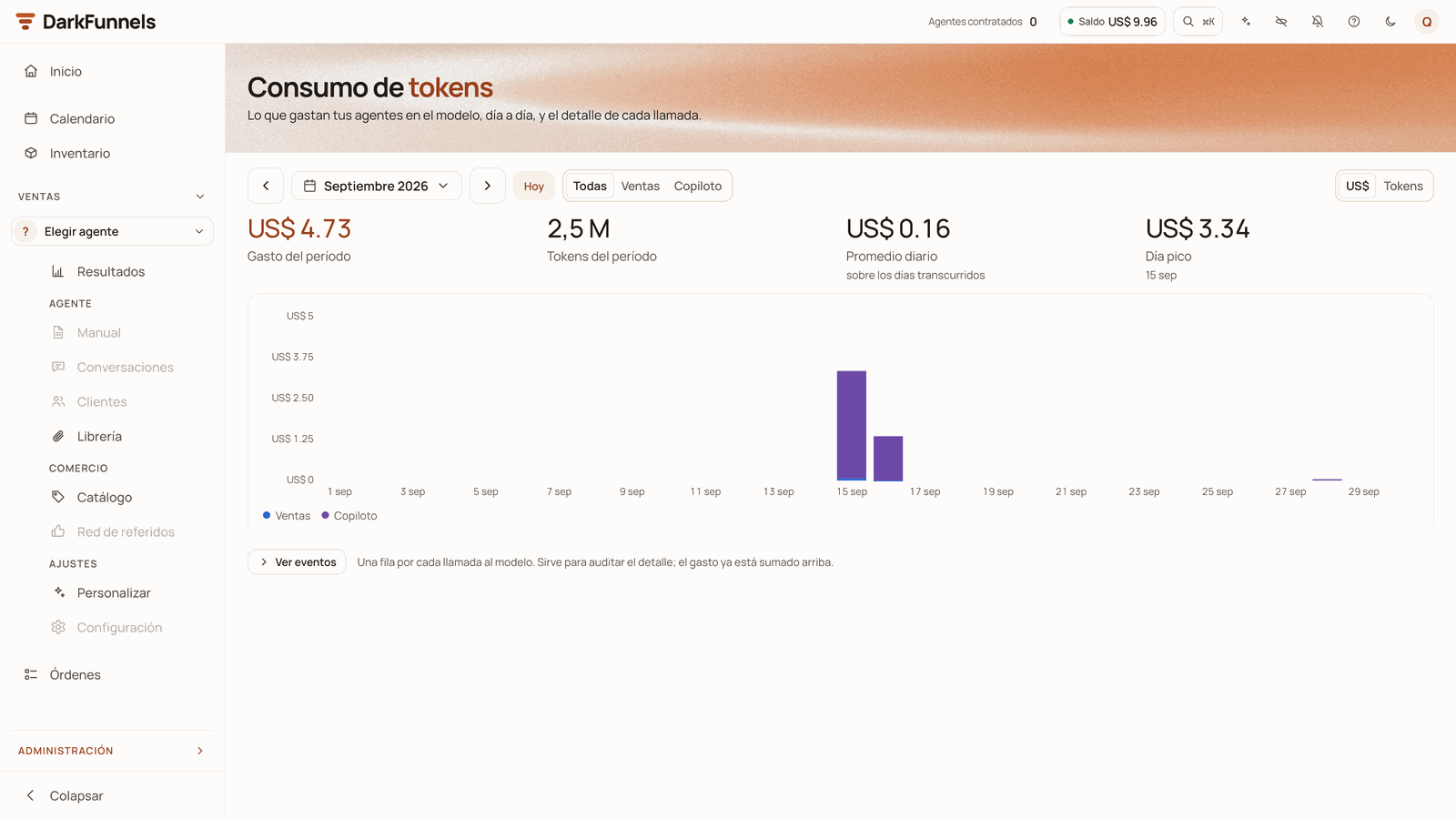
Consumo (Usage): each day's spend (here, September 2026), with the Todas · Ventas · Copiloto (All · Sales · Copilot) filter and the unit in dollars or in tokens.
- You choose the period at the top. The chart and the figures follow that choice.
- Todas · Ventas · Copiloto (All · Sales · Copilot) lets you see separately what the copilot spent.
- With Ventas (Sales) selected, if the spend comes from more than one funnel, a selector appears so you can look at just one (by default, Todos los embudos — All funnels).
- US$ · Tokens switches the chart’s unit.
- The figures for the period: Gasto del período (Spend for the period), Tokens del período (Tokens for the period), the average and the peak (Promedio diario — Daily average — and Día pico — Peak day — when the chart goes by day).
- Ver eventos (View events) opens the audit table: one row for each call to the model, with fecha, modelo, app, tokens and precio (date, model, app, tokens and price). It shows the 200 most recent and is read-only.
What happens when you reach zero
Meanwhile:- The messages people write to you are saved and you see them in the inbox.
- Audio, photos and videos that come in arrive without being transcribed or described.
- The dashboard’s AI buttons stop too, and the copilot answers «Tu cuenta no tiene saldo disponible. Recarga créditos para seguir usando el copiloto.» (“Your account has no balance available. Top up credits to keep using the copilot.”)
- Some background jobs keep running and keep spending, for example transcribing the audio files in your Library. That is why your balance can end up negative even though your agent has already gone quiet. The red notice reminds you: «Tus apps y los trabajos en segundo plano siguen activos, y su cargo estimado sigue corriendo.» (“Your apps and background jobs are still active, and their estimated charge keeps running.”) Whatever is left negative is deducted from your next top-up.
- You get a WhatsApp message when a customer writes and your agent cannot answer. You do not get one for each message: as a rule it repeats once a day per funnel. It says «⚠️ optiMind: tu cuenta se quedó sin saldo suficiente para responder…» (“⚠️ optiMind: your account no longer has enough balance to reply…”) and goes to the numbers you have in your funnel’s Alertas de error (Error alerts) (Funnel settings). If you have no numbers there, that notice does not reach you.
The notices, before and during the cut-off
The cut-off does not wait for exactly US$ 0: your agent goes quiet when the balance drops below US$ 0.10, so you can see a remainder on screen and still have it silent. That is why the dashboard uses several notices, and each one explains what is happening with the balance you see on screen:
The Saldo (Balance) chip in the top bar, here with the green dot: its colored dot warns you before any screen does, and one click takes you to Saldo y facturación.
How to top up
Open the «Recargar créditos» (Top up credits) window
Press «Comprar» (Buy) on the pack you want
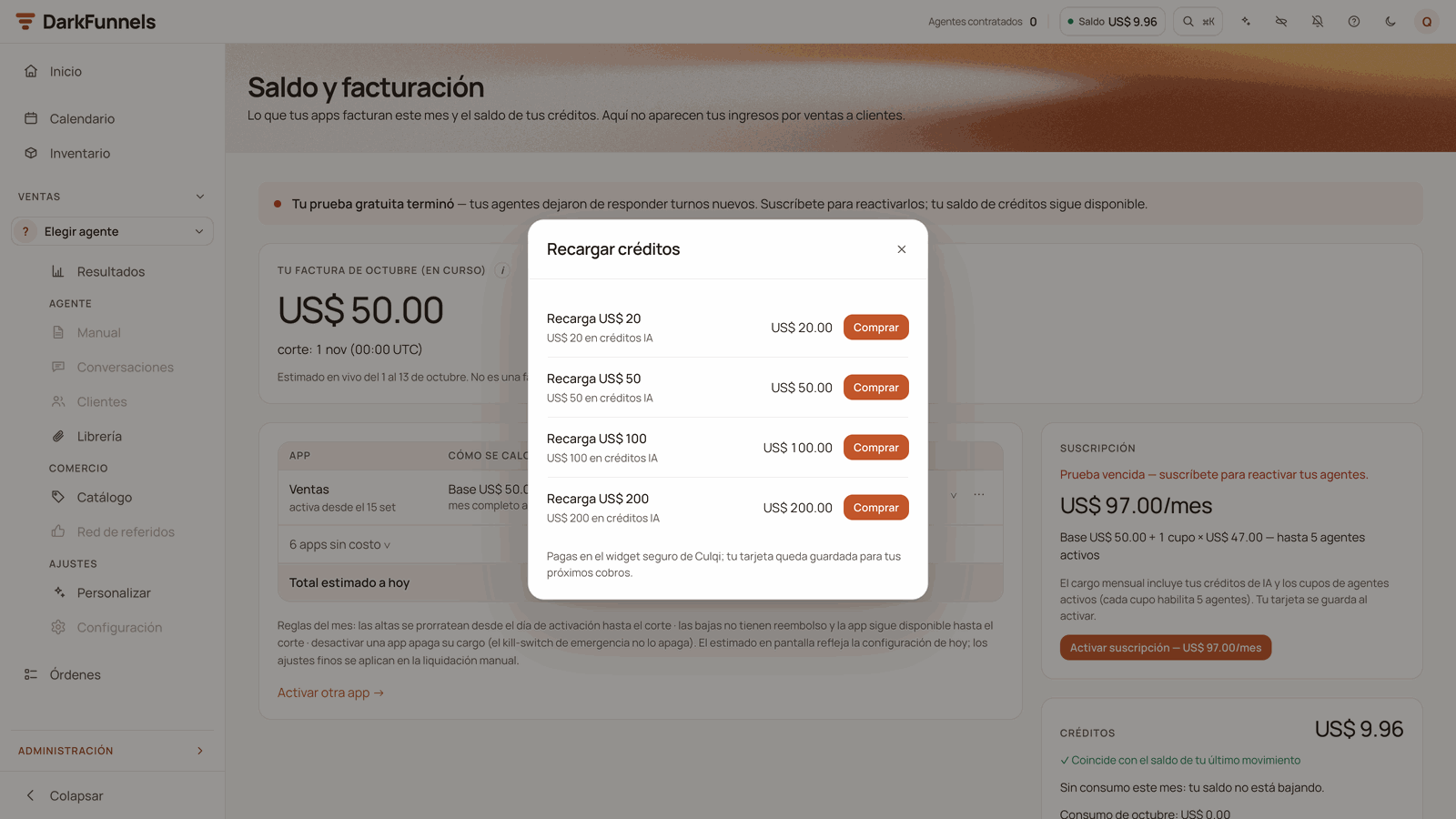
The «Recargar créditos» (Top up credits) window: one Comprar (Buy) button per pack and, at the bottom, how you will be charged (here, with no saved card: you pay in Culqi's secure widget).
Check the receipt
Auto top-up
Auto top-up buys a pack on its own when your balance drops below a threshold you choose. It is the best protection against a silent agent.Find the «Auto-recarga» (Auto top-up) block
Turn on the switch and set your threshold
Choose the pack
Press «Guardar auto-recarga» (Save auto top-up)
- When your balance drops below the threshold, within the following minutes the pack is charged to your primary card and the balance goes up. You get the receipt by email («Autorecarga de créditos ejecutada» — Credit auto top-up completed).
- It fires at most once every 24 hours, even if the charge fails. That is why a threshold with some margin and a pack that lasts you more than a day are a good idea: if you spend more than one pack a day, auto top-up alone will not keep up.
- If the bank declines your primary card and you have a backup card, that one is charged on the spot. You add it in the Métodos de pago (Payment methods) card → Agregar tarjeta de respaldo (Add backup card).
- If the bank declines the charge (and the backup card too, if you have one), nothing is charged and you get the email «Tu auto-recarga de créditos no se pudo procesar» (Your credit auto top-up could not be processed). If your balance is still below the threshold, the next attempt comes once the 24 hours have passed.
- If your subscription stops being active — for example, because the renewal failed three times and it was left past due —, auto top-up stops firing.
Trial, subscription and balance are three different things
It is worth not mixing them up:- The trial is 7 days with up to 5 active funnels. When it ends, your agents and the copilot stop answering even if you have balance to spare. Topping up does not reactivate them: you need to subscribe.
- The subscription is what gives you back active funnels when the trial ends, and it is what enables auto top-up.
- The balance is the AI’s fuel. It is spent with use and topped up whenever you like, whether you are on the trial or on a subscription.
Invite other businesses and earn credits
- they receive US$ 25 in credit;
- you earn US$ 15 in credit for that payment and for each of their renewals, up to 6 charges. The size of their subscription makes no difference.
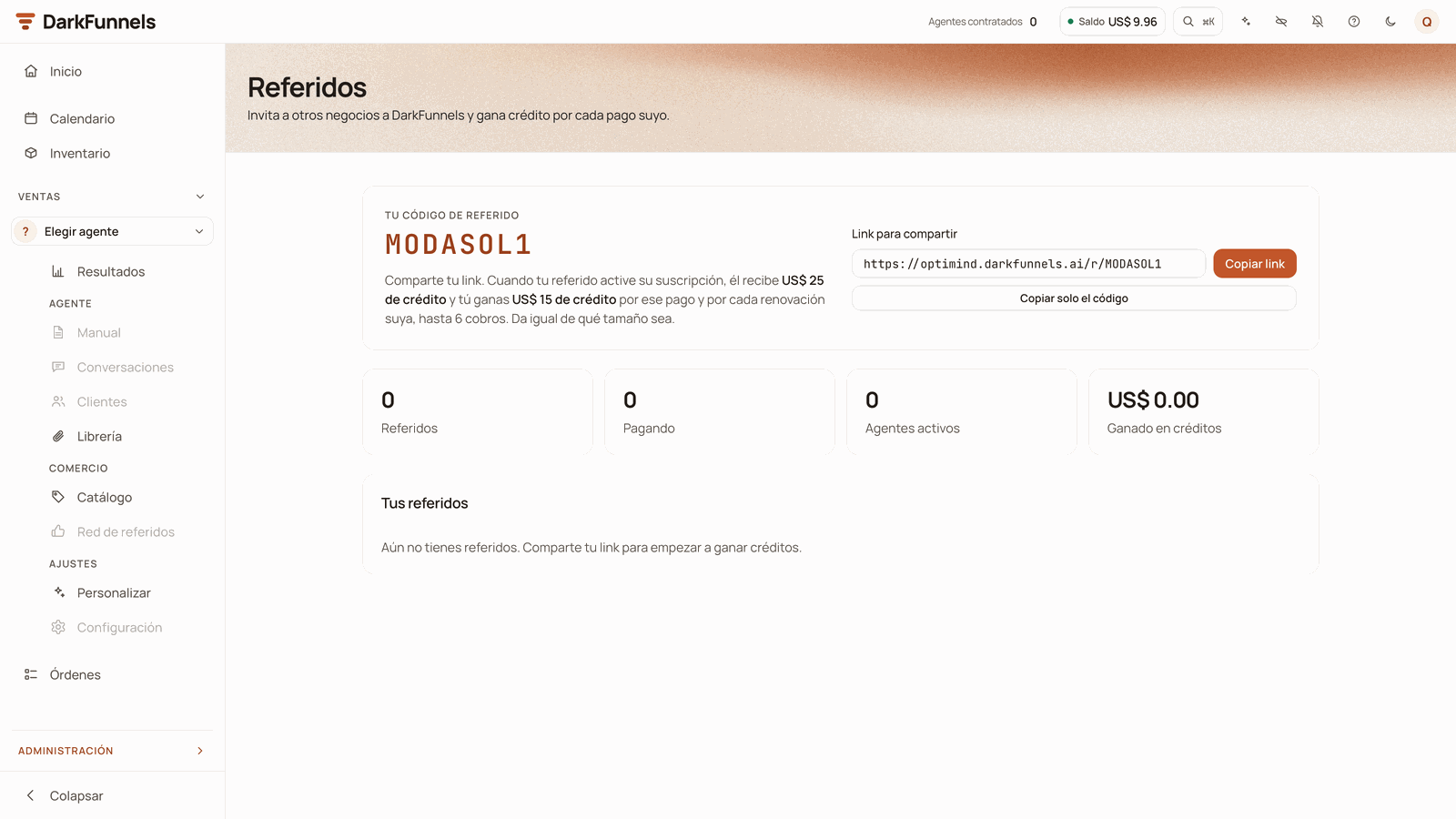
Referidos (Referrals): your code, the link to share, the four figures and the Tus referidos (Your referrals) table, still empty here.
- Tu código de referido (Your referral code) and the Link para compartir (Link to share), with Copiar link (Copy link) and Copiar solo el código (Copy code only). The link goes straight to sign-up with your code already filled in.
- Four figures: Referidos (Referrals), Pagando (Paying), Embudos activos (Active funnels) and Ganado en créditos (Earned in credits).
- The Tus referidos (Your referrals) table: each business with its status — Registrado (Registered: not paying), Suscrito (Subscribed: paying) or Completado (Completed: it has already rewarded you for the 6 charges) —, what you earned with it and the premiados (rewarded) column, which counts the rewarded charges, for example 2/6 cobros (2/6 charges).
If something goes wrong
I have balance and my agent does not answer
I have balance and my agent does not answer
- Does it say «Saldo insuficiente» (Insufficient balance)? Below US$ 0.10 the agent no longer answers, even if you see a remainder on screen.
- Has your trial ended? Without a subscription the agent does not answer even if you have balance to spare; topping up does not fix it.
- Is the funnel paused, or is autopilot switched off in that chat? With the funnel paused, its agent answers nobody; with autopilot off, that chat is handled by a person.
- Is your WhatsApp still connected? Check the common problems in Connect your WhatsApp.
I pressed «Comprar» (Buy) and got an error from the bank
I pressed «Comprar» (Buy) and got an error from the bank
It says «el cobro se realizó pero la acreditación quedó pendiente» (the charge went through but crediting is pending)
It says «el cobro se realizó pero la acreditación quedó pendiente» (the charge went through but crediting is pending)
The window says online payment is not enabled, or it shows no packs
The window says online payment is not enabled, or it shows no packs
I cannot save auto top-up
I cannot save auto top-up
Auto top-up did not top up
Auto top-up did not top up
I topped up and my agent did not answer the people who wrote before
I topped up and my agent did not answer the people who wrote before
The Créditos card says the balance and the last movement do not match
The Créditos card says the balance and the last movement do not match