

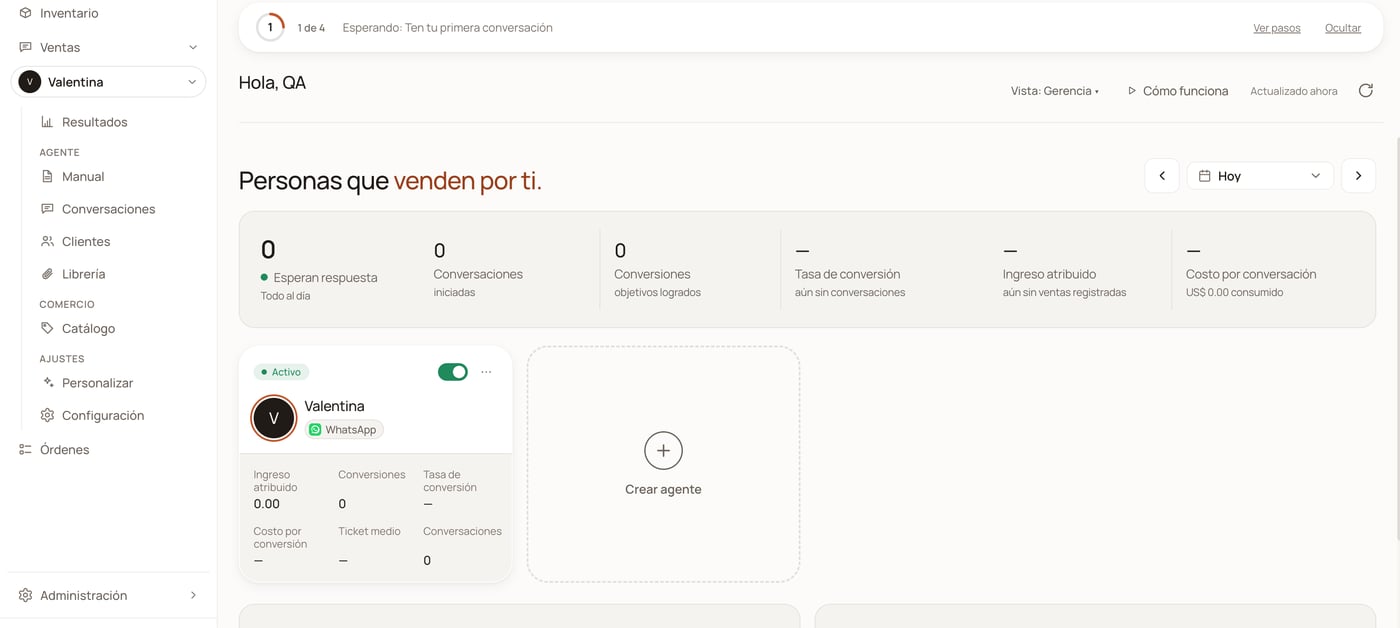
This is what the dashboard looks like: the menu on the left, your agents in the middle and the day's numbers at the top.
Start here
Five pages, in order, from creating the account to your agent replying on
its own. It is the recommended path if you have just arrived.
Open the dashboard
The dashboard is
optimind.darkfunnels.ai: where you sign in with your
email and where everything this documentation describes happens.Connect WhatsApp
The QR step by step, and what exactly happens to that number’s chats.
What does it cost?
The 7-day trial, what happens the day it expires and how much the
subscription is. With the figures.
Guides by task
The sales playbook
The script: chapters, rules, examples. With versions and undo.
The agent's tools
What it does besides writing: record the sale, hand the chat to a person,
schedule follow-ups, look up prices. And how each one is asked for.
The catalog
Products, prices and variants — so the agent does not make anything up.
The file library
The photos, the PDFs and the audios that your agent sends over WhatsApp.
Conversations
Reviewing what happened in the chats and where sales are being lost.
Orders and metrics
What was sold, what it cost and how the business is doing.
Frequently asked questions
Starting with the one that hurts most: “my agent did not reply to a
customer”.
Before you connect your WhatsApp
It is exactly what everybody asks: is it safe for an AI to answer my customers and read my chats? The long answer — what is stored, who sees it and what does not happen — is in Security. The short answer about money: your agent never charges your customers anything. It records the sale; collecting it is up to you. The only thing charged automatically is your own subscription and, if you switch it on, the balance top-up to the card you left stored.Optional: run it from Claude or ChatGPT
Once your agent is selling, you can connect your business to the assistant you already use and ask it things or make changes by talking to it: “go through yesterday’s conversations and tell me where sales are being lost” or “propose an improvement to the closing chapter and save it once I approve it”.This uses MCP, the standard that Claude and ChatGPT use to connect to
external tools; our connection to that standard is what these pages call the
bridge. It is not needed in order to sell: it is a convenience for anyone
who already uses one of those assistants.Always authorize with the same account you use to sign in to the dashboard —
with any other one you would be connecting a business that is not yours.
claude.ai
Two minutes. Works on the free plan.
Claude Code
The connector in your terminal.
Codex
App, editor or terminal — connect once.
ChatGPT
Developer mode (paid plans).
What the bridge does not do
The bridge does not move money: none of its tools charges, transfers, issues payment links or touches your payment provider. Sales are recorded by your WhatsApp agent; the bridge only reads them. The details are in Security.The English mirror of this site is being completed. Anything that is not
mirrored here yet is available in the Spanish documentation, which covers
getting started, the sales playbook, the catalog, the library, conversations,
orders and metrics, and the FAQ in full. The tool
reference is already in English.