WhatsApp AI agent pricing: the 7-day trial with no card, the monthly subscription, how it is charged, how to change your card and what to do if a payment fails.
Three things that are paid for differently and are best not mixed up:
What it is
How much
The trial
7 days, which start over when you connect your WhatsApp
Free, no card
The subscription
What keeps your funnels switched on
From US$ 97 a month
The balance
The fuel for the AI, spent as you use it
You top it up; US$ 50 come back to you every month you pay the subscription
The trial, the subscription and the balance are all shown in one place: in the
side menu, Administración → Dinero → Saldo y facturación (Administration →
Money → Balance and billing).
The subscription and the seats are paid from the dashboard in dollars and by
card. Top-ups too, unless the «Recargar créditos» (Top up credits)
window shows you «Pagar en soles (Yape)» (Pay in soles (Yape)): then you
can top up in soles with Yape. If your card does not go through, the team can
record a top-up or a renewal that you pay by Yape, Plin, bank transfer or in
cash: you will find it in
How it is charged, in the part
«If the charge fails».
Do not confuse it with the Yape or Plin of your sales: that is the money your
customers pay you.
Can’t see Saldo y facturación in your menu? First open Administración:
that block appears collapsed. If, once it is open, the Dinero group is not
there, your user does not have permission to see the business’s billing. Ask
whoever manages the team to switch on «Ver saldo y facturación» (View
balance and billing) for you; how permissions are given is explained in
Invite your team.
Each business pays its own way. If your account is in several businesses,
each one has its own trial, its own balance and its own subscription. Saldo y
facturación shows you those of the business you are in at that moment.
The clock runs from sign-up and starts over with the full 7 days when you connect your WhatsApp.
Up to 5 active funnels
The same as fit in one paid seat.
No card
Signing up does not ask for a single card detail.
It includes US$ 10 of welcome credit, and you have it from sign-up,
advanced so that you can build and test your funnel without getting stuck
halfway. If you signed up with a referral code, you also get US$ 25, but
not during the trial: they arrive when you activate your subscription.
Why the clock starts over when you connect: so that nobody spends their
trial setting up the funnel. If you take a few days to connect, you do not lose
them. That said, connect before 7 days have passed since sign-up: if you
haven’t connected by then, the trial expires on the date that was set when
you signed up.
On connecting, no balance arrives: you already have all of it. What happens
that day is that the 7-day clock starts over, and your agent starts answering
your number. The lifetime welcome total is still US$ 10.
During the trial, the Suscripción (Subscription) box in Saldo y
facturación tells you how many days you have left: «Prueba activa · quedan N
días» (Trial active · N days left).
Your agent stops replying that very instant. There is no grace period. The
date is checked on every incoming message.
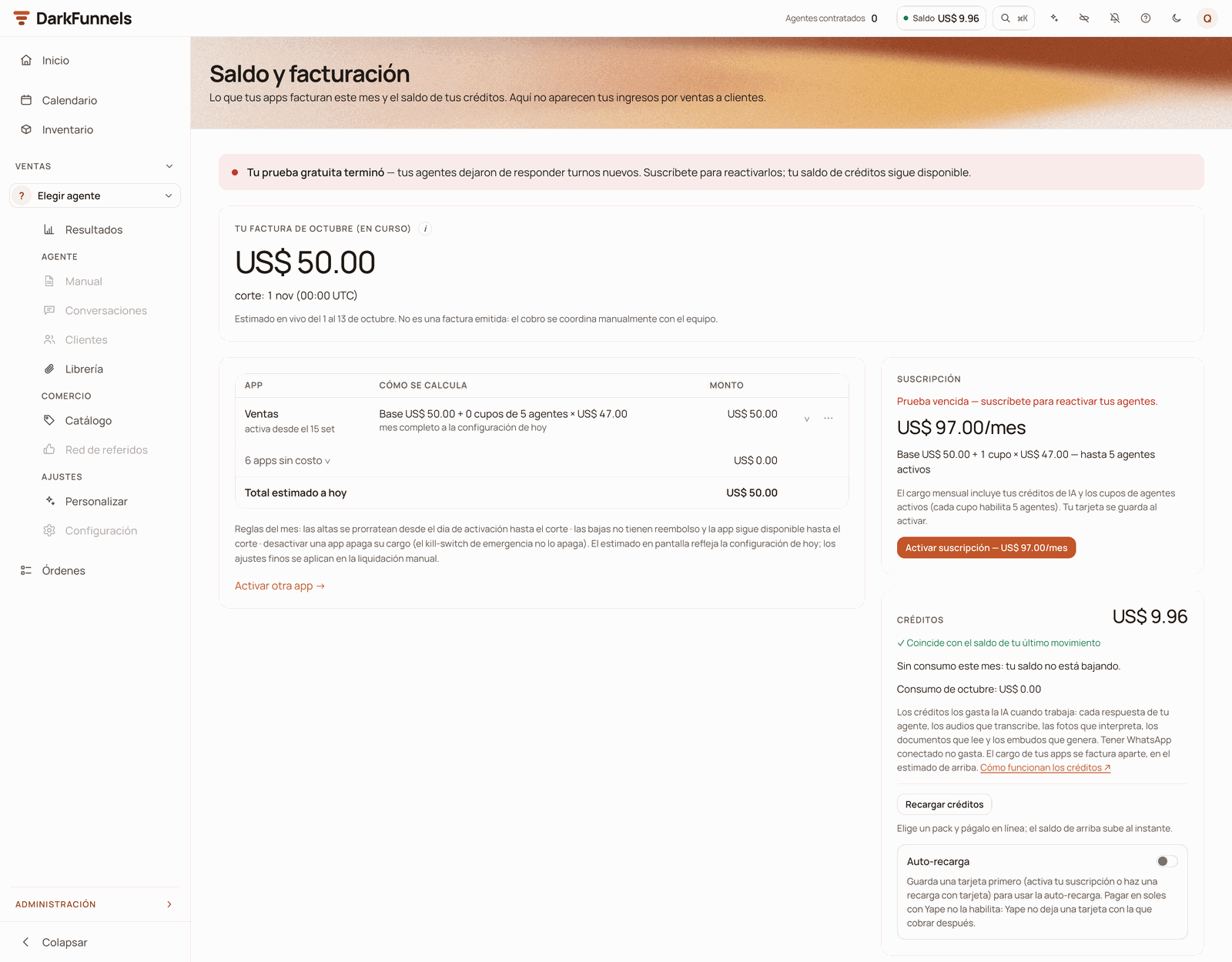
With the trial expired, a notice at the top tells you so and the Suscripción box offers to activate it.
In Saldo y facturación the notice «Tu prueba gratuita terminó — tus
agentes dejaron de responder turnos nuevos» (Your free trial has ended — your
agents stopped replying to new turns) appears, and the Suscripción box
says «Prueba vencida — suscríbete para reactivar tus embudos» (Trial expired
— subscribe to reactivate your funnels).Along with your agent, two more things are paused:
The copilot. If you write to it, it replies that your trial has ended and
that the copilot and your agents are paused until you choose a plan.
Switching funnels on. You cannot activate a funnel until you subscribe.
What does not happen, worth knowing because it is what everybody fears:
Nothing is deleted. Your funnel, its playbook, your conversations, your
contacts and your files stay intact.
Not a single message is lost. What your customers write to you keeps
being saved and you see it in the inbox, even while the agent is silent.
Your balance is still there. Whatever you have left, you use when you
subscribe.
When you subscribe, your agent does not answer the backlog. The messages
that arrived while it was silent were saved, but they did not sit in a queue:
your agent picks up with the next message that customer writes. If nobody
writes again, nobody gets a reply.
To avoid leaving those customers without a reply, go through the inbox. If your
inbox offers you «Responder con IA» (Reply with AI), you can choose the
chats that were left waiting and ask the AI to answer them: it does so one at a
time, one per minute and only from 8:00 to 21:00 in your agent’s time zone, if
the customer wrote to you 7 days ago or less. Each reply spends balance, like
any other. It is explained in
Reply with AI.
They reach you by email, and they depend on whether you have already connected
your WhatsApp:
If…
You get
You have already connected your WhatsApp
One email when there are 3 days left and another when there is 1.
You have not connected it yet
Emails on days 1, 3 and 5 after your sign-up reminding you to connect it, and the notice when there is 1 day left.
And once it has expired, the next time a customer writes you get a WhatsApp
message starting with «⚠️ optiMind:» at the numbers you have in Alertas
de error (Error alerts), in your
funnel settings.
The notice goes to you, not to the customer. If that list is empty, that notice
does not arrive.
It is made up of two parts. With one seat, the minimum, it comes to US$ 97 a
month:
Item
Price
What it gives you
Base
US$ 50 / month
A fixed charge per business, however many seats you have. It comes back to you in full as AI credit balance.
Seat
US$ 47 / month
Up to 5 active funnels. You pay for at least one.
Real minimum
US$ 97 / month
Base + one seat, with US$ 50 of balance inside
The seat is not «per funnel». A business with 5 funnels pays the same as one
with 1: US$ 97. To switch on a sixth funnel you need a second seat
(US$ 47 more a month), which you add yourself from the Suscripción box.
The US$ 50 of the base are not a lost charge. They come back in full to
your credit balance when you activate the subscription and again on every
renewal that gets charged. In practice, out of the US$ 97 the net charge for
the platform is the US$ 47 of the seat; the rest is fuel you have already
bought.
In the side menu, Administración → Dinero → Saldo y facturación.
Look for the Suscripción box: it shows you the month’s amount
(«US$ 97.00/mes») and its breakdown, «Base US$ 50.00 + 1 cupo ×
US$ 47.00 — hasta 5 embudos activos» (Base US$ 50.00 + 1 seat ×
US$ 47.00 — up to 5 active funnels).
2
Press «Activar suscripción»
The button carries the amount: «Activar suscripción — US$ 97.00/mes»
(Activate subscription — US$ 97.00/month). The secure payment window of
Culqi, the payment gateway we charge through, opens. Enter your card
details and pay.
3
Done: it is active
You see the «Suscripción activada» (Subscription activated) receipt on
screen and it also reaches you by email. The Suscripción box changes to
say «Activa» (Active), and the card you paid with is stored: it is the
one charged every month.
From that moment your agents reply again (starting from each customer’s next
message), and the US$ 50 of the base reach your balance.
If you signed up with a referral code, your US$ 25 also arrive that day.
Saldo y facturación: the month's invoice with the apps table and, in the column beside it, the Suscripción and Créditos boxes. It is an account whose trial has expired: that is why the Suscripción box still offers to activate it.
You can subscribe in the middle of your trial. The charge is that day and
your month starts there: the trial days you had left are not added to the
month.
Today only the Ventas (Sales) app charges a subscription. Calendario
(Calendar), Inventario (Inventory), Órdenes (Orders), Envíos (Shipping)
and Facturación electrónica (Electronic invoicing) show as «Gratis»
(Free): switching them on does not raise your invoice. The dashboard copilot
does not have a monthly charge of its own either, but its conversations do
consume balance, like any other AI work.In Saldo y facturación you see it in your invoice table: Ventas appears with
its calculation («Cómo se calcula», How it is calculated) and its amount, and
the rest is grouped into a row «N apps sin costo» (N apps at no cost) at
US$ 0.00. Below the table, «Activar otra app →» (Activate another app →)
takes you to the Apps screen, where each app shows its price. Only whoever
manages the team sees that screen.
The Apps screen: each app's box shows its status and its price; those that do not charge a subscription say «Gratis», and Ventas shows its base and its slots.
To run the numbers before deciding: in your invoice table, open the Ventas
row with the ∨ arrow. There you have a simulator, «¿Y si tuviera N
embudos?» (What if I had N funnels?), which tells you how many seats you would
need and how much your estimate would go up. It is only a calculation: it does
not change anything.
It is charged to your main card: the one you stored when activating, or
the one you put in later with «Cambiar tarjeta» (Change card). You
see the date in the Suscripción box: «Se renueva el … con tu tarjeta
guardada (culqi)» (Renews on … with your stored card (culqi)).
2
Three days before, we let you know by email
You get «Tu suscripción se renueva el …» (Your subscription renews on
…) with the date, the amount and the card that is going to be charged. If
that card no longer works, you have time to change it before the charge.
3
Adding a seat is charged prorated
In the Suscripción box, press + next to «cupos contratados»
(seats contracted). «Contratar un cupo más (+5 embudos)» (Add one
more seat (+5 funnels)) opens and tells you the «Cobro prorrateado hoy»
(Prorated charge today), how many funnels you go up to and how your
estimate for the month changes. You pay only for the part of the period
that is left, with a minimum of US$ 1. With a stored card it is charged on
the spot and the seat is available immediately.
4
Removing a seat is not immediate
Press −. The removal is scheduled for your next billing date: until
then you keep your funnels, and what you have already paid is not refunded.
The box says so with «Tu cuota baja a N cupos (M embudos) el …» (Your
plan goes down to N seats (M funnels) on …). It is rejected if you have
more funnels switched on than would fit without that seat: switch some off
first.
Seats are managed with the subscription active. During the trial the +
and − buttons do not appear. And if the renewal has had three failed
charge attempts, you cannot add seats until you pay it.If you had a removal scheduled, pressing + cancels it without charging you
anything, even if the window shows you the prorated amount.
They are managed in the Métodos de pago (Payment methods) box in Saldo y
facturación. Your first card is stored automatically when you activate the
subscription or make your first top-up by card; before that you will see
«Aún no hay una tarjeta guardada» (There is no stored card yet).
You want to…
How
Change your card
Press «Cambiar tarjeta». The payment window opens with the title «Cambiar tarjeta · sin cobro» (Change card · no charge). From that moment, charges use the new one and the previous one is no longer stored (your backup card, if you have one, stays as it is).
Have a backup card
Press «Agregar tarjeta de respaldo» (Add backup card); the window says «Tarjeta de respaldo · sin cobro» (Backup card · no charge).
Make the backup card the main one
Press «Usar como principal» (Use as main). The one that was the main card becomes the backup.
Remove the backup card
Press «Quitar» (Remove) and confirm with «Sí, quitar» (Yes, remove).
Even if the window’s button says «Pagar» (Pay), nothing is charged. When
you change or add a card, the window title warns «sin cobro» (no charge):
the card is only stored. If the bank rejects it, your previous card stays as it
was.
What the backup card is for: if the bank rejects your main card on a
renewal or an auto top-up, the backup card is charged on the spot, and the
email for that charge tells you so. In the payments you make yourself from the
dashboard — topping up, adding a seat, «Pagar ahora» (Pay now) — the main
card is used.The main card cannot be removed: it is replaced by another one. If what you
want is to stop paying, you have to cancel (see
What you cannot do on your own today).
From the first rejection, the Suscripción box changes its badge to
«Pago pendiente» (Payment pending) and tells you «No pudimos cobrar tu
renovación. Volvemos a intentarlo el … con tu tarjeta guardada.» (We could
not charge your renewal. We will try again on … with your stored card.) You
have three ways out:
Button
What it does
«Pagar ahora — US$ 97.00» (Pay now)
Charges the renewal on the spot to your stored card. Below it, it tells you which one: «Se cobra en el acto a tu Visa •••• 1234.» (It is charged on the spot to your Visa •••• 1234.)
«Pagar con otra tarjeta» (Pay with another card)
Opens the payment window. The card you use becomes your main card and the previous one is no longer stored (your backup card, if you have one, stays as it is).
«Pagar de otra forma →» (Pay another way →)
Opens WhatsApp with our team and a message already written. You can pay by Yape, Plin, bank transfer or in cash, and we record it as your renewal.
The amount on the button is that of your renewal: if you have more seats, it is
more. If you have no stored card, «Pagar ahora» opens the payment window
directly. When you pay, you see the «Renovación pagada» (Renewal paid)
receipt and the subscription goes back to «Activa».
If you pay outside the card, nothing gets out of step. The renewal the team
records counts just the same: your month renews and the US$ 50 of balance
arrive. The following month it is charged to your card again, as usual.
If you do nothing, this is what happens:
It is retried every day with your stored card. If the bank rejected the
main card and you have a backup card, the backup is tried in that same
attempt.
We write to you by email on the first failed attempt and on the third.
Your funnel is not switched off because of that: its agent keeps replying for as
long as you have balance left.
What does stop: while the renewal is not charged, that month’s US$ 50 of
balance do not arrive. And from the third failed attempt on, auto top-up stops
working, so your balance can run out.
Every charge that goes through the payment gateway reaches you by email with
its receipt: the breakdown of what was charged, what you paid with and the
operation number (N.º de operación). When you activate the subscription,
top up and use «Pagar ahora», you also see it on screen. Automatic charges
(the renewal and the auto top-up) and the charge for a new seat reach you by
email only.What you pay outside the gateway (Yape, Plin, bank transfer or cash) and the
team records does not generate that email: keep the proof of your payment.
The dashboard does not keep a history of your receipts. If you close the
receipt window, your copy is the one in the email. In Saldo y facturación you
see your balance and the month’s estimate, not a list of charges: keep those
emails.
It is solved by writing to the team, but it is honest to say so before you find
out:
You want to…
Today
Cancel the subscription
There is no button. Write to us and we cancel it.
Go below the last seat
The − button is disabled with one seat: it is the minimum.
Remove your main card without putting in another
It cannot be done. You can replace it with another one using «Cambiar tarjeta».
Pay by Yape, Plin, bank transfer or in cash
Not the subscription: write to us and we record your renewal. To top up, if the «Recargar créditos» window shows you «Pagar en soles (Yape)», you do it yourself; if not, write to us and we record the top-up. The first subscription does need a card.
A SUNAT receipt or invoice (boleta or factura) for your subscription
The dashboard does not issue it. Your proof of payment is the receipt that reaches you by email with each charge through the gateway; if you paid outside it, the proof of your payment.
Delete your account if you sign in with Google, or if your account is also in another business
Write to us and we close it. If you sign in with email and password and you are the owner, you do it yourself in Administración → Cuenta → Ajustes (Administration → Account → Settings), at the bottom, in «Eliminar cuenta» (Delete account). Careful: when you delete it you lose whatever balance you have left.
No, unless you decide to top up balance or subscribe before it ends. No card
is asked for to start. What is consumed in those 7 days is your welcome
credit, and only when the AI works.
Is the referral code credit collected by whoever referred me?
No: the US$ 25 are collected by whoever signs up with the code, and
they receive them when they activate their subscription, not on signing
up and not on connecting WhatsApp.Whoever refers earns separately: US$ 15 of credit for each charge
of their referral — the first payment and every renewal — up to 6
charges. If the referral stops paying, they stop generating rewards; if
they come back, the count picks up where it left off until the six are
complete.
Where do I see my code to invite other businesses?
In Administración → Plataforma → Referidos (Administration → Platform
→ Referrals). There you have your code, the link to share («Copiar
link» (Copy link) or «Copiar solo el código» (Copy only the
code)), how many referrals you have, how many are paying and what you have
earned so far. You get an email when someone signs up with your code and
every time your US$ 15 are credited to you.Do not confuse it with the Red de referidos (Referral network) in the
Ventas app: that is the program for your customers to bring you
customers. It is explained in
Referral network.If you do not see Referidos in your menu, open Administración: that
block appears collapsed. If it is not there once it is open either, your
user does not have permission to see the business’s billing.
Is the balance I bought lost when the trial ends?
No. The balance does not expire and is not reset every month: it is a
single balance that accumulates and is still there when you subscribe.
Can I pay in soles or with Yape?
Not the subscription or the seats: they are paid in dollars and by card. A
top-up, yes, you can pay in soles with Yape if the «Recargar créditos»
window shows you «Pagar en soles (Yape)». If it does not appear, write
to the team: they can record a top-up or a renewal that you pay by
Yape, Plin, bank transfer or in cash.The first subscription does need a card: it is the one that stays
stored to charge the following months.
If prices go up, do I keep mine?
There is no price frozen per customer: each renewal is calculated with the
price in force that day. According to the
Terms, a price change applies going
forward and is announced in advance.
I have two businesses in my account. Do I pay twice?
Each business has its own trial, its own balance and its own subscription,
and each one is charged separately, with the card stored in that business.
If you are in another business because you were invited, its subscription
is paid from that business: your account pays nothing for being in it.
Saldo y facturación shows you those of the business you are in; to see the
other one, switch business. It is explained in
Invite your team.
What spends balance, how long it lasts you and how to top up.
Connect your WhatsApp
The step that starts the trial clock over and puts your agent to work.
Last modified on October 19, 2026
{"docsConfig":{"theme":"mint","$schema":"https://mintlify.com/docs.json","name":"DarkFunnels","description":"Vende por WhatsApp con un agente de ventas IA — y opéralo desde tu asistente.","colors":{"primary":"#C2562A","light":"#D86A3C","dark":"#9A3F1C"},"logo":{"light":"https://mintcdn.com/darkfunnels/Df-1lKh1Aj5k8c-r/logo/light.svg?fit=max\u0026auto=format\u0026n=Df-1lKh1Aj5k8c-r\u0026q=85\u0026s=db60a9a883ed42e13a06aded18a08fb0","dark":"https://mintcdn.com/darkfunnels/Df-1lKh1Aj5k8c-r/logo/dark.svg?fit=max\u0026auto=format\u0026n=Df-1lKh1Aj5k8c-r\u0026q=85\u0026s=ab6a8b17d7e5e0d3b45de82ecd342327"},"favicon":"https://mintcdn.com/darkfunnels/Df-1lKh1Aj5k8c-r/favicon.svg?fit=max\u0026auto=format\u0026n=Df-1lKh1Aj5k8c-r\u0026q=85\u0026s=caa397a60f25d85c3d14d40fc8bb4841","navbar":{"primary":{"type":"button","label":"Entrar al panel","href":"https://optimind.darkfunnels.ai"}},"footer":{"socials":{"website":"https://darkfunnels.ai"}},"seo":{"metatags":{"og:locale":"es_PE"},"organization":{"id":"https://darkfunnels.ai/#organization","name":"DarkFunnels","url":"https://darkfunnels.ai","sameAs":["https://github.com/darkfunnels-ai"]},"indexing":"navigable"},"fonts":{"family":"Manrope"},"errors":{"404":{"redirect":false}},"contextual":{"options":["copy","view","claude","chatgpt","perplexity","cursor","vscode","mcp"],"display":"header"},"metadata":{"timestamp":true},"markdown":{"instructions":["DarkFunnels is a WhatsApp AI sales-agent platform used mainly in Peru and Latin America. The product interface and most of this documentation are in Spanish; the /en tree is the English mirror.","A business connects the WhatsApp number it already uses by scanning a QR code from the dashboard, the same linked-device mechanism as WhatsApp Web. It does not go through the Meta Cloud API (WhatsApp Business Platform), so there is no application to get approved and no message templates to submit. DarkFunnels is not a Meta product and is not affiliated with Meta.","DarkFunnels also publishes a remote MCP server at https://mcp.darkfunnels.ai/mcp?features=all (without parameters it only carries the default, mostly read-only set) so an assistant such as Claude, ChatGPT or Codex can operate the workspace on the owner's behalf, in one company and within the permissions of the person who connects it. The tool reference is at /referencia/tools and the connection parameters at /referencia/url-de-conexion.","The dashboard is https://optimind.darkfunnels.ai, the marketing site is https://darkfunnels.ai and the page written for AI agents is https://darkfunnels.ai/agents."]},"styling":{"latex":false},"navigation":{"languages":[{"language":"es","default":true,"href":""},{"language":"en","href":"en"}]}},"deployment":{"deploymentMetadataValue":{"subdomain":"darkfunnels","hasAudioNarration":false,"actualSubdomain":"darkfunnels","customDomains":["docs.darkfunnels.ai"],"gitSource":{"type":"github","owner":"darkfunnels-ai","repo":"optimind-docs","deployBranch":"main","contentDirectory":"","isPrivate":true,"mountPath":"","label":""},"chroma":{"latestBuiltDeploymentHistoryId":"6ad6a0705c698d64cc0b179c","collectionId":"09c1a31a-e794-4676-b353-1de0e8edd33d","liveDeploymentHistoryId":"6ad6a0705c698d64cc0b179c","schemaVersion":"v3"},"entitlements":{"AI_CHAT":{"status":"DISABLED"}},"buildId":"6ad6a0705c698d64cc0b179c","clientVersion":"0.0.3894","searchFilterCounts":[{"language":"en","tag":"Guides","count":11},{"language":"es","tag":"Guías","count":11},{"language":"en","tag":"Getting started","count":8},{"language":"es","tag":"Primeros pasos","count":8},{"language":"en","tag":"Optional: run it from Claude or ChatGPT","count":6},{"language":"es","tag":"Opcional: opéralo desde Claude o ChatGPT","count":6},{"language":"en","tag":"Reference","count":3},{"language":"es","tag":"Referencia","count":3},{"language":"en","tag":"Start","count":1},{"language":"en","tag":"Security","count":1},{"language":"es","tag":"Empezar","count":1},{"language":"es","tag":"Seguridad","count":1}]},"assistantConfig":{"enableAskAiButton":false,"enableStarterQuestions":false,"enableContextualStarterQuestions":false,"enableAskAiSearchBar":true},"hasChatPermissions":false,"hasWebMcpPermissions":false,"toggles":[{"name":"kill-isr","enabled":true,"variant":{"name":"disabled","enabled":false,"feature_enabled":true},"impressionData":false},{"name":"agent-mintlify-slack","enabled":true,"variant":{"name":"disabled","enabled":false,"feature_enabled":true},"impressionData":false},{"name":"editor-v7-file-tree","enabled":true,"variant":{"name":"disabled","enabled":false,"feature_enabled":true},"impressionData":false},{"name":"agent-integrations-settings","enabled":true,"variant":{"name":"disabled","enabled":false,"feature_enabled":true},"impressionData":false},{"name":"automations-pr-grouping","enabled":true,"variant":{"name":"disabled","enabled":false,"feature_enabled":true},"impressionData":false},{"name":"custom-prefix","enabled":true,"variant":{"name":"disabled","enabled":false,"feature_enabled":true},"impressionData":false},{"name":"analytics-v7","enabled":true,"variant":{"name":"disabled","enabled":false,"feature_enabled":true},"impressionData":false},{"name":"user-flows-analytics","enabled":true,"variant":{"name":"disabled","enabled":false,"feature_enabled":true},"impressionData":false},{"name":"no-publish-flow","enabled":true,"variant":{"name":"disabled","enabled":false,"feature_enabled":true},"impressionData":false},{"name":"workos-onboarding","enabled":true,"variant":{"name":"disabled","enabled":false,"feature_enabled":true},"impressionData":false},{"name":"llms-txt-v2","enabled":true,"variant":{"name":"disabled","enabled":false,"feature_enabled":true},"impressionData":false},{"name":"pause-universal-search-reconcile","enabled":true,"variant":{"name":"disabled","enabled":false,"feature_enabled":true},"impressionData":false},{"name":"snapshot-serving-live","enabled":true,"variant":{"name":"disabled","enabled":false,"feature_enabled":true},"impressionData":false},{"name":"stripTemperatureMiddleware","enabled":true,"variant":{"name":"disabled","enabled":false,"feature_enabled":true},"impressionData":false},{"name":"per-site-search-delta","enabled":true,"variant":{"name":"disabled","enabled":false,"feature_enabled":true},"impressionData":false},{"name":"support-platform-pylon-zendesk","enabled":true,"variant":{"name":"disabled","enabled":false,"feature_enabled":true},"impressionData":false},{"name":"editor-branches-v2-autocommit","enabled":true,"variant":{"name":"disabled","enabled":false,"feature_enabled":true},"impressionData":false},{"name":"editor-branches-v2","enabled":true,"variant":{"name":"disabled","enabled":false,"feature_enabled":true},"impressionData":false},{"name":"snapshot-serving","enabled":true,"variant":{"name":"disabled","enabled":false,"feature_enabled":true},"impressionData":false},{"name":"instant-rollback","enabled":true,"variant":{"name":"disabled","enabled":false,"feature_enabled":true},"impressionData":false},{"name":"granular-notifications-server","enabled":true,"variant":{"name":"disabled","enabled":false,"feature_enabled":true},"impressionData":false},{"name":"granular-notifications","enabled":true,"variant":{"name":"disabled","enabled":false,"feature_enabled":true},"impressionData":false},{"name":"editor-private-page-search","enabled":true,"variant":{"name":"disabled","enabled":false,"feature_enabled":true},"impressionData":false},{"name":"automations-fable","enabled":true,"variant":{"name":"disabled","enabled":false,"feature_enabled":true},"impressionData":false},{"name":"fixed-ai-action-pricing","enabled":true,"variant":{"name":"disabled","enabled":false,"feature_enabled":true},"impressionData":false},{"name":"automation-resolve-merge-conflict","enabled":true,"variant":{"name":"disabled","enabled":false,"feature_enabled":true},"impressionData":false},{"name":"scoped-publishing","enabled":true,"variant":{"name":"disabled","enabled":false,"feature_enabled":true},"impressionData":false},{"name":"mintql","enabled":true,"variant":{"name":"disabled","enabled":false,"feature_enabled":true},"impressionData":false},{"name":"page-level-analytics","enabled":true,"variant":{"name":"disabled","enabled":false,"feature_enabled":true},"impressionData":false},{"name":"teamspace","enabled":true,"variant":{"name":"disabled","enabled":false,"feature_enabled":true},"impressionData":false},{"name":"editor-version-history-v2","enabled":true,"variant":{"name":"disabled","enabled":false,"feature_enabled":true},"impressionData":false},{"name":"vite-origin","enabled":true,"variant":{"name":"disabled","enabled":false,"feature_enabled":true},"impressionData":false},{"name":"editor-nav-generations","enabled":true,"variant":{"name":"disabled","enabled":false,"feature_enabled":true},"impressionData":false},{"name":"workspace-projects","enabled":true,"variant":{"name":"disabled","enabled":false,"feature_enabled":true},"impressionData":false},{"name":"assistant-v5","enabled":true,"variant":{"name":"disabled","enabled":false,"feature_enabled":true},"impressionData":false},{"name":"byok-sep-25","enabled":true,"variant":{"name":"disabled","enabled":false,"feature_enabled":true},"impressionData":false},{"name":"revalidation-jwt","enabled":true,"variant":{"name":"disabled","enabled":false,"feature_enabled":true},"impressionData":false},{"name":"editor-agent-model-picker","enabled":true,"variant":{"name":"disabled","enabled":false,"feature_enabled":true},"impressionData":false},{"name":"client-snapshot-docs-config","enabled":true,"variant":{"name":"disabled","enabled":false,"feature_enabled":true},"impressionData":false},{"name":"hobby-abuse-scan","enabled":true,"variant":{"name":"disabled","enabled":false,"feature_enabled":true},"impressionData":false}],"isAtlas":false,"googleFontsInlined":true},"customCss":[{"filePath":"style.css","content":"@font-face{font-family:'JetBrains Mono';src:url(/fonts/jetbrains-mono-latin.woff2) format('woff2');font-weight:100 800;font-style:normal;font-display:swap}:root{--primary:194 86 42;--primary-light:216 106 60;--primary-dark:154 63 28;--background-light:255 255 255;--background-dark:23 18 14;--gray-50:247 245 241;--gray-100:245 243 239;--gray-200:237 234 228;--gray-300:224 220 212;--gray-400:154 144 137;--gray-500:124 114 106;--gray-600:107 98 91;--gray-700:61 53 47;--gray-800:42 35 29;--gray-900:33 27 23;--gray-950:23 18 14;--font-paper-mono:'JetBrains Mono';--default-mono-font-family:'JetBrains Mono', ui-monospace, SFMono-Regular,\n Menlo, Monaco, Consolas, 'Liberation Mono', 'Courier New', monospace;--rounded-xl:18px}"}],"page":{"pagePath":"en/getting-started/pricing","slug":"/en/getting-started/pricing","pageMetadata":{"title":"WhatsApp AI agent pricing and plans","sidebarTitle":"Pricing","description":"WhatsApp AI agent pricing: the 7-day trial with no card, the monthly subscription, how it is charged, how to change your card and what to do if a payment fails.","keywords":["WhatsApp AI agent pricing","WhatsApp automation cost","free WhatsApp agent trial","AI sales agent subscription","WhatsApp agent credits"],"href":"/en/getting-started/pricing"},"description":{"compiledSource":"\"use strict\";\nconst {jsx: _jsx} = arguments[0];\nconst {useMDXComponents: _provideComponents} = arguments[0];\nfunction _createMdxContent(props) {\n const _components = {\n p: \"p\",\n ..._provideComponents(),\n ...props.components\n };\n return _jsx(_components.p, {\n children: \"WhatsApp AI agent pricing: the 7-day trial with no card, the monthly subscription, how it is charged, how to change your card and what to do if a payment fails.\"\n });\n}\nfunction MDXContent(props = {}) {\n const {wrapper: MDXLayout} = {\n ..._provideComponents(),\n ...props.components\n };\n return MDXLayout ? _jsx(MDXLayout, {\n ...props,\n children: _jsx(_createMdxContent, {\n ...props\n })\n }) : _createMdxContent(props);\n}\nreturn {\n default: MDXContent\n};\n","frontmatter":{},"scope":{}},"pageType":"default","mdx":{"mdxSource":{"compiledSource":"\"use strict\";const{Fragment:_Fragment,jsx:_jsx,jsxs:_jsxs}=arguments[0];const{useMDXComponents:_provideComponents}=arguments[0];function _createMdxContent(props){const _components={a:`a`,em:`em`,li:`li`,p:`p`,strong:`strong`,tbody:`tbody`,td:`td`,th:`th`,thead:`thead`,tr:`tr`,ul:`ul`,..._provideComponents(),...props.components},{Accordion,AccordionGroup,Card,CardGroup,Frame,Heading,Info,Note,OptimizedImage,Step,Steps,Table,Tip,Warning}=_components;if(!Accordion)_missingMdxReference(`Accordion`,true);if(!AccordionGroup)_missingMdxReference(`AccordionGroup`,true);if(!Card)_missingMdxReference(`Card`,true);if(!CardGroup)_missingMdxReference(`CardGroup`,true);if(!Frame)_missingMdxReference(`Frame`,true);if(!Heading)_missingMdxReference(`Heading`,true);if(!Info)_missingMdxReference(`Info`,true);if(!Note)_missingMdxReference(`Note`,true);if(!OptimizedImage)_missingMdxReference(`OptimizedImage`,true);if(!Step)_missingMdxReference(`Step`,true);if(!Steps)_missingMdxReference(`Steps`,true);if(!Table)_missingMdxReference(`Table`,true);if(!Tip)_missingMdxReference(`Tip`,true);if(!Warning)_missingMdxReference(`Warning`,true);return _jsxs(_Fragment,{children:[_jsx(_components.p,{children:`Three things that are paid for differently and are best not mixed up:`}),`\n`,_jsxs(Table,{children:[_jsx(_components.thead,{children:_jsxs(_components.tr,{children:[_jsx(_components.th,{}),_jsx(_components.th,{children:`What it is`}),_jsx(_components.th,{children:`How much`})]})}),_jsxs(_components.tbody,{children:[_jsxs(_components.tr,{children:[_jsx(_components.td,{children:_jsx(_components.strong,{children:`The trial`})}),_jsx(_components.td,{children:`7 days, which start over when you connect your WhatsApp`}),_jsxs(_components.td,{children:[_jsx(_components.strong,{children:`Free`}),`, no card`]})]}),_jsxs(_components.tr,{children:[_jsx(_components.td,{children:_jsx(_components.strong,{children:`The subscription`})}),_jsx(_components.td,{children:`What keeps your funnels switched on`}),_jsx(_components.td,{children:_jsx(_components.strong,{children:`From US$ 97 a month`})})]}),_jsxs(_components.tr,{children:[_jsx(_components.td,{children:_jsx(_components.strong,{children:`The balance`})}),_jsx(_components.td,{children:`The fuel for the AI, spent as you use it`}),_jsxs(_components.td,{children:[`You top it up; `,_jsx(_components.strong,{children:`US$ 50 come back to you`}),` every month you pay the subscription`]})]})]})]}),`\n`,_jsxs(_components.p,{children:[`The trial, the subscription and the balance are all shown in one place: in the\nside menu, `,_jsx(_components.strong,{children:`Administración → Dinero → Saldo y facturación`}),` (`,_jsx(_components.em,{children:`Administration →\nMoney → Balance and billing`}),`).`]}),`\n`,_jsx(Note,{children:_jsxs(_components.p,{children:[_jsx(_components.strong,{children:`The subscription and the seats are paid from the dashboard in dollars and by\ncard.`}),` Top-ups too, unless the `,_jsx(_components.strong,{children:`«Recargar créditos»`}),` (`,_jsx(_components.em,{children:`Top up credits`}),`)\nwindow shows you `,_jsx(_components.strong,{children:`«Pagar en soles (Yape)»`}),` (`,_jsx(_components.em,{children:`Pay in soles (Yape)`}),`): then you\ncan top up in soles with Yape. If your card does not go through, the team can\nrecord a top-up or a renewal that you pay by Yape, Plin, bank transfer or in\ncash: you will find it in\n`,_jsx(_components.a,{href:`/en/getting-started/pricing#how-it-is-charged`,children:`How it is charged`}),`, in the part\n«If the charge fails».\nDo not confuse it with the Yape or Plin of your sales: that is the money `,_jsx(_components.strong,{children:`your\ncustomers pay you`}),`.`]})}),`\n`,_jsx(Info,{children:_jsxs(_components.p,{children:[_jsx(_components.strong,{children:`Can’t see Saldo y facturación in your menu?`}),` First open `,_jsx(_components.strong,{children:`Administración`}),`:\nthat block appears collapsed. If, once it is open, the `,_jsx(_components.strong,{children:`Dinero`}),` group is not\nthere, your user does not have permission to see the business’s billing. Ask\nwhoever manages the team to switch on `,_jsx(_components.strong,{children:`«Ver saldo y facturación»`}),` (`,_jsx(_components.em,{children:`View\nbalance and billing`}),`) for you; how permissions are given is explained in\n`,_jsx(_components.a,{href:`/en/getting-started/invite-your-team`,children:`Invite your team`}),`.`]})}),`\n`,_jsx(Note,{children:_jsxs(_components.p,{children:[_jsx(_components.strong,{children:`Each business pays its own way.`}),` If your account is in several businesses,\neach one has its own trial, its own balance and its own subscription. Saldo y\nfacturación shows you those of the business you are in at that moment.`]})}),`\n`,_jsx(Heading,{level:`2`,id:`the-trial`,children:`The trial`}),`\n`,_jsxs(CardGroup,{cols:3,children:[_jsx(Card,{title:`7 days`,icon:`calendar`,children:_jsxs(_components.p,{children:[`The clock runs from sign-up and `,_jsx(_components.strong,{children:`starts over with the full 7 days when you connect your WhatsApp`}),`.`]})}),_jsx(Card,{title:`Up to 5 active funnels`,icon:`users`,children:_jsx(_components.p,{children:`The same as fit in one paid seat.`})}),_jsx(Card,{title:`No card`,icon:`credit-card`,children:_jsx(_components.p,{children:`Signing up does not ask for a single card detail.`})})]}),`\n`,_jsxs(_components.p,{children:[`It includes `,_jsx(_components.strong,{children:`US$ 10 of welcome credit`}),`, and you have it `,_jsx(_components.strong,{children:`from sign-up`}),`,\nadvanced so that you can build and test your funnel without getting stuck\nhalfway. If you signed up with a referral code, you also get `,_jsx(_components.strong,{children:`US$ 25`}),`, but\nnot during the trial: they arrive `,_jsx(_components.strong,{children:`when you activate your subscription`}),`.`]}),`\n`,_jsx(Note,{children:_jsxs(_components.p,{children:[_jsx(_components.strong,{children:`Why the clock starts over when you connect:`}),` so that nobody spends their\ntrial setting up the funnel. If you take a few days to connect, you do not lose\nthem. That said, connect before 7 days have passed since sign-up: if you\n`,_jsx(_components.strong,{children:`haven’t connected by then`}),`, the trial expires on the date that was set when\nyou signed up.`]})}),`\n`,_jsx(Warning,{children:_jsxs(_components.p,{children:[_jsx(_components.strong,{children:`On connecting, no balance arrives: you already have all of it.`}),` What happens\nthat day is that the 7-day clock starts over, and your agent starts answering\nyour number. The lifetime welcome total is still US$ 10.`]})}),`\n`,_jsxs(_components.p,{children:[`During the trial, the `,_jsx(_components.strong,{children:`Suscripción`}),` (`,_jsx(_components.em,{children:`Subscription`}),`) box in Saldo y\nfacturación tells you how many days you have left: `,_jsx(_components.em,{children:`«Prueba activa · quedan N\ndías»`}),` (`,_jsx(_components.em,{children:`Trial active · N days left`}),`).`]}),`\n`,_jsx(Heading,{level:`2`,id:`what-happens-the-day-the-trial-expires`,children:`What happens the day the trial expires`}),`\n`,_jsx(Warning,{children:_jsxs(_components.p,{children:[_jsx(_components.strong,{children:`Your agent stops replying that very instant. There is no grace period.`}),` The\ndate is checked on every incoming message.`]})}),`\n`,_jsx(Frame,{caption:`With the trial expired, a notice at the top tells you so and the Suscripción box offers to activate it.`,children:_jsx(OptimizedImage,{src:`https://mintcdn.com/darkfunnels/fypBH9q351iR9qsC/images/saldo/04-prueba-vencida.png?fit=max\u0026auto=format\u0026n=fypBH9q351iR9qsC\u0026q=85\u0026s=237d5e19bf3be4f8a6c947cb5d3b879c`,alt:`Saldo y facturación (Balance and billing) with the notice «Tu prueba gratuita terminó» (Your free trial has ended) and the Suscripción (Subscription) box showing «Prueba vencida — suscríbete para reactivar tus embudos» (Trial expired — subscribe to reactivate your funnels)`,\"data-og-width\":`1600`,width:`1600`,\"data-og-height\":`696`,height:`696`,\"data-path\":`images/saldo/04-prueba-vencida.png`,\"data-optimize\":`true`,\"data-opv\":`3`,srcset:`https://mintcdn.com/darkfunnels/fypBH9q351iR9qsC/images/saldo/04-prueba-vencida.png?w=280\u0026fit=max\u0026auto=format\u0026n=fypBH9q351iR9qsC\u0026q=85\u0026s=8c8f65749c6e91b41fe2a14dcb00c3fc 280w, https://mintcdn.com/darkfunnels/fypBH9q351iR9qsC/images/saldo/04-prueba-vencida.png?w=560\u0026fit=max\u0026auto=format\u0026n=fypBH9q351iR9qsC\u0026q=85\u0026s=c07c4f9969fe7cfe70aa45b48a3092ea 560w, https://mintcdn.com/darkfunnels/fypBH9q351iR9qsC/images/saldo/04-prueba-vencida.png?w=840\u0026fit=max\u0026auto=format\u0026n=fypBH9q351iR9qsC\u0026q=85\u0026s=0a0eaaa6045d484da7d29f7b047039cc 840w, https://mintcdn.com/darkfunnels/fypBH9q351iR9qsC/images/saldo/04-prueba-vencida.png?w=1100\u0026fit=max\u0026auto=format\u0026n=fypBH9q351iR9qsC\u0026q=85\u0026s=b722961ec25fc18a5e5492f15d26d269 1100w, https://mintcdn.com/darkfunnels/fypBH9q351iR9qsC/images/saldo/04-prueba-vencida.png?w=1650\u0026fit=max\u0026auto=format\u0026n=fypBH9q351iR9qsC\u0026q=85\u0026s=5e7348969fbadc8964fa813292889fe1 1650w, https://mintcdn.com/darkfunnels/fypBH9q351iR9qsC/images/saldo/04-prueba-vencida.png?w=2500\u0026fit=max\u0026auto=format\u0026n=fypBH9q351iR9qsC\u0026q=85\u0026s=28a5e5267d6ac3c6905e34b68528542b 2500w`})}),`\n`,_jsxs(_components.p,{children:[`In `,_jsx(_components.strong,{children:`Saldo y facturación`}),` the notice `,_jsx(_components.em,{children:`«Tu prueba gratuita terminó — tus\nagentes dejaron de responder turnos nuevos»`}),` (`,_jsx(_components.em,{children:`Your free trial has ended — your\nagents stopped replying to new turns`}),`) appears, and the `,_jsx(_components.strong,{children:`Suscripción`}),` box\nsays `,_jsx(_components.em,{children:`«Prueba vencida — suscríbete para reactivar tus embudos»`}),` (`,_jsx(_components.em,{children:`Trial expired\n— subscribe to reactivate your funnels`}),`).`]}),`\n`,_jsx(_components.p,{children:`Along with your agent, two more things are paused:`}),`\n`,_jsxs(_components.ul,{children:[`\n`,_jsxs(_components.li,{children:[_jsx(_components.strong,{children:`The copilot.`}),` If you write to it, it replies that your trial has ended and\nthat the copilot and your agents are paused until you choose a plan.`]}),`\n`,_jsxs(_components.li,{children:[_jsx(_components.strong,{children:`Switching funnels on.`}),` You cannot activate a funnel until you subscribe.`]}),`\n`]}),`\n`,_jsxs(_components.p,{children:[`What does `,_jsx(_components.strong,{children:`not`}),` happen, worth knowing because it is what everybody fears:`]}),`\n`,_jsxs(_components.ul,{children:[`\n`,_jsxs(_components.li,{children:[_jsx(_components.strong,{children:`Nothing is deleted.`}),` Your funnel, its playbook, your conversations, your\ncontacts and your files stay intact.`]}),`\n`,_jsxs(_components.li,{children:[_jsx(_components.strong,{children:`Not a single message is lost.`}),` What your customers write to you keeps\nbeing saved and you see it in the inbox, even while the agent is silent.`]}),`\n`,_jsxs(_components.li,{children:[_jsx(_components.strong,{children:`Your balance is still there.`}),` Whatever you have left, you use when you\nsubscribe.`]}),`\n`]}),`\n`,_jsx(Warning,{children:_jsxs(_components.p,{children:[_jsx(_components.strong,{children:`When you subscribe, your agent does not answer the backlog.`}),` The messages\nthat arrived while it was silent were saved, but they did not sit in a queue:\nyour agent `,_jsx(_components.strong,{children:`picks up with the next message`}),` that customer writes. If nobody\nwrites again, nobody gets a reply.`]})}),`\n`,_jsxs(_components.p,{children:[`To avoid leaving those customers without a reply, go through the inbox. If your\ninbox offers you `,_jsx(_components.strong,{children:`«Responder con IA»`}),` (`,_jsx(_components.em,{children:`Reply with AI`}),`), you can choose the\nchats that were left waiting and ask the AI to answer them: it does so one at a\ntime, one per minute and only from 8:00 to 21:00 in your agent’s time zone, if\nthe customer wrote to you 7 days ago or less. Each reply spends balance, like\nany other. It is explained in\n`,_jsx(_components.a,{href:`/en/guides/conversations`,children:`Reply with AI`}),`.`]}),`\n`,_jsx(Heading,{level:`3`,id:`notices-you-will-get-beforehand`,children:`Notices you will get beforehand`}),`\n`,_jsx(_components.p,{children:`They reach you by email, and they depend on whether you have already connected\nyour WhatsApp:`}),`\n`,_jsxs(Table,{children:[_jsx(_components.thead,{children:_jsxs(_components.tr,{children:[_jsx(_components.th,{children:`If…`}),_jsx(_components.th,{children:`You get`})]})}),_jsxs(_components.tbody,{children:[_jsxs(_components.tr,{children:[_jsx(_components.td,{children:_jsx(_components.strong,{children:`You have already connected your WhatsApp`})}),_jsxs(_components.td,{children:[`One email when there are `,_jsx(_components.strong,{children:`3 days`}),` left and another when there is `,_jsx(_components.strong,{children:`1`}),`.`]})]}),_jsxs(_components.tr,{children:[_jsx(_components.td,{children:_jsx(_components.strong,{children:`You have not connected it yet`})}),_jsxs(_components.td,{children:[`Emails on `,_jsx(_components.strong,{children:`days 1, 3 and 5`}),` after your sign-up reminding you to connect it, and the notice when there is `,_jsx(_components.strong,{children:`1 day`}),` left.`]})]})]})]}),`\n`,_jsxs(_components.p,{children:[`And once it has expired, the next time a customer writes you get `,_jsx(_components.strong,{children:`a WhatsApp\nmessage`}),` starting with `,_jsx(_components.em,{children:`«⚠️ optiMind:»`}),` at the numbers you have in `,_jsx(_components.strong,{children:`Alertas\nde error`}),` (`,_jsx(_components.em,{children:`Error alerts`}),`), in your\n`,_jsx(_components.a,{href:`/en/guides/funnel-settings`,children:`funnel settings`}),`.\nThe notice goes to you, not to the customer. If that list is empty, that notice\ndoes not arrive.`]}),`\n`,_jsx(Heading,{level:`2`,id:`the-subscription`,children:`The subscription`}),`\n`,_jsx(_components.p,{children:`It is made up of two parts. With one seat, the minimum, it comes to US$ 97 a\nmonth:`}),`\n`,_jsxs(Table,{children:[_jsx(_components.thead,{children:_jsxs(_components.tr,{children:[_jsx(_components.th,{children:`Item`}),_jsx(_components.th,{children:`Price`}),_jsx(_components.th,{children:`What it gives you`})]})}),_jsxs(_components.tbody,{children:[_jsxs(_components.tr,{children:[_jsx(_components.td,{children:_jsx(_components.strong,{children:`Base`})}),_jsx(_components.td,{children:_jsx(_components.strong,{children:`US$ 50 / month`})}),_jsxs(_components.td,{children:[`A fixed charge per business, however many seats you have. `,_jsx(_components.strong,{children:`It comes back to you in full as AI credit balance.`})]})]}),_jsxs(_components.tr,{children:[_jsx(_components.td,{children:_jsx(_components.strong,{children:`Seat`})}),_jsx(_components.td,{children:_jsx(_components.strong,{children:`US$ 47 / month`})}),_jsxs(_components.td,{children:[_jsx(_components.strong,{children:`Up to 5 active funnels.`}),` You pay for at least one.`]})]}),_jsxs(_components.tr,{children:[_jsx(_components.td,{children:_jsx(_components.strong,{children:`Real minimum`})}),_jsx(_components.td,{children:_jsx(_components.strong,{children:`US$ 97 / month`})}),_jsx(_components.td,{children:`Base + one seat, with US$ 50 of balance inside`})]})]})]}),`\n`,_jsx(Tip,{children:_jsxs(_components.p,{children:[_jsx(_components.strong,{children:`The seat is not «per funnel».`}),` A business with 5 funnels pays the same as one\nwith 1: US$ 97. To switch on a sixth funnel you need a second seat\n(US$ 47 more a month), which you add yourself from the Suscripción box.`]})}),`\n`,_jsx(Note,{children:_jsxs(_components.p,{children:[_jsx(_components.strong,{children:`The US$ 50 of the base are not a lost charge.`}),` They come back in full to\nyour credit balance when you activate the subscription and again on every\nrenewal that gets charged. In practice, out of the US$ 97 the net charge for\nthe platform is the US$ 47 of the seat; the rest is fuel you have already\nbought.`]})}),`\n`,_jsx(Heading,{level:`3`,id:`how-it-is-activated`,children:`How it is activated`}),`\n`,_jsxs(Steps,{children:[_jsx(Step,{title:`Go into Saldo y facturación`,children:_jsxs(_components.p,{children:[`In the side menu, `,_jsx(_components.strong,{children:`Administración → Dinero → Saldo y facturación`}),`.\nLook for the `,_jsx(_components.strong,{children:`Suscripción`}),` box: it shows you the month’s amount\n(`,_jsx(_components.em,{children:`«US$ 97.00/mes»`}),`) and its breakdown, `,_jsx(_components.em,{children:`«Base US$ 50.00 + 1 cupo ×\nUS$ 47.00 — hasta 5 embudos activos»`}),` (`,_jsx(_components.em,{children:`Base US$ 50.00 + 1 seat ×\nUS$ 47.00 — up to 5 active funnels`}),`).`]})}),_jsx(Step,{title:`Press «Activar suscripción»`,children:_jsxs(_components.p,{children:[`The button carries the amount: `,_jsx(_components.strong,{children:`«Activar suscripción — US$ 97.00/mes»`}),`\n(`,_jsx(_components.em,{children:`Activate subscription — US$ 97.00/month`}),`). The secure payment window of\nCulqi, the payment gateway we charge through, opens. Enter your card\ndetails and pay.`]})}),_jsx(Step,{title:`Done: it is active`,children:_jsxs(_components.p,{children:[`You see the `,_jsx(_components.strong,{children:`«Suscripción activada»`}),` (`,_jsx(_components.em,{children:`Subscription activated`}),`) receipt on\nscreen and it also reaches you by email. The `,_jsx(_components.strong,{children:`Suscripción`}),` box changes to\nsay `,_jsx(_components.strong,{children:`«Activa»`}),` (`,_jsx(_components.em,{children:`Active`}),`), and the card you paid with is stored: it is the\none charged every month.`]})})]}),`\n`,_jsx(_components.p,{children:`From that moment your agents reply again (starting from each customer’s next\nmessage), and the US$ 50 of the base reach your balance.\nIf you signed up with a referral code, your US$ 25 also arrive that day.`}),`\n`,_jsx(Frame,{caption:`Saldo y facturación: the month's invoice with the apps table and, in the column beside it, the Suscripción and Créditos boxes. It is an account whose trial has expired: that is why the Suscripción box still offers to activate it.`,children:_jsx(OptimizedImage,{src:`https://mintcdn.com/darkfunnels/fypBH9q351iR9qsC/images/saldo/01-saldo-y-facturacion.png?fit=max\u0026auto=format\u0026n=fypBH9q351iR9qsC\u0026q=85\u0026s=89a38d8002efea8b31a6faa16e0cb564`,alt:`Saldo y facturación (Balance and billing) screen with the «Tu prueba gratuita terminó» (Your free trial has ended) notice, the current October invoice, the apps table and the Suscripción (Subscription) box, with the trial expired and «Activar suscripción» (Activate subscription), and the Créditos (Credits) box, with «Recargar créditos» (Top up credits) and auto top-up switched off`,\"data-og-width\":`1600`,width:`1600`,\"data-og-height\":`1250`,height:`1250`,\"data-path\":`images/saldo/01-saldo-y-facturacion.png`,\"data-optimize\":`true`,\"data-opv\":`3`,srcset:`https://mintcdn.com/darkfunnels/fypBH9q351iR9qsC/images/saldo/01-saldo-y-facturacion.png?w=280\u0026fit=max\u0026auto=format\u0026n=fypBH9q351iR9qsC\u0026q=85\u0026s=469c316dbe3e46e901b50ee5d16e5992 280w, https://mintcdn.com/darkfunnels/fypBH9q351iR9qsC/images/saldo/01-saldo-y-facturacion.png?w=560\u0026fit=max\u0026auto=format\u0026n=fypBH9q351iR9qsC\u0026q=85\u0026s=a1d1b99043413bb1dc6a48e9fd09747f 560w, https://mintcdn.com/darkfunnels/fypBH9q351iR9qsC/images/saldo/01-saldo-y-facturacion.png?w=840\u0026fit=max\u0026auto=format\u0026n=fypBH9q351iR9qsC\u0026q=85\u0026s=8f1b97116cc4075b20e8735eff88e2b8 840w, https://mintcdn.com/darkfunnels/fypBH9q351iR9qsC/images/saldo/01-saldo-y-facturacion.png?w=1100\u0026fit=max\u0026auto=format\u0026n=fypBH9q351iR9qsC\u0026q=85\u0026s=04081f24885ac79248b8674b56aa9733 1100w, https://mintcdn.com/darkfunnels/fypBH9q351iR9qsC/images/saldo/01-saldo-y-facturacion.png?w=1650\u0026fit=max\u0026auto=format\u0026n=fypBH9q351iR9qsC\u0026q=85\u0026s=8446045bcc04cb464b64993f0c580cdd 1650w, https://mintcdn.com/darkfunnels/fypBH9q351iR9qsC/images/saldo/01-saldo-y-facturacion.png?w=2500\u0026fit=max\u0026auto=format\u0026n=fypBH9q351iR9qsC\u0026q=85\u0026s=a8ad967c37d2c44e5fa537eb60b7e966 2500w`})}),`\n`,_jsx(Tip,{children:_jsxs(_components.p,{children:[_jsx(_components.strong,{children:`You can subscribe in the middle of your trial.`}),` The charge is that day and\nyour month starts there: the trial days you had left are not added to the\nmonth.`]})}),`\n`,_jsx(Heading,{level:`3`,id:`what-is-not-charged-today`,children:`What is not charged today`}),`\n`,_jsxs(_components.p,{children:[_jsxs(_components.strong,{children:[`Today only the Ventas (`,_jsx(_components.em,{children:`Sales`}),`) app charges a subscription.`]}),` Calendario\n(`,_jsx(_components.em,{children:`Calendar`}),`), Inventario (`,_jsx(_components.em,{children:`Inventory`}),`), Órdenes (`,_jsx(_components.em,{children:`Orders`}),`), Envíos (`,_jsx(_components.em,{children:`Shipping`}),`)\nand Facturación electrónica (`,_jsx(_components.em,{children:`Electronic invoicing`}),`) show as `,_jsx(_components.strong,{children:`«Gratis»`}),`\n(`,_jsx(_components.em,{children:`Free`}),`): switching them on does not raise your invoice. The dashboard copilot\ndoes not have a monthly charge of its own either, but its conversations `,_jsx(_components.strong,{children:`do\nconsume balance`}),`, like any other AI work.`]}),`\n`,_jsxs(_components.p,{children:[`In `,_jsx(_components.strong,{children:`Saldo y facturación`}),` you see it in your invoice table: Ventas appears with\nits calculation (`,_jsx(_components.em,{children:`«Cómo se calcula»`}),`, How it is calculated) and its amount, and\nthe rest is grouped into a row `,_jsx(_components.em,{children:`«N apps sin costo»`}),` (`,_jsx(_components.em,{children:`N apps at no cost`}),`) at\nUS$ 0.00. Below the table, `,_jsx(_components.strong,{children:`«Activar otra app →»`}),` (`,_jsx(_components.em,{children:`Activate another app →`}),`)\ntakes you to the `,_jsx(_components.strong,{children:`Apps`}),` screen, where each app shows its price. Only whoever\nmanages the team sees that screen.`]}),`\n`,_jsx(Frame,{caption:`The Apps screen: each app's box shows its status and its price; those that do not charge a subscription say «Gratis», and Ventas shows its base and its slots.`,children:_jsx(OptimizedImage,{src:`https://mintcdn.com/darkfunnels/fypBH9q351iR9qsC/images/apps/10-catalogo-de-apps.png?fit=max\u0026auto=format\u0026n=fypBH9q351iR9qsC\u0026q=85\u0026s=e2cc8d42b26a4c06a94827f81b92add2`,alt:`Apps screen with nine boxes, each with its status («Activa», «Core» or «No instalada», Active, Core or Not installed, with the «Instalar» button, Install), its price («Gratis», Free, or, for Ventas, the base plus the slots) and what it is running up this month`,\"data-og-width\":`1600`,width:`1600`,\"data-og-height\":`975`,height:`975`,\"data-path\":`images/apps/10-catalogo-de-apps.png`,\"data-optimize\":`true`,\"data-opv\":`3`,srcset:`https://mintcdn.com/darkfunnels/fypBH9q351iR9qsC/images/apps/10-catalogo-de-apps.png?w=280\u0026fit=max\u0026auto=format\u0026n=fypBH9q351iR9qsC\u0026q=85\u0026s=d25947a57810aebc066a4bca6e947910 280w, https://mintcdn.com/darkfunnels/fypBH9q351iR9qsC/images/apps/10-catalogo-de-apps.png?w=560\u0026fit=max\u0026auto=format\u0026n=fypBH9q351iR9qsC\u0026q=85\u0026s=ab3257fdc64cf8d15451ea4fe333d163 560w, https://mintcdn.com/darkfunnels/fypBH9q351iR9qsC/images/apps/10-catalogo-de-apps.png?w=840\u0026fit=max\u0026auto=format\u0026n=fypBH9q351iR9qsC\u0026q=85\u0026s=522a0be277d6d809cea8a7e124e51860 840w, https://mintcdn.com/darkfunnels/fypBH9q351iR9qsC/images/apps/10-catalogo-de-apps.png?w=1100\u0026fit=max\u0026auto=format\u0026n=fypBH9q351iR9qsC\u0026q=85\u0026s=2a99ff7a1d1e58f973a74b2544414287 1100w, https://mintcdn.com/darkfunnels/fypBH9q351iR9qsC/images/apps/10-catalogo-de-apps.png?w=1650\u0026fit=max\u0026auto=format\u0026n=fypBH9q351iR9qsC\u0026q=85\u0026s=01bfd9e9f0a0ebf59d4241f9c989a6d1 1650w, https://mintcdn.com/darkfunnels/fypBH9q351iR9qsC/images/apps/10-catalogo-de-apps.png?w=2500\u0026fit=max\u0026auto=format\u0026n=fypBH9q351iR9qsC\u0026q=85\u0026s=28fed3deb4f6950b5f69c721e4f93a08 2500w`})}),`\n`,_jsx(Tip,{children:_jsxs(_components.p,{children:[_jsx(_components.strong,{children:`To run the numbers before deciding:`}),` in your invoice table, open the Ventas\nrow with the `,_jsx(_components.strong,{children:`∨`}),` arrow. There you have a simulator, `,_jsx(_components.em,{children:`«¿Y si tuviera N\nembudos?»`}),` (`,_jsx(_components.em,{children:`What if I had N funnels?`}),`), which tells you how many seats you would\nneed and how much your estimate would go up. It is only a calculation: it does\nnot change anything.`]})}),`\n`,_jsx(Heading,{level:`2`,id:`how-it-is-charged`,children:`How it is charged`}),`\n`,_jsxs(Steps,{children:[_jsx(Step,{title:`It renews on its own every month`,children:_jsxs(_components.p,{children:[`It is charged to your `,_jsx(_components.strong,{children:`main card`}),`: the one you stored when activating, or\nthe one you put in later with `,_jsx(_components.strong,{children:`«Cambiar tarjeta»`}),` (`,_jsx(_components.em,{children:`Change card`}),`). You\nsee the date in the `,_jsx(_components.strong,{children:`Suscripción`}),` box: `,_jsx(_components.em,{children:`«Se renueva el … con tu tarjeta\nguardada (culqi)»`}),` (`,_jsx(_components.em,{children:`Renews on … with your stored card (culqi)`}),`).`]})}),_jsx(Step,{title:`Three days before, we let you know by email`,children:_jsxs(_components.p,{children:[`You get `,_jsx(_components.em,{children:`«Tu suscripción se renueva el …»`}),` (`,_jsx(_components.em,{children:`Your subscription renews on\n…`}),`) with the date, the amount and the card that is going to be charged. If\nthat card no longer works, you have time to change it before the charge.`]})}),_jsx(Step,{title:`Adding a seat is charged prorated`,children:_jsxs(_components.p,{children:[`In the `,_jsx(_components.strong,{children:`Suscripción`}),` box, press `,_jsx(_components.strong,{children:`+`}),` next to `,_jsx(_components.em,{children:`«cupos contratados»`}),`\n(`,_jsx(_components.em,{children:`seats contracted`}),`). `,_jsx(_components.strong,{children:`«Contratar un cupo más (+5 embudos)»`}),` (`,_jsx(_components.em,{children:`Add one\nmore seat (+5 funnels)`}),`) opens and tells you the `,_jsx(_components.em,{children:`«Cobro prorrateado hoy»`}),`\n(`,_jsx(_components.em,{children:`Prorated charge today`}),`), how many funnels you go up to and how your\nestimate for the month changes. You pay only for the part of the period\nthat is left, with a minimum of US$ 1. With a stored card it is charged on\nthe spot and the seat is available immediately.`]})}),_jsx(Step,{title:`Removing a seat is not immediate`,children:_jsxs(_components.p,{children:[`Press `,_jsx(_components.strong,{children:`−`}),`. The removal is scheduled for your next billing date: until\nthen you keep your funnels, and what you have already paid is not refunded.\nThe box says so with `,_jsx(_components.em,{children:`«Tu cuota baja a N cupos (M embudos) el …»`}),` (`,_jsx(_components.em,{children:`Your\nplan goes down to N seats (M funnels) on …`}),`). It is rejected if you have\nmore funnels switched on than would fit without that seat: switch some off\nfirst.`]})})]}),`\n`,_jsxs(Note,{children:[_jsxs(_components.p,{children:[_jsx(_components.strong,{children:`Seats are managed with the subscription active.`}),` During the trial the `,_jsx(_components.strong,{children:`+`}),`\nand `,_jsx(_components.strong,{children:`−`}),` buttons do not appear. And if the renewal has had three failed\ncharge attempts, you cannot add seats until you pay it.`]}),_jsxs(_components.p,{children:[`If you had a removal scheduled, pressing `,_jsx(_components.strong,{children:`+`}),` cancels it without charging you\nanything, even if the window shows you the prorated amount.`]})]}),`\n`,_jsx(Heading,{level:`3`,id:`your-cards-the-main-one-and-the-backup`,children:`Your cards: the main one and the backup`}),`\n`,_jsxs(_components.p,{children:[`They are managed in the `,_jsx(_components.strong,{children:`Métodos de pago`}),` (`,_jsx(_components.em,{children:`Payment methods`}),`) box in Saldo y\nfacturación. Your first card is stored automatically when you activate the\nsubscription or make your first top-up by card; before that you will see\n`,_jsx(_components.em,{children:`«Aún no hay una tarjeta guardada»`}),` (`,_jsx(_components.em,{children:`There is no stored card yet`}),`).`]}),`\n`,_jsxs(Table,{children:[_jsx(_components.thead,{children:_jsxs(_components.tr,{children:[_jsx(_components.th,{children:`You want to…`}),_jsx(_components.th,{children:`How`})]})}),_jsxs(_components.tbody,{children:[_jsxs(_components.tr,{children:[_jsx(_components.td,{children:_jsx(_components.strong,{children:`Change your card`})}),_jsxs(_components.td,{children:[`Press `,_jsx(_components.strong,{children:`«Cambiar tarjeta»`}),`. The payment window opens with the title `,_jsx(_components.em,{children:`«Cambiar tarjeta · sin cobro»`}),` (`,_jsx(_components.em,{children:`Change card · no charge`}),`). From that moment, charges use the new one and the previous one is no longer stored (your backup card, if you have one, stays as it is).`]})]}),_jsxs(_components.tr,{children:[_jsx(_components.td,{children:_jsx(_components.strong,{children:`Have a backup card`})}),_jsxs(_components.td,{children:[`Press `,_jsx(_components.strong,{children:`«Agregar tarjeta de respaldo»`}),` (`,_jsx(_components.em,{children:`Add backup card`}),`); the window says `,_jsx(_components.em,{children:`«Tarjeta de respaldo · sin cobro»`}),` (`,_jsx(_components.em,{children:`Backup card · no charge`}),`).`]})]}),_jsxs(_components.tr,{children:[_jsx(_components.td,{children:_jsx(_components.strong,{children:`Make the backup card the main one`})}),_jsxs(_components.td,{children:[`Press `,_jsx(_components.strong,{children:`«Usar como principal»`}),` (`,_jsx(_components.em,{children:`Use as main`}),`). The one that was the main card becomes the backup.`]})]}),_jsxs(_components.tr,{children:[_jsx(_components.td,{children:_jsx(_components.strong,{children:`Remove the backup card`})}),_jsxs(_components.td,{children:[`Press `,_jsx(_components.strong,{children:`«Quitar»`}),` (`,_jsx(_components.em,{children:`Remove`}),`) and confirm with `,_jsx(_components.strong,{children:`«Sí, quitar»`}),` (`,_jsx(_components.em,{children:`Yes, remove`}),`).`]})]})]})]}),`\n`,_jsx(Tip,{children:_jsxs(_components.p,{children:[_jsxs(_components.strong,{children:[`Even if the window’s button says «Pagar» (`,_jsx(_components.em,{children:`Pay`}),`), nothing is charged.`]}),` When\nyou change or add a card, the window title warns `,_jsx(_components.em,{children:`«sin cobro»`}),` (`,_jsx(_components.em,{children:`no charge`}),`):\nthe card is only stored. If the bank rejects it, your previous card stays as it\nwas.`]})}),`\n`,_jsxs(_components.p,{children:[_jsx(_components.strong,{children:`What the backup card is for:`}),` if the bank rejects your main card on a\nrenewal or an auto top-up, the backup card is charged on the spot, and the\nemail for that charge tells you so. In the payments you make yourself from the\ndashboard — topping up, adding a seat, `,_jsx(_components.strong,{children:`«Pagar ahora»`}),` (`,_jsx(_components.em,{children:`Pay now`}),`) — the main\ncard is used.`]}),`\n`,_jsxs(_components.p,{children:[`The main card cannot be removed: it is replaced by another one. If what you\nwant is to stop paying, you have to cancel (see\n`,_jsx(_components.a,{href:`/en/getting-started/pricing#what-you-cannot-do-on-your-own-today`,children:`What you cannot do on your own today`}),`).`]}),`\n`,_jsx(Heading,{level:`3`,id:`if-the-charge-fails`,children:`If the charge fails`}),`\n`,_jsxs(_components.p,{children:[`From the `,_jsx(_components.strong,{children:`first rejection`}),`, the `,_jsx(_components.strong,{children:`Suscripción`}),` box changes its badge to\n`,_jsx(_components.strong,{children:`«Pago pendiente»`}),` (`,_jsx(_components.em,{children:`Payment pending`}),`) and tells you `,_jsx(_components.em,{children:`«No pudimos cobrar tu\nrenovación. Volvemos a intentarlo el … con tu tarjeta guardada.»`}),` (`,_jsx(_components.em,{children:`We could\nnot charge your renewal. We will try again on … with your stored card.`}),`) You\nhave three ways out:`]}),`\n`,_jsxs(Table,{children:[_jsx(_components.thead,{children:_jsxs(_components.tr,{children:[_jsx(_components.th,{children:`Button`}),_jsx(_components.th,{children:`What it does`})]})}),_jsxs(_components.tbody,{children:[_jsxs(_components.tr,{children:[_jsxs(_components.td,{children:[_jsx(_components.strong,{children:`«Pagar ahora — US$ 97.00»`}),` (`,_jsx(_components.em,{children:`Pay now`}),`)`]}),_jsxs(_components.td,{children:[`Charges the renewal on the spot to your stored card. Below it, it tells you which one: `,_jsx(_components.em,{children:`«Se cobra en el acto a tu Visa •••• 1234.»`}),` (`,_jsx(_components.em,{children:`It is charged on the spot to your Visa •••• 1234.`}),`)`]})]}),_jsxs(_components.tr,{children:[_jsxs(_components.td,{children:[_jsx(_components.strong,{children:`«Pagar con otra tarjeta»`}),` (`,_jsx(_components.em,{children:`Pay with another card`}),`)`]}),_jsx(_components.td,{children:`Opens the payment window. The card you use becomes your main card and the previous one is no longer stored (your backup card, if you have one, stays as it is).`})]}),_jsxs(_components.tr,{children:[_jsxs(_components.td,{children:[_jsx(_components.strong,{children:`«Pagar de otra forma →»`}),` (`,_jsx(_components.em,{children:`Pay another way →`}),`)`]}),_jsx(_components.td,{children:`Opens WhatsApp with our team and a message already written. You can pay by Yape, Plin, bank transfer or in cash, and we record it as your renewal.`})]})]})]}),`\n`,_jsxs(_components.p,{children:[`The amount on the button is that of your renewal: if you have more seats, it is\nmore. If you have no stored card, `,_jsx(_components.strong,{children:`«Pagar ahora»`}),` opens the payment window\ndirectly. When you pay, you see the `,_jsx(_components.em,{children:`«Renovación pagada»`}),` (`,_jsx(_components.em,{children:`Renewal paid`}),`)\nreceipt and the subscription goes back to `,_jsx(_components.strong,{children:`«Activa»`}),`.`]}),`\n`,_jsx(Note,{children:_jsxs(_components.p,{children:[_jsx(_components.strong,{children:`If you pay outside the card, nothing gets out of step.`}),` The renewal the team\nrecords counts just the same: your month renews and the US$ 50 of balance\narrive. The following month it is charged to your card again, as usual.`]})}),`\n`,_jsx(_components.p,{children:`If you do nothing, this is what happens:`}),`\n`,_jsxs(_components.ul,{children:[`\n`,_jsxs(_components.li,{children:[_jsx(_components.strong,{children:`It is retried every day`}),` with your stored card. If the bank rejected the\nmain card and you have a backup card, the backup is tried in that same\nattempt.`]}),`\n`,_jsxs(_components.li,{children:[_jsx(_components.strong,{children:`We write to you by email`}),` on the first failed attempt and on the third.`]}),`\n`,_jsxs(_components.li,{children:[_jsx(_components.strong,{children:`Your funnel is not switched off because of that:`}),` its agent keeps replying for as\nlong as you have balance left.`]}),`\n`,_jsxs(_components.li,{children:[_jsx(_components.strong,{children:`What does stop:`}),` while the renewal is not charged, that month’s US$ 50 of\nbalance do not arrive. And from the third failed attempt on, auto top-up stops\nworking, so your balance can run out.`]}),`\n`]}),`\n`,_jsx(Heading,{level:`3`,id:`your-receipts`,children:`Your receipts`}),`\n`,_jsxs(_components.p,{children:[`Every charge that goes through the payment gateway reaches you `,_jsx(_components.strong,{children:`by email`}),` with\nits receipt: the breakdown of what was charged, what you paid with and the\n`,_jsx(_components.strong,{children:`operation number`}),` (`,_jsx(_components.em,{children:`N.º de operación`}),`). When you activate the subscription,\ntop up and use `,_jsx(_components.strong,{children:`«Pagar ahora»`}),`, you also see it on screen. Automatic charges\n(the renewal and the auto top-up) and the charge for a new seat reach you `,_jsx(_components.strong,{children:`by\nemail only`}),`.`]}),`\n`,_jsxs(_components.p,{children:[`What you pay outside the gateway (Yape, Plin, bank transfer or cash) and the\nteam records `,_jsx(_components.strong,{children:`does not generate that email`}),`: keep the proof of your payment.`]}),`\n`,_jsx(Warning,{children:_jsxs(_components.p,{children:[_jsx(_components.strong,{children:`The dashboard does not keep a history of your receipts.`}),` If you close the\nreceipt window, your copy is the one in the email. In Saldo y facturación you\nsee your balance and the month’s estimate, not a list of charges: keep those\nemails.`]})}),`\n`,_jsx(Heading,{level:`2`,id:`what-you-cannot-do-on-your-own-today`,children:`What you cannot do on your own today`}),`\n`,_jsx(_components.p,{children:`It is solved by writing to the team, but it is honest to say so before you find\nout:`}),`\n`,_jsxs(Table,{children:[_jsx(_components.thead,{children:_jsxs(_components.tr,{children:[_jsx(_components.th,{children:`You want to…`}),_jsx(_components.th,{children:`Today`})]})}),_jsxs(_components.tbody,{children:[_jsxs(_components.tr,{children:[_jsx(_components.td,{children:_jsx(_components.strong,{children:`Cancel the subscription`})}),_jsx(_components.td,{children:`There is no button. Write to us and we cancel it.`})]}),_jsxs(_components.tr,{children:[_jsx(_components.td,{children:_jsx(_components.strong,{children:`Go below the last seat`})}),_jsxs(_components.td,{children:[`The `,_jsx(_components.strong,{children:`−`}),` button is disabled with one seat: it is the minimum.`]})]}),_jsxs(_components.tr,{children:[_jsx(_components.td,{children:_jsx(_components.strong,{children:`Remove your main card without putting in another`})}),_jsxs(_components.td,{children:[`It cannot be done. You can replace it with another one using `,_jsx(_components.strong,{children:`«Cambiar tarjeta»`}),`.`]})]}),_jsxs(_components.tr,{children:[_jsx(_components.td,{children:_jsx(_components.strong,{children:`Pay by Yape, Plin, bank transfer or in cash`})}),_jsxs(_components.td,{children:[`Not the subscription: write to us and we record your renewal. To top up, if the `,_jsx(_components.strong,{children:`«Recargar créditos»`}),` window shows you `,_jsx(_components.strong,{children:`«Pagar en soles (Yape)»`}),`, you do it yourself; if not, write to us and we record the top-up. The first subscription does need a card.`]})]}),_jsxs(_components.tr,{children:[_jsx(_components.td,{children:_jsxs(_components.strong,{children:[`A SUNAT receipt or invoice (`,_jsx(_components.em,{children:`boleta`}),` or `,_jsx(_components.em,{children:`factura`}),`) for your subscription`]})}),_jsx(_components.td,{children:`The dashboard does not issue it. Your proof of payment is the receipt that reaches you by email with each charge through the gateway; if you paid outside it, the proof of your payment.`})]}),_jsxs(_components.tr,{children:[_jsx(_components.td,{children:_jsx(_components.strong,{children:`Delete your account if you sign in with Google, or if your account is also in another business`})}),_jsxs(_components.td,{children:[`Write to us and we close it. If you sign in with email and password and you are the owner, you do it yourself in `,_jsx(_components.strong,{children:`Administración → Cuenta → Ajustes`}),` (`,_jsx(_components.em,{children:`Administration → Account → Settings`}),`), at the bottom, in `,_jsx(_components.strong,{children:`«Eliminar cuenta»`}),` (`,_jsx(_components.em,{children:`Delete account`}),`). Careful: when you delete it you lose whatever balance you have left.`]})]})]})]}),`\n`,_jsx(Heading,{level:`2`,id:`how-to-write-to-us`,children:`How to write to us`}),`\n`,_jsx(Card,{title:`The team's WhatsApp`,icon:`whatsapp`,href:`https://wa.me/51976616514`,children:_jsxs(_components.p,{children:[_jsx(_components.strong,{children:`+51 976 616 514`}),` — it is the same number the dashboard’s help buttons\npoint to, such as `,_jsx(_components.strong,{children:`«Pagar de otra forma →»`}),`. It is the fastest route.`]})}),`\n`,_jsxs(_components.p,{children:[`You can also write to `,_jsx(_components.strong,{children:_jsx(_components.a,{href:`mailto:soporte@darkfunnels.ai`,children:`soporte@darkfunnels.ai`})}),`, which is the channel listed in\nthe `,_jsx(_components.a,{href:`https://darkfunnels.ai/terminos`,children:`Terms`}),` and the `,_jsx(_components.a,{href:`https://darkfunnels.ai/privacidad`,children:`Privacy\nPolicy`}),`.`]}),`\n`,_jsx(Heading,{level:`2`,id:`frequently-asked-questions`,children:`Frequently asked questions`}),`\n`,_jsxs(AccordionGroup,{children:[_jsx(Accordion,{title:`Am I charged anything during the trial?`,id:`am-i-charged-anything-during-the-trial`,children:_jsx(_components.p,{children:`No, unless you decide to top up balance or subscribe before it ends. No card\nis asked for to start. What is consumed in those 7 days is your welcome\ncredit, and only when the AI works.`})}),_jsxs(Accordion,{title:`Is the referral code credit collected by whoever referred me?`,id:`is-the-referral-code-credit-collected-by-whoever-referred-me`,children:[_jsxs(_components.p,{children:[`No: the US$ 25 are collected by `,_jsx(_components.strong,{children:`whoever signs up`}),` with the code, and\nthey receive them `,_jsx(_components.strong,{children:`when they activate their subscription`}),`, not on signing\nup and not on connecting WhatsApp.`]}),_jsxs(_components.p,{children:[`Whoever refers earns `,_jsx(_components.strong,{children:`separately`}),`: `,_jsx(_components.strong,{children:`US$ 15 of credit for each charge`}),`\nof their referral — the first payment and every renewal — `,_jsx(_components.strong,{children:`up to 6\ncharges`}),`. If the referral stops paying, they stop generating rewards; if\nthey come back, the count picks up where it left off until the six are\ncomplete.`]})]}),_jsxs(Accordion,{title:`Where do I see my code to invite other businesses?`,id:`where-do-i-see-my-code-to-invite-other-businesses`,children:[_jsxs(_components.p,{children:[`In `,_jsx(_components.strong,{children:`Administración → Plataforma → Referidos`}),` (`,_jsx(_components.em,{children:`Administration → Platform\n→ Referrals`}),`). There you have your code, the link to share (`,_jsx(_components.strong,{children:`«Copiar\nlink»`}),` (`,_jsx(_components.em,{children:`Copy link`}),`) or `,_jsx(_components.strong,{children:`«Copiar solo el código»`}),` (`,_jsx(_components.em,{children:`Copy only the\ncode`}),`)), how many referrals you have, how many are paying and what you have\nearned so far. You get an email when someone signs up with your code and\nevery time your US$ 15 are credited to you.`]}),_jsxs(_components.p,{children:[`Do not confuse it with the `,_jsx(_components.strong,{children:`Red de referidos`}),` (`,_jsx(_components.em,{children:`Referral network`}),`) in the\nVentas app: that is the program for `,_jsx(_components.strong,{children:`your customers`}),` to bring you\ncustomers. It is explained in\n`,_jsx(_components.a,{href:`/en/guides/referral-network`,children:`Referral network`}),`.`]}),_jsxs(_components.p,{children:[`If you do not see `,_jsx(_components.strong,{children:`Referidos`}),` in your menu, open `,_jsx(_components.strong,{children:`Administración`}),`: that\nblock appears collapsed. If it is not there once it is open either, your\nuser does not have permission to see the business’s billing.`]})]}),_jsx(Accordion,{title:`Is the balance I bought lost when the trial ends?`,id:`is-the-balance-i-bought-lost-when-the-trial-ends`,children:_jsxs(_components.p,{children:[`No. The balance `,_jsx(_components.strong,{children:`does not expire`}),` and is not reset every month: it is a\nsingle balance that accumulates and is still there when you subscribe.`]})}),_jsxs(Accordion,{title:`Can I pay in soles or with Yape?`,id:`can-i-pay-in-soles-or-with-yape`,children:[_jsxs(_components.p,{children:[`Not the subscription or the seats: they are paid in dollars and by card. A\ntop-up, yes, you can pay in soles with Yape if the `,_jsx(_components.strong,{children:`«Recargar créditos»`}),`\nwindow shows you `,_jsx(_components.strong,{children:`«Pagar en soles (Yape)»`}),`. If it does not appear, write\nto the team: they can record a `,_jsx(_components.strong,{children:`top-up`}),` or a `,_jsx(_components.strong,{children:`renewal`}),` that you pay by\nYape, Plin, bank transfer or in cash.`]}),_jsxs(_components.p,{children:[`The `,_jsx(_components.strong,{children:`first subscription`}),` does need a card: it is the one that stays\nstored to charge the following months.`]})]}),_jsx(Accordion,{title:`If prices go up, do I keep mine?`,id:`if-prices-go-up-do-i-keep-mine`,children:_jsxs(_components.p,{children:[`There is no price frozen per customer: each renewal is calculated with the\nprice in force that day. According to the\n`,_jsx(_components.a,{href:`https://darkfunnels.ai/terminos`,children:`Terms`}),`, a price change applies going\nforward and is announced in advance.`]})}),_jsx(Accordion,{title:`I have two businesses in my account. Do I pay twice?`,id:`i-have-two-businesses-in-my-account-do-i-pay-twice`,children:_jsxs(_components.p,{children:[`Each business has its own trial, its own balance and its own subscription,\nand each one is charged separately, with the card stored in that business.\nIf you are in another business because you were invited, its subscription\nis paid from that business: your account pays nothing for being in it.\nSaldo y facturación shows you those of the business you are in; to see the\nother one, switch business. It is explained in\n`,_jsx(_components.a,{href:`/en/getting-started/invite-your-team`,children:`Invite your team`}),`.`]})})]}),`\n`,_jsx(Heading,{level:`2`,id:`and-now`,children:`And now`}),`\n`,_jsxs(CardGroup,{cols:2,children:[_jsx(Card,{title:`Credits and top-ups`,icon:`wallet`,href:`/en/getting-started/credits-and-top-ups`,children:_jsx(_components.p,{children:`What spends balance, how long it lasts you and how to top up.`})}),_jsx(Card,{title:`Connect your WhatsApp`,icon:`whatsapp`,href:`/en/getting-started/connect-whatsapp`,children:_jsx(_components.p,{children:`The step that starts the trial clock over and puts your agent to work.`})})]})]})}function MDXContent(props={}){const{wrapper:MDXLayout}={..._provideComponents(),...props.components};return MDXLayout?_jsx(MDXLayout,{...props,children:_jsx(_createMdxContent,{...props})}):_createMdxContent(props)}return{default:MDXContent};function _missingMdxReference(id,component){throw new Error(`Expected `+(component?`component`:`object`)+\" `\"+id+\"` to be defined: you likely forgot to import, pass, or provide it.\")}","frontmatter":{},"scope":{"config":{},"pageMetadata":{"title":"WhatsApp AI agent pricing and plans","sidebarTitle":"Pricing","description":"WhatsApp AI agent pricing: the 7-day trial with no card, the monthly subscription, how it is charged, how to change your card and what to do if a payment fails.","keywords":["WhatsApp AI agent pricing","WhatsApp automation cost","free WhatsApp agent trial","AI sales agent subscription","WhatsApp agent credits"],"href":"/en/getting-started/pricing"}}},"mdxSourceWithNoJs":null},"mdxExtracts":{"tableOfContents":[{"title":"The trial","slug":"the-trial","depth":2,"children":[]},{"title":"What happens the day the trial expires","slug":"what-happens-the-day-the-trial-expires","depth":2,"children":[{"title":"Notices you will get beforehand","slug":"notices-you-will-get-beforehand","depth":3,"children":[]}]},{"title":"The subscription","slug":"the-subscription","depth":2,"children":[{"title":"How it is activated","slug":"how-it-is-activated","depth":3,"children":[]},{"title":"What is not charged today","slug":"what-is-not-charged-today","depth":3,"children":[]}]},{"title":"How it is charged","slug":"how-it-is-charged","depth":2,"children":[{"title":"Your cards: the main one and the backup","slug":"your-cards-the-main-one-and-the-backup","depth":3,"children":[]},{"title":"If the charge fails","slug":"if-the-charge-fails","depth":3,"children":[]},{"title":"Your receipts","slug":"your-receipts","depth":3,"children":[]}]},{"title":"What you cannot do on your own today","slug":"what-you-cannot-do-on-your-own-today","depth":2,"children":[]},{"title":"How to write to us","slug":"how-to-write-to-us","depth":2,"children":[]},{"title":"Frequently asked questions","slug":"frequently-asked-questions","depth":2,"children":[]},{"title":"And now","slug":"and-now","depth":2,"children":[]}],"codeExamples":{}},"jsLinks":[],"subdomain":"darkfunnels","siteName":"DarkFunnels","title":"WhatsApp AI agent pricing and plans - DarkFunnels","navMaps":{"firstHrefInVersion":{},"firstHrefInLanguage":{"es":{"href":"/","matchLevel":3},"en":{"href":"/en/getting-started/pricing","matchLevel":0}}},"lastModified":"2026-10-19T21:13:26.298Z","gitLastModified":"2026-10-19T21:13:00.000Z","originalFileLocation":"en/getting-started/pricing.mdx","locale":"en"},"headHtml":"\u003cmeta data-mint-head name=\"description\" content=\"WhatsApp AI agent pricing: the 7-day trial with no card, the monthly subscription, how it is charged, how to change your card and what to do if a payment fails.\">\u003cmeta data-mint-head name=\"application-name\" content=\"DarkFunnels\">\u003cmeta data-mint-head name=\"generator\" content=\"Mintlify\">\u003clink data-mint-head rel=\"icon\" type=\"image/png\" sizes=\"192x192\" href=\"/mintlify-assets/_mintlify/favicons/darkfunnels/HUHwZ7TPMDmPGRFh/_generated/favicon/android-chrome-192x192.png\" media=\"(prefers-color-scheme: light)\">\u003clink data-mint-head rel=\"apple-touch-icon\" type=\"image/png\" sizes=\"180x180\" href=\"/mintlify-assets/_mintlify/favicons/darkfunnels/HUHwZ7TPMDmPGRFh/_generated/favicon/apple-touch-icon.png\">\u003clink data-mint-head rel=\"icon\" type=\"image/png\" sizes=\"16x16\" href=\"/mintlify-assets/_mintlify/favicons/darkfunnels/HUHwZ7TPMDmPGRFh/_generated/favicon/favicon-16x16.png\" media=\"(prefers-color-scheme: light)\">\u003clink data-mint-head rel=\"icon\" type=\"image/png\" sizes=\"32x32\" href=\"/mintlify-assets/_mintlify/favicons/darkfunnels/HUHwZ7TPMDmPGRFh/_generated/favicon/favicon-32x32.png\" media=\"(prefers-color-scheme: light)\">\u003clink data-mint-head rel=\"shortcut icon\" type=\"image/x-icon\" href=\"/mintlify-assets/_mintlify/favicons/darkfunnels/HUHwZ7TPMDmPGRFh/_generated/favicon/favicon.ico\" media=\"(prefers-color-scheme: light)\">\u003clink data-mint-head rel=\"icon\" type=\"image/png\" sizes=\"192x192\" href=\"/mintlify-assets/_mintlify/favicons/darkfunnels/HUHwZ7TPMDmPGRFh/_generated/favicon-dark/android-chrome-192x192.png\" media=\"(prefers-color-scheme: dark)\">\u003clink data-mint-head rel=\"icon\" type=\"image/png\" sizes=\"16x16\" href=\"/mintlify-assets/_mintlify/favicons/darkfunnels/HUHwZ7TPMDmPGRFh/_generated/favicon-dark/favicon-16x16.png\" media=\"(prefers-color-scheme: dark)\">\u003clink data-mint-head rel=\"icon\" type=\"image/png\" sizes=\"32x32\" href=\"/mintlify-assets/_mintlify/favicons/darkfunnels/HUHwZ7TPMDmPGRFh/_generated/favicon-dark/favicon-32x32.png\" media=\"(prefers-color-scheme: dark)\">\u003clink data-mint-head rel=\"shortcut icon\" type=\"image/x-icon\" href=\"/mintlify-assets/_mintlify/favicons/darkfunnels/HUHwZ7TPMDmPGRFh/_generated/favicon-dark/favicon.ico\" media=\"(prefers-color-scheme: dark)\">\u003cmeta data-mint-head property=\"og:title\" content=\"WhatsApp AI agent pricing and plans - DarkFunnels\">\u003cmeta data-mint-head property=\"og:description\" content=\"WhatsApp AI agent pricing: the 7-day trial with no card, the monthly subscription, how it is charged, how to change your card and what to do if a payment fails.\">\u003cmeta data-mint-head property=\"og:site_name\" content=\"DarkFunnels\">\u003cmeta data-mint-head property=\"og:url\" content=\"https://docs.darkfunnels.ai/en/getting-started/pricing\">\u003cmeta data-mint-head property=\"og:type\" content=\"website\">\u003cmeta data-mint-head name=\"twitter:card\" content=\"summary_large_image\">\u003cmeta data-mint-head name=\"twitter:title\" content=\"WhatsApp AI agent pricing and plans - DarkFunnels\">\u003cmeta data-mint-head name=\"twitter:description\" content=\"WhatsApp AI agent pricing: the 7-day trial with no card, the monthly subscription, how it is charged, how to change your card and what to do if a payment fails.\">\u003cmeta data-mint-head name=\"msapplication-config\" content=\"/mintlify-assets/_mintlify/favicons/darkfunnels/HUHwZ7TPMDmPGRFh/_generated/favicon/browserconfig.xml\">\u003cmeta data-mint-head name=\"apple-mobile-web-app-title\" content=\"DarkFunnels\">\u003cmeta data-mint-head name=\"msapplication-TileColor\" content=\"#C2562A\">\u003cmeta data-mint-head name=\"og:locale\" content=\"es_PE\">\u003clink data-mint-head rel=\"canonical\" href=\"https://docs.darkfunnels.ai/en/getting-started/pricing\">\u003clink data-mint-head rel=\"alternate\" type=\"application/xml\" href=\"/sitemap.xml\">\u003clink data-mint-head rel=\"alternate\" type=\"text/markdown\" href=\"/en/getting-started/pricing.md\">\u003cscript data-mint-head type=\"application/ld+json\">{\"@context\":\"https://schema.org\",\"@graph\":[{\"@type\":\"Organization\",\"@id\":\"https://darkfunnels.ai/#organization\",\"name\":\"DarkFunnels\",\"url\":\"https://darkfunnels.ai\",\"logo\":{\"@type\":\"ImageObject\",\"url\":\"https://mintcdn.com/darkfunnels/Df-1lKh1Aj5k8c-r/logo/light.svg?fit=max\u0026auto=format\u0026n=Df-1lKh1Aj5k8c-r\u0026q=85\u0026s=db60a9a883ed42e13a06aded18a08fb0\"},\"sameAs\":[\"https://github.com/darkfunnels-ai\"]},{\"@type\":\"WebSite\",\"@id\":\"https://docs.darkfunnels.ai#website\",\"name\":\"DarkFunnels\",\"url\":\"https://docs.darkfunnels.ai\",\"publisher\":{\"@id\":\"https://darkfunnels.ai/#organization\"}},{\"@type\":\"WebPage\",\"@id\":\"https://docs.darkfunnels.ai/en/getting-started/pricing#webpage\",\"url\":\"https://docs.darkfunnels.ai/en/getting-started/pricing\",\"name\":\"WhatsApp AI agent pricing and plans\",\"description\":\"WhatsApp AI agent pricing: the 7-day trial with no card, the monthly subscription, how it is charged, how to change your card and what to do if a payment fails.\",\"dateModified\":\"2026-10-19T21:13:00.000Z\",\"isPartOf\":{\"@id\":\"https://docs.darkfunnels.ai#website\"},\"breadcrumb\":{\"@id\":\"https://docs.darkfunnels.ai/en/getting-started/pricing#breadcrumb\"}},{\"@type\":\"BreadcrumbList\",\"@id\":\"https://docs.darkfunnels.ai/en/getting-started/pricing#breadcrumb\",\"itemListElement\":[{\"@type\":\"ListItem\",\"position\":1,\"name\":\"Getting started\",\"item\":\"https://docs.darkfunnels.ai/en/getting-started/create-your-account\"},{\"@type\":\"ListItem\",\"position\":2,\"name\":\"WhatsApp AI agent pricing and plans\",\"item\":\"https://docs.darkfunnels.ai/en/getting-started/pricing\"}]},{\"@type\":[\"Article\",\"TechArticle\"],\"@id\":\"https://docs.darkfunnels.ai/en/getting-started/pricing#article\",\"headline\":\"WhatsApp AI agent pricing and plans\",\"name\":\"WhatsApp AI agent pricing and plans\",\"description\":\"WhatsApp AI agent pricing: the 7-day trial with no card, the monthly subscription, how it is charged, how to change your card and what to do if a payment fails.\",\"url\":\"https://docs.darkfunnels.ai/en/getting-started/pricing\",\"mainEntityOfPage\":{\"@id\":\"https://docs.darkfunnels.ai/en/getting-started/pricing#webpage\"},\"dateModified\":\"2026-10-19T21:13:00.000Z\",\"keywords\":\"WhatsApp AI agent pricing, WhatsApp automation cost, free WhatsApp agent trial, AI sales agent subscription, WhatsApp agent credits\",\"publisher\":{\"@id\":\"https://darkfunnels.ai/#organization\"},\"isPartOf\":{\"@id\":\"https://docs.darkfunnels.ai#website\"}}]}\u003c/script>\u003cscript data-mint-head type=\"application/ld+json\">{\"@context\":\"https://schema.org\",\"@type\":\"WebSite\",\"name\":\"DarkFunnels\",\"creator\":{\"@type\":\"Organization\",\"name\":\"Mintlify\",\"url\":\"https://mintlify.com\"}}\u003c/script>","siteName":"DarkFunnels","nav":{"global":null,"languages":[{"language":"es","default":true,"pages":[{"title":"es","href":"/"}]},{"language":"en","groups":[{"group":"Start","pages":[{"title":"DarkFunnels documentation","sidebarTitle":"Overview","href":"/en"}]},{"group":"Getting started","pages":[{"title":"Start your WhatsApp AI sales agent free trial","sidebarTitle":"Create your account","href":"/en/getting-started/create-your-account"},{"title":"Your WhatsApp AI agent dashboard, day one","sidebarTitle":"Your first look","href":"/en/getting-started/first-look"},{"title":"WhatsApp sales platform modules: the apps","sidebarTitle":"The apps","href":"/en/getting-started/the-apps"},{"title":"Your first funnel and its WhatsApp AI sales agent","sidebarTitle":"Your first funnel","href":"/en/getting-started/your-first-funnel"},{"title":"Connect WhatsApp without the Business API","sidebarTitle":"Connect WhatsApp","href":"/en/getting-started/connect-whatsapp"},{"title":"WhatsApp AI agent credits and top-ups","sidebarTitle":"Credits and top-ups","description":"What spends balance in DarkFunnels, how long it lasts, what happens when it runs out, how to top up or turn on auto top-up, and where to see daily usage.","href":"/en/getting-started/credits-and-top-ups"},{"title":"WhatsApp AI agent pricing and plans","sidebarTitle":"Pricing","href":"/en/getting-started/pricing"},{"title":"Invite your team","description":"Invite your team to DarkFunnels: choose which apps each person uses and whether they see the balance, remove access, and use one account in several businesses.","href":"/en/getting-started/invite-your-team"}]},{"group":"Guides","pages":[{"title":"WhatsApp AI agent sales script: the playbook","sidebarTitle":"The sales playbook","href":"/en/guides/sales-playbook"},{"title":"WhatsApp AI sales agent tools: what the agent can do","sidebarTitle":"The agent's tools","href":"/en/guides/tools"},{"title":"Funnel settings","href":"/en/guides/funnel-settings"},{"title":"Product catalog for a WhatsApp AI agent","sidebarTitle":"The catalog","href":"/en/guides/catalog"},{"title":"Send files from a WhatsApp AI agent: the Library","sidebarTitle":"The file Library","href":"/en/guides/library"},{"title":"WhatsApp shared inbox for AI agents","sidebarTitle":"The conversation inbox","href":"/en/guides/conversations"},{"title":"WhatsApp sales orders and conversion metrics","sidebarTitle":"Orders and metrics","href":"/en/guides/orders-and-metrics"},{"title":"The referral network","href":"/en/guides/referral-network"},{"title":"Your funnels","href":"/en/guides/your-funnels"},{"title":"Meta pixel for WhatsApp conversions","sidebarTitle":"Meta pixel","href":"/en/guides/meta-pixel"},{"title":"Connect your Meta ads","sidebarTitle":"Meta ads","href":"/en/guides/meta-ads"}]},{"group":"Reference","pages":[{"title":"WhatsApp AI sales agent glossary","sidebarTitle":"Glossary","href":"/en/reference/glossary"},{"title":"WhatsApp AI agent troubleshooting FAQ","sidebarTitle":"FAQ","href":"/en/reference/faq"},{"title":"Tool reference","href":"/en/reference/tools"}]},{"group":"Security","pages":[{"title":"WhatsApp AI agent data retention and privacy","sidebarTitle":"Security and privacy","href":"/en/security"}]},{"group":"Optional: run it from Claude or ChatGPT","pages":[{"title":"Connect Claude to your WhatsApp AI agent","sidebarTitle":"claude.ai","href":"/en/quickstarts/claude-ai"},{"title":"Claude Code MCP connector setup","sidebarTitle":"Claude Code","href":"/en/quickstarts/claude-code"},{"title":"Connect Codex to your WhatsApp AI agent","sidebarTitle":"Codex","href":"/en/quickstarts/codex"},{"title":"Connect ChatGPT to your WhatsApp agent","sidebarTitle":"ChatGPT","href":"/en/quickstarts/chatgpt"},{"title":"MCP setup for Cursor, VS Code and others","sidebarTitle":"Cursor, VS Code and others","href":"/en/quickstarts/other-mcp-clients"},{"title":"MCP connection URL parameters","sidebarTitle":"Connection URL","href":"/en/reference/connection-url"}]}]}]},"title":"WhatsApp AI agent pricing and plans - DarkFunnels","buildId":"dpl_8LJVMfxYNq6LJkohTrn2iyWT8umj","deploymentId":"dpl_8LJVMfxYNq6LJkohTrn2iyWT8umj","dynamics":["07c022d89b","a74be98ba7"],"chunks":["Frame-DgIorxK1.js","DynamicMarkdown-43fmNsOD.js","zoom-image-lightbox-D9lJgLSo.js","PlusIcon-C1lem43w.js","lightbox-handle-r17bVUz3.js"]}