> ## Documentation Index
> Fetch the complete documentation index at: https://docs.darkfunnels.ai/llms.txt
> Use this file to discover all available pages before exploring further.
> ## Agent Instructions
> DarkFunnels is a WhatsApp AI sales-agent platform used mainly in Peru and Latin America. The product interface and most of this documentation are in Spanish; the /en tree is the English mirror.
> A business connects the WhatsApp number it already uses by scanning a QR code from the dashboard, the same linked-device mechanism as WhatsApp Web. It does not go through the Meta Cloud API (WhatsApp Business Platform), so there is no application to get approved and no message templates to submit. DarkFunnels is not a Meta product and is not affiliated with Meta.
> DarkFunnels also publishes a remote MCP server at https://mcp.darkfunnels.ai/mcp so an assistant such as Claude, ChatGPT or Codex can operate the workspace on the owner's behalf. The tool reference is at /referencia/tools and the connection parameters at /referencia/url-de-conexion.
> The dashboard is https://optimind.darkfunnels.ai, the marketing site is https://darkfunnels.ai and the page written for AI agents is https://darkfunnels.ai/agents.
# The referral network
> Let your customers bring you customers: your agent records each WhatsApp recommendation, you set the rewards per level and keep track of the payouts.
A happy customer knows others like them. **The referral network turns those
recommendations into sales you can measure and reward.** Your agent records,
over WhatsApp, who each customer recommends to you. You decide how much each
person earns when the recommended person leaves their deposit. And on this
screen you keep track of what you owe and what you have already paid.
**Where it is.** In the left-hand menu, inside **Ventas** (*Sales*), choose your
agent in the selector (the circle with its photo or its initial and its name).
Then, under the **COMERCIO** (*COMMERCE*) divider, click **Red de referidos**
(*Referral network*), just below **Catálogo** (*Catalog*). (Direct:
`optimind.darkfunnels.ai/red-referidos`.) Anyone on your team with access to
the **Ventas** app can see it.
The dashboard is in Spanish, so buttons and labels are written here as you see
them on screen, with their English meaning in parentheses.
**This is not the same as «Referidos» in Administración → Plataforma**
(*Referrals* in *Administration → Platform*). That other program is
DarkFunnels': what you earn in credits when another business subscribes with
your code. It is covered in
[Credits and top-ups](/en/getting-started/credits-and-top-ups#invite-other-businesses-and-earn-credits).
This guide is about **your** business's program, for **your** customers.
## How it works, end to end
1. **Your customer recommends someone to you.** In the chat, they pass your
agent the contact of someone they know: as a WhatsApp contact card or by
typing the number.
2. **Your agent registers them.** From that moment on, that person is a
**referral** of your customer.
3. **The referral arrives.** Either your customer forwards them an
introduction with your number and they write to you, or your WhatsApp
writes to them first. You choose which.
4. **The referral buys and leaves their deposit.** You mark it on this screen.
5. **The network earns.** Whoever recommended them earns and, if you set an
amount for them, so do the people higher up in their network, up to 5
levels. Each one can receive a WhatsApp with the news.
6. **You pay through PayPal and record it here.** If the person has a
conversation with your agent and the **Cuando le pagas** (*When you pay
them*) notice is on (it comes that way by default), they receive another
WhatsApp confirming the payment.
**An example.** At the «Moda Sol» store, level 1 earns 30 PEN and level 2 earns
10 PEN. Lucía recommended Carla, and later Carla recommended Rosa. When Rosa
leaves her deposit, **Carla earns 30 PEN** (she recommended Rosa: she is level
1. and **Lucía earns 10 PEN** (she recommended Carla: she is level 2).
### The words on this screen
| Word | What it means |
| - | - |
| **Referral** (*referido*) | The person who was recommended to you. |
| **Referrer** (*referidor*) | Your customer who recommended someone to you. |
| **Deposit** (*adelanto*) | The referral's first payment. It is what makes the network earn, and you are the one who marks it. |
| **Reward** (*recompensa*) | What each person in the network earns for that deposit. The dashboard also calls it **premio** (*prize*). |
| **Level** (*nivel*) | In the rewards, **N1** is whoever recommended the referral and collects level 1; **N2**, whoever recommended that N1; and so on up to **N5**. Careful: the **nivel** column in the Referidos tab measures something else, how high up in the network the referral sits (see [Referidos](#referidos-referrals)). |
| **Origin** (*origen*) | Someone who recommends without having arrived recommended. They are the top of a branch of the network. |
## Set up your program
Open the **Programa** (*Program*) tab and scroll down to **Recompensas por
nivel** (*Rewards per level*). Choose the currency, click **Agregar nivel**
(*Add level*) and type the amount for each level. **Without levels, the
program generates no rewards**, and the automatic requests in the Avisos
tab do not go out.
→ [Programa](#programa-program)
In **¿Quién escribe primero?** (*Who writes first?*), leave **El cliente lo
presenta** (*The customer introduces them*; it comes that way by default
and it is the recommended option) or switch to **El agente le escribe
primero** (*The agent writes to them first*). You can see the difference in
[What your agent does on WhatsApp](#what-your-agent-does-on-whatsapp).
Your agent asks for referrals in the chapter where your playbook tells it
to. In that chapter, tell the customer about the program and add the
**Registrar un referido** (*Register a referral*) tool from the `@` menu →
**Herramientas** (*Tools*). In the playbook text it shows up as
**«Registrar Referido Tool»**.
→ [Register a referral](/en/guides/tools)
Back in **Programa**, under **¿Dónde pide referidos tu agente?** (*Where
does your agent ask for referrals?*), choose that chapter in **Capítulo
donde pide referidos** (*Chapter where it asks for referrals*). It is used
to count the referral requests and, if you switch it on in Avisos, it is
where the reminder **«Si tu cliente no te pasa ningún contacto»** (*If your
customer doesn't pass you any contact*) starts from.
The button is at the top, in the row of tabs. **Nothing in Programa is
saved until you click it.**
In the **Avisos** (*Notices*) tab you decide what the program sends on its
own. The requests when the payment is confirmed and in the after-sale, and
the reminder **«Si tu cliente no te pasa ningún contacto»**, come switched
off: if you want them, switch them on there.
→ [Avisos](#avisos-notices)
## What your agent does on WhatsApp
### When your customer passes it a contact
The agent registers **each person separately**. It needs their name and their
WhatsApp **with the country code**. If the number arrives without the country
code, the agent does not fill it in on its own: it asks your customer for it.
If your customer says something about that person (what they do, where they
live), it is saved.
On the referral's record you will find **Referido por** (*Referred by*), with
the name of whoever recommended them, and **Contexto del referido** (*Referral
context*), if your customer said something about them.
What happens next depends on what you chose in **¿Quién escribe primero?**:
* In the same chat, the agent sends your customer **a separate message with
your introduction**, exactly as you wrote it in Programa (or the default
one).
* The introduction carries **your agent's WhatsApp number as text**.
WhatsApp turns it on its own into a tap that opens the chat with you.
* If you chose a photo, a video or a PDF, it goes **in that same message**,
with the introduction as its caption. That way your customer forwards a
single thing.
* The agent asks your customer to forward it to the person they know and
thanks them.
* **The referral writes to you themselves.** The agent recognizes them by
their number, whatever they write, and serves them from the chapter you
chose in Programa.
* When the referral writes to you for the first time, the agent thanks your
customer for the recommendation in their chat, during the day (notice
**«Cuando su conocido escribe»**, *When their contact writes*).
* If the referral doesn't write, after 3 days (by default) the agent asks
your customer once whether they managed to forward your introduction
(notice **«Si su conocido no escribe»**, *If their contact doesn't
write*).
**Your number does not write to the referral first.** That is why it is the
recommended option.
* Your WhatsApp sends the referral **a single message**: an opening of one
or two lines written by the AI (the greeting for the time of day, who you
are, who it comes from and the context, if there is any), then your text
and, if you want, a photo, a video or a PDF.
* It goes out **during the day**: between 8:00 and 20:00 in the agent's
time zone, and outside its do-not-disturb hours. If your customer passes
the contact at night, the message goes out in the morning.
* There is a **daily cap on referrals** (3 by default, up to 20). When the
day is full, the next ones go out on the next day with room, from 8:00,
and the agent tells your customer that they will be written to tomorrow
(or in how many days), not that they already were.
* If the referral writes to you before that message goes out, the message
no longer goes out.
* **There is no follow-up to the referral afterwards.** The chapter you
chose runs when they reply. And when they reply, your customer gets the
thank-you (notice **«Cuando su conocido escribe»**), just as in the other
mode.
**Each of those messages reaches someone who doesn't have you saved.**
WhatsApp punishes writing first to strangers, not replying. With a newly
linked number, start with a low cap.
### The rules the agent already knows
* **Someone who already wrote to this agent does not count.** If that number
has already talked with this funnel, the agent tells your customer kindly and
registers nothing.
* **If the same customer passes you again someone they already recommended**,
that person still counts for them. If that person hasn't written to you yet,
the agent tells your customer to forward the message it gave them when it
registered the person.
* **The first one wins.** If another customer had already recommended that
number, the new registration does not count. The exception: if in Programa
you set **«Un referido vale (días)»** (*A referral is valid for (days)*) and
that period passed without a deposit, the recommendation goes to the new
customer.
* **Nobody recommends themselves.** The agent does not register the customer's
own number.
* **Without a connected WhatsApp, nobody is registered.** The agent tells your
customer it took note, without promising them that anyone will write.
When registering a referral, the agent is instructed **not to talk about
rewards**. Money is talked about in the requests and the messages of the
[Avisos](#avisos-notices) tab, which you switch on and write.
### When your customer says no
If your customer clearly says no («I don't know anyone», «no, thanks») after a
referral request that was counted, **the agent records it on its own**. A
request is counted when your customer enters the chapter you chose in **¿Dónde
pide referidos tu agente?**, or when they receive a request or the reminder from
[Avisos](#avisos-notices). From that moment the automatic requests no longer
reach them, and any reminder they had pending is cancelled.
If the agent asked from a chapter you didn't choose in Programa and there was no
counted request before, that «no» is not recorded: the automatic requests can
still go out later. An «I'll think about it» or «I'll send it to you later»
does not count as a no.
### When your customer asks how their referrals are doing
If your customer asks «how are my referrals doing?» or «have I been paid yet?»,
the agent **checks their real status** and answers in its own words: who they
recommended, whether that person already wrote to you or left their deposit, how
much they earned, how much they have been paid and how much is still owed. It
is instructed to name only the people your customer recommended (about the rest
of their network it only gives figures) and not to promise payment dates.
### What the referral receives
If in Programa you wrote something in **¿Qué recibe quien llega recomendado?**
(*What does someone who arrives recommended receive?*):
* In the **El cliente lo presenta** mode, the introduction your customer
forwards ends with the phrase **«Por ir de mi parte tienes…»** (*Because I
sent you, you get…*) with that benefit. If your text doesn't include
`{{numero}}`, your number goes after it, on its own line.
* In both modes, the benefit is saved on the referral's record, as **Beneficio
por venir recomendado** (*Benefit for coming recommended*). The one in place
that day is saved: if you change it later, what was promised doesn't change.
The agent is instructed to tell the referral about it, to honor it when quoting
and not to tell them what the person who recommended them earns.
### Ambassador customers
If in Programa you set **Embajador desde** (*Ambassador from*), the customer who
reaches that number of recommended people with a deposit becomes an
**ambassador** (*embajador*):
* Their record gets the **«Embajador»** label and the field **Embajador del
programa de referidos** (*Referral program ambassador*).
* The agent is instructed to serve them with priority and special warmth.
* When they write, your team receives a WhatsApp that starts with *«⭐ Te
escribe un embajador de tu programa de referidos»* (*⭐ An ambassador of your
referral program is writing to you*). It goes to the numbers in **Informar de
las ventas** (*Report sales*), in
[Configuración](/en/guides/agent-settings#reporting-sales).
It is decided when a deposit is marked: if a customer was already past that
number before you set it, they become an ambassador with their next
recommended person with a deposit. The same happens with the **Bono por
cantidad** (*Quantity bonus*).
That notice to the team goes out at most once every 6 hours per chat, between
7:00 and 22:00 in the agent's time, and not from your test chat. It only reaches
the numbers on the list that wrote to your agent's line in the last 30 days.
## The screen, tab by tab
At the top, the title **«Red de referidos»** and seven tabs: **Resumen**
(*Summary*) · **Referidos** (*Referrals*) · **Pagos** (*Payments*) · **Red**
(*Network*) · **Referidores** (*Referrers*) · **Programa** (*Program*) ·
**Avisos** (*Notices*).
**Everything is per agent.** What you see and what you configure belongs to the
agent chosen in the selector. If you switch agents, the whole network changes.
With no agent chosen, the screen says **«Selecciona un agente»** (*Select an
agent*).
**The first five tabs refresh on their own every 10 seconds** while the browser
tab is in view. To the right of the tabs it tells you so: *«En vivo ·
actualizado hace 8 s»* (*Live · updated 8 s ago*; in the first few seconds,
*«En vivo · actualizado ahora»*, *Live · updated now*). The **Actualizar**
(*Refresh*) button reloads right away. **Programa** and **Avisos** do not
refresh on their own: they are forms, and that way they don't erase what you
are typing.
### Resumen (Summary)
The program at a glance.
 | Figure | What it counts |
| - | - |
| **Referidos** (*Referrals*) | The registered referrals. Below, how many are waiting for a reply. |
| **Respondieron** (*Replied*) | Those who already wrote to you and haven't left a deposit yet. |
| **Adelantos** (*Deposits*) | The referrals with a deposit. Below, how many are already paid. |
| **Conversión** (*Conversion*) | From referral to deposit, as a percentage. |
| **Por pagar** (*To pay*) | What you owe in rewards, and what you have already paid. If you click it, it takes you to **Pagos**. |
Below come four blocks:
* **Dónde está cada referido** (*Where each referral stands*). A bar with five
sections: **Invitados, aún sin escribir** (*Invited, not written yet*) ·
**Esperando respuesta** (*Waiting for a reply*) · **Respondieron** (*Replied*)
· **Adelanto, por pagar** (*Deposit, to pay*) · **Pagados** (*Paid*).
* **Embudo del programa** (*Program funnel*). It measures the program since it
started. At the top, three figures: **Pedidos de referidos** (*Referral
requests*: how many times your agent asked and what the customer answered,
whether they gave contacts, said no, replied without passing contacts or
didn't reply), **Referidos por cliente** (*Referrals per customer*) and **Del
adelanto al pago** (*From deposit to payout*: how long you take to pay, as a
median). In the middle, a chart with four bars: **Contactos** (*Contacts*),
**Escribieron** (*Wrote*), **Adelanto** (*Deposit*) and **Pagado** (*Paid*).
Between one bar and the next it says what percentage moves on and how many
stay behind, and it marks **the weakest step**. At the bottom, the **Por
semana** (*By week*) table, with the last 8 weeks.
* **Recompensas** (*Rewards*). By currency: what is still to be paid, what has
been paid and what has been generated. **Ver pagos** (*See payments*) takes
you to Pagos.
* **Quién más recomienda** (*Who recommends the most*). Your top 5 referrers.
**Ver ranking** (*See ranking*) takes you to Referidores.
**A referral request is counted when your customer enters the chapter where your
agent asks for them**, and also when an automatic request from Avisos goes out
(when the payment is confirmed, in the after-sale or with the reminder). If you
don't choose that chapter in Programa, the requests your agent makes from the
playbook are not counted.
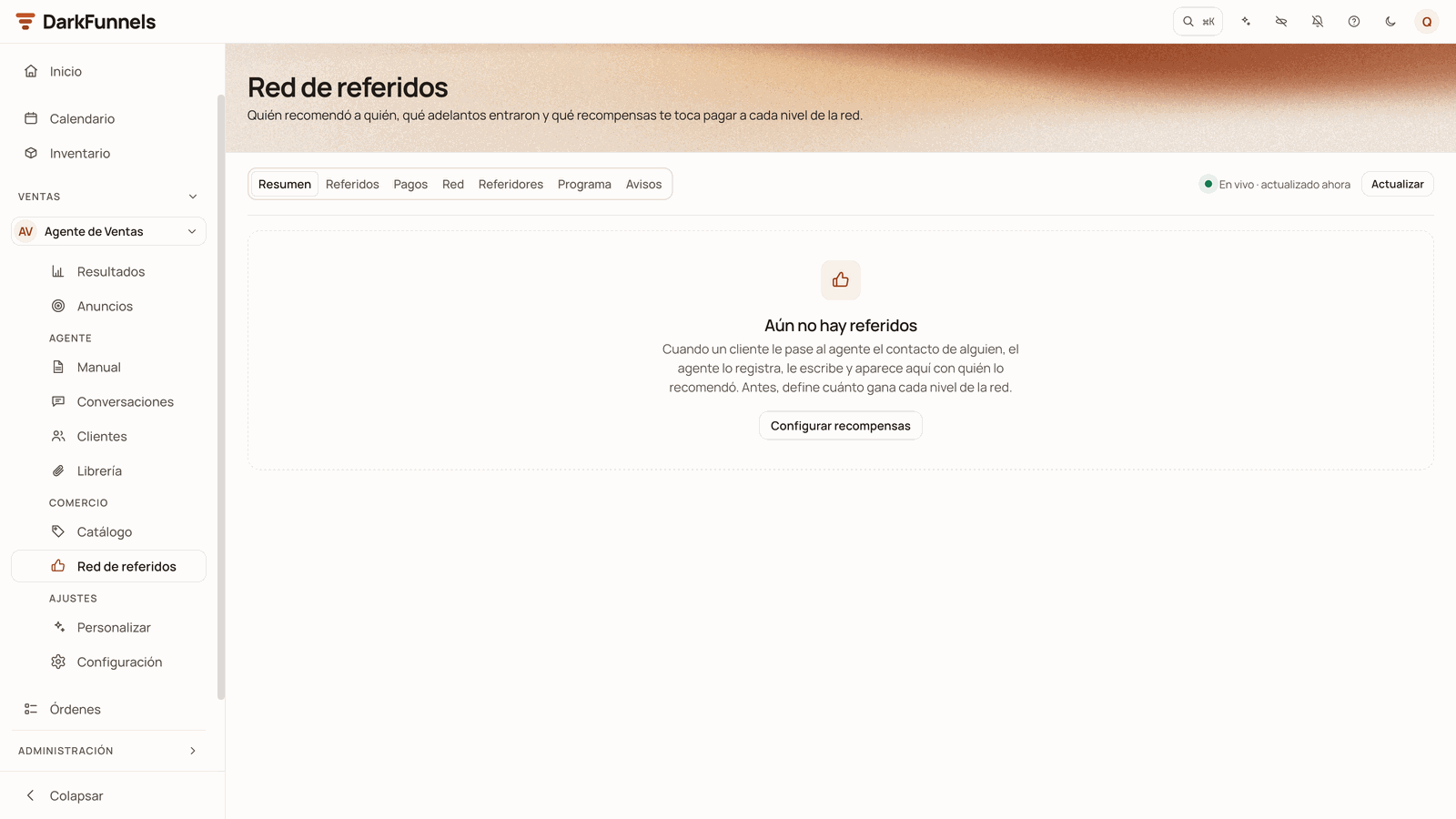
If there are still no referrals and no counted referral requests, Resumen says
**«Aún no hay referidos»** (*No referrals yet*) and offers you **Configurar
recompensas** (*Set up rewards*), which takes you to Programa.
### Referidos (Referrals)
The list of your referrals, with their status and what you can do with each
one.
| Figure | What it counts |
| - | - |
| **Referidos** (*Referrals*) | The registered referrals. Below, how many are waiting for a reply. |
| **Respondieron** (*Replied*) | Those who already wrote to you and haven't left a deposit yet. |
| **Adelantos** (*Deposits*) | The referrals with a deposit. Below, how many are already paid. |
| **Conversión** (*Conversion*) | From referral to deposit, as a percentage. |
| **Por pagar** (*To pay*) | What you owe in rewards, and what you have already paid. If you click it, it takes you to **Pagos**. |
Below come four blocks:
* **Dónde está cada referido** (*Where each referral stands*). A bar with five
sections: **Invitados, aún sin escribir** (*Invited, not written yet*) ·
**Esperando respuesta** (*Waiting for a reply*) · **Respondieron** (*Replied*)
· **Adelanto, por pagar** (*Deposit, to pay*) · **Pagados** (*Paid*).
* **Embudo del programa** (*Program funnel*). It measures the program since it
started. At the top, three figures: **Pedidos de referidos** (*Referral
requests*: how many times your agent asked and what the customer answered,
whether they gave contacts, said no, replied without passing contacts or
didn't reply), **Referidos por cliente** (*Referrals per customer*) and **Del
adelanto al pago** (*From deposit to payout*: how long you take to pay, as a
median). In the middle, a chart with four bars: **Contactos** (*Contacts*),
**Escribieron** (*Wrote*), **Adelanto** (*Deposit*) and **Pagado** (*Paid*).
Between one bar and the next it says what percentage moves on and how many
stay behind, and it marks **the weakest step**. At the bottom, the **Por
semana** (*By week*) table, with the last 8 weeks.
* **Recompensas** (*Rewards*). By currency: what is still to be paid, what has
been paid and what has been generated. **Ver pagos** (*See payments*) takes
you to Pagos.
* **Quién más recomienda** (*Who recommends the most*). Your top 5 referrers.
**Ver ranking** (*See ranking*) takes you to Referidores.
**A referral request is counted when your customer enters the chapter where your
agent asks for them**, and also when an automatic request from Avisos goes out
(when the payment is confirmed, in the after-sale or with the reminder). If you
don't choose that chapter in Programa, the requests your agent makes from the
playbook are not counted.
If there are still no referrals and no counted referral requests, Resumen says
**«Aún no hay referidos»** (*No referrals yet*) and offers you **Configurar
recompensas** (*Set up rewards*), which takes you to Programa.
### Referidos (Referrals)
The list of your referrals, with their status and what you can do with each
one.
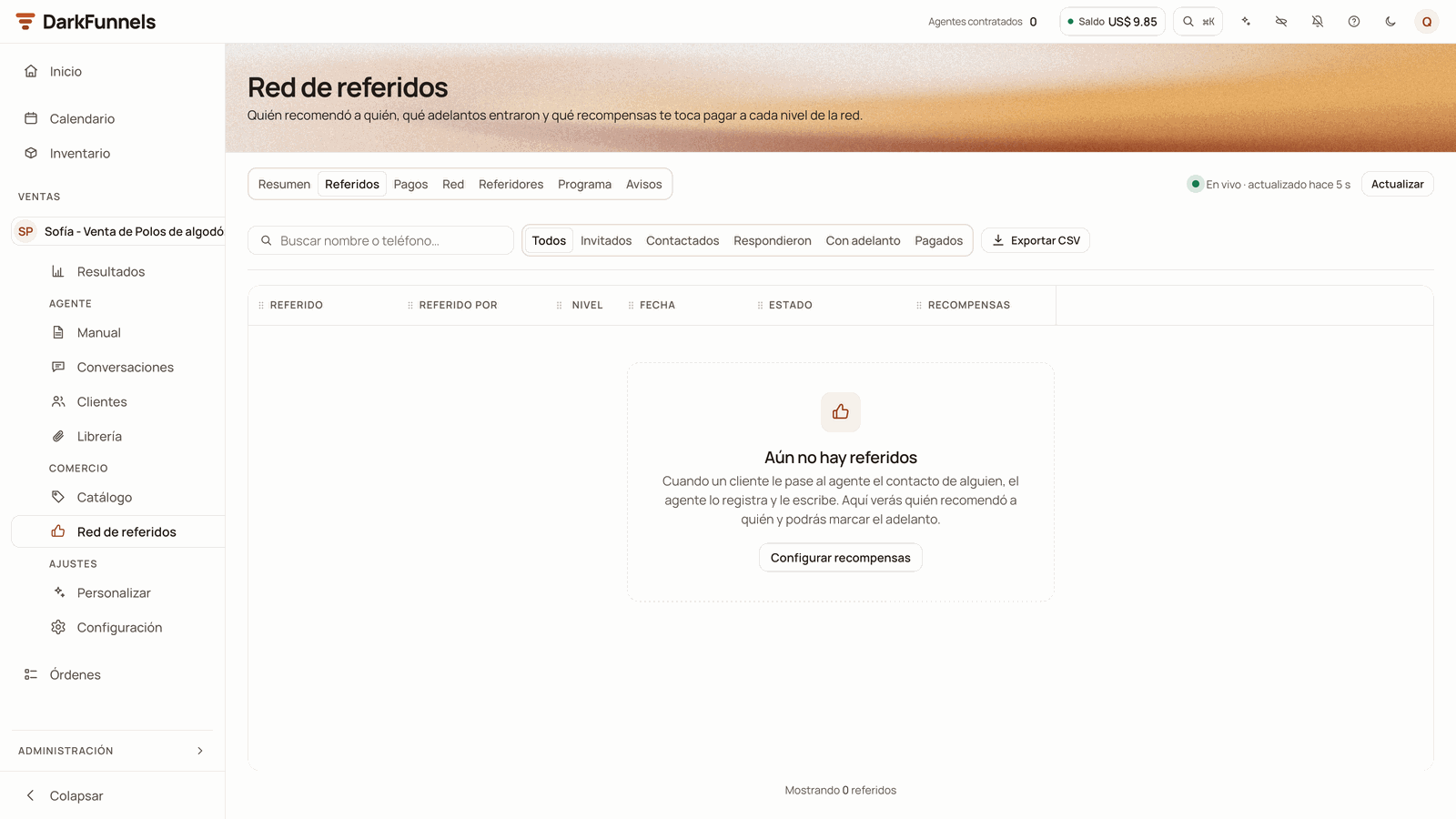 At the top you have the search box **«Buscar nombre o teléfono…»** (*Search name
or phone…*), the filters **Todos · Invitados · Contactados · Respondieron · Con
adelanto · Pagados** (*All · Invited · Contacted · Replied · With deposit ·
Paid*) and the **Exportar CSV** (*Export CSV*) button.
The columns are **referido** (*referral*), **referido por** (*referred by*),
**nivel** (*level*), **fecha** (*date*), **estado** (*status*) and
**recompensas** (*rewards*):
* Click the **referral's name** to open their side panel.
* Click the **name of whoever recommended them** to see only their referrals.
The filter **«Referidos de…»** (*Referrals of…*) appears at the top, with an
**x** to remove it.
* **Nivel** says how high up in the network the referral sits: **N1** if an
origin recommended them, **N2** if someone in N1 recommended them, **N3** if
someone in N2 recommended them, and so on (it can go beyond N5). **It is not
the reward level**: in the «Moda Sol» example, Rosa shows up as **N2**, and
her deposit pays level 1 to Carla and level 2 to Lucía.
* **Recompensas** shows what each level earns for their deposit. Before the
deposit is marked it says *«Al marcar el adelanto»* (*When the deposit is
marked*).
#### The statuses of a referral
| Status | What it means |
| - | - |
| **Invitado** (*Invited*) | Your customer introduced them and they haven't written to you yet. |
| **Contactado** (*Contacted*) | Registered with **El agente le escribe primero** and hasn't replied yet. The first message has already gone out or is waiting for its time: at night, during do-not-disturb hours or because of the daily cap. |
| **Respondió** (*Replied*) | They have already written to you. |
| **Adelanto recibido** (*Deposit received*) | You marked their deposit: their rewards are to be paid. Hovering over it shows who marked it. |
| **Pagado** (*Paid*) | You paid all their rewards. It moves to this status on its own, when you record the last payment. |
| **Pasó a otro cliente** (*Moved to another customer*) | Their period ran out without a deposit and another customer recommended them. It stays as history: their deposit is marked on the new customer's row. |
| **Devolvió el adelanto** (*Deposit refunded*) | You marked that you refunded their deposit. Their unpaid rewards were cancelled. |
#### The buttons on each row
| Button | When it appears | What it does |
| - | - | - |
| **Abrir chat** (*Open chat*) | If the referral has a chat. It is created when they are registered, so it is usually there from the start, empty until there is a message | Opens their chat in Conversaciones (*Conversations*). |
| **Vincular chat** (*Link chat*) | While the referral hasn't written to you | For when they wrote to you from another number. See below. |
| **Marcar adelanto** (*Mark deposit*) | In **Contactado** and **Respondió** | Records their deposit and creates the network's rewards. |
| **Pagar N1** (*Pay N1*; or **Pagar N2**, **Pagar bono**…) | If there is a reward to be paid | Opens the payment of the lowest-level one. |
| **Devolvió el adelanto** | In **Adelanto recibido** and **Pagado** | Cancels their unpaid rewards. |
#### Marking the deposit
**You are the one who marks the deposit.** Approving their payment in
**Pedidos** (*Orders*) does not mark it on its own.
The same cell asks you **«¿Adelanto recibido?»** (*Deposit received?*).
Click **Sí, marcar** (*Yes, mark*), or **No** if you made a mistake.
The dashboard checks whether Pedidos has a confirmed payment from that
referral: an order of theirs with a payment recorded by hand or an approved
receipt. If there isn't one, the cell says **«Sin pago confirmado en
Pedidos»** (*No confirmed payment in Orders*).
* If the deposit came in some other way (for example, in cash), click
**Marcar igual: entró por fuera** (*Mark anyway: it came in outside*). It
is noted, and you can read it by hovering over its status.
* If not, click **No** and record the payment first in
[Pedidos](/en/guides/orders-and-metrics).
When you mark it, the rewards for the whole chain are created, only on the
levels with an amount greater than 0. If the **«Cuando su referido da el
adelanto»** (*When their referral makes the deposit*) notice is on, each
person who earns is sent a WhatsApp through your agent's line. The notice
that appears on screen tells you what happened: who was notified, whether
that notice is off, whether any WhatsApp didn't go out or whether someone
has no open conversation. **Whoever didn't get it, write to them yourself
from their chat.**
If with that deposit your customer reaches the bonus or becomes an ambassador,
their bonus is also created or they are named an ambassador, and the sentence
goes in the same WhatsApp.
#### «Vincular chat»: the referral wrote to you from another number
Sometimes your customer passes you one number and the person they know writes
to you from another. Then that person comes in as a stranger and their row stays
in **Invitado** or **Contactado**.
**«¿Desde qué chat escribió…?»** (*Which chat did … write from?*) opens,
with the referral's name.
The list shows **only those who wrote to you for the first time after the
recommendation**, with their first message. That way a customer you already
had can't be linked to collect a reward. You can search by name or number.
They become a referral of whoever recommended them. Their record gets
**Referido por** and, if your customer said something about them,
**Contexto del referido**. Your customer gets the thank-you (if that notice
is on) and is no longer asked whether they managed to forward your
introduction. In cold mode (**El agente le escribe primero**), the message
to the number on the card is also cancelled if it hadn't gone out yet.
What doesn't change: their chat stays in the chapter it was in, and their
record doesn't get the **Beneficio por venir recomendado**. If you promised
them one, tell them yourself.
#### «Devolvió el adelanto»
If you refund a referral's deposit, click **Devolvió el adelanto** and confirm
with **Sí, anular premios** (*Yes, cancel rewards*). The **unpaid** rewards from
that deposit are cancelled across the whole chain, and so is your customer's
bonus if that leaves them below the target. **What is already paid doesn't
change, and no WhatsApp is sent**: if they ask you, explain it yourself. If the
referral pays again, mark it again.
#### Exporting a CSV
**Exportar CSV** downloads the referrals that match the filters you have set,
not just the ones you see on screen, up to 5000 rows. The file is called
`referidos-` plus the date in UTC time (in Peru, from 19:00 onward it carries
the next day's date). It includes the referral, who recommended them, their
phones, the level, the status, the dates, who marked the deposit, the rewards
and the note.
### Pagos (Payments)
The rewards ledger: whom you owe, how much and why.
At the top you have the search box **«Buscar nombre o teléfono…»** (*Search name
or phone…*), the filters **Todos · Invitados · Contactados · Respondieron · Con
adelanto · Pagados** (*All · Invited · Contacted · Replied · With deposit ·
Paid*) and the **Exportar CSV** (*Export CSV*) button.
The columns are **referido** (*referral*), **referido por** (*referred by*),
**nivel** (*level*), **fecha** (*date*), **estado** (*status*) and
**recompensas** (*rewards*):
* Click the **referral's name** to open their side panel.
* Click the **name of whoever recommended them** to see only their referrals.
The filter **«Referidos de…»** (*Referrals of…*) appears at the top, with an
**x** to remove it.
* **Nivel** says how high up in the network the referral sits: **N1** if an
origin recommended them, **N2** if someone in N1 recommended them, **N3** if
someone in N2 recommended them, and so on (it can go beyond N5). **It is not
the reward level**: in the «Moda Sol» example, Rosa shows up as **N2**, and
her deposit pays level 1 to Carla and level 2 to Lucía.
* **Recompensas** shows what each level earns for their deposit. Before the
deposit is marked it says *«Al marcar el adelanto»* (*When the deposit is
marked*).
#### The statuses of a referral
| Status | What it means |
| - | - |
| **Invitado** (*Invited*) | Your customer introduced them and they haven't written to you yet. |
| **Contactado** (*Contacted*) | Registered with **El agente le escribe primero** and hasn't replied yet. The first message has already gone out or is waiting for its time: at night, during do-not-disturb hours or because of the daily cap. |
| **Respondió** (*Replied*) | They have already written to you. |
| **Adelanto recibido** (*Deposit received*) | You marked their deposit: their rewards are to be paid. Hovering over it shows who marked it. |
| **Pagado** (*Paid*) | You paid all their rewards. It moves to this status on its own, when you record the last payment. |
| **Pasó a otro cliente** (*Moved to another customer*) | Their period ran out without a deposit and another customer recommended them. It stays as history: their deposit is marked on the new customer's row. |
| **Devolvió el adelanto** (*Deposit refunded*) | You marked that you refunded their deposit. Their unpaid rewards were cancelled. |
#### The buttons on each row
| Button | When it appears | What it does |
| - | - | - |
| **Abrir chat** (*Open chat*) | If the referral has a chat. It is created when they are registered, so it is usually there from the start, empty until there is a message | Opens their chat in Conversaciones (*Conversations*). |
| **Vincular chat** (*Link chat*) | While the referral hasn't written to you | For when they wrote to you from another number. See below. |
| **Marcar adelanto** (*Mark deposit*) | In **Contactado** and **Respondió** | Records their deposit and creates the network's rewards. |
| **Pagar N1** (*Pay N1*; or **Pagar N2**, **Pagar bono**…) | If there is a reward to be paid | Opens the payment of the lowest-level one. |
| **Devolvió el adelanto** | In **Adelanto recibido** and **Pagado** | Cancels their unpaid rewards. |
#### Marking the deposit
**You are the one who marks the deposit.** Approving their payment in
**Pedidos** (*Orders*) does not mark it on its own.
The same cell asks you **«¿Adelanto recibido?»** (*Deposit received?*).
Click **Sí, marcar** (*Yes, mark*), or **No** if you made a mistake.
The dashboard checks whether Pedidos has a confirmed payment from that
referral: an order of theirs with a payment recorded by hand or an approved
receipt. If there isn't one, the cell says **«Sin pago confirmado en
Pedidos»** (*No confirmed payment in Orders*).
* If the deposit came in some other way (for example, in cash), click
**Marcar igual: entró por fuera** (*Mark anyway: it came in outside*). It
is noted, and you can read it by hovering over its status.
* If not, click **No** and record the payment first in
[Pedidos](/en/guides/orders-and-metrics).
When you mark it, the rewards for the whole chain are created, only on the
levels with an amount greater than 0. If the **«Cuando su referido da el
adelanto»** (*When their referral makes the deposit*) notice is on, each
person who earns is sent a WhatsApp through your agent's line. The notice
that appears on screen tells you what happened: who was notified, whether
that notice is off, whether any WhatsApp didn't go out or whether someone
has no open conversation. **Whoever didn't get it, write to them yourself
from their chat.**
If with that deposit your customer reaches the bonus or becomes an ambassador,
their bonus is also created or they are named an ambassador, and the sentence
goes in the same WhatsApp.
#### «Vincular chat»: the referral wrote to you from another number
Sometimes your customer passes you one number and the person they know writes
to you from another. Then that person comes in as a stranger and their row stays
in **Invitado** or **Contactado**.
**«¿Desde qué chat escribió…?»** (*Which chat did … write from?*) opens,
with the referral's name.
The list shows **only those who wrote to you for the first time after the
recommendation**, with their first message. That way a customer you already
had can't be linked to collect a reward. You can search by name or number.
They become a referral of whoever recommended them. Their record gets
**Referido por** and, if your customer said something about them,
**Contexto del referido**. Your customer gets the thank-you (if that notice
is on) and is no longer asked whether they managed to forward your
introduction. In cold mode (**El agente le escribe primero**), the message
to the number on the card is also cancelled if it hadn't gone out yet.
What doesn't change: their chat stays in the chapter it was in, and their
record doesn't get the **Beneficio por venir recomendado**. If you promised
them one, tell them yourself.
#### «Devolvió el adelanto»
If you refund a referral's deposit, click **Devolvió el adelanto** and confirm
with **Sí, anular premios** (*Yes, cancel rewards*). The **unpaid** rewards from
that deposit are cancelled across the whole chain, and so is your customer's
bonus if that leaves them below the target. **What is already paid doesn't
change, and no WhatsApp is sent**: if they ask you, explain it yourself. If the
referral pays again, mark it again.
#### Exporting a CSV
**Exportar CSV** downloads the referrals that match the filters you have set,
not just the ones you see on screen, up to 5000 rows. The file is called
`referidos-` plus the date in UTC time (in Peru, from 19:00 onward it carries
the next day's date). It includes the referral, who recommended them, their
phones, the level, the status, the dates, who marked the deposit, the rewards
and the note.
### Pagos (Payments)
The rewards ledger: whom you owe, how much and why.
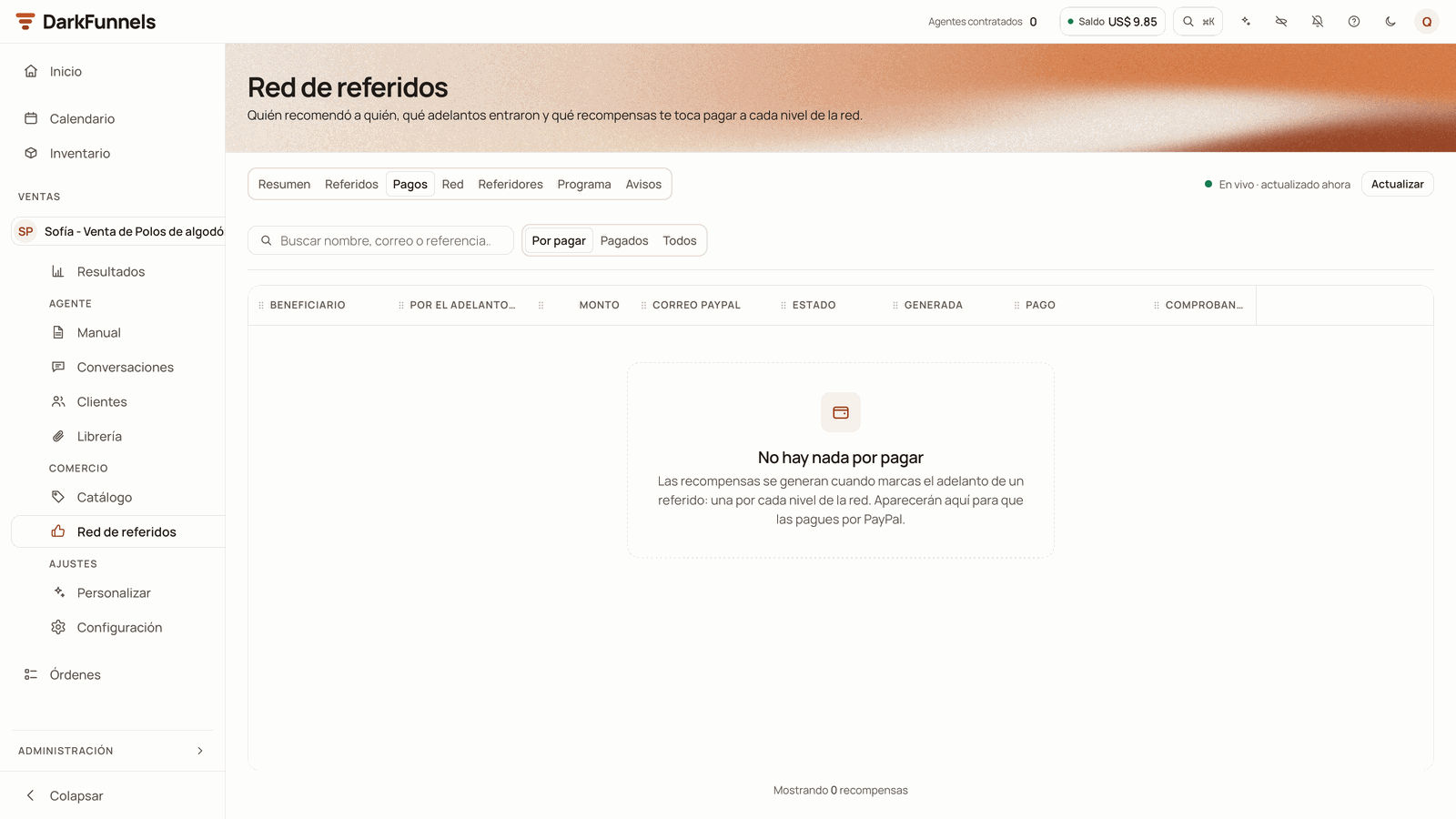 At the top, the filters **Por pagar · Pagados · Todos** (*To pay · Paid · All*;
it opens on **Por pagar**) and the search box **«Buscar nombre, correo o
referencia…»** (*Search name, email or reference…*). The columns are
**beneficiario** (*beneficiary*), **por el adelanto de** (*for the deposit of*,
with its level: N1, N2… or Bono), **monto** (*amount*), **correo paypal**
(*PayPal email*), **estado** (*status*), **generada** (*generated*), **pago**
(*payment*: the reference, the date and who paid) and **comprobante**
(*receipt*). At the bottom, the total of what you see, without the cancelled
ones.
| Status | What it means |
| - | - |
| **Por pagar** (*To pay*) | You owe it. If you set a deadline, hovering over it tells you by when you promised it. |
| **En espera** (*On hold*) | It isn't released yet (that is decided by **Espera antes de pagar**, *Wait before paying*, in Programa). If the deposit is refunded before then, it is cancelled. |
| **Atrasado** (*Overdue*) | The deadline you promised in **Plazo para pagar** (*Payment deadline*) has passed. |
| **Retenido** (*Held*) | Held for review: the same PayPal email or the same full name (first and last name) appears twice in the same recommendation chain. It may be the same person collecting twice. |
| **Pagado** (*Paid*) | You have already recorded its payment. |
| **Anulado** (*Cancelled*) | The deposit that generated it was refunded (or, if it is a bonus, your customer fell below the target). It is not paid. You see it in **Todos**. |
#### Paying a reward
**The dashboard does not send the money.** You pay in PayPal and then record it
here.
Send the amount from your PayPal account and keep the transaction ID.
**«Pagar recompensa»** (*Pay reward*) opens, with the amount, the level, to
whom and for whose deposit.
* **Correo de PayPal** (*PayPal email*, required): the email you sent the
payment to. If the person left it on their record, it comes filled in:
confirm it anyway.
* **Referencia de PayPal** (*PayPal reference*, required): paste the
transaction ID.
* **Comprobante** (*Receipt*, optional): a screenshot or PDF of the payment,
in JPG, PNG, WEBP or PDF, up to 10 MB.
Below the fields, a sentence tells you whether the person has a
conversation with your agent. If they do and the **Cuando le pagas** notice
is on, they receive a WhatsApp confirming the payment, with the receipt if
you attached it. With that notice off, nothing reaches them, even if the
sentence says it will: the notice that appears when you record the payment
confirms it.
Two cases need one more step:
* **Retenido:** the dialog explains whom it matches. Review the chain and, if
everything is fine, tick **Revisé la cadena: pagar igual** (*I reviewed the
chain: pay anyway*).
* **En espera:** the dialog says until when. To pay it now, tick **Pagar antes
de tiempo** (*Pay early*). Careful: if the deposit is refunded later, that
money can no longer be recovered.
When you record the payment, the reward moves to **Pagado** with its reference,
the date and who paid. When all of a referral's rewards are paid, their row in
Referidos moves to **Pagado** on its own.
### Red (Network)
The tree of who recommended whom: **whoever recommended at the top and their
referral below**. At the top it says how many people and how many
recommendations there are, with the color legend: **Origen** (*Origin*),
**Invitado**, **Contactado**, **Respondió**, **Adelanto recibido** and
**Pagado**.
Each card shows the name, the phone, the status, what has been **Ganado**
(*Earned*) and **Pagado** (*Paid*), and how many referrals they have. Zoom in
and out with the buttons at the bottom right. The network shows up to 2000
people: if yours is bigger, it warns you, and in the Referidos tab you can
search for anyone.
**Click a card and that person's panel opens**, the same one that opens from the
names in the other tabs:
* **Abrir chat** and **Ver sus referidos en la tabla** (*See their referrals in
the table*).
* Three figures: **Refirió** (*Referred*), **Por cobrar** (*To collect*) and
**Cobrado** (*Collected*).
* **La recomendó** (*Recommended by*): who brought them, if they came
recommended.
* **Sus recompensas** (*Their rewards*): each one with its status and a
**Pagar** button if it is still to be paid.
* **Refirió a** (*Referred these people*): whom they recommended and what status
each one is in.
### Referidores (Referrers)
The ranking of **the 10 who move your program the most**: first by deposits,
then by referrals. Columns: **referidor** (*referrer*), **referidos**
(*referrals*), **adelantos** (*deposits*), **conversión** (*conversion*),
**ganado** (*earned*), **pagado** (*paid*), **por pagar** (*to pay*) and
**correo paypal** (*PayPal email*). Ambassadors carry the **Embajador**
(*Ambassador*) badge next to their name.
Each row has **Abrir chat** and **Ver referidos** (*See referrals*), which takes
you to the Referidos tab filtered by that person.
### Programa (Program)
Here you configure the program. At the top, a drawing shows you **the
referral's path**, step by step, according to what you choose. Next to the
form, a phone shows you how the message reaches the referral, with sample data.
At the top, the filters **Por pagar · Pagados · Todos** (*To pay · Paid · All*;
it opens on **Por pagar**) and the search box **«Buscar nombre, correo o
referencia…»** (*Search name, email or reference…*). The columns are
**beneficiario** (*beneficiary*), **por el adelanto de** (*for the deposit of*,
with its level: N1, N2… or Bono), **monto** (*amount*), **correo paypal**
(*PayPal email*), **estado** (*status*), **generada** (*generated*), **pago**
(*payment*: the reference, the date and who paid) and **comprobante**
(*receipt*). At the bottom, the total of what you see, without the cancelled
ones.
| Status | What it means |
| - | - |
| **Por pagar** (*To pay*) | You owe it. If you set a deadline, hovering over it tells you by when you promised it. |
| **En espera** (*On hold*) | It isn't released yet (that is decided by **Espera antes de pagar**, *Wait before paying*, in Programa). If the deposit is refunded before then, it is cancelled. |
| **Atrasado** (*Overdue*) | The deadline you promised in **Plazo para pagar** (*Payment deadline*) has passed. |
| **Retenido** (*Held*) | Held for review: the same PayPal email or the same full name (first and last name) appears twice in the same recommendation chain. It may be the same person collecting twice. |
| **Pagado** (*Paid*) | You have already recorded its payment. |
| **Anulado** (*Cancelled*) | The deposit that generated it was refunded (or, if it is a bonus, your customer fell below the target). It is not paid. You see it in **Todos**. |
#### Paying a reward
**The dashboard does not send the money.** You pay in PayPal and then record it
here.
Send the amount from your PayPal account and keep the transaction ID.
**«Pagar recompensa»** (*Pay reward*) opens, with the amount, the level, to
whom and for whose deposit.
* **Correo de PayPal** (*PayPal email*, required): the email you sent the
payment to. If the person left it on their record, it comes filled in:
confirm it anyway.
* **Referencia de PayPal** (*PayPal reference*, required): paste the
transaction ID.
* **Comprobante** (*Receipt*, optional): a screenshot or PDF of the payment,
in JPG, PNG, WEBP or PDF, up to 10 MB.
Below the fields, a sentence tells you whether the person has a
conversation with your agent. If they do and the **Cuando le pagas** notice
is on, they receive a WhatsApp confirming the payment, with the receipt if
you attached it. With that notice off, nothing reaches them, even if the
sentence says it will: the notice that appears when you record the payment
confirms it.
Two cases need one more step:
* **Retenido:** the dialog explains whom it matches. Review the chain and, if
everything is fine, tick **Revisé la cadena: pagar igual** (*I reviewed the
chain: pay anyway*).
* **En espera:** the dialog says until when. To pay it now, tick **Pagar antes
de tiempo** (*Pay early*). Careful: if the deposit is refunded later, that
money can no longer be recovered.
When you record the payment, the reward moves to **Pagado** with its reference,
the date and who paid. When all of a referral's rewards are paid, their row in
Referidos moves to **Pagado** on its own.
### Red (Network)
The tree of who recommended whom: **whoever recommended at the top and their
referral below**. At the top it says how many people and how many
recommendations there are, with the color legend: **Origen** (*Origin*),
**Invitado**, **Contactado**, **Respondió**, **Adelanto recibido** and
**Pagado**.
Each card shows the name, the phone, the status, what has been **Ganado**
(*Earned*) and **Pagado** (*Paid*), and how many referrals they have. Zoom in
and out with the buttons at the bottom right. The network shows up to 2000
people: if yours is bigger, it warns you, and in the Referidos tab you can
search for anyone.
**Click a card and that person's panel opens**, the same one that opens from the
names in the other tabs:
* **Abrir chat** and **Ver sus referidos en la tabla** (*See their referrals in
the table*).
* Three figures: **Refirió** (*Referred*), **Por cobrar** (*To collect*) and
**Cobrado** (*Collected*).
* **La recomendó** (*Recommended by*): who brought them, if they came
recommended.
* **Sus recompensas** (*Their rewards*): each one with its status and a
**Pagar** button if it is still to be paid.
* **Refirió a** (*Referred these people*): whom they recommended and what status
each one is in.
### Referidores (Referrers)
The ranking of **the 10 who move your program the most**: first by deposits,
then by referrals. Columns: **referidor** (*referrer*), **referidos**
(*referrals*), **adelantos** (*deposits*), **conversión** (*conversion*),
**ganado** (*earned*), **pagado** (*paid*), **por pagar** (*to pay*) and
**correo paypal** (*PayPal email*). Ambassadors carry the **Embajador**
(*Ambassador*) badge next to their name.
Each row has **Abrir chat** and **Ver referidos** (*See referrals*), which takes
you to the Referidos tab filtered by that person.
### Programa (Program)
Here you configure the program. At the top, a drawing shows you **the
referral's path**, step by step, according to what you choose. Next to the
form, a phone shows you how the message reaches the referral, with sample data.
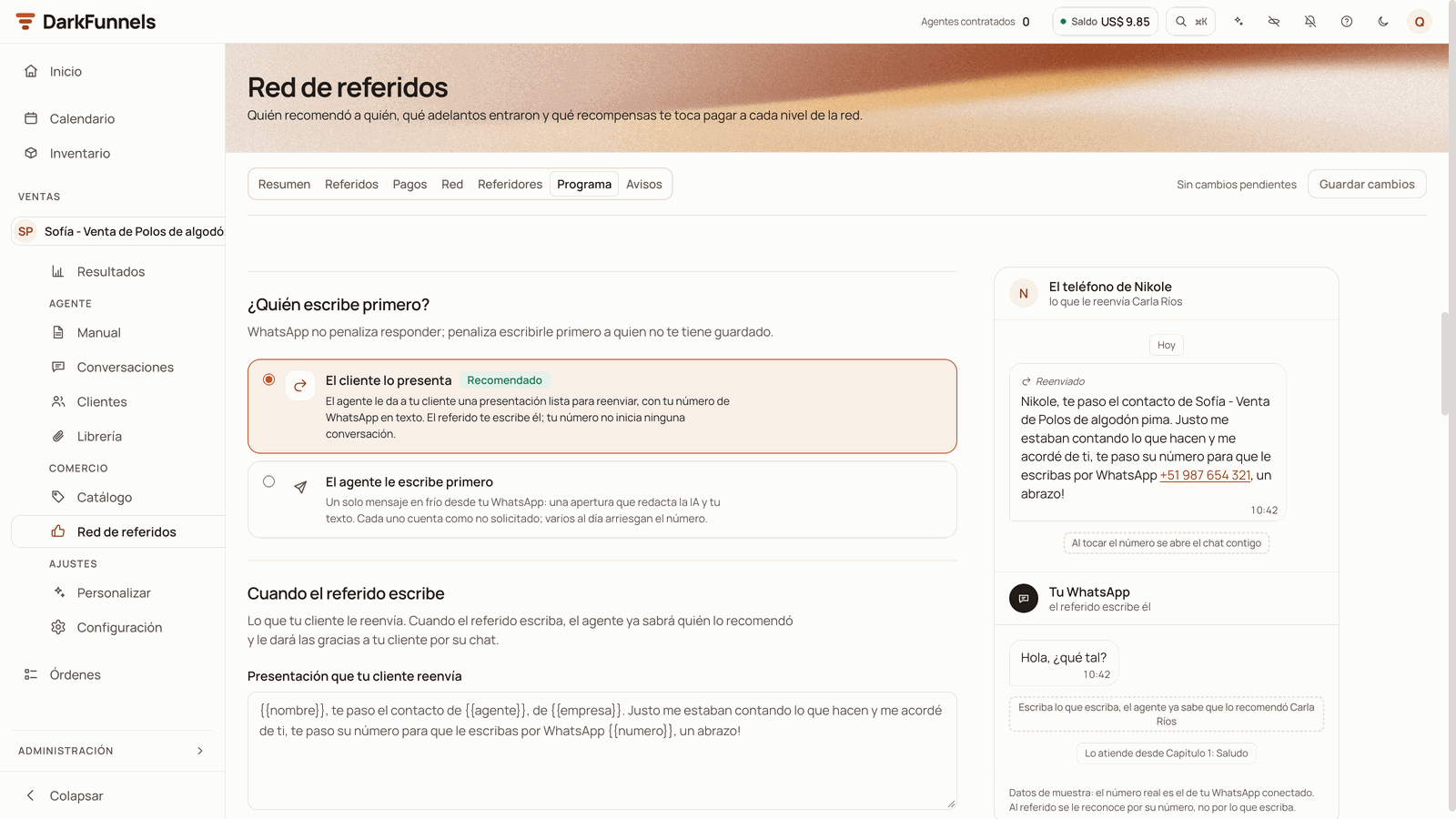 The sections come in this order.
#### Where your agent asks for referrals
In **¿Dónde pide referidos tu agente?**:
* **Capítulo donde pide referidos** (*Chapter where it asks for referrals*). The
chapter of your playbook where the agent tells your customer about the
program and asks them for a contact. Each customer who enters it counts as a
request, and the reminder **«Si tu cliente no te pasa ningún contacto»**
starts from there. With no chapter chosen, those requests are not counted and
the reminder does not go out.
* **¿A quién buscas?** (*Who are you looking for?*) Describe the customer you
want to be recommended, for example «someone who has a clothing store in your
area». In the automatic requests, the agent asks about that profile instead
of a generic «do you know anyone?». Up to 200 characters, no variables. If
it's empty, it asks in general.
#### Who writes first
In **¿Quién escribe primero?**, two cards: **El cliente lo presenta** (with the
**Recomendado**, *Recommended*, badge) and **El agente le escribe primero**.
What each one does is explained in
[What your agent does on WhatsApp](#what-your-agent-does-on-whatsapp).
If you choose **El agente le escribe primero**, **¿A cuántos referidos puede
escribirles primero cada día?** (*How many referrals can it write to first each
day?*) appears: from 1 to 20, 3 by default. Only the first messages your number
starts count; replies don't.
#### The message to the referral
This section changes its name depending on the mode.
It is the one for the **El cliente lo presenta** mode.
* **Presentación que tu cliente reenvía** (*Introduction your customer
forwards*). Write it in your customer's voice, because they are the one
who sends it. Up to 500 characters. You can name `{{nombre}}` (the
referral), `{{referido_por}}` (your customer) and `{{numero}}` (your
agent's WhatsApp, as text). If you remove `{{numero}}`, it is added at
the end. If it's empty, the default one goes out, which you see in grey:
> «`{{nombre}}`, te paso el contacto de `{{agente}}`, de `{{empresa}}`.
> Justo me estaban contando lo que hacen y me acordé de ti, te paso su
> número para que le escribas por WhatsApp `{{numero}}`, un abrazo!»
(*In English:* `{{nombre}}`*, here's the contact for* `{{agente}}`*,
from* `{{empresa}}`*. They were just telling me what they do and I
thought of you; here's their number so you can message them on
WhatsApp* `{{numero}}`*, hugs!*)
In the default one, the agent fills `{{agente}}` with the name it
introduces itself with and `{{empresa}}` with the **Nombre de tu
negocio** (*Your business name*).
* **Foto, video o PDF** (*Photo, video or PDF*). **Sin adjunto** (*No
attachment*), or **Una foto, un video o un PDF de la librería** (*A
photo, a video or a PDF from the library*). The photos, videos and PDFs
linked to this agent in the [Library](/en/guides/library) appear.
Your number goes as text and not as a link: a link in a forwarded message
reads as spam.
It is the one for the **El agente le escribe primero** mode. The message
has three pieces:
* **Apertura** (*Opening*). The AI writes it on each send: one or two
lines, without links, prices or rewards. It can't be edited.
* **Tu texto** (*Your text*). It goes out exactly as written, after the
opening. Up to 700 characters. You can name `{{nombre}}`,
`{{referido_por}}` and `{{contexto}}` (what was said about the referral).
If it's empty, the default one goes out. The dashboard warns you, without
stopping you from saving, if your text starts with a greeting, contains a
link or contains a price.
* **Foto, video o PDF.** **Sin adjunto** comes marked as **Recomendado**: a
file in the first message to a stranger is what gets reported the most.
With the field empty, **Usar el texto de fábrica** (*Use the default text*)
copies it so you can adjust it. If you type a variable that isn't on the list,
the dashboard tells you which one it is and doesn't let you save until you fix
it.
**Careful with the default introduction.** It contains `{{agente}}` and
`{{empresa}}`, which are filled in when you leave the field empty but which the
dashboard doesn't accept in a text of your own. If you copy it with **Usar el
texto de fábrica**, replace them with the name your agent introduces itself
with and your business's name, written out as they are, or the dashboard won't
let you save.
#### Your business name and the entry chapter
* **Nombre de tu negocio** (*Your business name*). What your business is called
in what the referral receives. It fills `{{empresa}}` in the default
introduction and signs the opening of the cold message. Up to 80 characters,
no variables or line breaks. If it's empty, the funnel's name is used.
* **The entry chapter.** It is called **¿En qué capítulo empiezan los
referidos?** (*Which chapter do referrals start in?*, introduction mode) or
**¿En qué capítulo sigue el referido cuando conteste?** (*Which chapter does
the referral continue in when they reply?*, cold mode). If you don't choose
any, it is the first chapter of your playbook, with the **Por defecto**
(*Default*) badge. In introduction mode, that chapter must greet whoever
arrives introduced. In cold mode it runs as a continuation, because the agent
has already introduced itself.
If you deleted the chosen chapter from the playbook, the dashboard warns you:
until you choose another one, referrals come in through the first chapter.
#### Rewards per level
The sections come in this order.
#### Where your agent asks for referrals
In **¿Dónde pide referidos tu agente?**:
* **Capítulo donde pide referidos** (*Chapter where it asks for referrals*). The
chapter of your playbook where the agent tells your customer about the
program and asks them for a contact. Each customer who enters it counts as a
request, and the reminder **«Si tu cliente no te pasa ningún contacto»**
starts from there. With no chapter chosen, those requests are not counted and
the reminder does not go out.
* **¿A quién buscas?** (*Who are you looking for?*) Describe the customer you
want to be recommended, for example «someone who has a clothing store in your
area». In the automatic requests, the agent asks about that profile instead
of a generic «do you know anyone?». Up to 200 characters, no variables. If
it's empty, it asks in general.
#### Who writes first
In **¿Quién escribe primero?**, two cards: **El cliente lo presenta** (with the
**Recomendado**, *Recommended*, badge) and **El agente le escribe primero**.
What each one does is explained in
[What your agent does on WhatsApp](#what-your-agent-does-on-whatsapp).
If you choose **El agente le escribe primero**, **¿A cuántos referidos puede
escribirles primero cada día?** (*How many referrals can it write to first each
day?*) appears: from 1 to 20, 3 by default. Only the first messages your number
starts count; replies don't.
#### The message to the referral
This section changes its name depending on the mode.
It is the one for the **El cliente lo presenta** mode.
* **Presentación que tu cliente reenvía** (*Introduction your customer
forwards*). Write it in your customer's voice, because they are the one
who sends it. Up to 500 characters. You can name `{{nombre}}` (the
referral), `{{referido_por}}` (your customer) and `{{numero}}` (your
agent's WhatsApp, as text). If you remove `{{numero}}`, it is added at
the end. If it's empty, the default one goes out, which you see in grey:
> «`{{nombre}}`, te paso el contacto de `{{agente}}`, de `{{empresa}}`.
> Justo me estaban contando lo que hacen y me acordé de ti, te paso su
> número para que le escribas por WhatsApp `{{numero}}`, un abrazo!»
(*In English:* `{{nombre}}`*, here's the contact for* `{{agente}}`*,
from* `{{empresa}}`*. They were just telling me what they do and I
thought of you; here's their number so you can message them on
WhatsApp* `{{numero}}`*, hugs!*)
In the default one, the agent fills `{{agente}}` with the name it
introduces itself with and `{{empresa}}` with the **Nombre de tu
negocio** (*Your business name*).
* **Foto, video o PDF** (*Photo, video or PDF*). **Sin adjunto** (*No
attachment*), or **Una foto, un video o un PDF de la librería** (*A
photo, a video or a PDF from the library*). The photos, videos and PDFs
linked to this agent in the [Library](/en/guides/library) appear.
Your number goes as text and not as a link: a link in a forwarded message
reads as spam.
It is the one for the **El agente le escribe primero** mode. The message
has three pieces:
* **Apertura** (*Opening*). The AI writes it on each send: one or two
lines, without links, prices or rewards. It can't be edited.
* **Tu texto** (*Your text*). It goes out exactly as written, after the
opening. Up to 700 characters. You can name `{{nombre}}`,
`{{referido_por}}` and `{{contexto}}` (what was said about the referral).
If it's empty, the default one goes out. The dashboard warns you, without
stopping you from saving, if your text starts with a greeting, contains a
link or contains a price.
* **Foto, video o PDF.** **Sin adjunto** comes marked as **Recomendado**: a
file in the first message to a stranger is what gets reported the most.
With the field empty, **Usar el texto de fábrica** (*Use the default text*)
copies it so you can adjust it. If you type a variable that isn't on the list,
the dashboard tells you which one it is and doesn't let you save until you fix
it.
**Careful with the default introduction.** It contains `{{agente}}` and
`{{empresa}}`, which are filled in when you leave the field empty but which the
dashboard doesn't accept in a text of your own. If you copy it with **Usar el
texto de fábrica**, replace them with the name your agent introduces itself
with and your business's name, written out as they are, or the dashboard won't
let you save.
#### Your business name and the entry chapter
* **Nombre de tu negocio** (*Your business name*). What your business is called
in what the referral receives. It fills `{{empresa}}` in the default
introduction and signs the opening of the cold message. Up to 80 characters,
no variables or line breaks. If it's empty, the funnel's name is used.
* **The entry chapter.** It is called **¿En qué capítulo empiezan los
referidos?** (*Which chapter do referrals start in?*, introduction mode) or
**¿En qué capítulo sigue el referido cuando conteste?** (*Which chapter does
the referral continue in when they reply?*, cold mode). If you don't choose
any, it is the first chapter of your playbook, with the **Por defecto**
(*Default*) badge. In introduction mode, that chapter must greet whoever
arrives introduced. In cold mode it runs as a continuation, because the agent
has already introduced itself.
If you deleted the chosen chapter from the playbook, the dashboard warns you:
until you choose another one, referrals come in through the first chapter.
#### Rewards per level
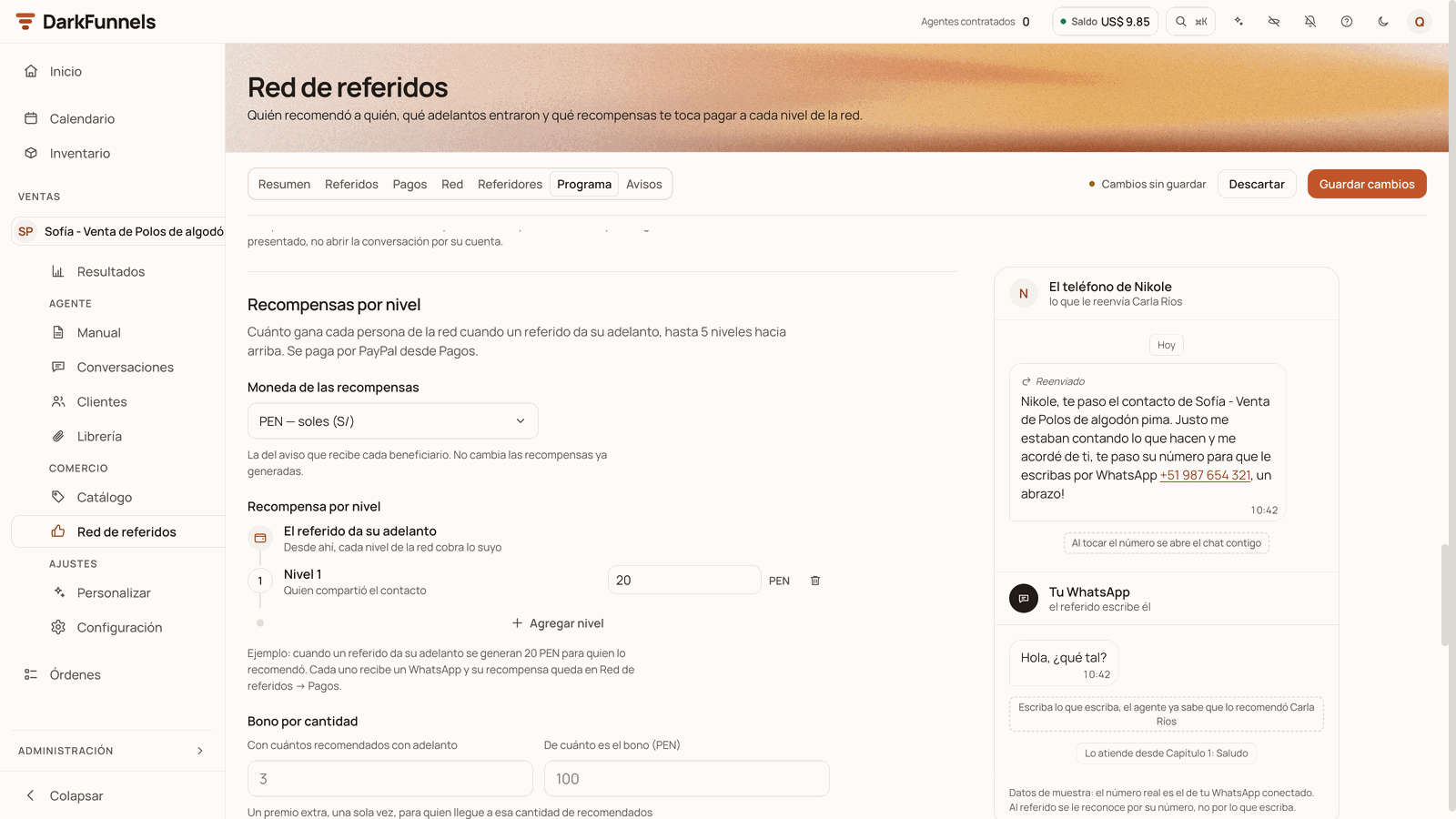 * **Moneda de las recompensas** (*Rewards currency*). PEN, USD, COP, MXN, CLP,
ARS, BOB or EUR. It is the one used in the notice each person receives.
Changing it doesn't change rewards already generated.
* **Recompensa por nivel** (*Reward per level*). A ladder that starts at *«El
referido da su adelanto»* (*The referral makes their deposit*). Click
**Agregar nivel** to add one, up to 5. They are removed starting from the
last one, with the trash can. The amount allows up to 2 decimals, and **0**
is valid: that level doesn't collect. Below, a sentence gives you the example
with your amounts.
**The new amounts apply to the deposits you mark after saving.** What has
already been generated doesn't change.
#### The optional settings
All of them can be left empty.
| Field | What it does | Values |
| - | - | - |
| **Bono por cantidad** (*Quantity bonus*) | An extra reward, only once, for the customer who reaches a certain number of recommended people with a deposit. Whoever recommended them earns it (level 1), and it is paid from Pagos as **Bono**. When they are one short, their notice tells them. | **Con cuántos recomendados con adelanto** (*With how many recommended people with a deposit*): from 2 to 50. **De cuánto es el bono** (*How much the bonus is*): greater than 0. Both or neither. |
| **Tope por venta** (*Cap per sale*) | It adds up what one sale hands out (all the levels and the bonus) and warns you if it goes over that percentage of your smallest deposit. It only warns: it doesn't change any reward or stop you from saving. | **Tu adelanto más chico** (*Your smallest deposit*): greater than 0. **Máximo a repartir por venta (%)** (*Maximum to hand out per sale (%)*): from 1 to 100. Both or neither. |
| **Un referido vale (días)** (*A referral is valid for (days)*) | How many days a referral counts for whoever recommended them while they haven't left their deposit. Once that period has passed, if another customer recommends them, they move to that customer and their old row stays as **«Pasó a otro cliente»**. If nobody else recommends them, the first customer keeps them even if they buy late. Someone who has already written to you doesn't change owner. | From 7 to 365. Empty: it doesn't expire. |
| **Espera antes de pagar (días)** (*Wait before paying (days)*) | How many days each reward waits from the deposit before it can be paid. If during that time you refund the deposit, you mark **Devolvió el adelanto** and the rewards are cancelled without anything having been paid. | From 1 to 90. Empty: no wait. |
| **Plazo para pagar (horas)** (*Payment deadline (hours)*) | How soon you commit to paying from the deposit (with a wait, from when the reward is released). The deposit notice promises it, for example *«Te enviamos el pago en las próximas 72 horas»* (*We'll send you the payment within the next 72 hours*), and Pagos marks whatever goes past it as **Atrasado**. Changing it doesn't move what has already been promised. | From 1 to 720. Empty: no deadline. |
| **Embajador desde (recomendados con adelanto)** (*Ambassador from (recommended people with a deposit)*) | Whoever reaches that number becomes an ambassador. See [Ambassador customers](#ambassador-customers). | From 2 to 50. Empty: no ambassadors. |
| **¿Qué recibe quien llega recomendado?** | A benefit for the referral, for example «10% off your first purchase». See [What the referral receives](#what-the-referral-receives). | Up to 200 characters, no variables. Empty: they receive nothing. |
#### Saving
**Guardar cambios** and **Descartar** (*Discard*) are at the top, in the row of
tabs. **Descartar** appears when you have changed something and goes back to
what you last saved. Next to them, the status: **Sin cambios pendientes** (*No
pending changes*), **Cambios sin guardar** (*Unsaved changes*), **Guardando…**
(*Saving…*) or **Guardado** (*Saved*). When you save, the notice *«Programa
guardado»* (*Program saved*) appears.
If **Guardar cambios** is grey even though you changed something, there is a
field with an error: it says so in red next to the field, and hovering over the
button tells you which one to check.
### Avisos (Notices)
**What the program sends on its own, without anyone asking for it.** Each notice
has its switch (**Encendido**, *On*, or **Apagado**, *Off*), its timing when it
has one, its text and, below, the rule that cancels it.
* **Moneda de las recompensas** (*Rewards currency*). PEN, USD, COP, MXN, CLP,
ARS, BOB or EUR. It is the one used in the notice each person receives.
Changing it doesn't change rewards already generated.
* **Recompensa por nivel** (*Reward per level*). A ladder that starts at *«El
referido da su adelanto»* (*The referral makes their deposit*). Click
**Agregar nivel** to add one, up to 5. They are removed starting from the
last one, with the trash can. The amount allows up to 2 decimals, and **0**
is valid: that level doesn't collect. Below, a sentence gives you the example
with your amounts.
**The new amounts apply to the deposits you mark after saving.** What has
already been generated doesn't change.
#### The optional settings
All of them can be left empty.
| Field | What it does | Values |
| - | - | - |
| **Bono por cantidad** (*Quantity bonus*) | An extra reward, only once, for the customer who reaches a certain number of recommended people with a deposit. Whoever recommended them earns it (level 1), and it is paid from Pagos as **Bono**. When they are one short, their notice tells them. | **Con cuántos recomendados con adelanto** (*With how many recommended people with a deposit*): from 2 to 50. **De cuánto es el bono** (*How much the bonus is*): greater than 0. Both or neither. |
| **Tope por venta** (*Cap per sale*) | It adds up what one sale hands out (all the levels and the bonus) and warns you if it goes over that percentage of your smallest deposit. It only warns: it doesn't change any reward or stop you from saving. | **Tu adelanto más chico** (*Your smallest deposit*): greater than 0. **Máximo a repartir por venta (%)** (*Maximum to hand out per sale (%)*): from 1 to 100. Both or neither. |
| **Un referido vale (días)** (*A referral is valid for (days)*) | How many days a referral counts for whoever recommended them while they haven't left their deposit. Once that period has passed, if another customer recommends them, they move to that customer and their old row stays as **«Pasó a otro cliente»**. If nobody else recommends them, the first customer keeps them even if they buy late. Someone who has already written to you doesn't change owner. | From 7 to 365. Empty: it doesn't expire. |
| **Espera antes de pagar (días)** (*Wait before paying (days)*) | How many days each reward waits from the deposit before it can be paid. If during that time you refund the deposit, you mark **Devolvió el adelanto** and the rewards are cancelled without anything having been paid. | From 1 to 90. Empty: no wait. |
| **Plazo para pagar (horas)** (*Payment deadline (hours)*) | How soon you commit to paying from the deposit (with a wait, from when the reward is released). The deposit notice promises it, for example *«Te enviamos el pago en las próximas 72 horas»* (*We'll send you the payment within the next 72 hours*), and Pagos marks whatever goes past it as **Atrasado**. Changing it doesn't move what has already been promised. | From 1 to 720. Empty: no deadline. |
| **Embajador desde (recomendados con adelanto)** (*Ambassador from (recommended people with a deposit)*) | Whoever reaches that number becomes an ambassador. See [Ambassador customers](#ambassador-customers). | From 2 to 50. Empty: no ambassadors. |
| **¿Qué recibe quien llega recomendado?** | A benefit for the referral, for example «10% off your first purchase». See [What the referral receives](#what-the-referral-receives). | Up to 200 characters, no variables. Empty: they receive nothing. |
#### Saving
**Guardar cambios** and **Descartar** (*Discard*) are at the top, in the row of
tabs. **Descartar** appears when you have changed something and goes back to
what you last saved. Next to them, the status: **Sin cambios pendientes** (*No
pending changes*), **Cambios sin guardar** (*Unsaved changes*), **Guardando…**
(*Saving…*) or **Guardado** (*Saved*). When you save, the notice *«Programa
guardado»* (*Program saved*) appears.
If **Guardar cambios** is grey even though you changed something, there is a
field with an error: it says so in red next to the field, and hovering over the
button tells you which one to check.
### Avisos (Notices)
**What the program sends on its own, without anyone asking for it.** Each notice
has its switch (**Encendido**, *On*, or **Apagado**, *Off*), its timing when it
has one, its text and, below, the rule that cancels it.
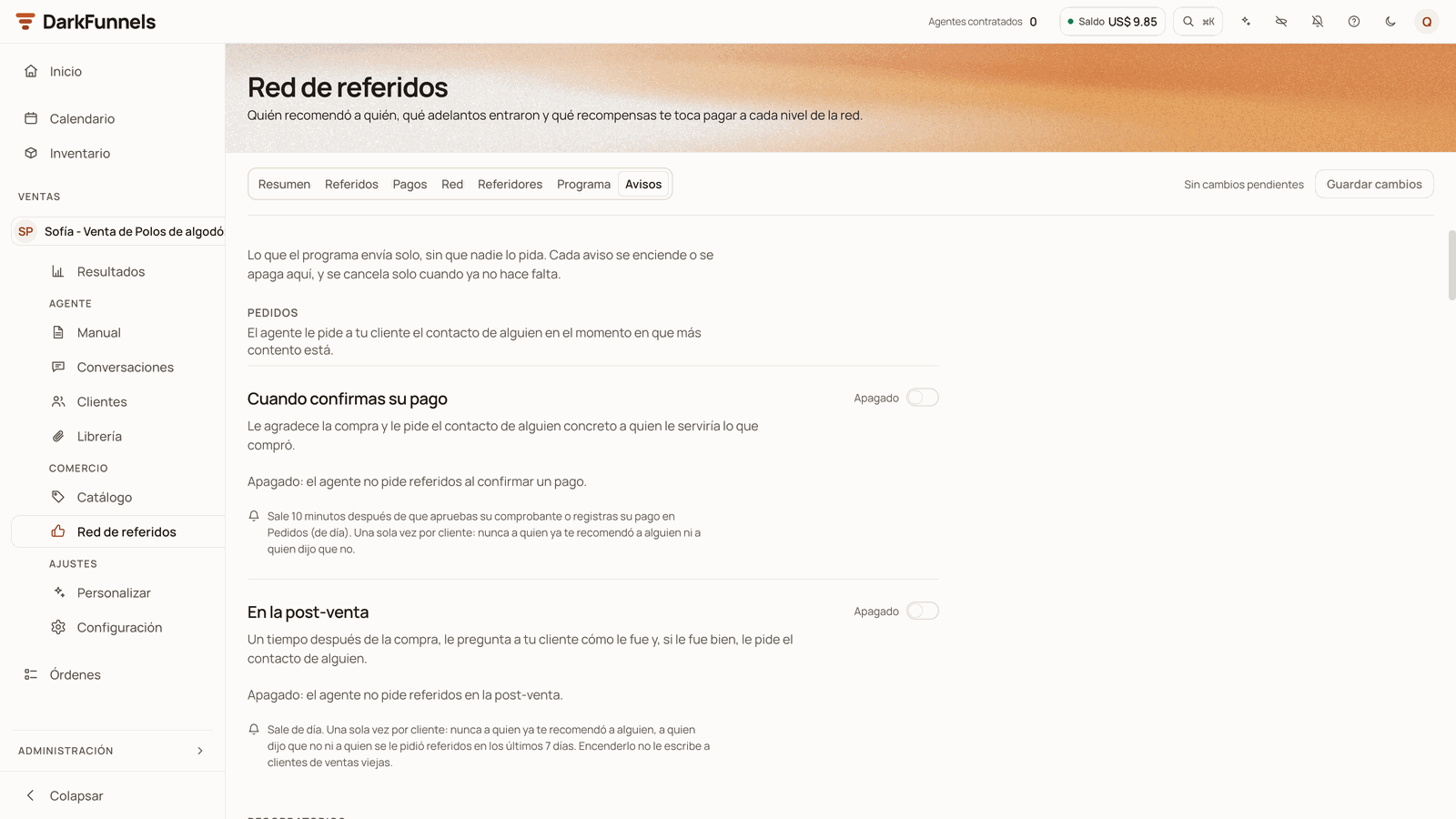 | Notice | Default | When it goes out | When it doesn't go out |
| - | - | - | - |
| **Pedidos** (*Requests*) **→ Cuando confirmas su pago** (*When you confirm their payment*) | Off | 10 minutes after the payment you approve or record on the **Pedidos** (*Orders*) screen covers the order's deposit (or completes it), during the day. The agent thanks them for the purchase and asks them for a contact. | If they have already recommended someone to you or if they said no. It goes out only once per customer. |
| **Pedidos → En la post-venta** (*In the after-sale*) | Off | 7, 15, 30, 45, 60 or 90 days after the sale (30 by default), during the day. It asks them how it went and, only if it went well, asks them for a contact. | If they have already recommended someone to you, if they said no or if they were asked for referrals in the last 7 days. Switching it on doesn't write to customers from old sales. |
| **Recordatorios** (*Reminders*) **→ Si tu cliente no te pasa ningún contacto** | Off | 24 hours, or 2, 3, 7, 14, 30, 60 or 90 days after your customer enters the chapter where your agent asks for referrals (30 days by default). | If before then they pass you a contact, say no or have already recommended someone to you. One per customer of this funnel. |
| **Recordatorios → Si su conocido no escribe** | On | 1, 2, 3, 5, 7 or 14 days after your customer passes you the contact (3 by default). It asks them whether they managed to forward your introduction. | If their contact has already written to you. It only works with **El cliente lo presenta**. |
| **Mensajes** (*Messages*) **→ Cuando su conocido escribe** | On | With the referral's first message, during the day. The agent thanks your customer for the recommendation. | If it has already gone out once for that referral. |
| **Mensajes → Cuando su referido da el adelanto** | On | When you mark the deposit (in Referidos or on the customer record): one for each person in the network who earns. | To anyone who has no conversation with your agent. |
| **Mensajes → Cuando le pagas** | On | When you record the payment (in Pagos, in Referidos, in the person's panel or on the customer record). If you attached the receipt, it goes in a second bubble. | To anyone who has no conversation with your agent. |
The reminders go out **from 8:00 to 20:00 in the funnel's time zone**.
**The two requests and the reminder need a level 1 reward greater than 0.** If
Programa doesn't have one, they don't go out; for the two requests, the
dashboard warns you next to the switch. Also, **the reminder needs the chapter
where your agent asks for referrals**: if you switch it on without it, the
dashboard doesn't let you save and offers you **Elegirlo en Programa** (*Choose
it in Programa*).
#### Instruction or literal message
The texts are of two kinds, and the screen tells you which for each one:
* **Instructions for the agent** (*instrucción para el agente*): the requests,
the reminders and **Cuando su conocido escribe**. The agent says them in its
own words.
* **Messages as written** (*mensaje tal cual*): **Cuando su referido da el
adelanto** and **Cuando le pagas**. They go out exactly as you write them, in
one bubble. If the person's name or email is missing, the sentence fixes
itself, and the deposit notice gets the bonus and ambassador sentences added
at the end when they apply. Below each one, **«Así le llega (con datos de
ejemplo)»** (*This is how it reaches them (with sample data)*) shows you the
result.
Each text allows up to 500 characters. **If it's empty, the default one is
used**, which you see in grey. If you type a variable that isn't on its list,
the dashboard tells you which one it is and doesn't let you save until you fix
it.
| Text | Variables you can name |
| - | - |
| The two requests and the reminder | `{{premio}}`: what they earn for each referral with a deposit (level 1). |
| **Si su conocido no escribe** and **Cuando su conocido escribe** | `{{referido}}`: the name of the person they know. |
| **Cuando su referido da el adelanto**, for whoever recommended | `{{nombre}}`, `{{referido}}`, `{{monto}}` and `{{plazo}}` (when you pay them; with no deadline, «pronto», *soon*). |
| **Cuando su referido da el adelanto**, for the rest of the network | The same ones, plus `{{como_llego}}`: how that referral reached their network. |
| **Si con ese adelanto gana el bono** (*If that deposit earns them the bonus*) and **Si le falta 1 para el bono** (*If they are 1 short of the bonus*) | `{{cantidad}}` and `{{bono}}`. |
| **Si con ese adelanto pasa a embajador** (*If that deposit makes them an ambassador*) | `{{cantidad}}`. |
| **Cuando le pagas** | `{{nombre}}`, `{{monto}}`, `{{motivo}}`, `{{correo}}` and `{{referido}}`. |
The default deposit notice, for whoever recommended, reads like this:
> «¡Buenas noticias, `{{nombre}}`! `{{referido}}` ya realizó su adelanto. Ganaste
> `{{monto}}` por recomendarnos 🎉 Te avisaremos cuando te enviemos el pago.»
(*In English: Good news,* `{{nombre}}`*!* `{{referido}}` *has made their
deposit. You earned* `{{monto}}` *for recommending us 🎉 We'll let you know when
we send you the payment.*)
If you set a **Plazo para pagar**, the ending changes to *«Te enviamos el pago*
`{{plazo}}` *y te avisamos.»* (*We'll send you the payment* `{{plazo}}` *and let
you know.*) The bonus and ambassador sentences are added at the end of that
same message, only for whoever recommended and only if you have a bonus or
ambassadors in Programa.
It is saved the same way as Programa, with **Guardar cambios** at the top. When
you save, the notice *«Avisos guardados»* (*Notices saved*) appears.
## From the customer record
In **Clientes** (*Customers*), and in the record that opens next to each chat in
**Conversaciones** (*Conversations*), the record has a **Referidos** section if
that customer recommended someone or arrived recommended. If not, the section
doesn't appear.
| Notice | Default | When it goes out | When it doesn't go out |
| - | - | - | - |
| **Pedidos** (*Requests*) **→ Cuando confirmas su pago** (*When you confirm their payment*) | Off | 10 minutes after the payment you approve or record on the **Pedidos** (*Orders*) screen covers the order's deposit (or completes it), during the day. The agent thanks them for the purchase and asks them for a contact. | If they have already recommended someone to you or if they said no. It goes out only once per customer. |
| **Pedidos → En la post-venta** (*In the after-sale*) | Off | 7, 15, 30, 45, 60 or 90 days after the sale (30 by default), during the day. It asks them how it went and, only if it went well, asks them for a contact. | If they have already recommended someone to you, if they said no or if they were asked for referrals in the last 7 days. Switching it on doesn't write to customers from old sales. |
| **Recordatorios** (*Reminders*) **→ Si tu cliente no te pasa ningún contacto** | Off | 24 hours, or 2, 3, 7, 14, 30, 60 or 90 days after your customer enters the chapter where your agent asks for referrals (30 days by default). | If before then they pass you a contact, say no or have already recommended someone to you. One per customer of this funnel. |
| **Recordatorios → Si su conocido no escribe** | On | 1, 2, 3, 5, 7 or 14 days after your customer passes you the contact (3 by default). It asks them whether they managed to forward your introduction. | If their contact has already written to you. It only works with **El cliente lo presenta**. |
| **Mensajes** (*Messages*) **→ Cuando su conocido escribe** | On | With the referral's first message, during the day. The agent thanks your customer for the recommendation. | If it has already gone out once for that referral. |
| **Mensajes → Cuando su referido da el adelanto** | On | When you mark the deposit (in Referidos or on the customer record): one for each person in the network who earns. | To anyone who has no conversation with your agent. |
| **Mensajes → Cuando le pagas** | On | When you record the payment (in Pagos, in Referidos, in the person's panel or on the customer record). If you attached the receipt, it goes in a second bubble. | To anyone who has no conversation with your agent. |
The reminders go out **from 8:00 to 20:00 in the funnel's time zone**.
**The two requests and the reminder need a level 1 reward greater than 0.** If
Programa doesn't have one, they don't go out; for the two requests, the
dashboard warns you next to the switch. Also, **the reminder needs the chapter
where your agent asks for referrals**: if you switch it on without it, the
dashboard doesn't let you save and offers you **Elegirlo en Programa** (*Choose
it in Programa*).
#### Instruction or literal message
The texts are of two kinds, and the screen tells you which for each one:
* **Instructions for the agent** (*instrucción para el agente*): the requests,
the reminders and **Cuando su conocido escribe**. The agent says them in its
own words.
* **Messages as written** (*mensaje tal cual*): **Cuando su referido da el
adelanto** and **Cuando le pagas**. They go out exactly as you write them, in
one bubble. If the person's name or email is missing, the sentence fixes
itself, and the deposit notice gets the bonus and ambassador sentences added
at the end when they apply. Below each one, **«Así le llega (con datos de
ejemplo)»** (*This is how it reaches them (with sample data)*) shows you the
result.
Each text allows up to 500 characters. **If it's empty, the default one is
used**, which you see in grey. If you type a variable that isn't on its list,
the dashboard tells you which one it is and doesn't let you save until you fix
it.
| Text | Variables you can name |
| - | - |
| The two requests and the reminder | `{{premio}}`: what they earn for each referral with a deposit (level 1). |
| **Si su conocido no escribe** and **Cuando su conocido escribe** | `{{referido}}`: the name of the person they know. |
| **Cuando su referido da el adelanto**, for whoever recommended | `{{nombre}}`, `{{referido}}`, `{{monto}}` and `{{plazo}}` (when you pay them; with no deadline, «pronto», *soon*). |
| **Cuando su referido da el adelanto**, for the rest of the network | The same ones, plus `{{como_llego}}`: how that referral reached their network. |
| **Si con ese adelanto gana el bono** (*If that deposit earns them the bonus*) and **Si le falta 1 para el bono** (*If they are 1 short of the bonus*) | `{{cantidad}}` and `{{bono}}`. |
| **Si con ese adelanto pasa a embajador** (*If that deposit makes them an ambassador*) | `{{cantidad}}`. |
| **Cuando le pagas** | `{{nombre}}`, `{{monto}}`, `{{motivo}}`, `{{correo}}` and `{{referido}}`. |
The default deposit notice, for whoever recommended, reads like this:
> «¡Buenas noticias, `{{nombre}}`! `{{referido}}` ya realizó su adelanto. Ganaste
> `{{monto}}` por recomendarnos 🎉 Te avisaremos cuando te enviemos el pago.»
(*In English: Good news,* `{{nombre}}`*!* `{{referido}}` *has made their
deposit. You earned* `{{monto}}` *for recommending us 🎉 We'll let you know when
we send you the payment.*)
If you set a **Plazo para pagar**, the ending changes to *«Te enviamos el pago*
`{{plazo}}` *y te avisamos.»* (*We'll send you the payment* `{{plazo}}` *and let
you know.*) The bonus and ambassador sentences are added at the end of that
same message, only for whoever recommended and only if you have a bonus or
ambassadors in Programa.
It is saved the same way as Programa, with **Guardar cambios** at the top. When
you save, the notice *«Avisos guardados»* (*Notices saved*) appears.
## From the customer record
In **Clientes** (*Customers*), and in the record that opens next to each chat in
**Conversaciones** (*Conversations*), the record has a **Referidos** section if
that customer recommended someone or arrived recommended. If not, the section
doesn't appear.
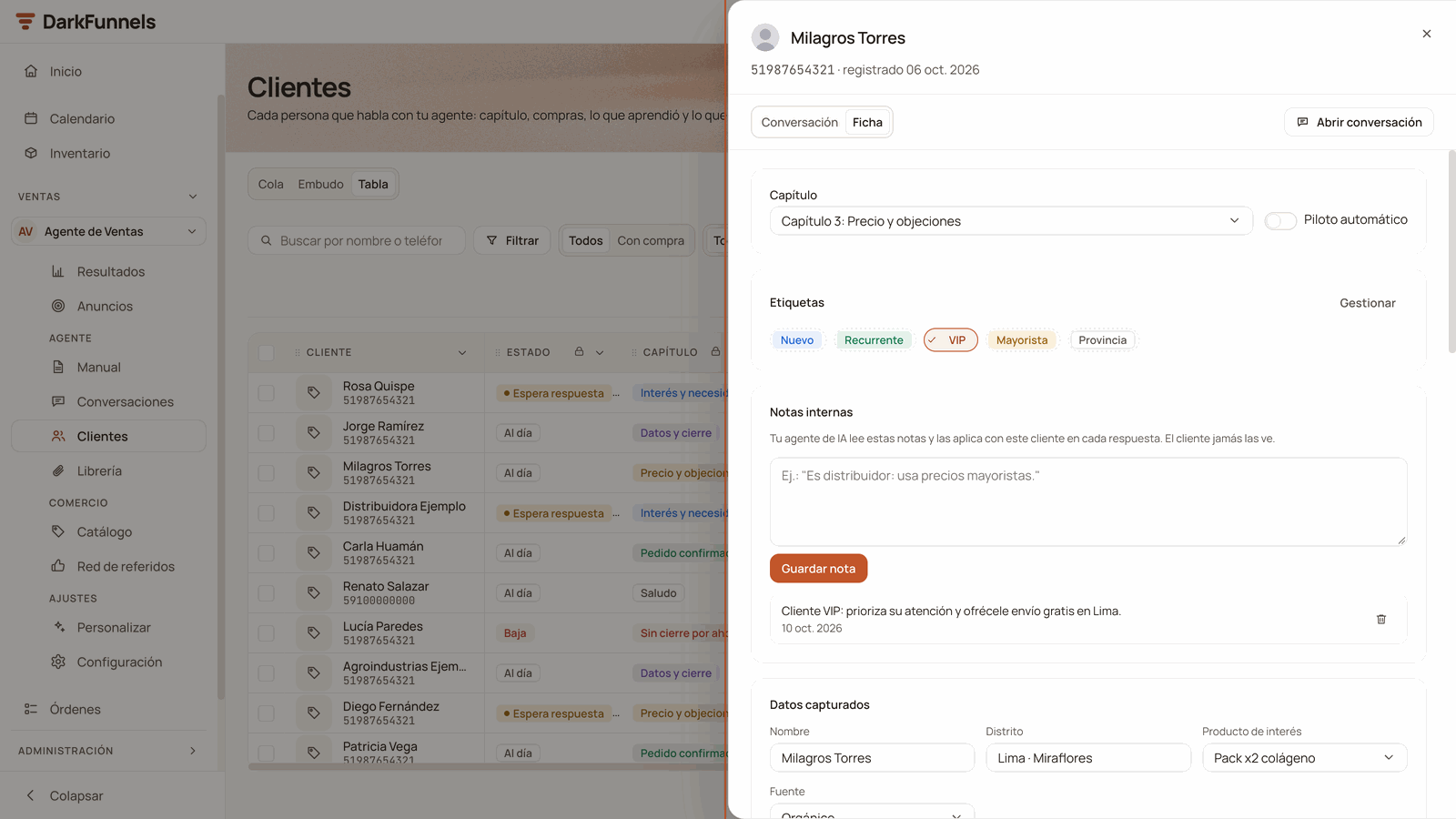 It shows **Refirió a** or **Referido por**, the status, the date and the rewards
per level, each with **Pagar** if it is still to be paid. From there you can
also mark the deposit with **Marcar adelanto recibido** (*Mark deposit
received*) and confirm with **Sí, adelanto recibido** (*Yes, deposit
received*): the confirmation tells you who will get the WhatsApp. **Vincular
chat** and **Devolvió el adelanto** are only in the
[Referidos](#referidos-referrals) tab.
## If something doesn't work
| What you see | It's almost always | How to fix it |
| - | - | - |
| The screen says **«Selecciona un agente»** | No agent is chosen | Choose one in the selector, inside **Ventas** |
| **The network comes up empty** even though you have referrals | You have another agent chosen: the program is per agent | Choose the right agent in the selector |
| The agent **doesn't ask for referrals** | No chapter of your playbook tells it to, and the requests in Avisos are off | Write the request in the playbook with **Registrar un referido**, or switch on the requests in **Avisos** |
| The agent **didn't register the contact** | Your agent's WhatsApp is disconnected | Check the connection in **Personalizar** (*Customize*) |
| The agent said **that number doesn't count** | It already talked with this funnel, another customer recommended it first or it is the customer's own number | Those are [the rules](#the-rules-the-agent-already-knows): it's not a fault |
| The agent **asked for the country code** | The number arrived without it | Have your customer share the contact card or the full number |
| **The automatic requests don't go out** | The switch is off or there is no level 1 reward | Switch them on in **Avisos** and set level 1 in **Programa** |
| **The reminder doesn't go out** | It is off, the chapter where it asks for referrals is missing, that chapter is no longer in the playbook or there is no level 1 reward | Switch it on in **Avisos**; choose the chapter and level 1 in **Programa**, and save |
| The referral is still in **Invitado** even though they wrote to you | They wrote to you from another number | **Vincular chat** on their row |
| **I don't see «Marcar adelanto»** | The referral is in **Invitado** (hasn't written to you yet), already has the deposit marked or moved to another customer | If they wrote to you from another number, link them first. If they paid without writing to you, mark it from the **Referidos** section of the record of whoever recommended them. If they moved to another customer, mark it on the new customer's row |
| **«Sin pago confirmado en Pedidos»** | There is no recorded payment or approved receipt from that referral | Record the payment in Pedidos, or **Marcar igual: entró por fuera** |
| *«…no tiene conversación abierta, así que no se envió aviso»* (*…has no open conversation, so no notice was sent*) | That person has no chat with your agent | Let them know yourself some other way |
| *«…un aviso por WhatsApp no salió»* (*…a WhatsApp notice didn't go out*) | The send failed | Write to them yourself from their chat |
| *«Este agente no tiene recompensas configuradas…»* (*This agent has no rewards set up…*) | There are no levels in Programa, or the levels that apply to that chain are at 0 | Set amounts greater than 0 in **Programa**: they apply to the deposits you mark afterwards |
| A reward in **Retenido** | The same PayPal email or the same name appears twice in the chain | Review the chain and, if everything is fine, **Revisé la cadena: pagar igual** |
| **Guardar cambios** is grey | A field has an error | Look for the red text; the button tells you what to check when you hover over it |
| *«Ese archivo ya no está en tu librería…»* (*That file is no longer in your library…*) | You deleted the attachment or unlinked it from the agent | Choose another file or **Sin adjunto**, and save |
## Frequently asked questions
No. You pay through PayPal, outside the dashboard, and here you record the
payment with its reference and, if you want, the receipt. Recording it asks
for the PayPal email and reference.
Yes. Programa, Avisos and the whole network are per agent: each one with
its own rewards, messages and referrals.
Nothing. The new amounts apply to the deposits you mark after saving.
Rewards already generated keep their amount and their currency.
If you set a benefit in **¿Qué recibe quien llega recomendado?**, the agent
tells the referral about it and is instructed not to tell them what the
person who recommended them earns. Without a benefit there is no such
explicit instruction: just in case, don't put the program's amounts in the
chapter referrals come in through.
The first one. If in Programa you set **Un referido vale (días)** and that
period passed without a deposit, the second one wins, and the first one's
row stays as **Pasó a otro cliente**. If the person had already written to
you, they don't change owner.
What is already paid doesn't change. **Devolvió el adelanto** only cancels
the rewards that were still unpaid. To give yourself some margin, use
**Espera antes de pagar**: the rewards wait that many days before they can
be paid.
This documentation is built and hosted on [Mintlify](https://mintlify.com), a developer documentation platform.
It shows **Refirió a** or **Referido por**, the status, the date and the rewards
per level, each with **Pagar** if it is still to be paid. From there you can
also mark the deposit with **Marcar adelanto recibido** (*Mark deposit
received*) and confirm with **Sí, adelanto recibido** (*Yes, deposit
received*): the confirmation tells you who will get the WhatsApp. **Vincular
chat** and **Devolvió el adelanto** are only in the
[Referidos](#referidos-referrals) tab.
## If something doesn't work
| What you see | It's almost always | How to fix it |
| - | - | - |
| The screen says **«Selecciona un agente»** | No agent is chosen | Choose one in the selector, inside **Ventas** |
| **The network comes up empty** even though you have referrals | You have another agent chosen: the program is per agent | Choose the right agent in the selector |
| The agent **doesn't ask for referrals** | No chapter of your playbook tells it to, and the requests in Avisos are off | Write the request in the playbook with **Registrar un referido**, or switch on the requests in **Avisos** |
| The agent **didn't register the contact** | Your agent's WhatsApp is disconnected | Check the connection in **Personalizar** (*Customize*) |
| The agent said **that number doesn't count** | It already talked with this funnel, another customer recommended it first or it is the customer's own number | Those are [the rules](#the-rules-the-agent-already-knows): it's not a fault |
| The agent **asked for the country code** | The number arrived without it | Have your customer share the contact card or the full number |
| **The automatic requests don't go out** | The switch is off or there is no level 1 reward | Switch them on in **Avisos** and set level 1 in **Programa** |
| **The reminder doesn't go out** | It is off, the chapter where it asks for referrals is missing, that chapter is no longer in the playbook or there is no level 1 reward | Switch it on in **Avisos**; choose the chapter and level 1 in **Programa**, and save |
| The referral is still in **Invitado** even though they wrote to you | They wrote to you from another number | **Vincular chat** on their row |
| **I don't see «Marcar adelanto»** | The referral is in **Invitado** (hasn't written to you yet), already has the deposit marked or moved to another customer | If they wrote to you from another number, link them first. If they paid without writing to you, mark it from the **Referidos** section of the record of whoever recommended them. If they moved to another customer, mark it on the new customer's row |
| **«Sin pago confirmado en Pedidos»** | There is no recorded payment or approved receipt from that referral | Record the payment in Pedidos, or **Marcar igual: entró por fuera** |
| *«…no tiene conversación abierta, así que no se envió aviso»* (*…has no open conversation, so no notice was sent*) | That person has no chat with your agent | Let them know yourself some other way |
| *«…un aviso por WhatsApp no salió»* (*…a WhatsApp notice didn't go out*) | The send failed | Write to them yourself from their chat |
| *«Este agente no tiene recompensas configuradas…»* (*This agent has no rewards set up…*) | There are no levels in Programa, or the levels that apply to that chain are at 0 | Set amounts greater than 0 in **Programa**: they apply to the deposits you mark afterwards |
| A reward in **Retenido** | The same PayPal email or the same name appears twice in the chain | Review the chain and, if everything is fine, **Revisé la cadena: pagar igual** |
| **Guardar cambios** is grey | A field has an error | Look for the red text; the button tells you what to check when you hover over it |
| *«Ese archivo ya no está en tu librería…»* (*That file is no longer in your library…*) | You deleted the attachment or unlinked it from the agent | Choose another file or **Sin adjunto**, and save |
## Frequently asked questions
No. You pay through PayPal, outside the dashboard, and here you record the
payment with its reference and, if you want, the receipt. Recording it asks
for the PayPal email and reference.
Yes. Programa, Avisos and the whole network are per agent: each one with
its own rewards, messages and referrals.
Nothing. The new amounts apply to the deposits you mark after saving.
Rewards already generated keep their amount and their currency.
If you set a benefit in **¿Qué recibe quien llega recomendado?**, the agent
tells the referral about it and is instructed not to tell them what the
person who recommended them earns. Without a benefit there is no such
explicit instruction: just in case, don't put the program's amounts in the
chapter referrals come in through.
The first one. If in Programa you set **Un referido vale (días)** and that
period passed without a deposit, the second one wins, and the first one's
row stays as **Pasó a otro cliente**. If the person had already written to
you, they don't change owner.
What is already paid doesn't change. **Devolvió el adelanto** only cancels
the rewards that were still unpaid. To give yourself some margin, use
**Espera antes de pagar**: the rewards wait that many days before they can
be paid.
This documentation is built and hosted on [Mintlify](https://mintlify.com), a developer documentation platform.