> ## Documentation Index
> Fetch the complete documentation index at: https://docs.darkfunnels.ai/llms.txt
> Use this file to discover all available pages before exploring further.
> ## Agent Instructions
> DarkFunnels is a WhatsApp AI sales-agent platform used mainly in Peru and Latin America. The product interface and most of this documentation are in Spanish; the /en tree is the English mirror.
> A business connects the WhatsApp number it already uses by scanning a QR code from the dashboard, the same linked-device mechanism as WhatsApp Web. It does not go through the Meta Cloud API (WhatsApp Business Platform), so there is no application to get approved and no message templates to submit. DarkFunnels is not a Meta product and is not affiliated with Meta.
> DarkFunnels also publishes a remote MCP server at https://mcp.darkfunnels.ai/mcp so an assistant such as Claude, ChatGPT or Codex can operate the workspace on the owner's behalf. The tool reference is at /referencia/tools and the connection parameters at /referencia/url-de-conexion.
> The dashboard is https://optimind.darkfunnels.ai, the marketing site is https://darkfunnels.ai and the page written for AI agents is https://darkfunnels.ai/agents.
# Connect your Meta ads
> How to connect your Meta ad account to the Ads page, what Meta asks on each screen, what you see afterwards (spend, cost per chat, yield and where to invest), when to reconnect, and what to do if something fails.
The **Ads** page brings together two things that until now lived in different
places: what you spent on Meta for each click-to-WhatsApp ad, and what happened
next in your chats: who wrote, who qualified and who bought. DarkFunnels already
knows the second half: the first message from someone who writes from an ad
usually carries the ad they came from, hidden, and we store it with the chat. The
first half lives in your Meta ad account, and to read it you have to connect it.
This guide is that step, screen by screen.
Without connecting, the page already shows, per ad, the chats, the qualified
leads and the sales. Connecting adds the **spend**, the **clicks**, what each chat,
each qualified lead and each sale cost you, the **ROAS**, the **engagement**
(reactions, comments, shares), each ad's **thumbnail** and **video** (when Meta
shares it), and **yield**: which ad is your best one by what each sol (or dollar)
you put into it brings back.
## Before you start: what you need to know
**1. Connect with the Facebook account that runs your ads.** It must have access
to the ad account that pays for your click-to-WhatsApp ads (in Ads Manager, it's
the account you pick at the top left). If you connect with a Facebook account
that can't see that ad account, DarkFunnels can't find your ads and tells you
so.
**2. DarkFunnels recognizes your ad account by the ads that bring you chats.**
If nobody has written to you from a click-to-WhatsApp ad yet, you can still
connect: if your Facebook account sees a single ad account, that one gets
connected; if it sees several, we add yours on our own when the first chat from
an ad reaches you.
**3. To see Facebook's "organic" engagement, that same Facebook account must
manage the Page that publishes your ads.** Without that, everything else works
the same and that part doesn't show up.
**4. The Ads page is in a pilot and lives in the Sales app.** You need access to
Sales. If you still don't see it in the menu, or it says *"Not available for your
account yet"* when you open it, write to us to join. While the pilot lasts there
is one extra step: accepting an invitation from Meta (explained right below).
### While the pilot lasts: accept Meta's invitation
The app DarkFunnels uses to connect to Meta doesn't have Meta's approval for
everyone yet, and in the meantime Meta only lets people the app invited connect. So, the first time:
The profile of the person who will connect (the one who runs your ads): their
name as it appears on Facebook, or the link to their profile. We invite you
as a **tester** of the DarkFunnels app.
Go to `developers.facebook.com/requests` with that Facebook account and accept
the DarkFunnels invitation. If Meta asks you to register as a developer, do
it: it's free and doesn't publish anything in your name.
From then on you can connect. This step goes away once Meta approves the app for
everyone; this guide will be updated then.
## Connect your ad account
In the left menu: **Sales → Ads**.
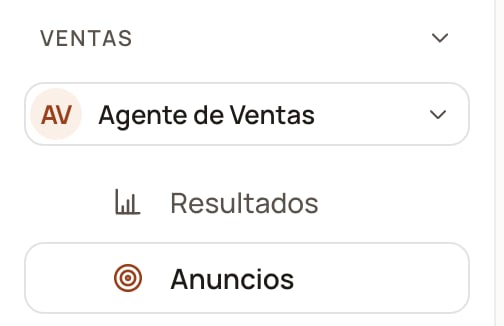 Top right, next to **Qualified chapter**.
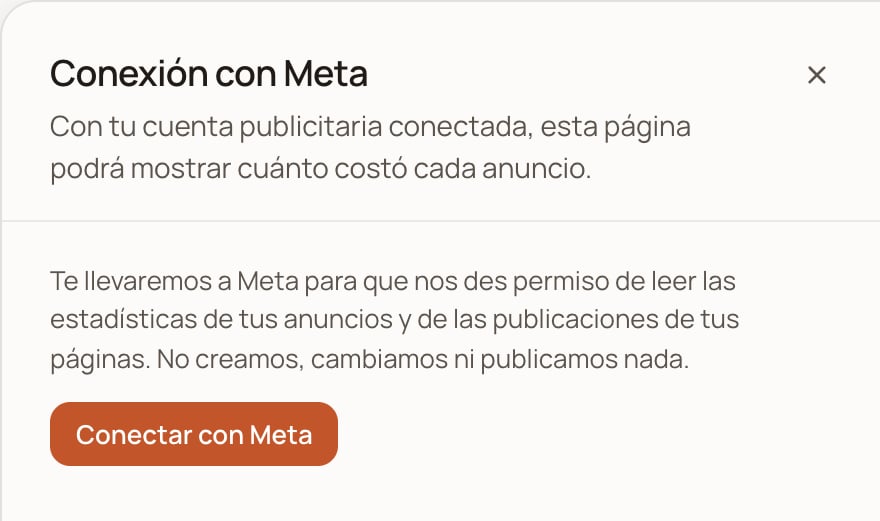
 The **Connection with Meta** sheet opens. Click **Connect with Meta**: it
takes you to Meta's window.
The **Connection with Meta** sheet opens. Click **Connect with Meta**: it
takes you to Meta's window.
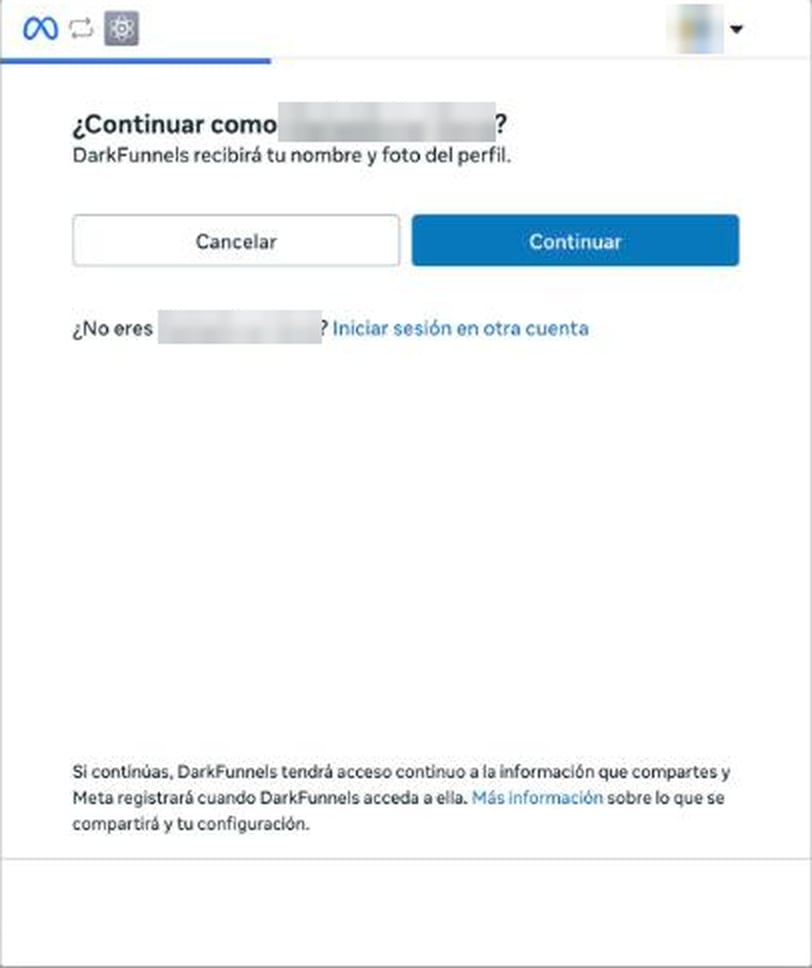
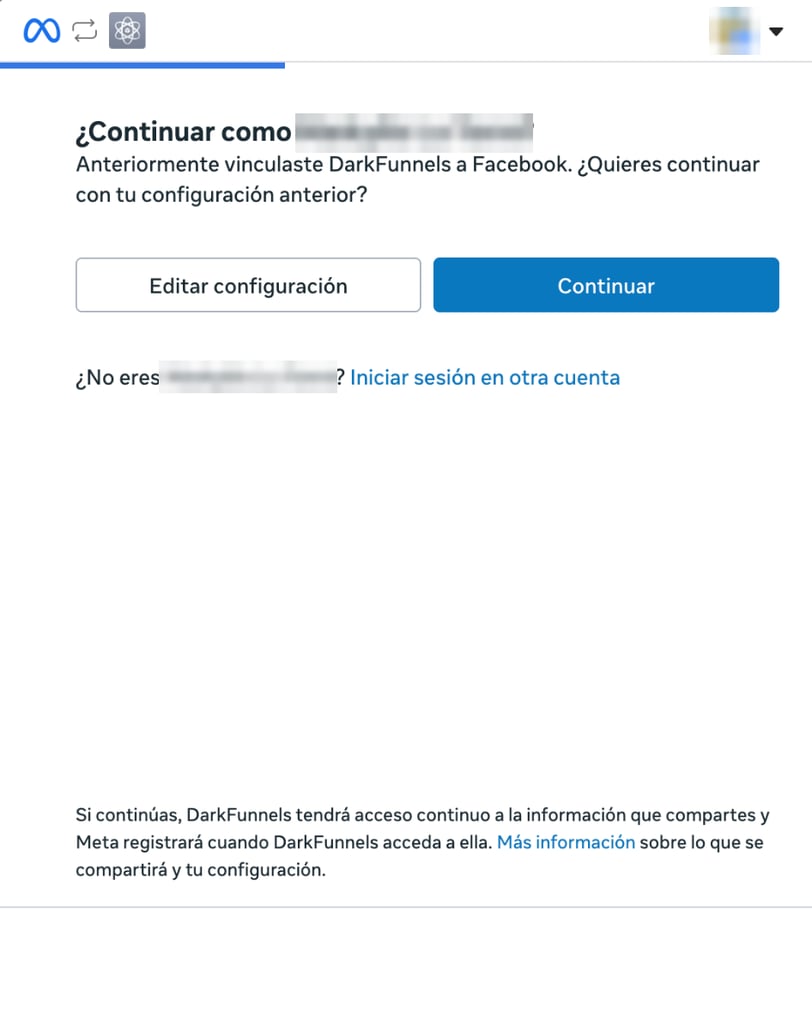
 Meta asks **Continue as …?** with the name of the Facebook account open in
that browser. If it's the one that runs your ads, click **Continue**. If not,
**Log in to another account** and sign in with the right one.
Meta asks **Continue as …?** with the name of the Facebook account open in
that browser. If it's the one that runs your ads, click **Continue**. If not,
**Log in to another account** and sign in with the right one.
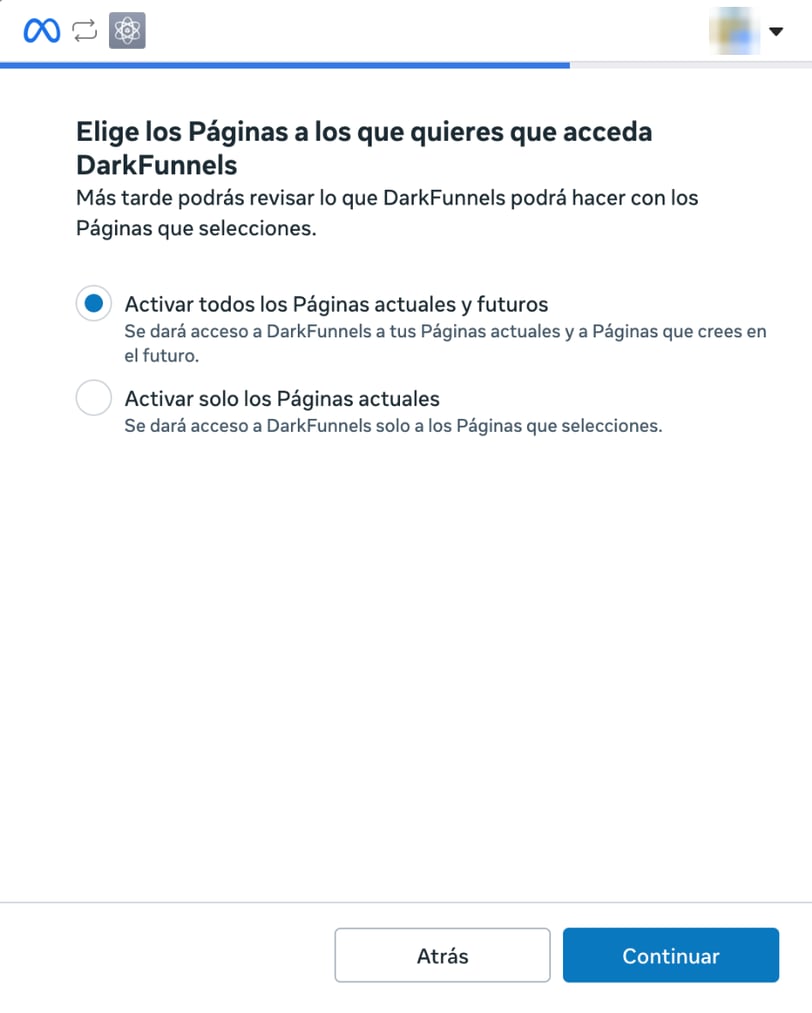
 Meta asks you to choose which Pages DarkFunnels can access. Leave the first
option selected (all your Pages, current ones and those you create later), or
pick the second one (current ones only) and check, at least, the Page that
publishes your ads. Click **Continue**.
Meta asks you to choose which Pages DarkFunnels can access. Leave the first
option selected (all your Pages, current ones and those you create later), or
pick the second one (current ones only) and check, at least, the Page that
publishes your ads. Click **Continue**.
 Meta sums up what DarkFunnels asks for under **Review DarkFunnels' access
request**: *access your Facebook ads and related statistics*, *read content
posted on the Page*, *read user content on your Page* and *show a list of the
Pages you manage*. Click **Save**.
Meta sums up what DarkFunnels asks for under **Review DarkFunnels' access
request**: *access your Facebook ads and related statistics*, *read content
posted on the Page*, *read user content on your Page* and *show a list of the
Pages you manage*. Click **Save**.
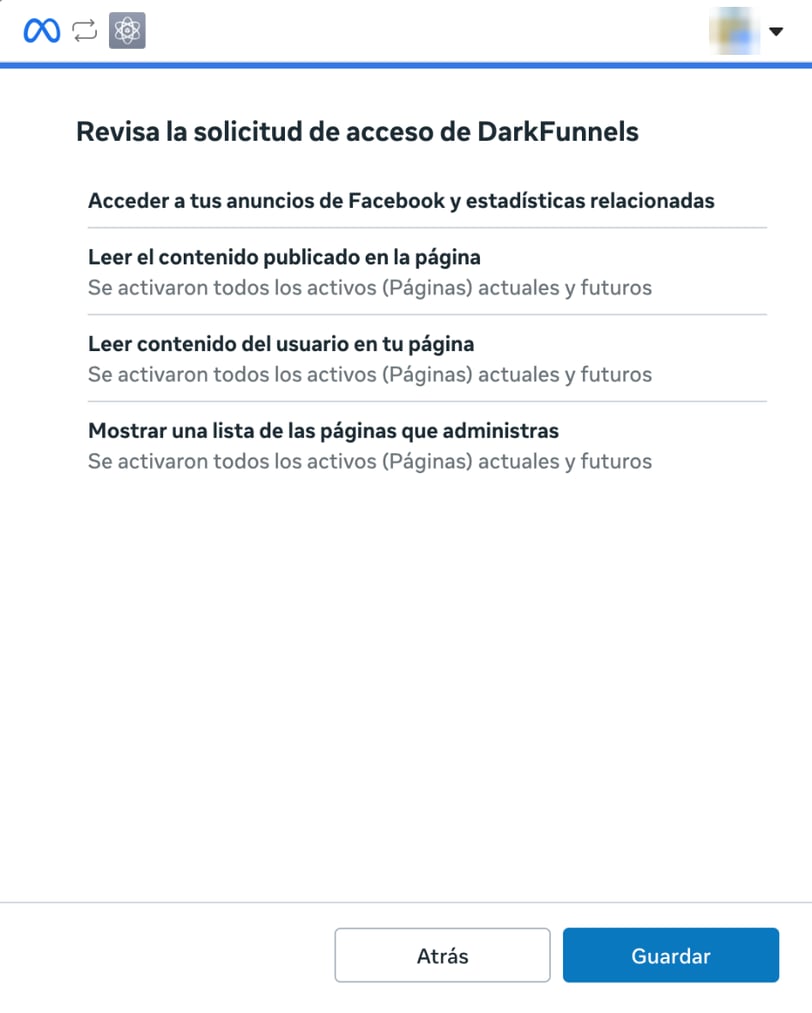 The Page permissions are what make Facebook's organic engagement visible. If
you don't grant them, the connection still works, but that part doesn't show
up and the ad's detail sheet will ask you to reconnect.
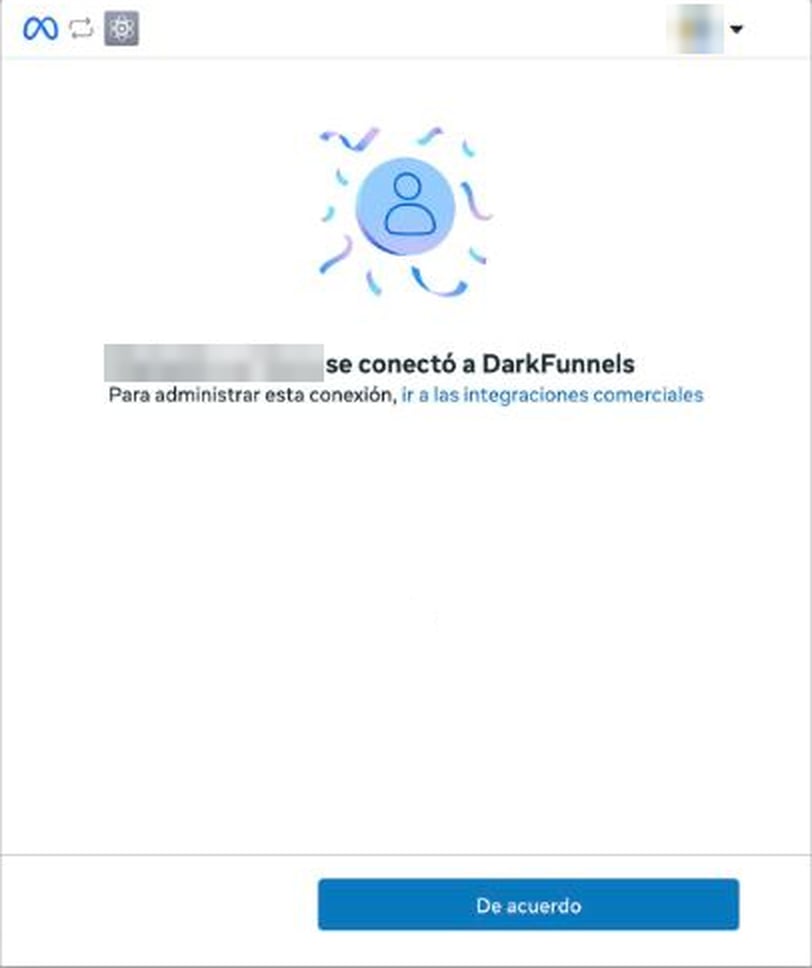
Meta confirms your Facebook account **connected to DarkFunnels**. **OK** takes
you back to DarkFunnels.
The Page permissions are what make Facebook's organic engagement visible. If
you don't grant them, the connection still works, but that part doesn't show
up and the ad's detail sheet will ask you to reconnect.
Meta confirms your Facebook account **connected to DarkFunnels**. **OK** takes
you back to DarkFunnels.
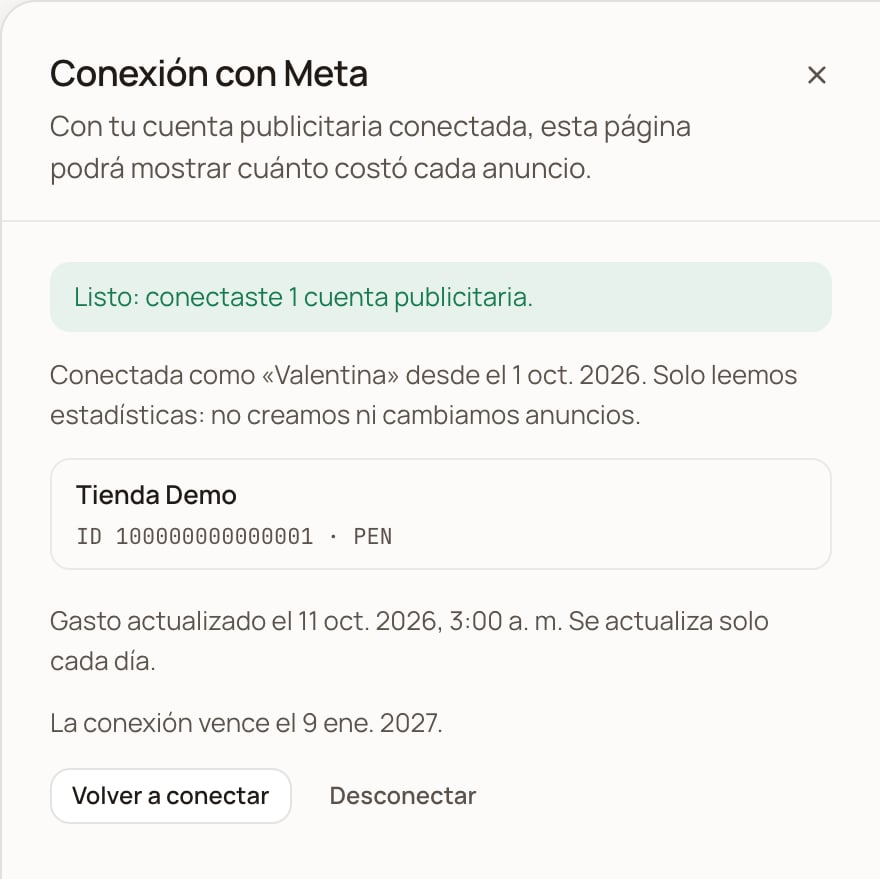
 Back in Ads, the sheet says **Done: you connected 1 ad account** (or however
many) and shows each account with its name, ID and currency. At first you'll
see *"We're bringing in the spend for the last 93 days. Come back in a few
minutes."*; when it's done, it tells you when the spend was updated and until
when the connection is valid.
Back in Ads, the sheet says **Done: you connected 1 ad account** (or however
many) and shows each account with its name, ID and currency. At first you'll
see *"We're bringing in the spend for the last 93 days. Come back in a few
minutes."*; when it's done, it tells you when the spend was updated and until
when the connection is valid.
 **Which accounts get connected.** If your Facebook account has access to several
ad accounts (for example, those of other businesses you manage), DarkFunnels
keeps the ones that pay for ads that brought chats to your business. The rest are
not read. If you connect before your first chat from an ad and your Facebook
account sees several ad accounts, the sheet says *"We don't know yet which of
your Facebook's ad accounts belongs to this business"* and yours is added on its
own when that chat arrives. And if you later start paying for ads from another
account, it's added on its own too. In both cases it comes in with the daily
update that follows that account's first chat, if the Facebook account you
connected can see it.
## What you see once it's connected
**Which accounts get connected.** If your Facebook account has access to several
ad accounts (for example, those of other businesses you manage), DarkFunnels
keeps the ones that pay for ads that brought chats to your business. The rest are
not read. If you connect before your first chat from an ad and your Facebook
account sees several ad accounts, the sheet says *"We don't know yet which of
your Facebook's ad accounts belongs to this business"* and yours is added on its
own when that chat arrives. And if you later start paying for ads from another
account, it's added on its own too. In both cases it comes in with the daily
update that follows that account's first chat, if the Facebook account you
connected can see it.
## What you see once it's connected
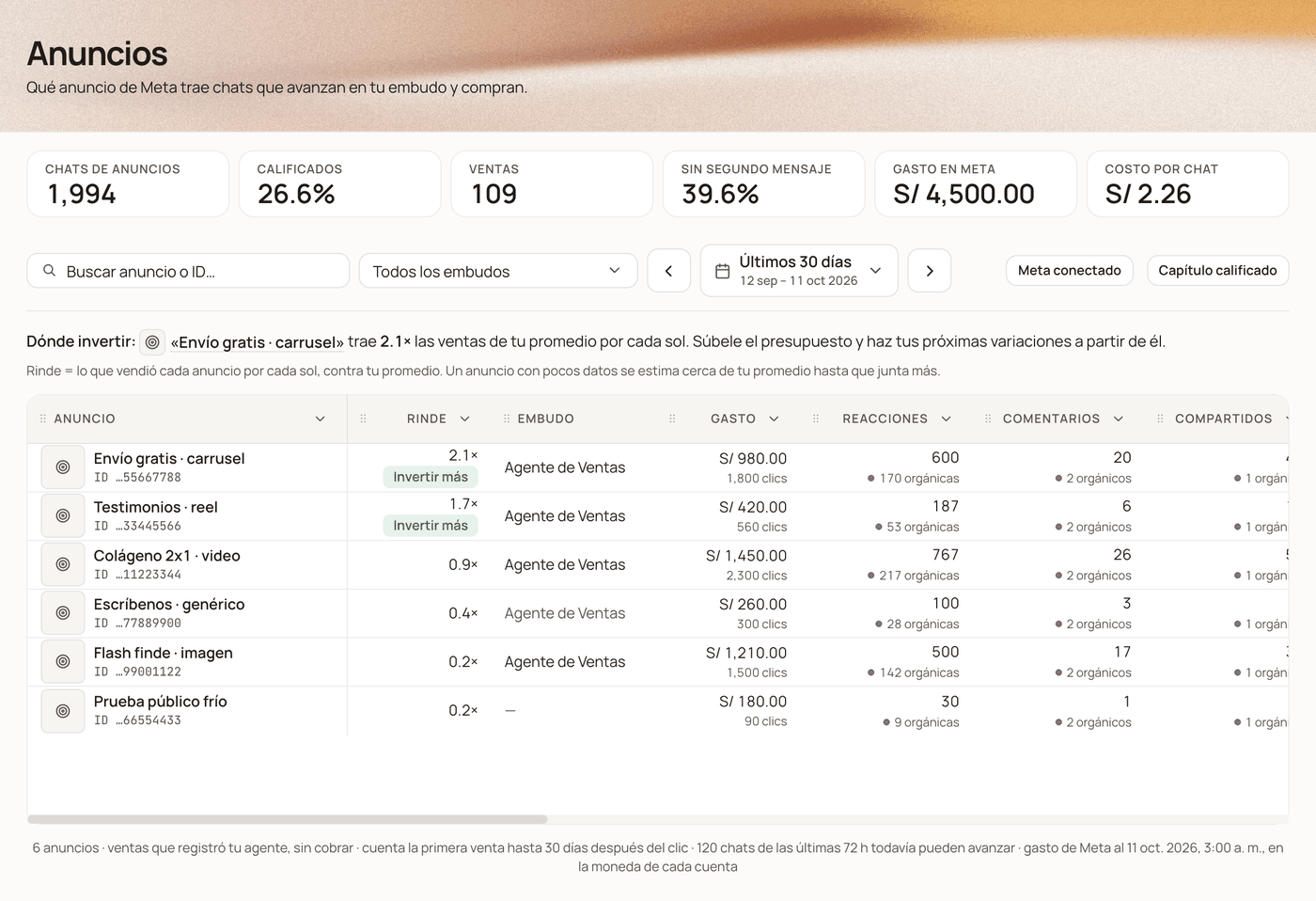 * **The top strip** adds two figures: **Meta spend** and **Cost per chat** (all
the spend divided by all the chats from those ads).
* **Each ad** shows its name in Meta and its thumbnail, what it **spent** in the
period (with its clicks underneath), the **reactions, comments and shares** it
brought in the period (underneath, with a purple dot, its post's organic ones:
those that came on their own, unpaid, since it was published), and what **each
chat, each qualified lead and each sale** cost you, plus the **ROAS** (what it
sold divided by what it spent).
* **Ads from those accounts that spent without bringing a single chat also show
up, with 0 chats** (for example, campaigns that aren't click-to-WhatsApp), when
you look at all funnels. Their spend counts toward your average.
* **Yield** and the **Where to invest** sentence, explained below.
* **Country**: if your contacts come from more than one country, a selector shows
up in the toolbar. When you pick one, the page counts the chats from contacts in
that country and the spend Meta delivered there.
### Yield: which ad is your best one
Yield answers a single question: **for each sol (or dollar) you put into this ad,
how much does it bring you compared with an average one across all your ads?**
"2.0×" is double; "0.4×", less than half. The table comes sorted by this column:
the best one on top.
What counts as "what it brings you" depends on what your business already
measures:
| If in the period, among your ads with spend… | yield compares… |
| - | - |
| your agent registered **10 or more sales** | what each ad **sold**, in money |
| there are **10 or more qualified leads** (and fewer than 10 sales) | the **qualified leads** each ad brought |
| neither | the **chats** each ad brought |
The line below **Where to invest** tells you which of the three it's using. For
qualified leads to count, each funnel needs its **qualified chapter** (the
**Qualified chapter** button, top right): the chapter from which a chat is
already a serious customer.
An ad with little data **doesn't shoot up by luck**: its yield is estimated close to
your average and moves away from it as it gathers chats. One that spent 21 cents
and brought 2 chats comes out near 1×, not above all the others.
The column's two marks:
* **Invest more**: it yields more than your average with good confidence (80% or
more) and **is still running** (it spent in the three days before the last
update). It's the candidate for a bigger budget.
* **Iterate**: it yields more than your average with the same confidence, but
**is no longer running**. It's the base for your next variations: the same
hook, another format or copy.
**Where to invest**, the sentence above the table, puts it all together: which ad
to invest more in and which one to start from for the next version. If no ad
clearly yields more than your average yet, it tells you which one looks most
promising and that it needs more data. The ad's name is a link that opens its
detail sheet.
Yield compares each ad with your own average, so it works even if you spend in
dollars and sell in soles: it doesn't need an exchange rate. If you pay from
accounts in two currencies, it only compares the ads in the currency you spend
the most in. And it recommends, it doesn't execute: you change the budget
yourself in Ads Manager.
### An ad's detail sheet
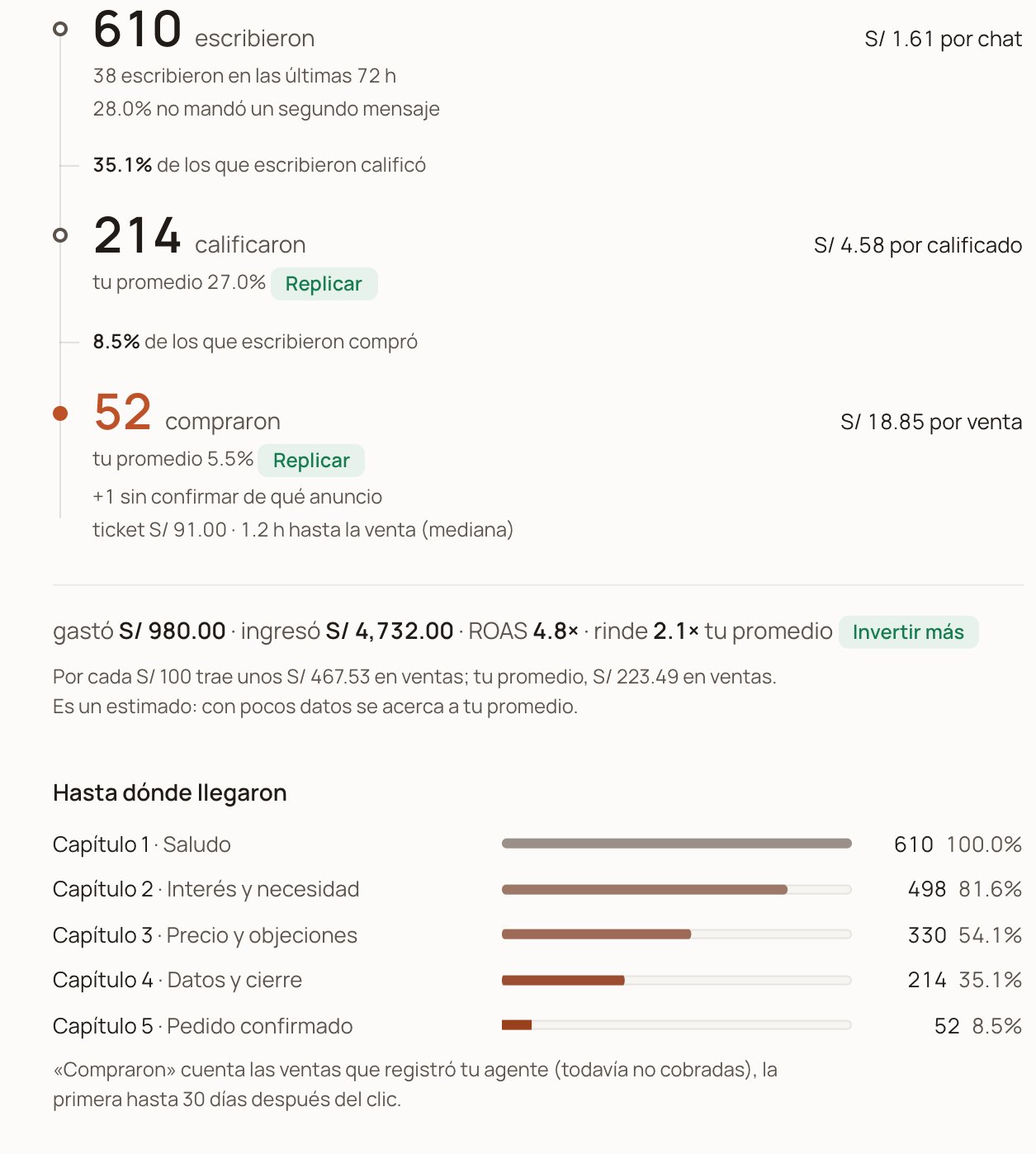
Click an ad's name to open its detail sheet. On the left, **What they saw**: the
video (or the image), how many times it was shown and the people who reacted. On
the right, **What happened**: wrote → qualified → bought, what each step cost, and
on one line what it spent, what it brought in, the ROAS and its yield.
* **The top strip** adds two figures: **Meta spend** and **Cost per chat** (all
the spend divided by all the chats from those ads).
* **Each ad** shows its name in Meta and its thumbnail, what it **spent** in the
period (with its clicks underneath), the **reactions, comments and shares** it
brought in the period (underneath, with a purple dot, its post's organic ones:
those that came on their own, unpaid, since it was published), and what **each
chat, each qualified lead and each sale** cost you, plus the **ROAS** (what it
sold divided by what it spent).
* **Ads from those accounts that spent without bringing a single chat also show
up, with 0 chats** (for example, campaigns that aren't click-to-WhatsApp), when
you look at all funnels. Their spend counts toward your average.
* **Yield** and the **Where to invest** sentence, explained below.
* **Country**: if your contacts come from more than one country, a selector shows
up in the toolbar. When you pick one, the page counts the chats from contacts in
that country and the spend Meta delivered there.
### Yield: which ad is your best one
Yield answers a single question: **for each sol (or dollar) you put into this ad,
how much does it bring you compared with an average one across all your ads?**
"2.0×" is double; "0.4×", less than half. The table comes sorted by this column:
the best one on top.
What counts as "what it brings you" depends on what your business already
measures:
| If in the period, among your ads with spend… | yield compares… |
| - | - |
| your agent registered **10 or more sales** | what each ad **sold**, in money |
| there are **10 or more qualified leads** (and fewer than 10 sales) | the **qualified leads** each ad brought |
| neither | the **chats** each ad brought |
The line below **Where to invest** tells you which of the three it's using. For
qualified leads to count, each funnel needs its **qualified chapter** (the
**Qualified chapter** button, top right): the chapter from which a chat is
already a serious customer.
An ad with little data **doesn't shoot up by luck**: its yield is estimated close to
your average and moves away from it as it gathers chats. One that spent 21 cents
and brought 2 chats comes out near 1×, not above all the others.
The column's two marks:
* **Invest more**: it yields more than your average with good confidence (80% or
more) and **is still running** (it spent in the three days before the last
update). It's the candidate for a bigger budget.
* **Iterate**: it yields more than your average with the same confidence, but
**is no longer running**. It's the base for your next variations: the same
hook, another format or copy.
**Where to invest**, the sentence above the table, puts it all together: which ad
to invest more in and which one to start from for the next version. If no ad
clearly yields more than your average yet, it tells you which one looks most
promising and that it needs more data. The ad's name is a link that opens its
detail sheet.
Yield compares each ad with your own average, so it works even if you spend in
dollars and sell in soles: it doesn't need an exchange rate. If you pay from
accounts in two currencies, it only compares the ads in the currency you spend
the most in. And it recommends, it doesn't execute: you change the budget
yourself in Ads Manager.
### An ad's detail sheet
Click an ad's name to open its detail sheet. On the left, **What they saw**: the
video (or the image), how many times it was shown and the people who reacted. On
the right, **What happened**: wrote → qualified → bought, what each step cost, and
on one line what it spent, what it brought in, the ROAS and its yield.
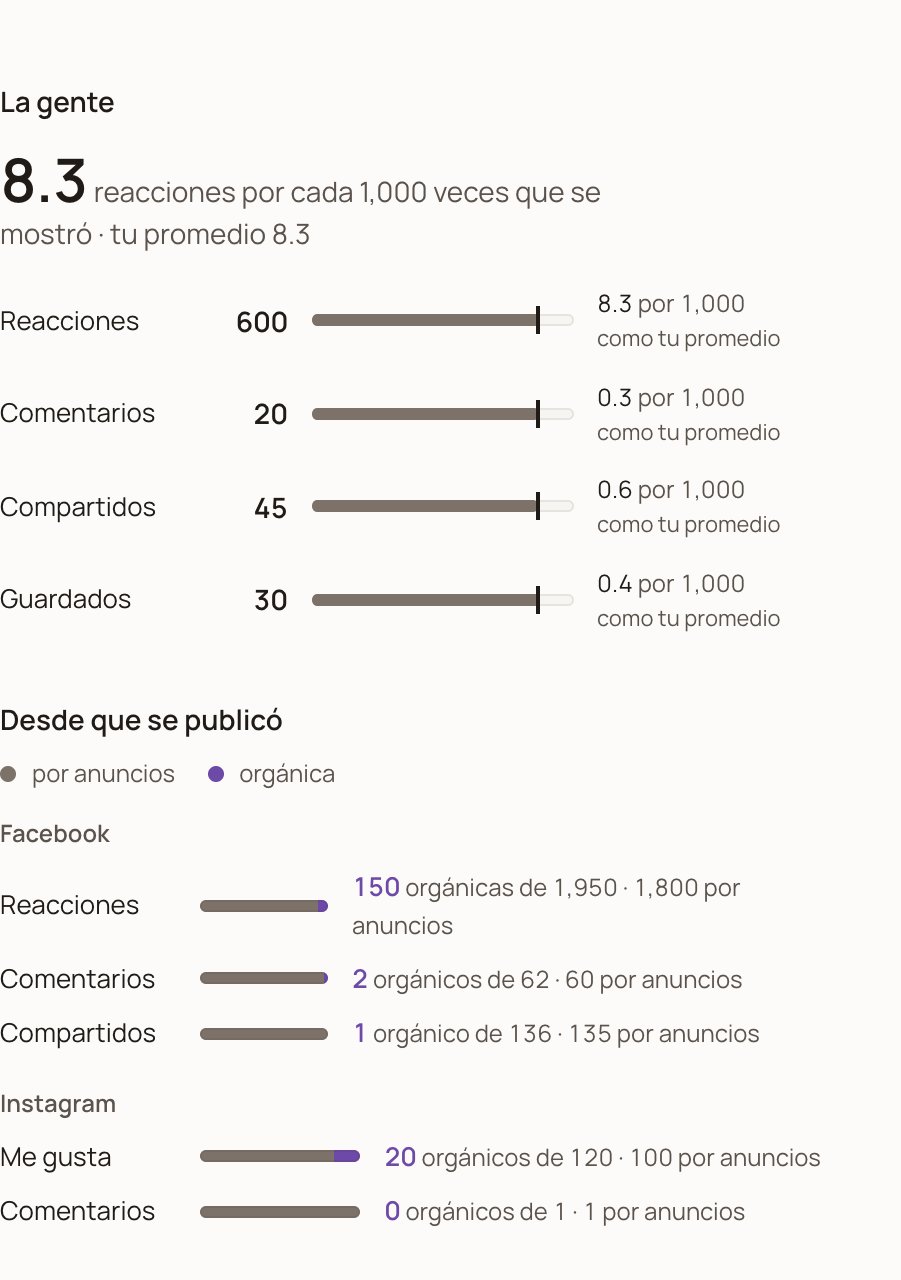
 Under **The people**, each interaction is read per 1,000 times the ad was shown,
with a mark for your average: that's how you compare a big ad with a small one.
Below, **Since it was published** splits the post's engagement into what the ads
brought (gray) and what came on its own (purple), on Facebook and on Instagram.
Under **The people**, each interaction is read per 1,000 times the ad was shown,
with a mark for your average: that's how you compare a big ad with a small one.
Below, **Since it was published** splits the post's engagement into what the ads
brought (gray) and what came on its own (purple), on Facebook and on Instagram.
 ## How often it updates
* **When you connect**, DarkFunnels brings in the last 93 days. It takes a few
minutes.
* **After that, once a day, on its own.** Each day it also re-reads the last 7
days, so if Meta corrects a recent day's spend, the correction arrives on its
own. The **Connection with Meta** sheet says when the last update was.
* **Days follow your ad account's time zone.** Today's spend is completed by the
next update: don't expect it to match Ads Manager minute by minute.
* **The post's engagement** (the organic part) is the total since it was
published, read in the daily update.
## When to reconnect
Reconnecting is the same steps as above, starting with the button at the top
(**Meta connected** or **Reconnect Meta**) → **Reconnect**. Since you connected
before, Meta asks whether you want to **continue with your previous settings**:
**Continue** reuses what you already accepted and finishes there; **Edit
settings** takes you to choose the Pages and review the permissions again. If the
detail sheet asked you for your Pages permission, use **Edit settings**.
## How often it updates
* **When you connect**, DarkFunnels brings in the last 93 days. It takes a few
minutes.
* **After that, once a day, on its own.** Each day it also re-reads the last 7
days, so if Meta corrects a recent day's spend, the correction arrives on its
own. The **Connection with Meta** sheet says when the last update was.
* **Days follow your ad account's time zone.** Today's spend is completed by the
next update: don't expect it to match Ads Manager minute by minute.
* **The post's engagement** (the organic part) is the total since it was
published, read in the daily update.
## When to reconnect
Reconnecting is the same steps as above, starting with the button at the top
(**Meta connected** or **Reconnect Meta**) → **Reconnect**. Since you connected
before, Meta asks whether you want to **continue with your previous settings**:
**Continue** reuses what you already accepted and finishes there; **Edit
settings** takes you to choose the Pages and review the permissions again. If the
detail sheet asked you for your Pages permission, use **Edit settings**.
 The spend we already brought in stays. You need to reconnect in three cases:
1. **Every 90 days.** Meta grants access to the data for 90 days from when you
accept. The sheet says *"The connection expires on …"* and, in the last 14
days, it warns you so you renew it before it's cut off. That warning shows up
inside **Meta connected**: open it every now and then.
2. **If Meta stops accepting the connection**, for example because you removed
the permission from Facebook. The button at the top changes to **Reconnect
Meta** and the sheet explains that Meta no longer accepts the connection.
3. **If the detail sheet asks you to.** If you didn't grant the Page permissions
(or connected before we asked for them), the Facebook part of **Since it was
published** says *"Reading it needs your Pages permission."* with a
**Reconnect** button. When you come back, go through **Edit settings** and
accept the Page permissions.
If you start paying for ads from another ad account, you don't need to: it's
added on its own (see "Which accounts get connected", above).
When you reconnect, the spend for the days the connection was cut comes in on
its own, up to 93 days back.
## Disconnect
**Meta connected → Disconnect**, and confirm. DarkFunnels stops reading your
accounts, and the page stops showing the spend, the costs, yield and the
thumbnails. What we already brought in stays stored: if you reconnect, it shows
up again.
That cuts the connection on DarkFunnels' side. To also remove its access on
Meta's side, go to **Business integrations** on Facebook (the link Meta shows you
when connecting) and remove DarkFunnels.
## What we read from Meta and what we don't
**We read, once a day:** each ad's spend, impressions, clicks and engagement, by
day and by country; the names of the ad, the ad set and the campaign; and the
totals of the post each ad uses (reactions, comments and shares on Facebook;
likes and comments on Instagram). We store a copy of each ad's thumbnail and, the
first time you open its detail sheet, of its video (if Meta shares it), to show
them to you without depending on Meta's links, which expire.
**We don't:** we don't create, change, pause or publish anything. For comments
we only count how many there are; we don't read what they say.
The permission Meta gives you is stored encrypted. We also store the name and
Facebook ID of whoever connected, and the connected ad accounts (name, ID and
currency). The figures are only visible to the people in your business with
access to Sales. To have us delete what we've already stored, write to us.
## Common problems
The page is in a pilot and your business isn't in it yet. Write to us and
we'll add you.
While the pilot lasts, Meta only lets people who accepted the DarkFunnels app
invitation connect. Check that you accepted it at
`developers.facebook.com/requests` and that you're using that same Facebook
account in Meta's window. If another name shows up in **Continue as …?**, use
**Log in to another account**.
You clicked **Cancel** in Meta or didn't accept the permissions. Click
**Connect Meta** again and go all the way to **OK**.
Something failed on Meta's side while closing the connection. Wait a few
minutes and start again from **Connect Meta**. If it happens again, write to
us.
Chats from ads have already reached you, but the Facebook account you
connected with doesn't have access to the ad account that pays for them.
Connect with the Facebook account that manages those ads (or ask to be given
access to the ad account in Meta).
You connected before your first chat from an ad and your Facebook account
sees several ad accounts: DarkFunnels doesn't know yet which one is yours. You
don't have to do anything. When a chat arrives from an ad paid by one of those
accounts, it's added on its own with the daily update and brings in its last
93 days of spend. If chats from ads are already reaching you and the sheet
still looks the same the next day, those ads are paid by an account your
Facebook can't see: connect with the Facebook account that manages them.
Your Facebook account doesn't have access to any ad account, or you didn't
accept the permission to read your ads. Connect with the Facebook account
that runs your ads and accept all the permissions.
Each connection attempt is valid for 10 minutes, only once, and for the same
business and DarkFunnels user that started it. If you took longer in Meta's
window, came back with an old link or switched business or user halfway,
start again from **Connect Meta**.
Either it spent nothing in the period you have selected, or it's paid by
another ad account that isn't connected yet (it's added on its own with the
daily update if the Facebook account you connected can see it). Try a longer
period; if it still shows "—" the next day, connect with a Facebook account
that can see that other account.
Check that the period is the same, that days follow your ad account's time
zone and that today's spend is only completed by the next day's update (the
corrections Meta makes to the last few days arrive on their own). Also: with
a funnel selected, the strip only adds the ads that brought chats to that
funnel; with accounts in two currencies, it shows the one with the most spend
("Spend (main currency)"); and clicks are Meta's "clicks (all)", not only
link clicks.
In the table, the purple figure doesn't show up; in the detail sheet, the
Facebook part of **Since it was published** tells you why. If it says
*"Reading it needs your Pages permission."*, click **Reconnect** and accept
the Page permissions. If it says *"We haven't read it yet…"*, it shows up
with the next update; if it's still the same the day after, your Facebook
account doesn't manage the Page that publishes the ad: reconnect with one
that does.
Meta stopped accepting the connection: it expired or the permission was
removed. Click the button and repeat the steps. The spend we already brought
in isn't lost, and the spend for the days it was cut comes in on its own when
you reconnect (up to 93 days back).
What follows the colon is Meta's answer. If it talks about the session, the
permission or the token, reconnect. If not, wait for the next day's update;
if it happens again, write to us with that text.
The chats table looks the same, but this time the spend didn't arrive. Reload
the page; if it happens again, write to us.
Meta shares videos uploaded to the ad account; the ones an ad takes from a
post on your Page sometimes can't be copied. You can still see the ad on
Facebook with **See the ad on Facebook**.
Your ad account spends in one currency and your sales are in another.
DarkFunnels doesn't convert currencies, so it doesn't divide one by the
other. Yield does work in that case, because it compares each ad with your
own average.
## What this page doesn't do
* It doesn't touch your ads, your campaigns or your budget: it only reads.
* It doesn't count as a sale anything that wasn't registered as a sale in
DarkFunnels. It counts registered sales (by your agent or your team), collected
or not, the first one up to 30 days after the click.
* It doesn't convert currencies.
* It doesn't read ad accounts that aren't connected.
The way back: letting Meta know who bought over WhatsApp.
What each sale your agent registers really measures.
This documentation is built and hosted on [Mintlify](https://mintlify.com), a developer documentation platform.
The spend we already brought in stays. You need to reconnect in three cases:
1. **Every 90 days.** Meta grants access to the data for 90 days from when you
accept. The sheet says *"The connection expires on …"* and, in the last 14
days, it warns you so you renew it before it's cut off. That warning shows up
inside **Meta connected**: open it every now and then.
2. **If Meta stops accepting the connection**, for example because you removed
the permission from Facebook. The button at the top changes to **Reconnect
Meta** and the sheet explains that Meta no longer accepts the connection.
3. **If the detail sheet asks you to.** If you didn't grant the Page permissions
(or connected before we asked for them), the Facebook part of **Since it was
published** says *"Reading it needs your Pages permission."* with a
**Reconnect** button. When you come back, go through **Edit settings** and
accept the Page permissions.
If you start paying for ads from another ad account, you don't need to: it's
added on its own (see "Which accounts get connected", above).
When you reconnect, the spend for the days the connection was cut comes in on
its own, up to 93 days back.
## Disconnect
**Meta connected → Disconnect**, and confirm. DarkFunnels stops reading your
accounts, and the page stops showing the spend, the costs, yield and the
thumbnails. What we already brought in stays stored: if you reconnect, it shows
up again.
That cuts the connection on DarkFunnels' side. To also remove its access on
Meta's side, go to **Business integrations** on Facebook (the link Meta shows you
when connecting) and remove DarkFunnels.
## What we read from Meta and what we don't
**We read, once a day:** each ad's spend, impressions, clicks and engagement, by
day and by country; the names of the ad, the ad set and the campaign; and the
totals of the post each ad uses (reactions, comments and shares on Facebook;
likes and comments on Instagram). We store a copy of each ad's thumbnail and, the
first time you open its detail sheet, of its video (if Meta shares it), to show
them to you without depending on Meta's links, which expire.
**We don't:** we don't create, change, pause or publish anything. For comments
we only count how many there are; we don't read what they say.
The permission Meta gives you is stored encrypted. We also store the name and
Facebook ID of whoever connected, and the connected ad accounts (name, ID and
currency). The figures are only visible to the people in your business with
access to Sales. To have us delete what we've already stored, write to us.
## Common problems
The page is in a pilot and your business isn't in it yet. Write to us and
we'll add you.
While the pilot lasts, Meta only lets people who accepted the DarkFunnels app
invitation connect. Check that you accepted it at
`developers.facebook.com/requests` and that you're using that same Facebook
account in Meta's window. If another name shows up in **Continue as …?**, use
**Log in to another account**.
You clicked **Cancel** in Meta or didn't accept the permissions. Click
**Connect Meta** again and go all the way to **OK**.
Something failed on Meta's side while closing the connection. Wait a few
minutes and start again from **Connect Meta**. If it happens again, write to
us.
Chats from ads have already reached you, but the Facebook account you
connected with doesn't have access to the ad account that pays for them.
Connect with the Facebook account that manages those ads (or ask to be given
access to the ad account in Meta).
You connected before your first chat from an ad and your Facebook account
sees several ad accounts: DarkFunnels doesn't know yet which one is yours. You
don't have to do anything. When a chat arrives from an ad paid by one of those
accounts, it's added on its own with the daily update and brings in its last
93 days of spend. If chats from ads are already reaching you and the sheet
still looks the same the next day, those ads are paid by an account your
Facebook can't see: connect with the Facebook account that manages them.
Your Facebook account doesn't have access to any ad account, or you didn't
accept the permission to read your ads. Connect with the Facebook account
that runs your ads and accept all the permissions.
Each connection attempt is valid for 10 minutes, only once, and for the same
business and DarkFunnels user that started it. If you took longer in Meta's
window, came back with an old link or switched business or user halfway,
start again from **Connect Meta**.
Either it spent nothing in the period you have selected, or it's paid by
another ad account that isn't connected yet (it's added on its own with the
daily update if the Facebook account you connected can see it). Try a longer
period; if it still shows "—" the next day, connect with a Facebook account
that can see that other account.
Check that the period is the same, that days follow your ad account's time
zone and that today's spend is only completed by the next day's update (the
corrections Meta makes to the last few days arrive on their own). Also: with
a funnel selected, the strip only adds the ads that brought chats to that
funnel; with accounts in two currencies, it shows the one with the most spend
("Spend (main currency)"); and clicks are Meta's "clicks (all)", not only
link clicks.
In the table, the purple figure doesn't show up; in the detail sheet, the
Facebook part of **Since it was published** tells you why. If it says
*"Reading it needs your Pages permission."*, click **Reconnect** and accept
the Page permissions. If it says *"We haven't read it yet…"*, it shows up
with the next update; if it's still the same the day after, your Facebook
account doesn't manage the Page that publishes the ad: reconnect with one
that does.
Meta stopped accepting the connection: it expired or the permission was
removed. Click the button and repeat the steps. The spend we already brought
in isn't lost, and the spend for the days it was cut comes in on its own when
you reconnect (up to 93 days back).
What follows the colon is Meta's answer. If it talks about the session, the
permission or the token, reconnect. If not, wait for the next day's update;
if it happens again, write to us with that text.
The chats table looks the same, but this time the spend didn't arrive. Reload
the page; if it happens again, write to us.
Meta shares videos uploaded to the ad account; the ones an ad takes from a
post on your Page sometimes can't be copied. You can still see the ad on
Facebook with **See the ad on Facebook**.
Your ad account spends in one currency and your sales are in another.
DarkFunnels doesn't convert currencies, so it doesn't divide one by the
other. Yield does work in that case, because it compares each ad with your
own average.
## What this page doesn't do
* It doesn't touch your ads, your campaigns or your budget: it only reads.
* It doesn't count as a sale anything that wasn't registered as a sale in
DarkFunnels. It counts registered sales (by your agent or your team), collected
or not, the first one up to 30 days after the click.
* It doesn't convert currencies.
* It doesn't read ad accounts that aren't connected.
The way back: letting Meta know who bought over WhatsApp.
What each sale your agent registers really measures.
This documentation is built and hosted on [Mintlify](https://mintlify.com), a developer documentation platform.