> ## Documentation Index
> Fetch the complete documentation index at: https://docs.darkfunnels.ai/llms.txt
> Use this file to discover all available pages before exploring further.
> ## Agent Instructions
> DarkFunnels is a WhatsApp AI sales-agent platform used mainly in Peru and Latin America. The product interface and most of this documentation are in Spanish; the /en tree is the English mirror.
> A business connects the WhatsApp number it already uses by scanning a QR code from the dashboard, the same linked-device mechanism as WhatsApp Web. It does not go through the Meta Cloud API (WhatsApp Business Platform), so there is no application to get approved and no message templates to submit. DarkFunnels is not a Meta product and is not affiliated with Meta.
> DarkFunnels also publishes a remote MCP server at https://mcp.darkfunnels.ai/mcp?features=all (without parameters it only carries the default, mostly read-only set) so an assistant such as Claude, ChatGPT or Codex can operate the workspace on the owner's behalf, in one company and within the permissions of the person who connects it. The tool reference is at /referencia/tools and the connection parameters at /referencia/url-de-conexion.
> The dashboard is https://optimind.darkfunnels.ai, the marketing site is https://darkfunnels.ai and the page written for AI agents is https://darkfunnels.ai/agents.
# Your first funnel and its WhatsApp AI sales agent
> Create your funnel and its WhatsApp AI sales agent by talking to the copilot: the Ecommerce template, the playbook's placeholders and how to resume if you stop halfway.
A funnel is **what you create to sell over WhatsApp**: a script, a WhatsApp
number and **an agent**, the AI that chats with your customers like a
salesperson, with a name it introduces itself with and a way of speaking. To
get started you don't need a blank page: **you tell your copilot what you
sell** and it leaves the funnel created for you. If you sell over WhatsApp with
the template, or if you book appointments, it's born with a starting script,
which you finish in the playbook.
The dashboard is in Spanish, so buttons and labels are written here as you will
see them on screen, with an English translation in parentheses the first time.
## What a funnel is
**The funnel is what you create in Ventas (*Sales*) to sell over WhatsApp.** It
isn't a chart or a report: it has its WhatsApp number, its agent and its
script, the sales conversation written down and arranged into **chapters**,
like the playbook you would hand a new salesperson. Its agent follows that
script with each customer.
A typical script goes like this: greet and understand what the customer is
looking for → present the product that fits them → answer their questions →
close and take the shipping details. Each of those stretches is a chapter, with
its rules and its examples.
And the important part: **it's yours and you edit it**. What comes out of the
conversation with the copilot is a first draft. From there on you live in
[the sales playbook](/en/guides/sales-playbook), which is where the script gets
corrected a thousand times.
**A funnel = a script + an agent + a WhatsApp number.** That's why the creation
card says «Creando el embudo» (*Creating the funnel*) and asks you for the
«Título del embudo» (*Funnel title*). The agent is the AI that chats; the
character it introduces itself as — the salesperson's name, their tone, their
way of speaking — the dashboard calls the **persona**, and it doesn't refer to
any flesh-and-blood person.
If you sell two very different things, that's two funnels, not two chapters.
## Building it by talking: the normal path
When you finish signing up **the copilot opens by itself**, in the right-hand
panel (unless you arrived through the link of a funnel someone shared with you:
then it takes you to that funnel), and starts the conversation to build your
funnel. On screen it's called the **«puesta en marcha»** (*setup*). While it
lasts, above the compose box you see this label:
> «Estamos armando tu embudo.» (*We're building your funnel.*)
Later on you open it with **«Crear embudo»** (*Create funnel*): it's on the
Home screen (*Inicio*), in the funnel selector and in the search (**⌘K**;
**Ctrl+K** on Windows). Creating funnels is a job for whoever manages the
company: if you don't see that button, ask that person to create the funnel or
to give you access (see
[Invite your team](/en/getting-started/invite-your-team#what-each-person-can-see-and-do)).
The conversation spends balance, like everything the AI does: that's why your
account is born with a **US\$ 10** advance (see
[Pricing](/en/getting-started/pricing)).
### The first question: what you sell
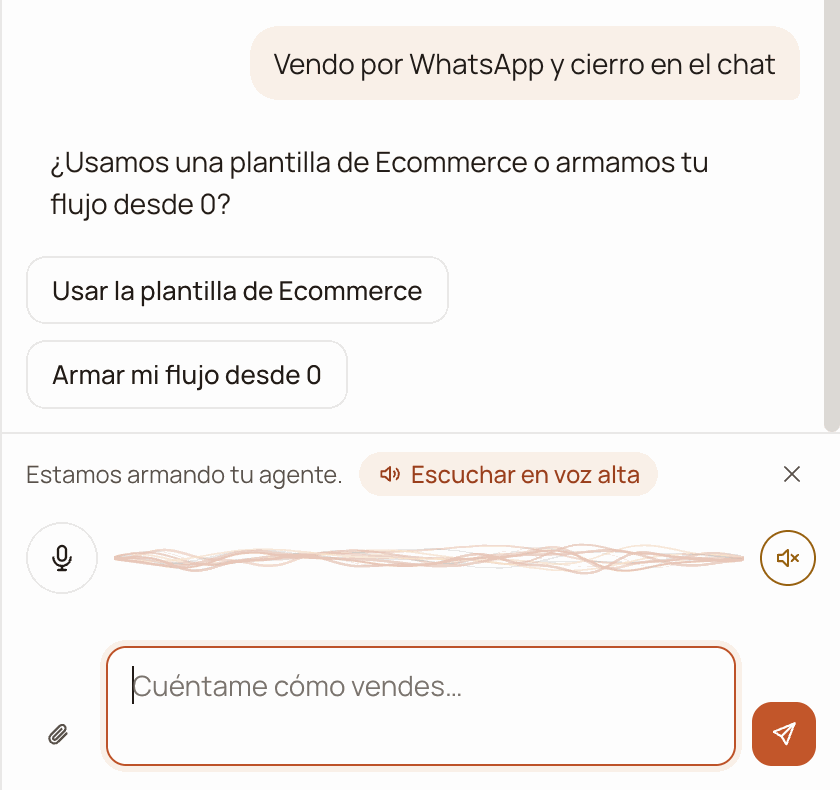
The first thing the copilot asks you is **what you sell**. Below its question
three one-tap replies appear, and what you answer decides how your funnel is
born:
| What you answer | How your funnel is born |
| - | - |
| **«Vendo por WhatsApp y cierro en el chat»** (*I sell over WhatsApp and close in the chat*) | From the **Ecommerce template**. Continue at [If you sell over WhatsApp](#if-you-sell-over-whatsapp-the-ecommerce-template). |
| **«Agendo visitas o citas»** (*I book visits or appointments*) | With its **chapter 1** already written. Continue at [If you book appointments or screen applicants](#if-you-book-appointments-or-screen-applicants). |
| **«Filtro postulantes o solicitudes»** (*I screen applicants or requests*) | With an empty playbook: you write chapter 1 yourself in the playbook or ask the copilot for it. Continue at [If you book appointments or screen applicants](#if-you-book-appointments-or-screen-applicants). |
You can also answer in your own words. **If what you describe is a product
(«vendo ropa de baño» — *I sell swimwear*), the copilot takes it as selling over
WhatsApp** and takes you to the Ecommerce template, unless you tell it that you
book appointments or screen applicants.
**Would you rather talk than type?** During setup, above the compose box there's
a voice strip. Tap the microphone (when you hover over it, it says «Toca para
hablar» — *Tap to speak*), talk, and tap it again to send; each recording is cut
off at 2 minutes. With **«Escuchar en voz alta»** (*Listen out loud*) the copilot
reads its replies to you, and the speaker button mutes it. Voice comes switched
off, your choice is remembered in that browser and, like all the AI, **it spends
balance**.
## If you sell over WhatsApp: the Ecommerce template
When what you do is **sell over WhatsApp and close in the chat**, the copilot
doesn't interview you chapter by chapter. Your funnel is born copied from a
template designed for shops that sell that way, and afterwards you fill in what
belongs to your business.
The copilot asks you *«¿Usamos una plantilla de Ecommerce o armamos tu flujo
desde 0?»* (*Shall we use an Ecommerce template or build your flow from
scratch?*) and leaves you two buttons below it: **«Usar la plantilla de
Ecommerce»** (*Use the Ecommerce template*) and **«Armar mi flujo desde 0»**
(*Build my flow from scratch*). If you're unsure, the template is the short
path.
 With that name the **persona** that serves your customers is born, and the
copilot works out whether it's **Asesora** or **Asesor** (female or male
advisor); if it can't work it out, it asks you. If at the start you didn't
tell it what product you sell, it asks you that too; if you already told
it, it doesn't.
The **«Confirmar: Creando el embudo»** (*Confirm: Creating the funnel*) card
appears with what it's going to create: the **Título del embudo** (*Funnel
title*; for example, *«Carla - Venta de Vital Colágeno»*), the
**Objetivo** (*Objective*), the **Forma de creación** (*Creation mode*:
*Plantilla de Ecommerce* or *Flujo desde 0*), the **Vendedor**
(*Salesperson*) and the **Producto** (*Product*). At the bottom, the
**Aprobar** (*Approve*) and **Rechazar** (*Reject*) buttons.
It asks for your approval because **creating a funnel takes up a slot in
your plan**. When you press **Aprobar**, the copilot tells you in one line
that your funnel now has its shared block and its 3 chapters, and the
dashboard takes you to your new funnel's **Manual** (*Playbook*). That's
where the questions end: there's no tour and nothing more to answer. The
conversation stays saved in **Sesiones** (*Sessions*) as «Tu puesta en
marcha» (*Your setup*); if you later want to build another funnel, archive
it first (see [If you stop halfway](#if-you-stop-halfway)).
**What is born when you approve.** A **shared block** with the business data
and three chapters:
| Chapter | What it does |
| - | - |
| **1 · Saludo** (*Greeting*) | Runs once: greets with the product, its benefits and the promotion, and asks where the customer is writing from. |
| **2 · En venta** (*Selling*) | Answers questions, asks about shipping, helps pick the promotion and takes the order details (and the deposit if the order goes to the provinces). |
| **3 · Pedido confirmado** (*Order confirmed*) | Confirms the order, records the sale and hands the conversation to your team. |
Your funnel is born active, with its agent's persona already active and
**without a WhatsApp number**: until you connect it, its agent doesn't serve
anyone.
What only you know goes in as **placeholders** like `«PRODUCTO_MARCA»` or
`«ESCALERA_PRECIOS»`: the brand, the presentation, the benefits, the prices,
your payment methods, the frequent objections and the follow-up messages. The
salesperson's name, your business's name and the product's name come already
filled in.
The **SOBRE EL PAGO** (*About payment*), **UBICACIÓN DE LA TIENDA** (*Store
location*) and **SOBRE EL ENVÍO** (*About shipping*) sections come written with
typical details of an online shop in Peru (for example, cash on delivery in Lima
and a deposit for the provinces). Read them and change them if your business
works differently: before connecting you'll have to confirm them.
**From scratch** creates the same three chapters and the same shared block, but
with **empty steps** for you to write. The shared block's placeholders are there
too, and they're filled in the same way.
### Then, in the playbook
**Filling in the placeholders is your next task**, and it's done in the Manual.
The placeholders are highlighted in the text, and above the document a notice
tells you how many are missing (*«Faltan N datos por completar…»* — *N details
left to complete…*).
With that name the **persona** that serves your customers is born, and the
copilot works out whether it's **Asesora** or **Asesor** (female or male
advisor); if it can't work it out, it asks you. If at the start you didn't
tell it what product you sell, it asks you that too; if you already told
it, it doesn't.
The **«Confirmar: Creando el embudo»** (*Confirm: Creating the funnel*) card
appears with what it's going to create: the **Título del embudo** (*Funnel
title*; for example, *«Carla - Venta de Vital Colágeno»*), the
**Objetivo** (*Objective*), the **Forma de creación** (*Creation mode*:
*Plantilla de Ecommerce* or *Flujo desde 0*), the **Vendedor**
(*Salesperson*) and the **Producto** (*Product*). At the bottom, the
**Aprobar** (*Approve*) and **Rechazar** (*Reject*) buttons.
It asks for your approval because **creating a funnel takes up a slot in
your plan**. When you press **Aprobar**, the copilot tells you in one line
that your funnel now has its shared block and its 3 chapters, and the
dashboard takes you to your new funnel's **Manual** (*Playbook*). That's
where the questions end: there's no tour and nothing more to answer. The
conversation stays saved in **Sesiones** (*Sessions*) as «Tu puesta en
marcha» (*Your setup*); if you later want to build another funnel, archive
it first (see [If you stop halfway](#if-you-stop-halfway)).
**What is born when you approve.** A **shared block** with the business data
and three chapters:
| Chapter | What it does |
| - | - |
| **1 · Saludo** (*Greeting*) | Runs once: greets with the product, its benefits and the promotion, and asks where the customer is writing from. |
| **2 · En venta** (*Selling*) | Answers questions, asks about shipping, helps pick the promotion and takes the order details (and the deposit if the order goes to the provinces). |
| **3 · Pedido confirmado** (*Order confirmed*) | Confirms the order, records the sale and hands the conversation to your team. |
Your funnel is born active, with its agent's persona already active and
**without a WhatsApp number**: until you connect it, its agent doesn't serve
anyone.
What only you know goes in as **placeholders** like `«PRODUCTO_MARCA»` or
`«ESCALERA_PRECIOS»`: the brand, the presentation, the benefits, the prices,
your payment methods, the frequent objections and the follow-up messages. The
salesperson's name, your business's name and the product's name come already
filled in.
The **SOBRE EL PAGO** (*About payment*), **UBICACIÓN DE LA TIENDA** (*Store
location*) and **SOBRE EL ENVÍO** (*About shipping*) sections come written with
typical details of an online shop in Peru (for example, cash on delivery in Lima
and a deposit for the provinces). Read them and change them if your business
works differently: before connecting you'll have to confirm them.
**From scratch** creates the same three chapters and the same shared block, but
with **empty steps** for you to write. The shared block's placeholders are there
too, and they're filled in the same way.
### Then, in the playbook
**Filling in the placeholders is your next task**, and it's done in the Manual.
The placeholders are highlighted in the text, and above the document a notice
tells you how many are missing (*«Faltan N datos por completar…»* — *N details
left to complete…*).
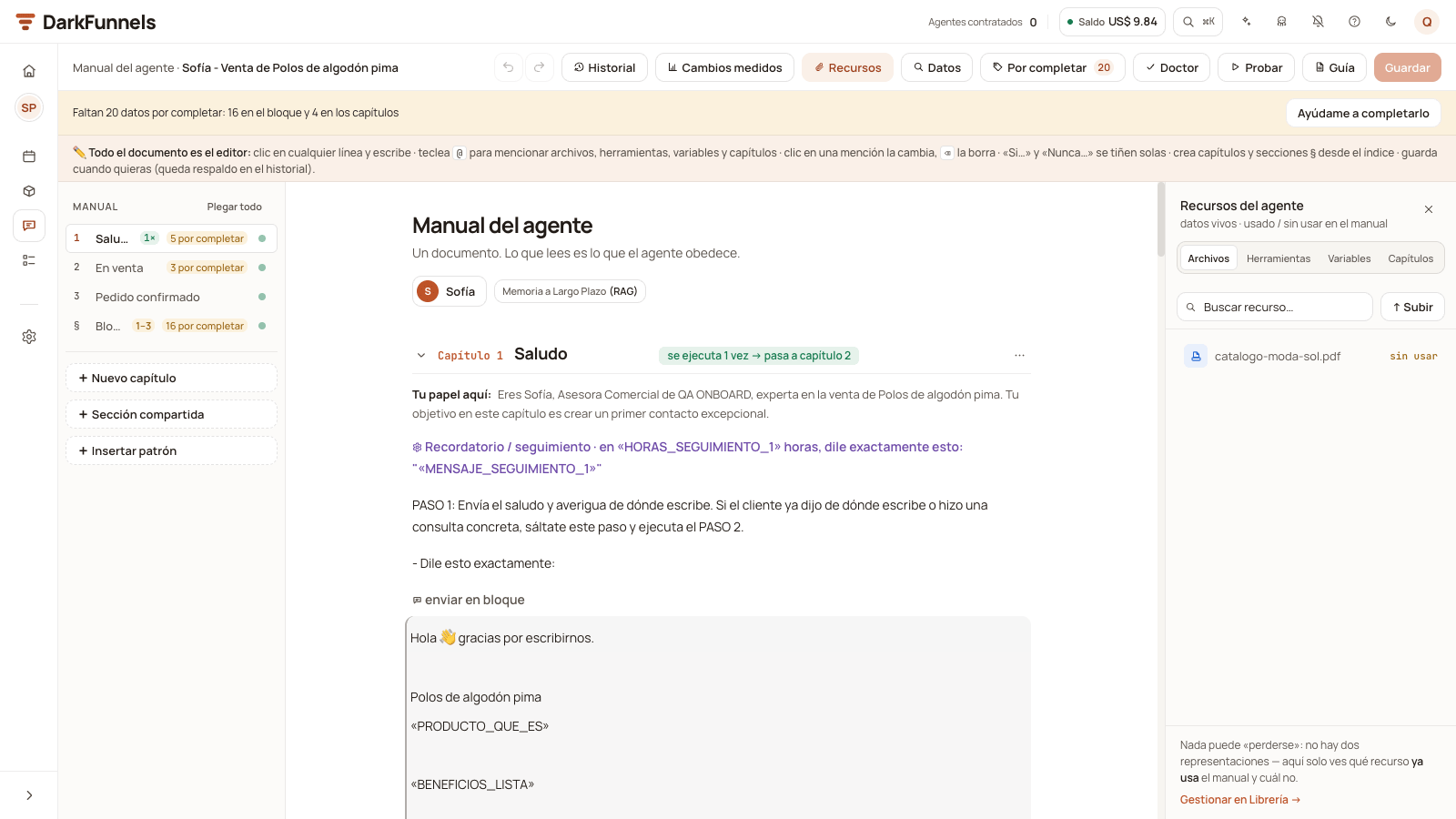 * **The «Por completar» (*To complete*) button** in the bar lists them one by one. You
type the detail once and it goes into every place where it appears.
* **File placeholders** (the price image, the product photo) aren't typed: you
pick one of the files your agent can send, that is, the ones that have **send
via WhatsApp** (*enviar por WhatsApp*) switched on for that funnel in the
[Library](/en/guides/library) (or the ones you uploaded from the playbook's
**«Recursos»** (*Resources*) panel). If you don't have it, **«No tengo este
archivo»** (*I don't have this file*) removes it from the playbook.
* **«Ayúdame a completarlo»** (*Help me complete it*), next to the notice, asks the
copilot for help: it first asks you for your product's files, asks you one
question at a time and proposes the changes for you to approve.
* What you fill in by hand is saved when you press **«Guardar cambios»** (*Save
changes*).
[The sales playbook](/en/guides/sales-playbook) covers it in detail.
**Fill in the placeholders from a computer.** On the phone the playbook lets you
touch up prices, phone numbers and links, but to fill in the placeholders or
rewrite the script it asks you to open it on the computer.
**When you can test and when you can connect:**
* **«Probar»** (*Test*, the Manual's test chat) turns on when chapter 1 and the
block's **PRODUCTO** (*Product*) and **PRECIOS Y PROMOCIONES** (*Prices and
promotions*) sections no longer have placeholders. Chapters 2 and 3 can wait.
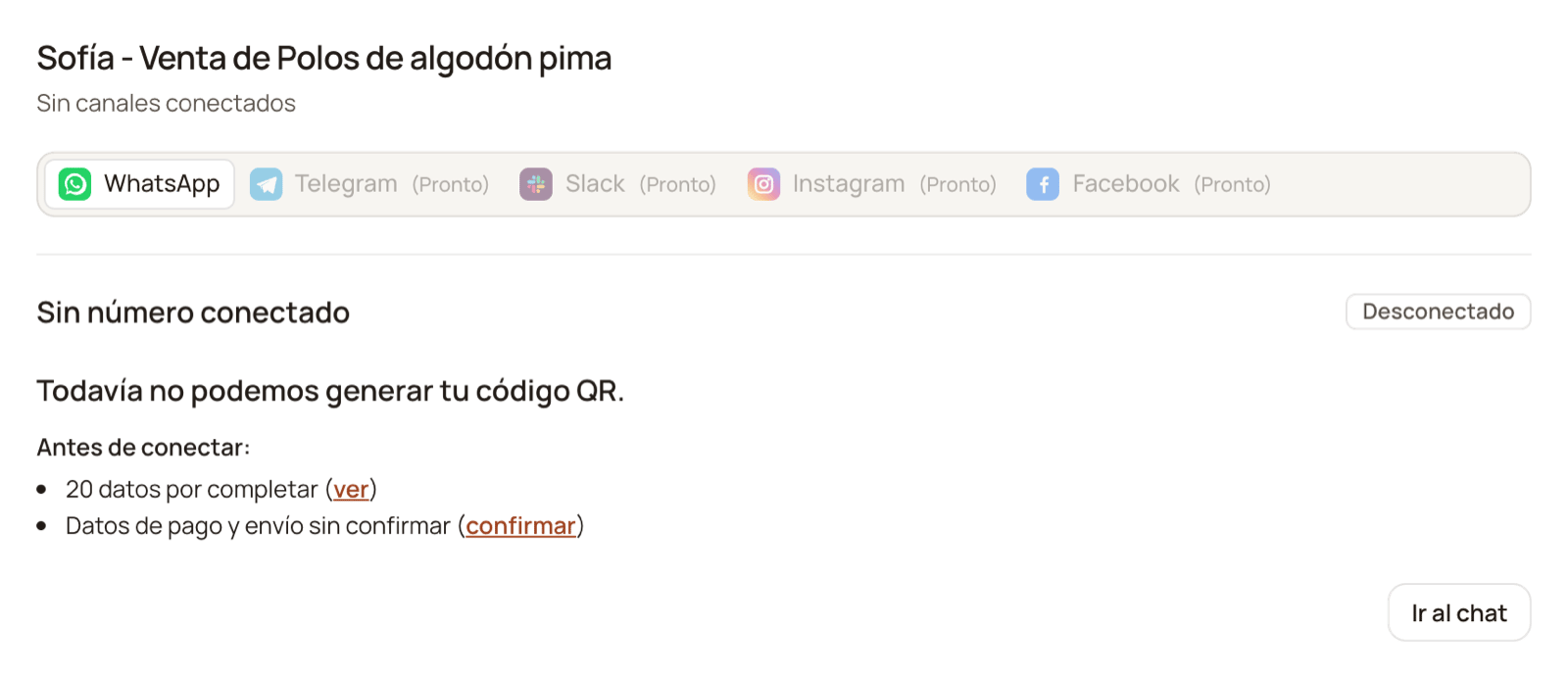
* **Connecting WhatsApp** asks for three things: that no placeholders are left,
that the three chapters have their steps written — in **From scratch**, that
means writing all of them — and that you confirm the payment, location and
shipping details with **«Sí, son correctos»** (*Yes, they're correct*). While
something is missing, when you press **«Conectar / Escanear»** (*Connect /
Scan*) in Canales (*Channels*) you don't see the QR code, but **«Antes de
conectar:»** (*Before connecting:*) with what's missing and a link to each
item.
* **The «Por completar» (*To complete*) button** in the bar lists them one by one. You
type the detail once and it goes into every place where it appears.
* **File placeholders** (the price image, the product photo) aren't typed: you
pick one of the files your agent can send, that is, the ones that have **send
via WhatsApp** (*enviar por WhatsApp*) switched on for that funnel in the
[Library](/en/guides/library) (or the ones you uploaded from the playbook's
**«Recursos»** (*Resources*) panel). If you don't have it, **«No tengo este
archivo»** (*I don't have this file*) removes it from the playbook.
* **«Ayúdame a completarlo»** (*Help me complete it*), next to the notice, asks the
copilot for help: it first asks you for your product's files, asks you one
question at a time and proposes the changes for you to approve.
* What you fill in by hand is saved when you press **«Guardar cambios»** (*Save
changes*).
[The sales playbook](/en/guides/sales-playbook) covers it in detail.
**Fill in the placeholders from a computer.** On the phone the playbook lets you
touch up prices, phone numbers and links, but to fill in the placeholders or
rewrite the script it asks you to open it on the computer.
**When you can test and when you can connect:**
* **«Probar»** (*Test*, the Manual's test chat) turns on when chapter 1 and the
block's **PRODUCTO** (*Product*) and **PRECIOS Y PROMOCIONES** (*Prices and
promotions*) sections no longer have placeholders. Chapters 2 and 3 can wait.
* **Connecting WhatsApp** asks for three things: that no placeholders are left,
that the three chapters have their steps written — in **From scratch**, that
means writing all of them — and that you confirm the payment, location and
shipping details with **«Sí, son correctos»** (*Yes, they're correct*). While
something is missing, when you press **«Conectar / Escanear»** (*Connect /
Scan*) in Canales (*Channels*) you don't see the QR code, but **«Antes de
conectar:»** (*Before connecting:*) with what's missing and a link to each
item.
 As long as a placeholder is still unfilled, the line that contains it **doesn't
reach your agent's instructions**: that way it doesn't say a half-written
`«PRODUCTO_MARCA»` to a customer.
## If you book appointments or screen applicants
If you answered **«Agendo visitas o citas»**, your funnel is born with its first
chapter written and the copilot teaches you the playbook using it. If you
answered **«Filtro postulantes o solicitudes»**, the funnel is born with an
empty playbook: there's nothing to test yet, so the copilot shows you the
screen and asks you to write chapter 1 (or to ask it for the whole funnel).
As soon as it knows what your business does, it offers to create the
funnel: the **«Confirmar: Creando el embudo»** card appears with the
**Título del embudo** (your business's name) and the **Objetivo** (*Citas*
— *Appointments* — or *Captación* — *Lead capture*), and the **Aprobar**
and **Rechazar** buttons.
It asks you because **creating a funnel takes up a slot in your plan** (the
copilot brings up the slot when the creation fails because you have none
left). Your funnel is born active, with its agent's **persona** already
active — with a name and a tone — and without a WhatsApp number. If you book
appointments, it's born with its **chapter 1 already written**: the
greeting, with your business's name filled in and a sample salesperson
name, which you change in the persona (step 4). If you screen applicants,
it's born with an empty playbook.
The dashboard takes you to your agent's **Manual**, and the first thing the
copilot asks you is to **test it**: write «hola» (*hi*) to your agent in the
test chat the dashboard leaves open for you, as if you were a customer.
Once you've seen it answer, the copilot explains it to you using that same
reply and walks you through the playbook screen: the dashboard points at
each part — the chapter, its PASOS (*steps*) and the line that moves on to
the next one — and explains it in a box, and you move forward with
**«Siguiente»** (*Next*). If you turned voice on, it also reads it to you
out loud and the tour moves on by itself when each step ends.
If you screen applicants, this step is shorter: the dashboard also takes
you to the Manual, but since it's empty there's no test. The copilot walks
you through the screen and asks you to write chapter 1.
Each stage of your sale is a chapter, and **you write the missing ones
yourself** in the playbook, with the same shape as chapter 1: the agent's
role, the numbered PASOS and the line that moves on to the next one.
If you'd rather have the copilot write it, **ask it for the whole funnel**.
It interviews you first, one question at a time and in plain language. It
starts by asking you to tell it how you sell today, from the customer's
first message until you consider the sale closed: that's where the stages
come from. Then it follows up on whatever is missing from each stage, with
no more than a few questions per stage. What it will want to know:
* **Your business and your audience** — who buys from you, where you sell
and how people reach your WhatsApp.
* **The product** — what exactly you offer and what benefits you can state
with confidence. What you don't confirm to it **isn't promised**: it's
handed off to someone on your team.
* **Prices and promotions** — each variant or bundle with its price, and the
discount rules currently in force.
* **Payment and delivery** — how they pay you, how long you really take and
what details you need from the customer.
* **Objections** — what they ask you most and **the answer you give**. That
answer, exactly as it is, is the one the agent will use.
* **What name and what tone** it should introduce itself with.
* **Which cases go to a person** on your team.
* **What files you usually send** (catalog, flyer, price list) and at what
point in the conversation.
With that it leaves you **a proposal of the complete funnel**, which you
approve or reject.
When you consider the playbook ready, the close comes, in this order: first
you review the **persona** — in the Manual, press the pill with its name;
there you change its name and its tone — and then you connect your WhatsApp
at **Personalizar → Canales** (*Customize → Channels*). It's worth reviewing
it first: when you connect, WhatsApp takes the persona's name as the line's
name, and it's the first thing your customers see. If you change it later,
the dashboard tries to update that name on WhatsApp too.
If you approved the whole funnel, the dashboard takes you straight to
Channels so you can scan the QR code.
**Nothing is written into your funnel until you approve it.** If you ask it for
the whole funnel, the proposal waits in the thread with **Aprobar** /
**Rechazar**, and until you press Aprobar your playbook stays exactly as it was.
Approving it **replaces the whole playbook**, including the chapter 1 your
funnel was born with.
Answer in your own words and with concrete data: real prices, real delivery
areas, the phrases you already use when you sell yourself. A generic answer
produces a generic salesperson, and that gets fixed afterwards by hand in the
playbook.
## The welcome advance
**Building your funnel spends part of your advance**: with the template, very
little; if you ask the copilot for the whole funnel or use voice, quite a bit
more. That's why you can do it before connecting WhatsApp: your account is born
with **US\$ 10** precisely for this.
**It isn't a gift, it's an advance.** Those US\$ 10 are your **whole** welcome
credit, brought forward so you can build your funnel and test its agent without
stopping halfway: when you connect WhatsApp no more balance arrives (the
US\$ 25 bonus, if you were referred, arrives when you activate your
subscription). What happens that day is that **your trial starts over** with
its full 7 days (the clock had been running since you signed up), with up to 5
active funnels, and your agent starts answering the number **if you have
balance left**: if you spent the whole advance building your funnel, you'll
have to top up for it to answer.
[Pricing](/en/getting-started/pricing) covers it.
## If you stop halfway
**You lose nothing.** The conversation lives in your account, not in the
browser: when you press **«Crear embudo»** again, from this computer or from
another one, your setup reopens where you left it, with everything you already
told it.
You'll also find it in the copilot's **«Sesiones»** (*Sessions*) tab: right below
**«Nueva conversación»** (*New conversation*) there's **«Tu puesta en marcha»**
(*Your setup*; with your funnel's name, if you already created it) and the
**«Reanudar»** (*Resume*) button.
As long as a placeholder is still unfilled, the line that contains it **doesn't
reach your agent's instructions**: that way it doesn't say a half-written
`«PRODUCTO_MARCA»` to a customer.
## If you book appointments or screen applicants
If you answered **«Agendo visitas o citas»**, your funnel is born with its first
chapter written and the copilot teaches you the playbook using it. If you
answered **«Filtro postulantes o solicitudes»**, the funnel is born with an
empty playbook: there's nothing to test yet, so the copilot shows you the
screen and asks you to write chapter 1 (or to ask it for the whole funnel).
As soon as it knows what your business does, it offers to create the
funnel: the **«Confirmar: Creando el embudo»** card appears with the
**Título del embudo** (your business's name) and the **Objetivo** (*Citas*
— *Appointments* — or *Captación* — *Lead capture*), and the **Aprobar**
and **Rechazar** buttons.
It asks you because **creating a funnel takes up a slot in your plan** (the
copilot brings up the slot when the creation fails because you have none
left). Your funnel is born active, with its agent's **persona** already
active — with a name and a tone — and without a WhatsApp number. If you book
appointments, it's born with its **chapter 1 already written**: the
greeting, with your business's name filled in and a sample salesperson
name, which you change in the persona (step 4). If you screen applicants,
it's born with an empty playbook.
The dashboard takes you to your agent's **Manual**, and the first thing the
copilot asks you is to **test it**: write «hola» (*hi*) to your agent in the
test chat the dashboard leaves open for you, as if you were a customer.
Once you've seen it answer, the copilot explains it to you using that same
reply and walks you through the playbook screen: the dashboard points at
each part — the chapter, its PASOS (*steps*) and the line that moves on to
the next one — and explains it in a box, and you move forward with
**«Siguiente»** (*Next*). If you turned voice on, it also reads it to you
out loud and the tour moves on by itself when each step ends.
If you screen applicants, this step is shorter: the dashboard also takes
you to the Manual, but since it's empty there's no test. The copilot walks
you through the screen and asks you to write chapter 1.
Each stage of your sale is a chapter, and **you write the missing ones
yourself** in the playbook, with the same shape as chapter 1: the agent's
role, the numbered PASOS and the line that moves on to the next one.
If you'd rather have the copilot write it, **ask it for the whole funnel**.
It interviews you first, one question at a time and in plain language. It
starts by asking you to tell it how you sell today, from the customer's
first message until you consider the sale closed: that's where the stages
come from. Then it follows up on whatever is missing from each stage, with
no more than a few questions per stage. What it will want to know:
* **Your business and your audience** — who buys from you, where you sell
and how people reach your WhatsApp.
* **The product** — what exactly you offer and what benefits you can state
with confidence. What you don't confirm to it **isn't promised**: it's
handed off to someone on your team.
* **Prices and promotions** — each variant or bundle with its price, and the
discount rules currently in force.
* **Payment and delivery** — how they pay you, how long you really take and
what details you need from the customer.
* **Objections** — what they ask you most and **the answer you give**. That
answer, exactly as it is, is the one the agent will use.
* **What name and what tone** it should introduce itself with.
* **Which cases go to a person** on your team.
* **What files you usually send** (catalog, flyer, price list) and at what
point in the conversation.
With that it leaves you **a proposal of the complete funnel**, which you
approve or reject.
When you consider the playbook ready, the close comes, in this order: first
you review the **persona** — in the Manual, press the pill with its name;
there you change its name and its tone — and then you connect your WhatsApp
at **Personalizar → Canales** (*Customize → Channels*). It's worth reviewing
it first: when you connect, WhatsApp takes the persona's name as the line's
name, and it's the first thing your customers see. If you change it later,
the dashboard tries to update that name on WhatsApp too.
If you approved the whole funnel, the dashboard takes you straight to
Channels so you can scan the QR code.
**Nothing is written into your funnel until you approve it.** If you ask it for
the whole funnel, the proposal waits in the thread with **Aprobar** /
**Rechazar**, and until you press Aprobar your playbook stays exactly as it was.
Approving it **replaces the whole playbook**, including the chapter 1 your
funnel was born with.
Answer in your own words and with concrete data: real prices, real delivery
areas, the phrases you already use when you sell yourself. A generic answer
produces a generic salesperson, and that gets fixed afterwards by hand in the
playbook.
## The welcome advance
**Building your funnel spends part of your advance**: with the template, very
little; if you ask the copilot for the whole funnel or use voice, quite a bit
more. That's why you can do it before connecting WhatsApp: your account is born
with **US\$ 10** precisely for this.
**It isn't a gift, it's an advance.** Those US\$ 10 are your **whole** welcome
credit, brought forward so you can build your funnel and test its agent without
stopping halfway: when you connect WhatsApp no more balance arrives (the
US\$ 25 bonus, if you were referred, arrives when you activate your
subscription). What happens that day is that **your trial starts over** with
its full 7 days (the clock had been running since you signed up), with up to 5
active funnels, and your agent starts answering the number **if you have
balance left**: if you spent the whole advance building your funnel, you'll
have to top up for it to answer.
[Pricing](/en/getting-started/pricing) covers it.
## If you stop halfway
**You lose nothing.** The conversation lives in your account, not in the
browser: when you press **«Crear embudo»** again, from this computer or from
another one, your setup reopens where you left it, with everything you already
told it.
You'll also find it in the copilot's **«Sesiones»** (*Sessions*) tab: right below
**«Nueva conversación»** (*New conversation*) there's **«Tu puesta en marcha»**
(*Your setup*; with your funnel's name, if you already created it) and the
**«Reanudar»** (*Resume*) button.
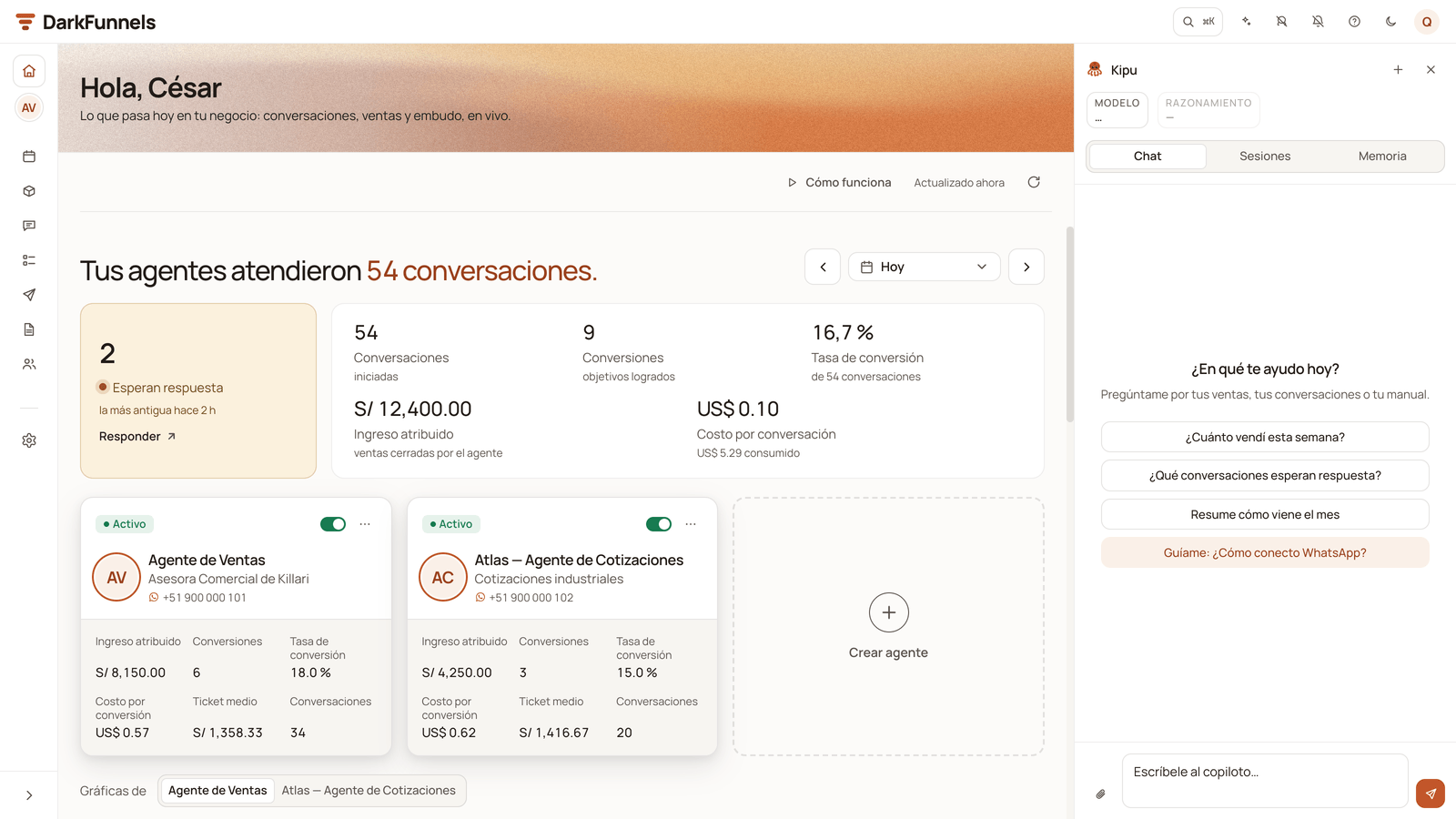 * **Closing the drawer** doesn't delete anything: your setup waits for you.
* **Leaving it** — with the ✕ on the *«Estamos armando tu embudo.»* label or
with **«Nueva conversación»** — first asks you *«¿Salir de la puesta en
marcha?»* (*Leave setup?*). Your progress stays saved either way.
* **To start another one from the beginning**, archive the one you have: in
Sesiones, the **⋯** menu of «Tu puesta en marcha» → **«Archivar»**
(*Archive*). The next time you press **«Crear embudo»** a new one starts (if
you have another setup that isn't archived, it resumes that one). Archived
ones stay under **«Otras puestas en marcha»** (*Other setups*), with a
**«Reactivar»** (*Reactivate*) button.
## Right after approving it
Your PDF catalog, the flyer, the price list and the photos are uploaded in
the **Library** (*Librería*), and there you decide which ones it can send
over WhatsApp. If your funnel was born from the template, upload them and
switch on **send via WhatsApp** before choosing the template's files: the
«Por completar» (*To complete*) panel only offers you the files your agent
can send.
[The file library](/en/guides/library).
Without a number, your agent talks to nobody. You connect your WhatsApp at
**Personalizar → Canales** (*Customize → Channels*), by scanning the QR
code (or, if your screen offers you **«Vincular con código»** — *Link with
a code* — with a code). It's also what **restarts your trial**: when you connect, the 7 days
start over, in full. Mind you, the clock is already running from the day you
sign up: if 7 days go by without connecting, your trial shows as ended and
the copilot pauses until you connect it.
[Connect your WhatsApp](/en/getting-started/connect-whatsapp) covers it in
full.
## Redoing the playbook of a funnel that already exists
If you go into the **Manual** of a funnel that has no chapters, the screen
itself offers you where to start:
| Button | What it does |
| - | - |
| **💬 Armarlo conversando** (*Build it by talking*) | Opens setup on **that** funnel, instead of creating another one. It's the way out for the funnel that was left with an empty playbook. |
| **🛍️ Cargar plantilla de Ecommerce** (*Load the Ecommerce template*) | Asks you for the salesperson's name, whether it's Asesora or Asesor, and the product, and puts the template's playbook into that funnel. It appears on sales funnels that weren't born from the template, when your account has it. |
| **📄 Cargar un manual de ejemplo** (*Load a sample playbook*) | A sample for you to replace with your own. It appears when the template isn't offered. |
| **+ Crear el primer capítulo en blanco** (*Create the first chapter blank*) | You start writing yourself. |
| **✦ Redactar un capítulo con IA** (*Draft a chapter with AI*) | You give it your notes and the AI writes up a chapter for you as a draft, which you review before accepting it. |
**«Cargar plantilla de Ecommerce»** also works on a playbook with a single
chapter, from the index: it replaces that playbook, and the previous one stays
in the History (*Historial*). If that funnel has ever connected its WhatsApp,
you first have to pause it.
[The sales playbook](/en/guides/sales-playbook) covers it.
Everything except **Armarlo conversando** is done from a computer. On the phone
you'll also see **«Enviármelo a la computadora»** (*Send it to my computer*), to
open that playbook there.
## If the copilot says you have no balance
Setup runs against the same balance as everything else. If it runs out, the
copilot leaves you a notice in the thread:
* **If you haven't connected WhatsApp yet:** *«Tus US\$ 10 de arranque se
gastaron en armar tu embudo: recarga para seguir.»* (*Your US\$ 10 starter
credit was spent building your funnel: top up to continue.*) The way out is
**«Recargar créditos»** (*Top up credits*): connecting WhatsApp doesn't add
balance, because your welcome credit was already in the account in full.
* **If you've already connected:** *«Tu cuenta no tiene saldo disponible.
Recarga créditos para seguir usando el copiloto.»* (*Your account has no
balance available. Top up credits to keep using the copilot.*), also with
**«Recargar créditos»**.
[Credits and top-ups](/en/getting-started/credits-and-top-ups) covers it.
* **If your trial ended:** *«Tu prueba terminó: el copiloto y tus agentes
quedan en pausa hasta que elijas un plan. Tu saldo de créditos sigue
disponible.»* (*Your trial ended: the copilot and your agents are paused until
you choose a plan. Your credit balance is still available.*) If you've already
connected your WhatsApp, topping up isn't enough: you need a plan, with the
**«Ver planes»** (*See plans*) button. If you haven't connected it yet,
connecting it starts your 7-day trial over.
If the dashboard can't check your balance, the notice offers you both ways out:
**«Conectar WhatsApp»** (*Connect WhatsApp*) and **«Recargar créditos»**.
The **«Recargar créditos»** and **«Ver planes»** buttons are seen by whoever has
access to the company's balance.
**What you already built isn't lost**: the funnel and whatever its playbook has
written are still there, and you can keep writing
[in the playbook](/en/guides/sales-playbook), chapter by chapter and with
versions.
## After creating it
Without a number, your agent talks to nobody. It's the step that switches
everything on.
What came out of the conversation is a draft. Here it becomes your script.
Prices, variants and stock the agent checks while selling.
Photos, spec sheets and PDFs the agent sends over WhatsApp.
## Common problems
* **I don't see «Crear embudo»** — creating funnels belongs to whoever manages
the company, because it takes up a slot in the plan. Ask that person.
* **I don't know how much detail to give it** — all you have. It's better to
tell it too much and let it discard, than to leave it gaps: what you don't give
it doesn't show up in the script.
* **It's asking me things I already told it** — sum it up in one message and
tell it to carry on with what it has.
* **I closed the copilot without finishing** — press **«Crear embudo»**, from
this computer or from another one, and it reopens where you left off. It's
also in the copilot's **«Sesiones»** tab → **«Tu puesta en marcha»** →
**«Reanudar»**.
* **I want to build another funnel and «Crear embudo» takes me back to the
previous conversation** — that's on purpose, so you don't lose your progress.
To start another one, archive the previous one in **«Sesiones»** (**⋯** menu
→ **«Archivar»**) and press **«Crear embudo»** again.
* **The card says «No se aplicó: la plantilla de Ecommerce no está disponible
en este momento…»** (*Not applied: the Ecommerce template isn't available
right now…*) — the funnel wasn't created and no slot was used. Try again in a
few minutes.
* **«Probar» is switched off in my playbook** — in a template funnel, Probar
waits until chapter 1 and the PRODUCTO and PRECIOS Y PROMOCIONES sections have
no placeholders. The notice at the top of the playbook tells you how many are
left, and **«Por completar»** (*To complete*) lists them.
* **Channels shows me «Antes de conectar:» instead of the QR code** — your
playbook still has placeholders to fill in, steps missing in some chapter or
the payment and shipping details unconfirmed. Placeholders and chapters are
fixed in the playbook (each item on the list takes you there); the details
are confirmed right there, with **«Sí, son correctos»**.
* **I approved the funnel but not the script** (appointments or applicants) —
the funnel already exists: for appointments, with its chapter 1 written; for
applicants, with an empty playbook. You write what's missing in its
**Manual**, or you ask the copilot for the whole funnel in your setup.
* **The persona doesn't sound like my business** — it's fixed in
[the playbook](/en/guides/sales-playbook), by pressing the active persona.
Nothing has to be generated again.
* **It makes up prices or conditions** — what you didn't give it, it imagines.
Prices and variants live in [the catalog](/en/guides/catalog); the hard rules,
in [the playbook](/en/guides/sales-playbook).
* **I approved the whole funnel and it wasn't the one I wanted** — approving
**replaces the whole playbook**, so from there on it's corrected in
[the playbook](/en/guides/sales-playbook), chapter by chapter and with
versions.
This documentation is built and hosted on [Mintlify](https://mintlify.com), a developer documentation platform.
* **Closing the drawer** doesn't delete anything: your setup waits for you.
* **Leaving it** — with the ✕ on the *«Estamos armando tu embudo.»* label or
with **«Nueva conversación»** — first asks you *«¿Salir de la puesta en
marcha?»* (*Leave setup?*). Your progress stays saved either way.
* **To start another one from the beginning**, archive the one you have: in
Sesiones, the **⋯** menu of «Tu puesta en marcha» → **«Archivar»**
(*Archive*). The next time you press **«Crear embudo»** a new one starts (if
you have another setup that isn't archived, it resumes that one). Archived
ones stay under **«Otras puestas en marcha»** (*Other setups*), with a
**«Reactivar»** (*Reactivate*) button.
## Right after approving it
Your PDF catalog, the flyer, the price list and the photos are uploaded in
the **Library** (*Librería*), and there you decide which ones it can send
over WhatsApp. If your funnel was born from the template, upload them and
switch on **send via WhatsApp** before choosing the template's files: the
«Por completar» (*To complete*) panel only offers you the files your agent
can send.
[The file library](/en/guides/library).
Without a number, your agent talks to nobody. You connect your WhatsApp at
**Personalizar → Canales** (*Customize → Channels*), by scanning the QR
code (or, if your screen offers you **«Vincular con código»** — *Link with
a code* — with a code). It's also what **restarts your trial**: when you connect, the 7 days
start over, in full. Mind you, the clock is already running from the day you
sign up: if 7 days go by without connecting, your trial shows as ended and
the copilot pauses until you connect it.
[Connect your WhatsApp](/en/getting-started/connect-whatsapp) covers it in
full.
## Redoing the playbook of a funnel that already exists
If you go into the **Manual** of a funnel that has no chapters, the screen
itself offers you where to start:
| Button | What it does |
| - | - |
| **💬 Armarlo conversando** (*Build it by talking*) | Opens setup on **that** funnel, instead of creating another one. It's the way out for the funnel that was left with an empty playbook. |
| **🛍️ Cargar plantilla de Ecommerce** (*Load the Ecommerce template*) | Asks you for the salesperson's name, whether it's Asesora or Asesor, and the product, and puts the template's playbook into that funnel. It appears on sales funnels that weren't born from the template, when your account has it. |
| **📄 Cargar un manual de ejemplo** (*Load a sample playbook*) | A sample for you to replace with your own. It appears when the template isn't offered. |
| **+ Crear el primer capítulo en blanco** (*Create the first chapter blank*) | You start writing yourself. |
| **✦ Redactar un capítulo con IA** (*Draft a chapter with AI*) | You give it your notes and the AI writes up a chapter for you as a draft, which you review before accepting it. |
**«Cargar plantilla de Ecommerce»** also works on a playbook with a single
chapter, from the index: it replaces that playbook, and the previous one stays
in the History (*Historial*). If that funnel has ever connected its WhatsApp,
you first have to pause it.
[The sales playbook](/en/guides/sales-playbook) covers it.
Everything except **Armarlo conversando** is done from a computer. On the phone
you'll also see **«Enviármelo a la computadora»** (*Send it to my computer*), to
open that playbook there.
## If the copilot says you have no balance
Setup runs against the same balance as everything else. If it runs out, the
copilot leaves you a notice in the thread:
* **If you haven't connected WhatsApp yet:** *«Tus US\$ 10 de arranque se
gastaron en armar tu embudo: recarga para seguir.»* (*Your US\$ 10 starter
credit was spent building your funnel: top up to continue.*) The way out is
**«Recargar créditos»** (*Top up credits*): connecting WhatsApp doesn't add
balance, because your welcome credit was already in the account in full.
* **If you've already connected:** *«Tu cuenta no tiene saldo disponible.
Recarga créditos para seguir usando el copiloto.»* (*Your account has no
balance available. Top up credits to keep using the copilot.*), also with
**«Recargar créditos»**.
[Credits and top-ups](/en/getting-started/credits-and-top-ups) covers it.
* **If your trial ended:** *«Tu prueba terminó: el copiloto y tus agentes
quedan en pausa hasta que elijas un plan. Tu saldo de créditos sigue
disponible.»* (*Your trial ended: the copilot and your agents are paused until
you choose a plan. Your credit balance is still available.*) If you've already
connected your WhatsApp, topping up isn't enough: you need a plan, with the
**«Ver planes»** (*See plans*) button. If you haven't connected it yet,
connecting it starts your 7-day trial over.
If the dashboard can't check your balance, the notice offers you both ways out:
**«Conectar WhatsApp»** (*Connect WhatsApp*) and **«Recargar créditos»**.
The **«Recargar créditos»** and **«Ver planes»** buttons are seen by whoever has
access to the company's balance.
**What you already built isn't lost**: the funnel and whatever its playbook has
written are still there, and you can keep writing
[in the playbook](/en/guides/sales-playbook), chapter by chapter and with
versions.
## After creating it
Without a number, your agent talks to nobody. It's the step that switches
everything on.
What came out of the conversation is a draft. Here it becomes your script.
Prices, variants and stock the agent checks while selling.
Photos, spec sheets and PDFs the agent sends over WhatsApp.
## Common problems
* **I don't see «Crear embudo»** — creating funnels belongs to whoever manages
the company, because it takes up a slot in the plan. Ask that person.
* **I don't know how much detail to give it** — all you have. It's better to
tell it too much and let it discard, than to leave it gaps: what you don't give
it doesn't show up in the script.
* **It's asking me things I already told it** — sum it up in one message and
tell it to carry on with what it has.
* **I closed the copilot without finishing** — press **«Crear embudo»**, from
this computer or from another one, and it reopens where you left off. It's
also in the copilot's **«Sesiones»** tab → **«Tu puesta en marcha»** →
**«Reanudar»**.
* **I want to build another funnel and «Crear embudo» takes me back to the
previous conversation** — that's on purpose, so you don't lose your progress.
To start another one, archive the previous one in **«Sesiones»** (**⋯** menu
→ **«Archivar»**) and press **«Crear embudo»** again.
* **The card says «No se aplicó: la plantilla de Ecommerce no está disponible
en este momento…»** (*Not applied: the Ecommerce template isn't available
right now…*) — the funnel wasn't created and no slot was used. Try again in a
few minutes.
* **«Probar» is switched off in my playbook** — in a template funnel, Probar
waits until chapter 1 and the PRODUCTO and PRECIOS Y PROMOCIONES sections have
no placeholders. The notice at the top of the playbook tells you how many are
left, and **«Por completar»** (*To complete*) lists them.
* **Channels shows me «Antes de conectar:» instead of the QR code** — your
playbook still has placeholders to fill in, steps missing in some chapter or
the payment and shipping details unconfirmed. Placeholders and chapters are
fixed in the playbook (each item on the list takes you there); the details
are confirmed right there, with **«Sí, son correctos»**.
* **I approved the funnel but not the script** (appointments or applicants) —
the funnel already exists: for appointments, with its chapter 1 written; for
applicants, with an empty playbook. You write what's missing in its
**Manual**, or you ask the copilot for the whole funnel in your setup.
* **The persona doesn't sound like my business** — it's fixed in
[the playbook](/en/guides/sales-playbook), by pressing the active persona.
Nothing has to be generated again.
* **It makes up prices or conditions** — what you didn't give it, it imagines.
Prices and variants live in [the catalog](/en/guides/catalog); the hard rules,
in [the playbook](/en/guides/sales-playbook).
* **I approved the whole funnel and it wasn't the one I wanted** — approving
**replaces the whole playbook**, so from there on it's corrected in
[the playbook](/en/guides/sales-playbook), chapter by chapter and with
versions.
This documentation is built and hosted on [Mintlify](https://mintlify.com), a developer documentation platform.